Product Genealogy Workspace
Genealogy investigations require teams to manually assemble fragmented data across Product Genealogy, Quality, Manufacturing, Inventory, and external systems, resulting in slow, labor-intensive investigations and increased compliance and containment risks.
Quality analysts often investigate issues across multiple applications and records. They must manually trace parent, child, and sibling lots, review manufacturing and inspection data, determine inventory and shipment exposure, and document their findings in the problem report. Product Genealogy Workspace provides a unified investigation experience that reduces this manual effort.
Key capabilities include the following:
- Starts an investigation from an existing problem report and automatically derives the available item, lot, serial, inspection, work order, and operation context.
- Traces upstream and downstream genealogy across component, parent, sibling, and where-used lots.
- Identifies potentially affected inventory, work in process, reservations, picks, and receipts.
- Analyzes inspection results, manufacturing transactions, process deviations, resource signals, and other operational evidence.
- Finds similar historical problem reports and related corrective actions to identify recurring failure patterns.
- Recommends reviewable actions for containment, reinspection, root-cause investigation, disposition, and corrective action.
- Adds selected findings, affected objects, relationships, notes, attachments, and tasks to the problem report.
- Generates an investigation summary PDF containing the evidence, findings, actions, and related records.
To access Product Genealogy Workspace, open an existing problem report and launch the workspace from the available actions. You can also launch the workspace from the Quick Actions options. To access Product Genealogy Workspace:
1. Navigate to Supply Chain Execution.
2. Under Quick Actions, select Show More to view the complete list of available actions.
3. Select Product Genealogy Workspace under Quality Management.
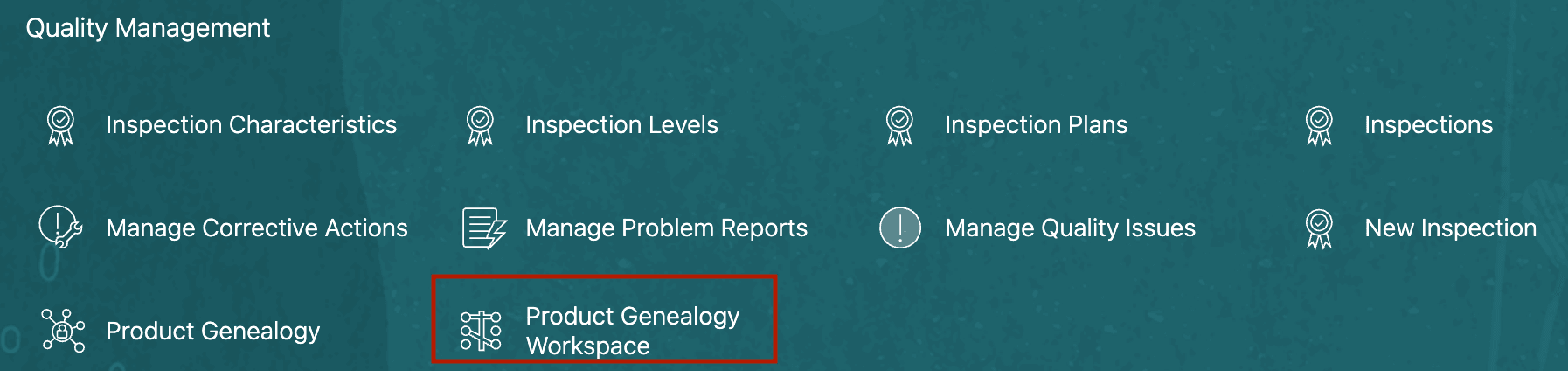
Quick Actions menu: Quality Management
Product Genealogy Workspace contains the following areas:
-
Ask Oracle: Provides a conversational interface for asking questions about the active investigation. Ask Oracle uses the current problem report context and information from the investigation panels to provide a consolidated response.
-
Investigation panels: Present structured findings for the current problem report. The panels analyze genealogy, transactional, operational, and historical information and are refreshed as the investigation context changes.
-
Priority Actions: Recommends the next actions based on the identified risk and supporting evidence. These can include creating a containment task, changing material status, relating work orders, adding evidence, or creating an investigation task.
-
Communications: Enables the quality analyst to generate a problem report summary or create a PDF evidence packet containing affected objects, relationships, notes, evidence, and tasks.
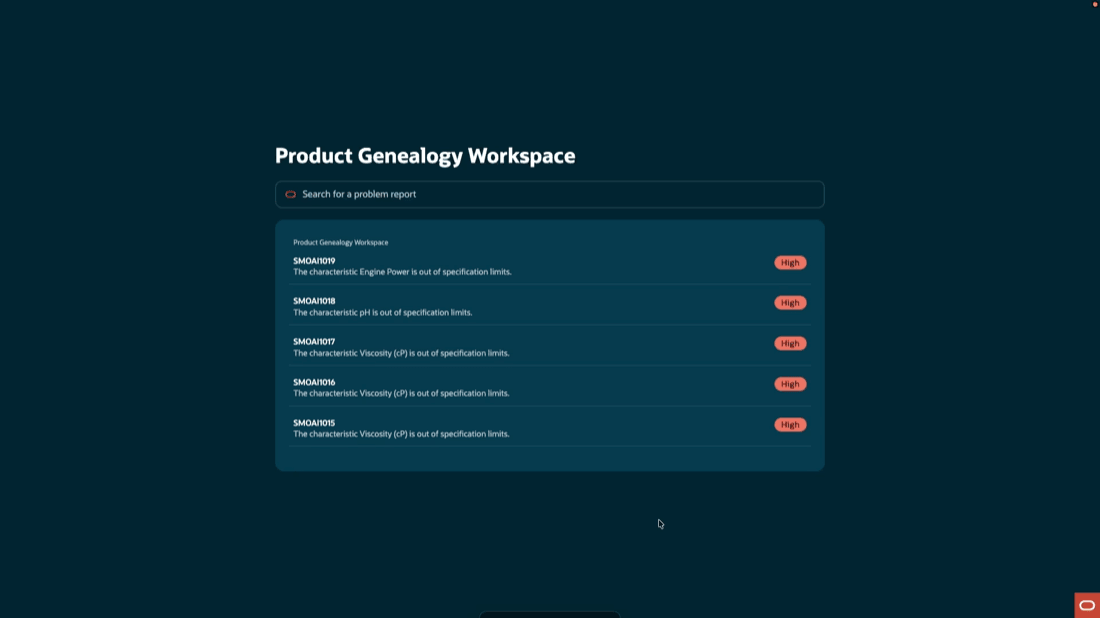
Select a problem report to investigate
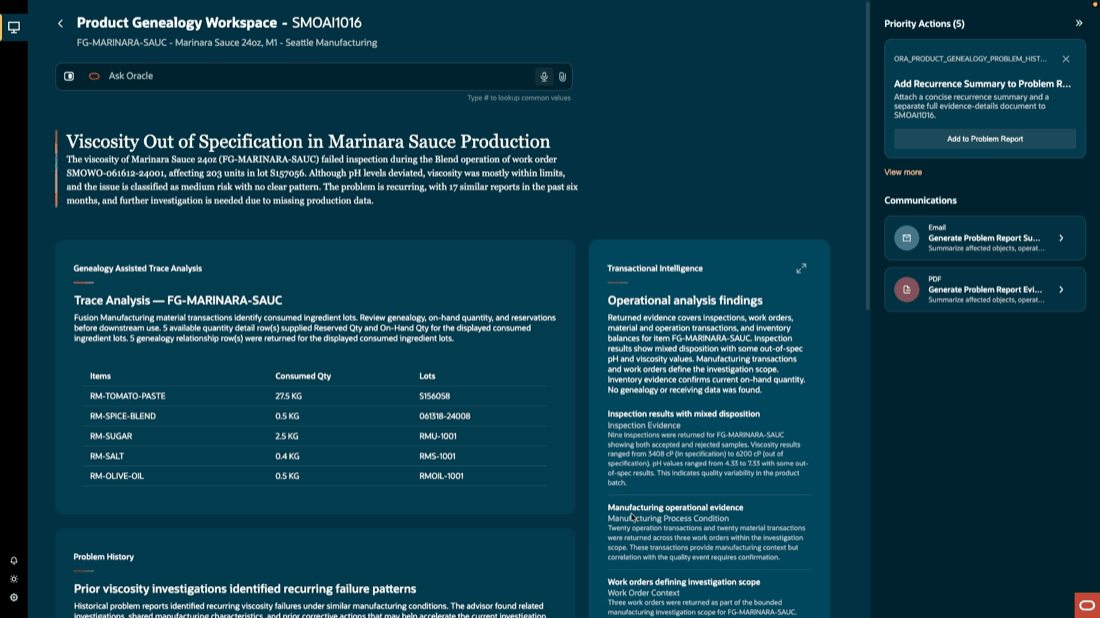
Analyzing a problem report in Product Genealogy Workspace
Genealogy Assisted Trace Analysis
The Genealogy Assisted Trace Analysis panel identifies the material and lot relationships associated with the quality issue. Starting from the problem report context, it shows the ingredient lots consumed by the affected work order or operation and traces the manufacturing origin of those materials.
The panel presents consumed quantities, lot numbers, on-hand quantities, reservations, related materials, and the work orders that have already consumed or reserved the material. It helps the quality analyst understand whether a suspect lot remains available or could be used in downstream production.
From this panel, the quality analyst can add affected materials and related work orders to the problem report. The workspace can also recommend containment tasks or material-status changes when inventory or downstream reservations create additional exposure.
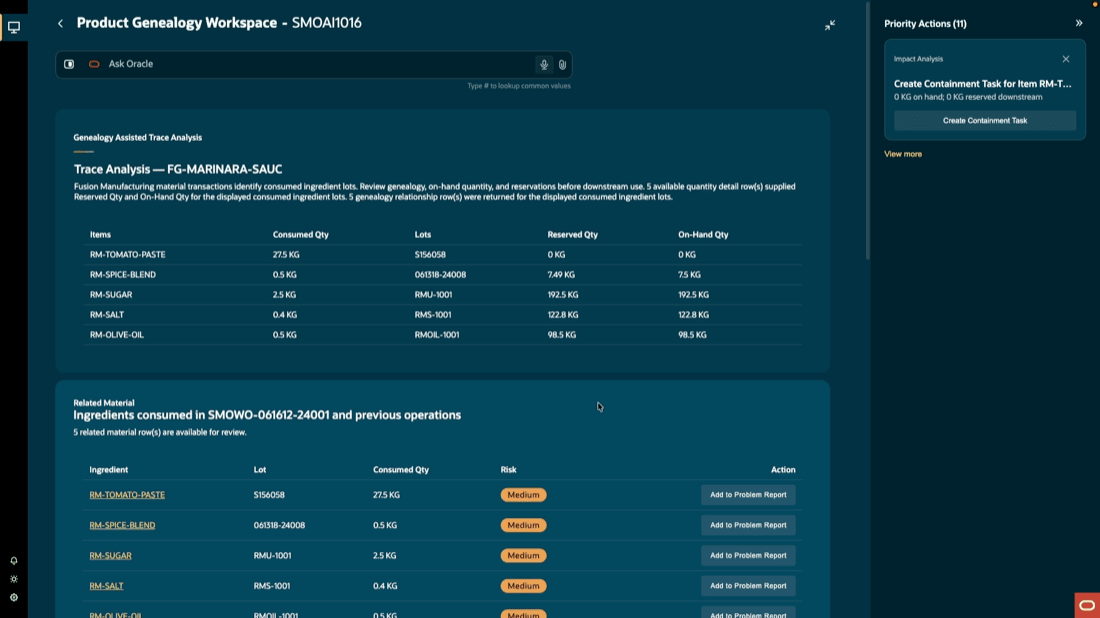
Genealogy Assisted Trace Analysis
Transactional Intelligence
The Transactional Intelligence panel analyzes transactional and operational evidence associated with the investigation. It brings together inspection results, manufacturing transactions, work order operations, process parameters, inventory availability, supplier and receiving information, and equipment signals.
The panel highlights findings such as failed inspection results, consumed ingredient lots, process deviations, recurring inspection failures, and resource conditions that overlap the failure window. It helps the quality engineer distinguish between material, process, resource, and inspection-related contributors.
Relevant findings can be added to the Problem Report as investigation evidence. The quality engineer can also create investigation tasks or maintenance requests when the analysis identifies an operational deviation that requires follow-up.
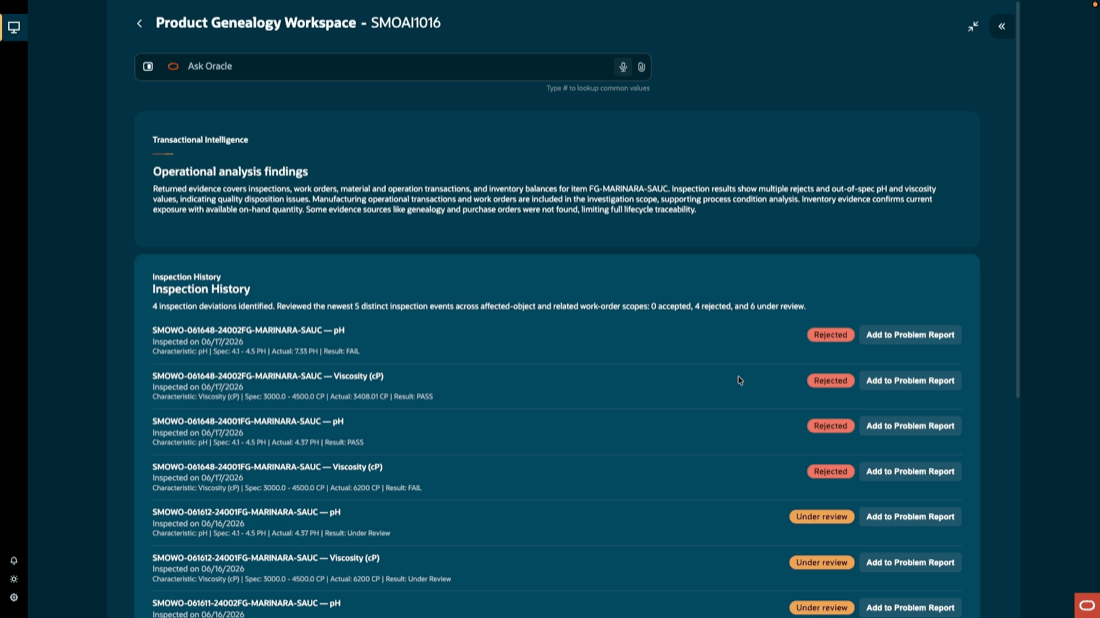
Manufacturing Transaction Intelligence
Problem History
The Problem History panel identifies previous problem reports that share characteristics with the current investigation. It compares information such as the affected item, inspection, work order operation, resource, and manufacturing conditions.
The panel presents related historical investigations, shared characteristics, and prior corrective actions that may help accelerate the current investigation. Each suggested record remains under user control—the quality analyst reviews the match before adding it to the current problem report.
When the evidence suggests a recurring problem, the workspace can recommend adding a recurrence summary, creating a recurrence investigation task, reviewing the effectiveness of an earlier corrective action, or initiating a new corrective action.
Product Genealogy Workspace provides quality analysts and engineers with a unified investigation experience that connects product genealogy with manufacturing and quality evidence. It helps reduce the time required to determine material exposure, initiate containment, investigate likely causes, and prepare a complete problem report record.
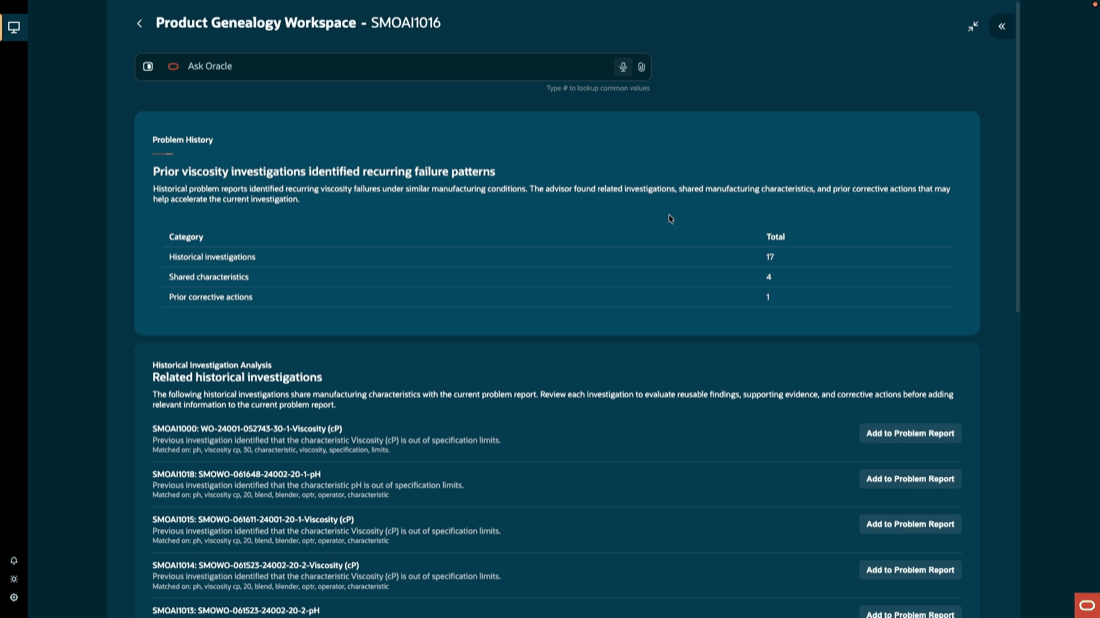
Problem report historical analysis
Problem Report Builder
The Problem Report Builder panel provides a consolidated view of the information selected during the investigation. It shows affected objects, inspection and operation relationships, investigation findings, notes, supporting evidence, containment tasks, and other open actions added to the problem report.
The quality engineer can review the accumulated content and remove information that isn’t relevant before completing the investigation package. This helps maintain an accurate, evidence-based problem report instead of automatically adding every possible relationship or finding.
The panel also supports generating a problem report evidence packet. The PDF summarizes affected objects, operation relationships, investigation notes, supporting evidence, containment activities, and open tasks for review and audit purposes.
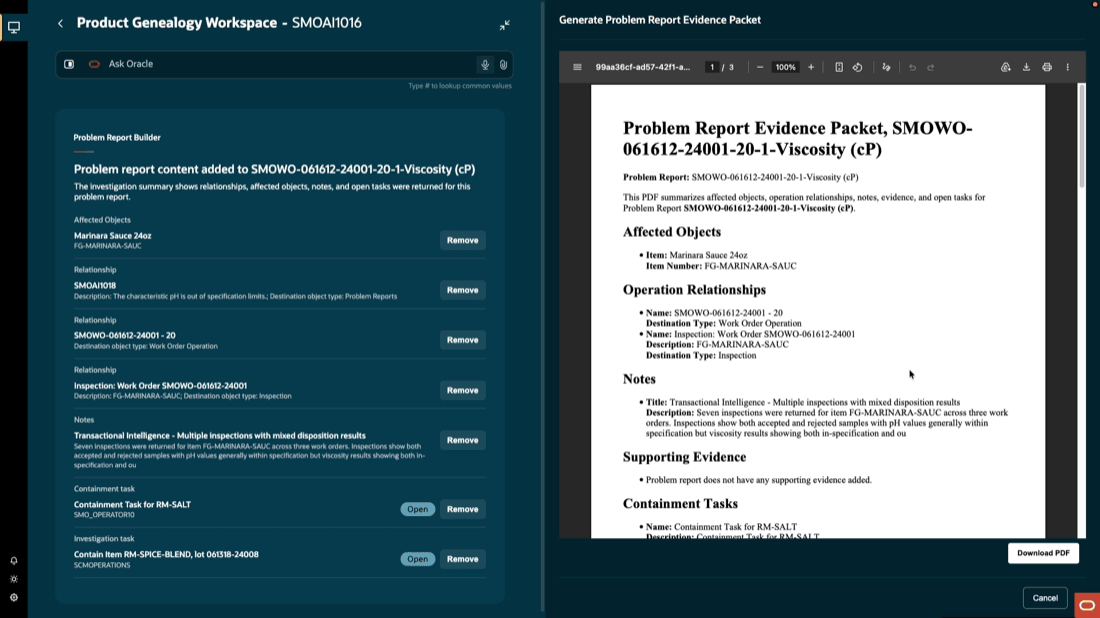
Problem Report Builder
Here's the demo of these capabilities:
Steps to enable and configure
Follow these steps to use this feature:
Set up the profile option to enable the AI agentic app:
- In the Setup and Maintenance work area, search for and select the Manage Administrator Profile Values task.
- On the Manage Administrator Profile Values page, search for and select the ORA_WIE_PRODUCT_GENEALOGY_WORKSPACE_AGENTIC_APP_ENABLED profile option code.
- In the Profile Values section, set the Site level to Yes.
- Click Save and Close. Changes in the profile value will affect users the next time they sign in.
Ensure that the user has the appropriate privileges, as enumerated under Access Requirements.
Tips and considerations
- Review AI recommended priority actions for accuracy before applying. Always validate AI suggestions against your business priority.
- This is an early release version which may be enhanced in subsequent updates.
- A problem report can be automatically created upon inspection failure by configuring inspection actions rules in an inspection plan.
- For investigating issues identified in the field, or after shipment, manually create a problem report and add the item, lot, or serial information as an affected object. This enables the AI Agentic Workspace to retrieve and analyze data pertaining to the product in question.
- To add a lot or serial number for an item as an affected object in the problem report, configure descriptive flexfields with names as LotNumber and SerialNumber. This enables the AI agents to investigate specific lots, or serial numbers of components and ingredients.
Key resources
- Oracle Fusion Cloud SCM: Using Manufacturing guide, available on the Oracle Help Center.
- Oracle Fusion Cloud SCM: Implementing Manufacturing and Supply Chain Materials Management guide, available on the Oracle Help Center.
- Oracle Fusion Cloud SCM: Overview of Problem Reports and Corrective Actions, available in Oracle Help Center.
- Oracle Fusion Cloud SCM: Using Inventory Management guide, available on the Oracle Help Center.
Access requirements
If you are using custom job roles, then you need to add privileges identified as new in this update as well as validate that you have the previously delivered privileges listed.
| Privilege status | Privilege name and code |
|---|---|
| New |
Access Product Genealogy Workspace |
| New | Product Genealogy Workspace Access Duty ORA_WIE_PRODUCT_GENEALOGY_WORKSPACE_DUTY |
| Previously delivered | Monitor Product Management Workflow Objects
ACA_MONITOR_PRODUCT_MANAGEMENT_WORFLOW_OBJECTS_PRIV |
| Previously delivered | View Problem Report
ACA_VIEW_PROBLEM_REPORTS_PRIV |
| Previously delivered | Manage Problem Report
ACA_MANAGE_PROBLEM_REPORT_PRIV |
| Previously delivered | View Corrective Actions
ACA_VIEW_CORRECTIVE_ACTIONS_PRIV |
| Previously delivered | Manage Corrective Action
ACA_MANAGE_CORRECTIVE_ACTION_PRIV |
| Previously delivered | View Inspection Results
QA_VIEW_INSPECTION_RESULTS_PRIV |
| Previously delivered | Review Product Genealogy
CSE_REVIEW_PRODUCT_GENEALOGY_PRIV |
| Previously delivered | View Work Orders
WIP_VIEW_WORK_ORDERS_PRIV |
| Previously delivered | View Production Transaction History
WIE_VIEW_MANUFACTURING_TRANSACTION_HISTORY_PRIV |
| Previously delivered | Review Completed Inventory Transactions Using Responsive Inventory
INV_REVIEW_COMPLETED_INVENTORY_TRANSACTION_PWA_PRIV |
| Previously delivered | View On-Hand Quantity Using Responsive Inventory
INV_VIEW_ONHAND_QUANTITY_USING_RESPONSIVE_INVENTORY_PWA_PRIV |
| Previously delivered | View Inventory Reservation Using Responsive Inventory
INV_VIEW_INVENTORY_RESERVATION_PWA_PRIV |
| Previously delivered | Manage Inventory Status
INV_MANAGE_INVENTORY_STATUS_PRIV |
| Previously delivered | View Receipt Summary and Transaction History Using Responsive Receiving
RCV_VIEW_RECEIPT_SUMMARY_TXN_HISTORY_PWA_PRIV |
| Previously delivered | View Purchase Order
PO_VIEW_PURCHASE_ORDER_PRIV |
| Previously delivered | View Shipment Using Responsive Shipping
WSH_VIEW_SHIPMENT_USING_RESPONSIVE_SHIPPING_PWA_PRIV |
| Previously delivered | View Operational Parameters
SMO_VIEW_OPERATIONAL_PARAMETERS_PRIV |
| Previously delivered | View Operational Events
SMO_VIEW_EVENT_LOGS_PRIV |
| Previously delivered | Create Maintenance Work Orders by Service
MNT_CREATE_WORK_ORDERS_BY_SERVICE_PRIV |