Recommended product configurations
Recommended Product Configurations provide configuration suggestions to speed up option selection in the Configurator Runtime UI. Recommendations are based on historical customer behavior, similar customer data, and commonly selected configuration patterns to help users identify relevant options more efficiently.
The feature helps users reduce manual option selection and order-entry efforts while improving consistency and configuration accuracy. Relevant starting configurations can also reduce reliance on deep product expertise for repeat and similar customer orders.
Get these benefits
- Accelerate repeat ATO orders.
- Users can access previous configurations to reuse relevant selections instead of having to rebuild a whole new configuration.
- Make more informed configuration choices.
- Review the recommendation basis, key features, current price, and match type before selecting a configuration.
- Use popular configurations from similar customers as a starting point.
- Review configuration patterns that are popular with similar customers when the customer has no relevant previous configuration.
- Maintain flexibility while supporting configuration accuracy.
- Add a selected configuration to the order, modify prefilled selections in Configurator Runtime, or build a configuration manually when a recommendation does not fit the order.
How it works
When configuring an assemble-to-order item on a sales order, you can select the Structure icon to open Recommended Product Configurations. The page appears before Configurator Runtime and helps you begin with a configuration that reflects either the customer’s prior purchases or configurations that are popular with similar customers. It provides a relevant starting configuration, so you don't need to select every option manually. You can also apply a recommendation as is, modify its selections in Configurator Runtime, or build a configuration without using a recommendation.
The page presents up to six recommendations: the customer’s top three past configurations followed by up to three popular configurations for similar customers. When you select Structure, Oracle Order Management retrieves configuration information for the selected ATO model and uses order-history insights to identify relevant starting configurations.
Recommendations are informed by:
- Customer purchase history: Identifies configurations that the customer previously ordered for the same ATO model, including patterns that are frequently reordered.
- Similar-customer configuration data: Identifies configurations selected by customers with similar characteristics, helping users consider options that are commonly used in comparable situations.
- Popular configuration patterns: Ranks configurations based on purchasing patterns so users can review options that are commonly selected for the model.
This ordering puts the customer’s previous purchases first while also making popular configurations from similar customers easy to review. Each recommendation includes its rationale, key features, last purchased price, and match type, helping users compare options before choosing whether to add the configuration directly to the order, modify it, or build a configuration from scratch.
Each recommendation gives you enough context to make a selection without opening the configuration first. You can review the recommendation rationale, distinguishing features, last purchased price, and match type. After selecting one recommendation, you can add it directly to the order or open it in Configurator Runtime with its selections prefilled. You can also choose to create a configuration without using a recommendation.
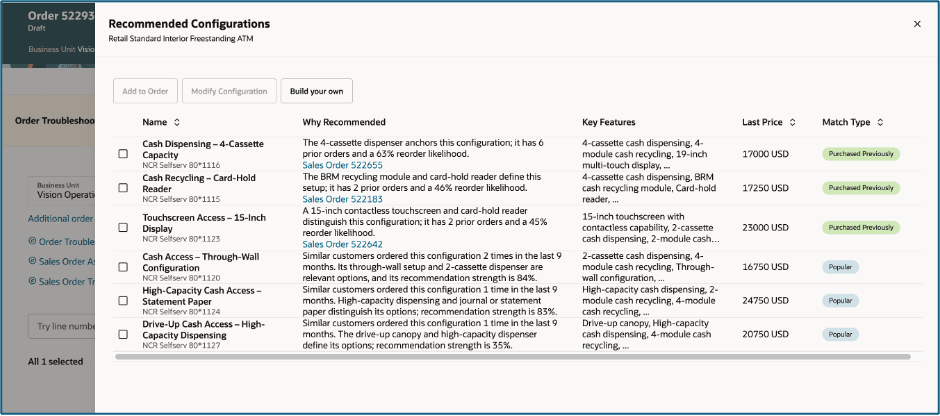
The page is organized to help users compare recommendations quickly.
- Header: Identifies the Recommended Configurations page and the ATO model being configured.
- Action bar: Includes Add to Order, Modify Configuration, and Build Your Own. Add to Order and Modify Configuration become available after a user selects a recommendation. Build Your Own is always available.
- Selection column: Lets the user select one recommended configuration to use as the starting point for the order.
- Name: Identifies each available configuration with a meaningful configuration name.
- Why Recommended: Explains why the configuration is relevant. For past configurations, this can include previous-order details. For popular configurations, it explains how the configuration relates to similar customers.
- Key Features: Highlights the options that distinguish the configuration and help users compare it with other recommendations.
- Last Price: Displays the last purchased price for the configuration.
- Match Type: Shows Purchased Previously when the customer ordered the configuration before and Popular when similar customers commonly selected it.
To get recommended product confiurations
- Add an ATO configurable item to a sales order.
- On the order line, select Structure. Oracle Order Management opens Recommended Product Configurations before opening Configurator Runtime.
- Review the recommendations. Customer past configurations appear first, followed by popular configurations from similar customers. Use the information in each row to compare the reason for the recommendation, key features, current price, and match type.
- Select one configuration, then choose the action that fits the order.
- Add to Order
Choose this action when the recommendation already contains the selections needed for the order. Oracle Order Management validates the configuration, calculates the price, adds the configured item to the order line, and returns the user to the sales order. Configurator Runtime does not open. - Modify Configuration
Choose this action when the recommendation is close to what is needed but requires changes. Configurator Runtime opens with the selected configuration already filled in. The user can update options, review the revised configuration, and finish the configuration to add it to the sales order. - Build Your Own
Choose this action when none of the recommendations fits the order. Configurator Runtime opens without prefilled selections, allowing the user to create a configuration manually. This action does not require a recommendation to be selected.
- Add to Order
- If no past or popular configurations are available for the item, Oracle Order Management skips the Recommended Configurations page and opens Configurator Runtime directly.
Steps to enable and configure
Before users can see recommendations, Oracle Order Management must have order-history insight data available, and the Recommended Configurations page must be enabled in Visual Builder Studio.
Analyze Sales Orders for Insights ESS Process
-
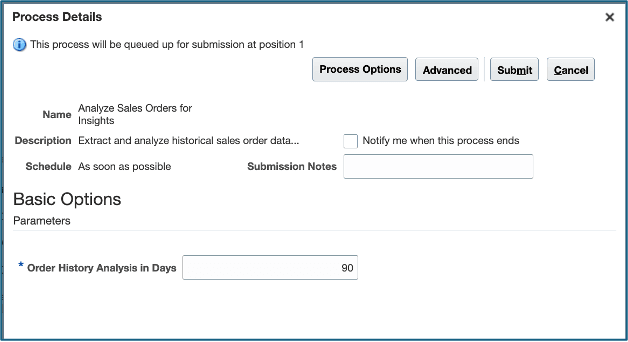
1. Run the Analyze Sales Orders for Insights scheduled process to analyze recent sales order activity. The process identifies frequently purchased products and commonly purchased product combinations that support Recommended Product Configurations.
-
2. In the Process Details window, enter the number of days of order history to analyze. The default and maximum value for Order History Analysis in Days is 90 days. Use the default value unless a shorter analysis period is needed for the business.
-
3. After setting the analysis period, submit the process. Run it periodically so recommendation data continues to reflect recent purchasing behavior. The process refreshes recommendation data incrementally and excludes extremely large orders from its analysis.
Show Recommended Configurations Page Property in Visual Builder
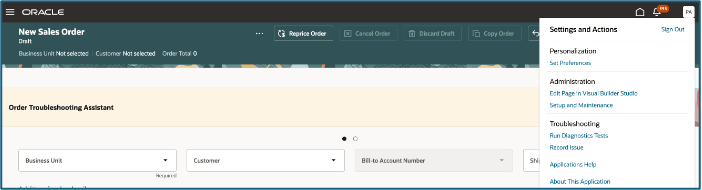
- Open the Sales Order page and select Settings and Actions. Then select Edit Page in Visual Builder Studio. This opens the page designer for the Create Sales Order page, where page-level behavior can be configured.
- Visual Builder Studio opens the Sales Order page in Design mode. Use the page designer to access the page settings that control whether Recommended Product Configurations is shown to users.
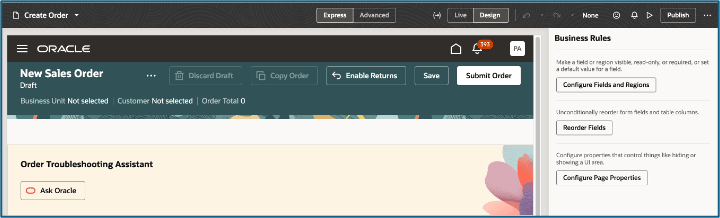
2. In the Visual Builder Studio page designer, select Configure Page Properties.
- This opens the Page Properties panel for the Sales Order page. The Page Properties panel groups settings by the part of the page that they control.
- Recommended Product Configurations is controlled through the settings for header and line behavior.
3. Locate Header and Line Management
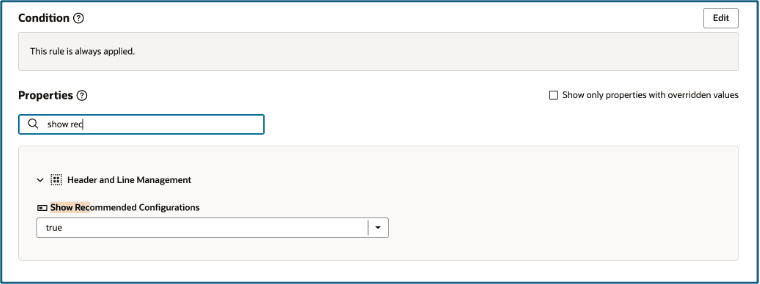
- In the Properties region, expand Header and Line Management and select Show Recommended Configurations. If needed, use the search field to find the setting more quickly.
-
- When the property is set to True, selecting Structure for an ATO configurable item opens the Recommended Configurations page first. Users can then select Add to Order, Modify Configuration, or Build Your Own.
- Set the property to False when the organization does not want to show recommendations. In that case, selecting Structure opens Configurator Runtime directly.
- Publish and close Visual Builder.
Tips and considerations
- Keep the customer’s Customer Class and Ship-To address information current. Popular configurations are matched using similar-customer information, including customer class and location.
- If a customer does not have a Customer Class, the application uses available geographic information to identify popular configurations. If the Ship-To address does not include a state, the application uses Customer Class instead. If neither value is available, recommendations are based on overall model popularity.
- Make sure historical sales order activity is available before relying on customer-specific recommendations. Customers without relevant order history might see only popular configurations from similar customers.
- Maintain valid customer price lists. If a price is not available for a recommended configuration, users can review the recommendation but cannot add that configuration directly to the order.
- Review the Why Recommended column when popular configurations are returned. The rationale explains the customer information used to identify the recommendation and helps users understand why it is relevant.