Sales Order Command Center
In this release the Sales Order Command Center has expanded support for returns and cancellations across complex product types. This update leverages intelligent policy-based recommendations and AI-driven actions to improve decision-making, reduce cancellations, and speed up issue resolution. Order inquiry is streamlined through NLP-powered interactions and enriched customer insights, enabling faster and more intuitive access to order information.
Get these benefits
The Sales Order Command Center is an AI-powered agentic command center where customer service representatives continuously review sales order exceptions, review sales orders on hold, coordinate and execute priority actions, and perform actions such as return and cancel to drive faster issue resolution and improved customer satisfaction. We've added more features to the command center for this release.
The enhanced capabilities of the command center now include:
- Use Ask Oracle to cancel an order containing kit and model items.
- Use Ask Oracle to cancel a specific line containing a kit or a model.
- Use Ask Oracle to cancel partial quantity on a line containing a standard item, a kit or a model.
- Use Ask Oracle to return an entire order or return a line containing kit and model items.
- Use Ask Oracle to return partial quantity on a line containing a standard item, a kit or a model.
- Use customer metrics and product metrics to assess customer importance, predict cancellation/return deflection potential, and select the most effective exception resolution path so that avoidable revenue loss is reduced. The metrics are authored in a policy document in this release.
- Check to see if order lines are fulfilled, in exception, or on hold.
To open the Sales Order Command Center, go to Order Management > Show More > Sales Order Command Center.
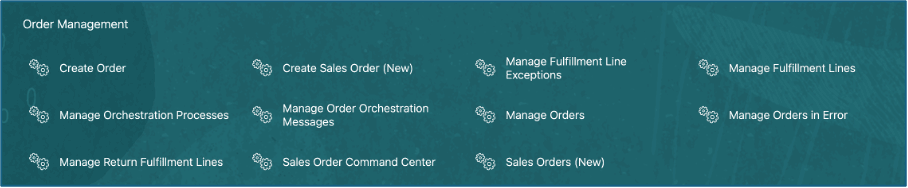
To view the Sales Order Command Center link, set the value of the profile ORA_FOM_COMMAND_CENTER_AGENTIC_APP_ENABLED to Yes at the Site level. If you want to restrict access to a specific set of users, set the profile at the user level.
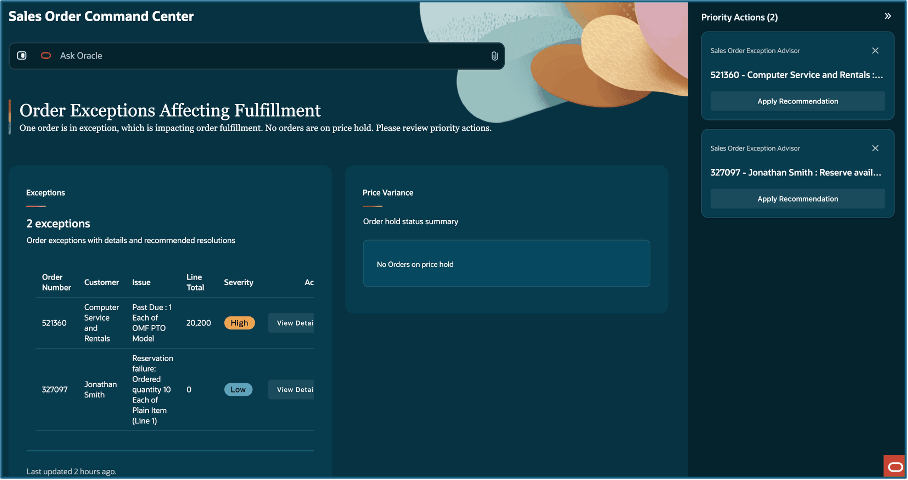
How it works - cancelling orders
Users can now cancel an entire order, a subset of lines, or partial quantity on a line in an order, where the lines on the order contain a model or a kit. Use the cancel order prompt or your computer microphone to Ask Oracle to cancel your order. Provide a mandatory cancel reason in your prompt.

Cancel order prompt
The app does not support cancellation of a component or option in a kit and model. Only the entire model or kit can be cancelled. Cancellation of standalone and associated subscription lines and associated coverage lines are not supported in this release. The app does not allow cancellation of a remnant in a model or a kit. The cancellation reason for a root parent in a model or kit is defaulted to all components or options. In case of partial quantity cancellation, all options or components in a model or kit are cancelled proportionally.
Beginning in this release, the app presents a recommended deflection action when a cancellation request is initiated. Customers can use the customer score, customer cancellation score, order value normalization and selected reason code to write policies to deflect the cancellation.
The customer revenue score is derived from trailing 12-month revenue percentile.
The customer cancellations score is calculated as a percentage of (cancelled lines (trailing twelve months) for the customer / total lines (trailing twelve months) for the customer x 100).
Order value normalization is the order value that can be cancelled compared against the stored percentile boundaries to classify the transaction into low, medium, high, or very high value bands.
The trailing 12 month revenue and the customer cancellation rate are computed by the Analyze Sales Orders for Insights scheduled process.
The rules defined in the policy document are queried to provide one of the following recommended defection actions:
- Provide X% discount, where X can be defined by the customer in the policy document
- Expedited shipping
- Cancel
Here's an example use case for cancelling orders
Hilman And Associates have placed an order for a M18 FUEL 7-1/4" Circular Saw standard item. The customer are now calling to cancel their order and the reason fro cancellation is that they don't want the item now.
- The customer's trailing twelve month revenue is used to compute customer importance band, which in this case is high.
- The cancel rate for the customer is also computed and it is found to be Medium.
- The order value is also slotted into an appropriate bucket and is found to be High.
- The cancel reason is set to high based on the policy document data.
This is the cancellation policy matrix set up in the policy document.
| Customer Importance | Cancel Band | Order Value | Reason Impact | Recommended Action |
|---|---|---|---|---|
| High | Medium | High | High | Provide X% discount |
Based on this setup, the agent recommends providing an additional discount to deflect or prevent the cancellation. Based on the response from the customer, the CSR can apply the recommended action or proceed with the order cancellation.
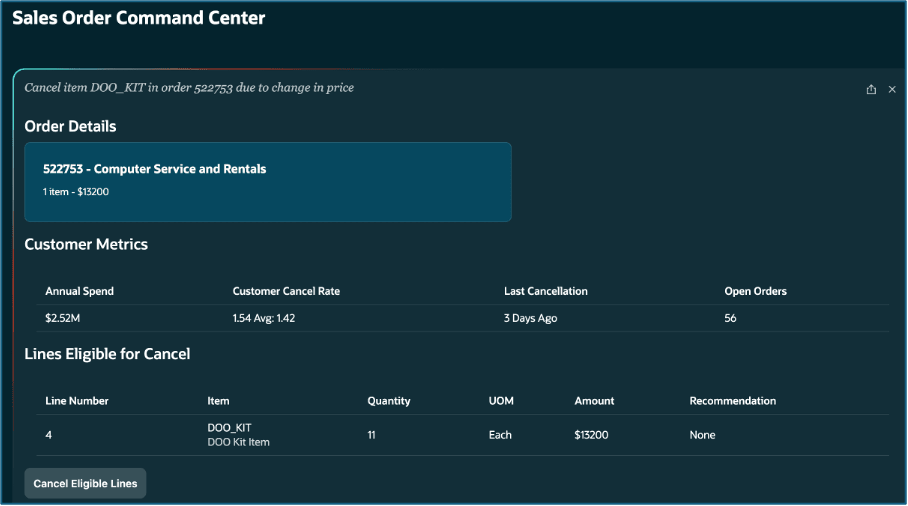
Cancel order details
If a recommendation cannot be provided by the agent, the only option to the CSR is to cancel the order or lines. In the example above, no recommendation was provided.
Refer to the sample policy document provided in the Key Resources section for more details.
Deploying customers can author the policy document to use one or more of the facts - customer importance (low, medium, high, very high), customer cancellation rate (low, medium, high, very high), order value or order line value (low, medium, high, very high) and cancellation reason deflection (low, medium, high, very high).
How it works - return orders
Return an order using Ask Oracle. Type the return order prompt or use your computer microphone to Ask Oracle to return your order. Provide a mandatory return reason in your prompt.

The agentic app does not support return of a component or option in a kit or model. Only the entire model or kit can be returned. It does not allow creation of an non-referenced return for a model or a kit. The return reason, return type for a root parent is defaulted to all components or options. The return reason, return type cannot be changed at component or option level. In case of partial quantity return, all the options or components in a model or kit are returned proportionally. The app does not support return of a remnant kit or model line.
Beginning in this release, the agentic app presents a recommended deflection action when a return request is initiated by the CSR. Customers can use the customer score, customer return rate, product return rate, order value normalization and selected return reason code to write policies to deflect the return request.
The customer revenue score is derived from trailing 12-month revenue percentile.
The customer return rate is calculated as a percentage of (number of lines returned for a customer / total lines for a customer)* 100).
The global return rate for the product is calculated as a percentage of (number of lines returned across all customers for a product / total lines across all customers for the product)*100)
Order value normalization is the return order value compared against the stored percentile boundaries to classify the transaction into low, medium, high, or very high value bands.
The trailing 12 month revenue, the customer return rate and the product return rate are computed by the Analyze Sales Orders for Insights scheduled process.
The rules defined in the policy document are queried to provide one of the following recommended defection actions:
- Return for credit and return the item
- Provide X% Credit, where X can be defined by the customer in the policy document
- Return & Replacement
- Return for credit
Here's an example use case for returning orders
Hilman And Associates have placed an order for a M18 FUEL 7-1/4" Circular Saw standard item. They are calling to cancel their order and the reason provided is that they do not want the item now.
- The customer's trailing twelve month revenue is used to compute the Customer Importance band and it is found to be high.
- The return band for the customer is also computed and it is found to be medium.
- The order value is also slotted into an appropriate bucket and is found to be high.
- The return reason impact is set to high based on the policy document data.
- The product return band is also computed and it is found to be medium.
This is the return policy matrix set up in the policy document.
| Customer Importance | Return Band | Order Value | Return Reason Impact | Product Return Rate | Recommended Return Type |
|---|---|---|---|---|---|
| High | Medium | High | High | Medium | Provide X% Discount |
Based on this setup, the agent recommends to provide an additional discount to prevent the return. Based on the response from the customer, the CSR can apply the recommended action or proceed with the return request.
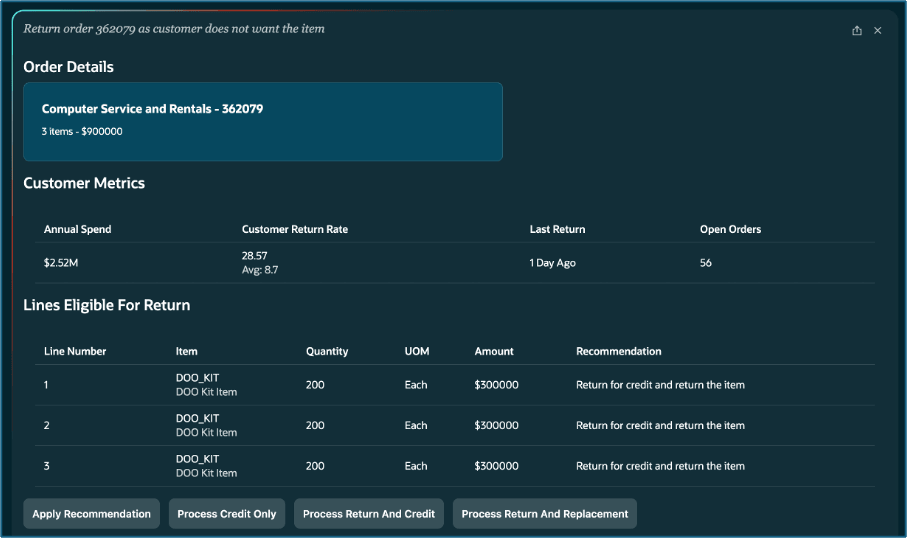
If a recommendation can't be provided by the agent, the only option is to return the order or lines based on the confirmation from the customer.
Refer to the sample policy document provided in the Key Resources section for more details.
Deploying customers can author the policy document to use one or more of the facts in case of returns - customer importance (low, medium, high, very high), return band (low, medium, high), order value or order line value (low, medium, high, very high), return reason impact (low, medium, high) and product return rate (low, medium, high).
Steps to enable and configure
Profile Option - Sales Order Command Center Agentic App Enabled
To use this feature, you must enable this profile option. Enable at the Site level to provide access to all users or at the User level to provide access to select users.
Profile Option Name: Sales Order Command Center Agentic App Enabled
Profile Option Code: ORA_FOM_COMMAND_CENTER_AGENTIC_APP_ENABLED
Profile Option - Enable Intelligent Deflection for Order Cancellation and Return
This profile can only set at the Site level. When set to Yes, the Analyze Sales Orders for Insights scheduled process computes the metrics that are used to compute defection potential during cancellation and return. Deflection recommendations are displayed only if this profile is set to Yes. If you do not want to use the intelligent deflection feature, set this profile to No.
Profile Option Name: Enable Intelligent Deflection for Order Cancellation and Return
Profile Option Code: ORA_FOM_ENABLE_DEFLECTION_INTELLIGENCE
Sales Order Precompute Processor
The agentic app consists of multiple autonomous workflow AI agents that periodically scan the order management sales order data to identify new or unresolved exceptions. The Sales Order Precompute Processor agent periodically crawls the transactional order data and policy documents to identify the exceptions.
To schedule your crawler agent in the AI Agent Studio
- Go to Tools > AI Agent Studio, and navigate to Workflows.
- Search for the Sales Order Precompute Processor and View the workflow.
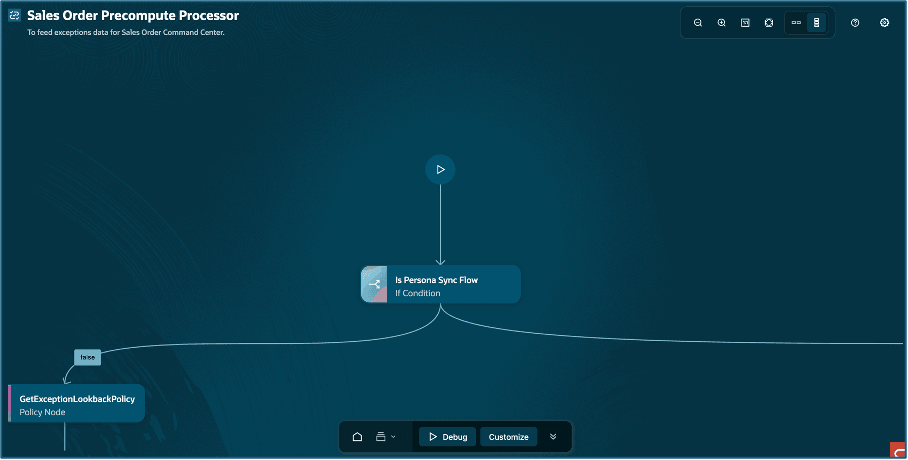
3. Navigate to Settings > Triggers > Schedule
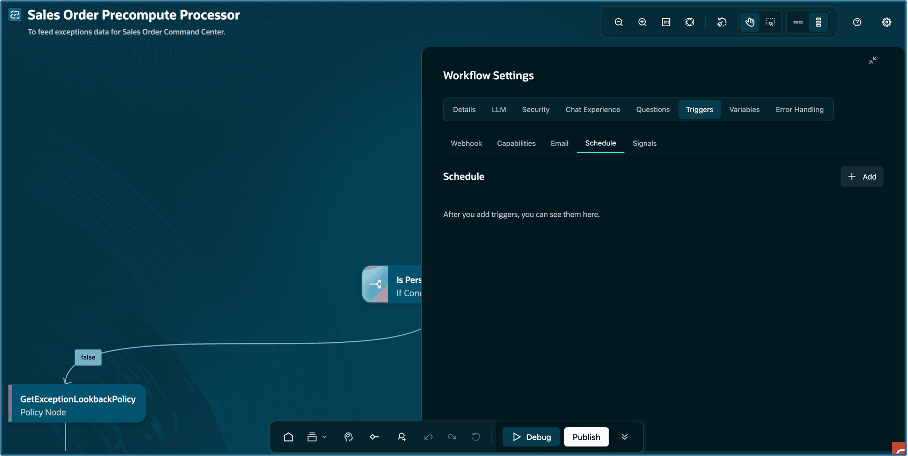
4. Click on Add to schedule your precompute processor.
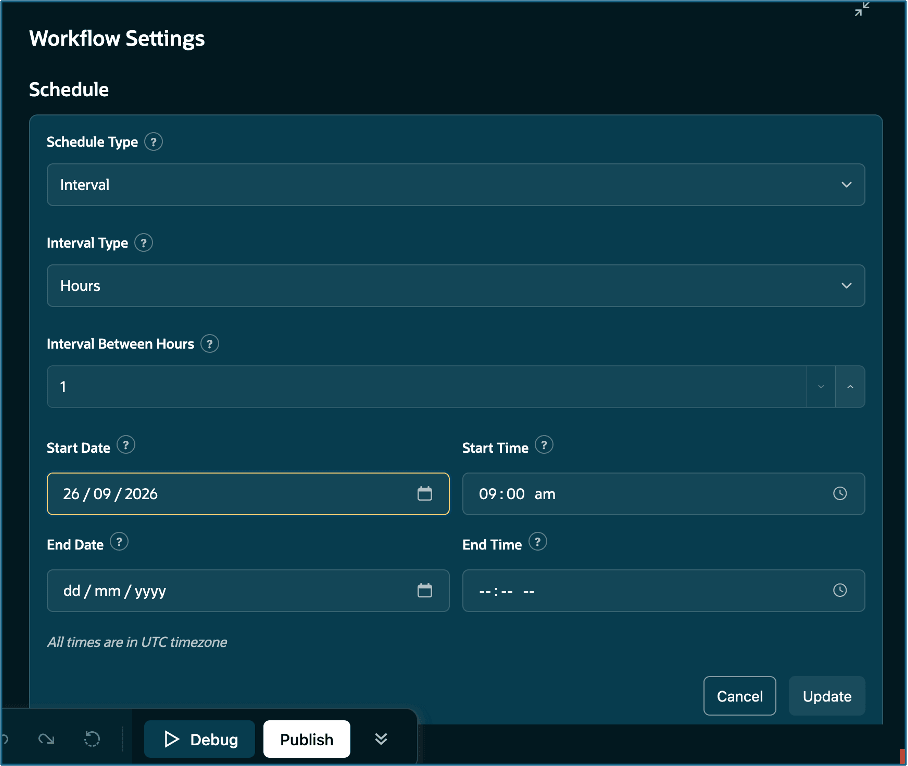
5. Choose Schedule Type = Interval to specify an Interval Type in Minutes, Hours or Days.
6. Choose Schedule Type = Recurrence to specify a Recurrence Mode of One Time or Repeating. In case of Repeating, choose a Recurrence Pattern from Daily, Weekly or Monthly.
7. Specify your Start Date and Start Time, and End Date and End Time if applicable. Click on Update to save your changes and then Publish your workflow.
Add your customized policy document
- Go to Tools > AI Agent Studio, and navigate to Policy Models.
- Under Policies tab, search for Sales Order Visibility and Exception Handling Policy.
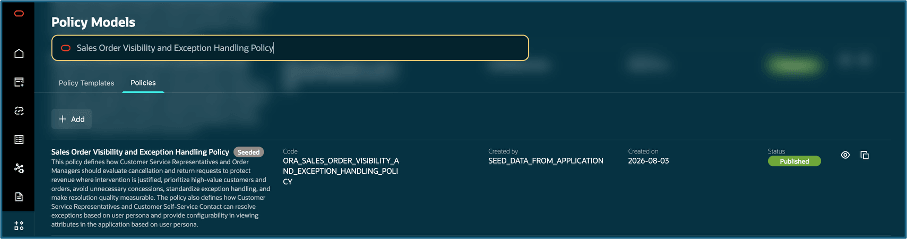
3. Open the seeded policy and Click on Customize
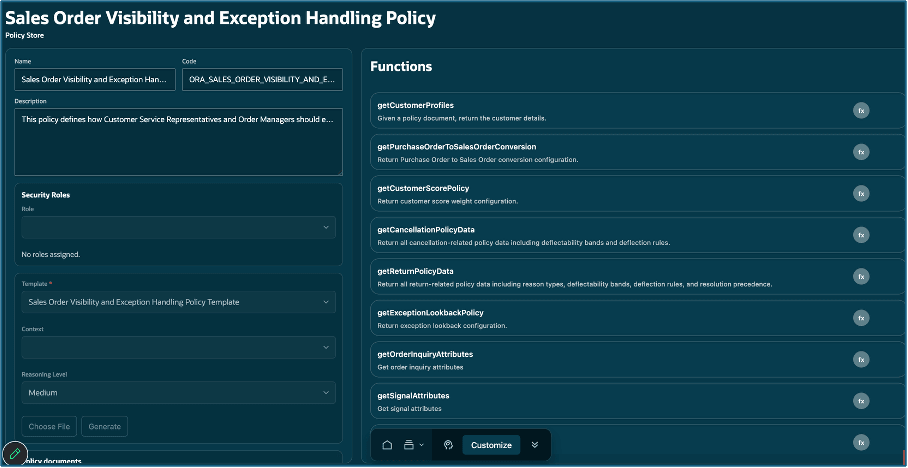
4. Click on Choose File and upload your policy document. Click on Generate.
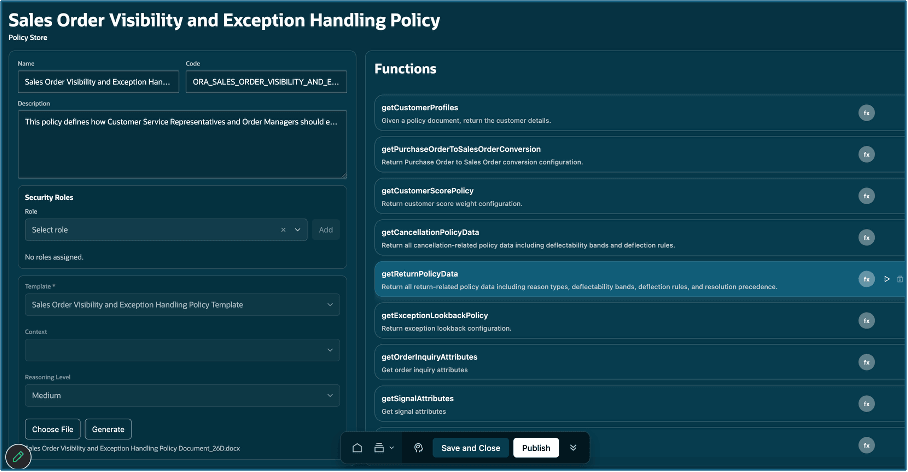
5 Click on Publish once the policy document is uploaded.
Run the Analyze Sales Orders for Insights
Run the Analyze Sales Orders for Insights scheduled process to compute the following metrics that are used by the Sales Order Command Center.
- Customer Importance Score
- Customer Return Rate
- Cancel Rate
- Product Return Rate
We recommend that this process be scheduled once daily. Use the number of months parameter to specify the number of past months over which the order data is analyzed. We recommend the number of months to be 12.
Tips and considerations
- Use the policy document to provide details for the following information:
- Customer details such as Account Type, Annual Revenue, Sales Agreement, Penalty Clause, and Penalty.
- Order History Pattern such as Substitutes Accepted, Splits Accepted, Delay Tolerance, Average Orders Per Quarter, Average Order Value and whether the customer prefers Reserve Available option in case of reservation exceptions.
- The number of days to look back for orders containing exceptions.
- Return reason impact and return policy matrix
- Cancellation reason impact and cancellation policy matrix
- Review AI recommended priority actions for accuracy before applying. Always validate AI suggestions against your business priority.
- You can’t access the sales order details from the Sales Order Command Center. To view sales orders details, log in to the Oracle Order Management work area on Redwood.
Key resources
Access requirements
Users who are assigned the job role below can access this feature:
ORA_FOM_ORDER_ENTRY_SPECIALIST_JOB
ORA_DOO_ORDER_MANAGER_JOB
If you have created custom job roles, you can assign the following duty role to your custom job roles.
ORA_DR_FOM_SO_COMMAND_CENTER_WORKFLOW_DUTY