Allow substitutes that meet lifecycle requirements through same change order promotion
Lifecycle validation for substitute components has been enhanced to support substitutes in Draft approval status and validate them during change order promotion.
This update enables you to:
-
Add substitute items in Draft approval status to a structure when the parent item is also in Draft approval status.
-
Apply lifecycle phase and approval status validations to substitute components when the parent item is promoted through a change order. These validations occur when you save the item or release the redlined change order.
You can also add a substitute item in a lower lifecycle phase to a component in a higher lifecycle phase and promote both items through the same change order if all of the following conditions are met:
-
The substitute item is added as an affected item in the same change order.
-
The substitute item's lifecycle phase is updated in the same change order to match the component's lifecycle phase.
-
The change order includes the redline that adds the substitute item to the component.
Additional enhancements include:
-
Profile option to prevent obsolete status for components and substitutes.
-
Profile option to set a default structure view.
-
Hierarchy view in the Where Used report on an item.
Prevent obsolete status for items used as components or substitutes
Use this profile option to prevent an item from being changed to Obsolete when it is currently used as a component or substitute in a structure.
-
Profile Code: ORA_ACA_OBSOLETE_STATUS_COMP_SUBSTITUTE
-
Profile Display Name: Prevent Obsolete Status for Components and Substitutes
-
Description: Prevents items used as components or substitutes from being marked as Obsolete.
-
Application: Product Development
-
Module: Items
-
Level: Site
-
Default Value: No
Default structure view
Use this site-level profile option to specify the default structure view for all users. You can choose from Single Level, Multilevel, Hierarchy, or Summary.
-
Profile Code: ORA_EGP_RW_STRUCTURE_DEFAULT_VIEW
-
Profile Display Name: Default Structure View
-
Description: Sets the default structure view based on the selected display type.
-
Application: Product Model
-
Module: Product Model Common
-
Level: Site
-
Values: Single Level, Multilevel, Hierarchy, Summary
Where used tab on the item
Use the Hierarchy view in the Where Used tab to view complete where-used details in expandable and collapsible rows, matching the experience on the Structures tab.
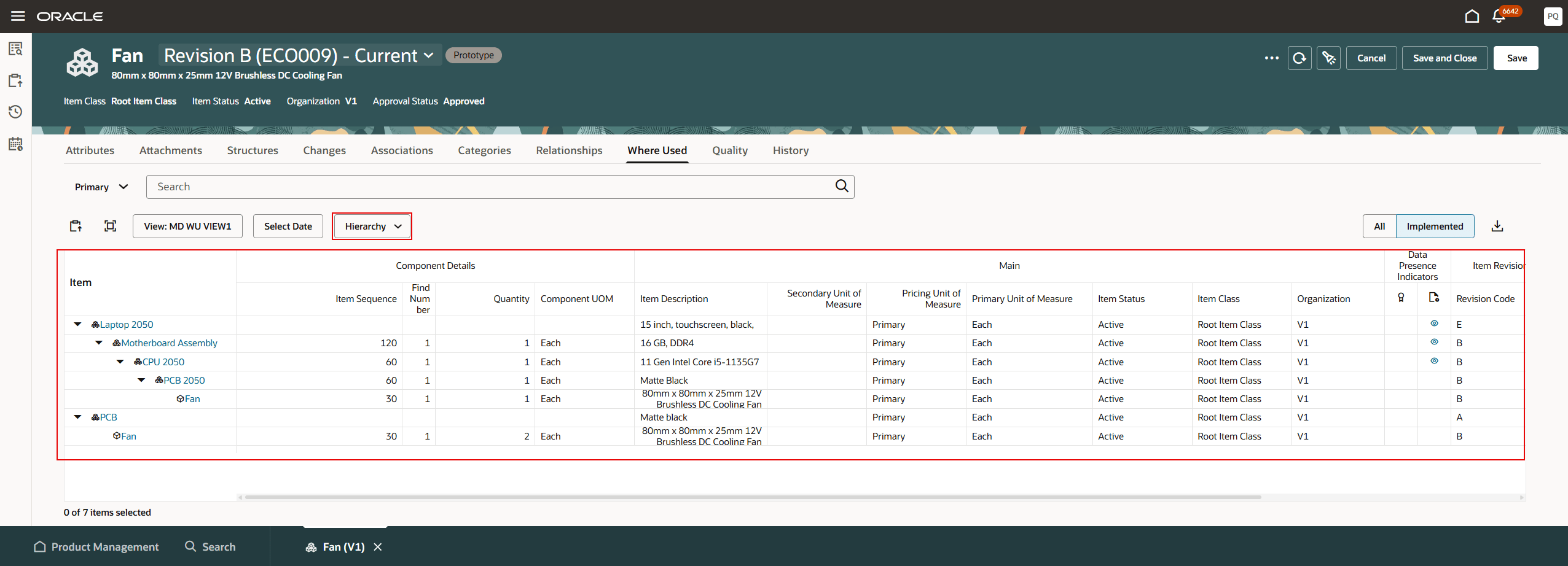
Hierarchy view on the where used tab of item
This feature provides the following business benefits:
-
Streamlines engineering change management: Allows substitute components to be introduced as part of the same change order that promotes them to the required lifecycle phase, eliminating unnecessary intermediate change orders.
-
Accelerates product updates: Enables engineering teams to implement component substitutions and lifecycle promotions together, reducing delays in releasing product structure changes.
-
Maintains lifecycle governance: Ensures substitute components meet the required lifecycle phase before becoming effective, preserving compliance with product lifecycle policies while providing greater process flexibility.
-
Reduces administrative overhead: Consolidates related lifecycle promotions and component substitutions into a single controlled change process, improving efficiency and minimizing the risk of errors.
Steps to enable and configure
Use the Opt In UI to enable this feature. For instructions, refer to the Optional Uptake of New Features section of this document.
Offering: Product Management No Longer Optional From: Update 27B
-
Short code: ORA_ACA_STR_SUBS_LCP_WHEREUSED
Tips and considerations
The following parent assembly behavior applies to both Item and Change Order contexts.
-
If the parent assembly (top-level item) is Approved and its lifecycle status is Design, Draft items can be added as substitutes for its components.
-
If the parent assembly (top-level item) is Approved and its lifecycle status is not Design (for example, Prototype or Production), Draft items can't be added as substitutes for its components.
-
If the parent assembly is not Approved, Draft items can be added as substitutes regardless of its lifecycle phase.
In the Change Order context, the validation is enforced during the approval process. This validation is applicable only to SOAP, REST, Import, and Redwood pages.
Key resources
-
Oracle Fusion Cloud SCM Using Product Development Guide, available on the Oracle Help Center.
-
Oracle Fusion Cloud SCM Using Product Master Data Management Guide, available on the Oracle Help Center.
-
Oracle Fusion Cloud SCM Implementing Product Management Guide, available on the Oracle Help Center.
Access requirements
Users who are assigned a configured job role that contains these privileges can access this feature:
|
Privilege status |
Privilege name and code |
|---|---|
|
Existing |
To access the item on Redwood page:
|
|
Existing |
To create, manage, or view the item structure on the Redwood page:
|