View and manage advanced trading partner item relationships
You can configure the new Trading Partner Item Relationships table to display relationship attributes, supplier address information, and extensible flexfield attributes for manufacturer and trading partner items in a single, unified view. You can display the attributes most relevant to your business, reducing the need to navigate to individual trading partner items or manufacturer records to view additional information.
The following screenshot shows the manufacturer extensible flexfield attributes displayed in the Trading Partner Item Relationships table.
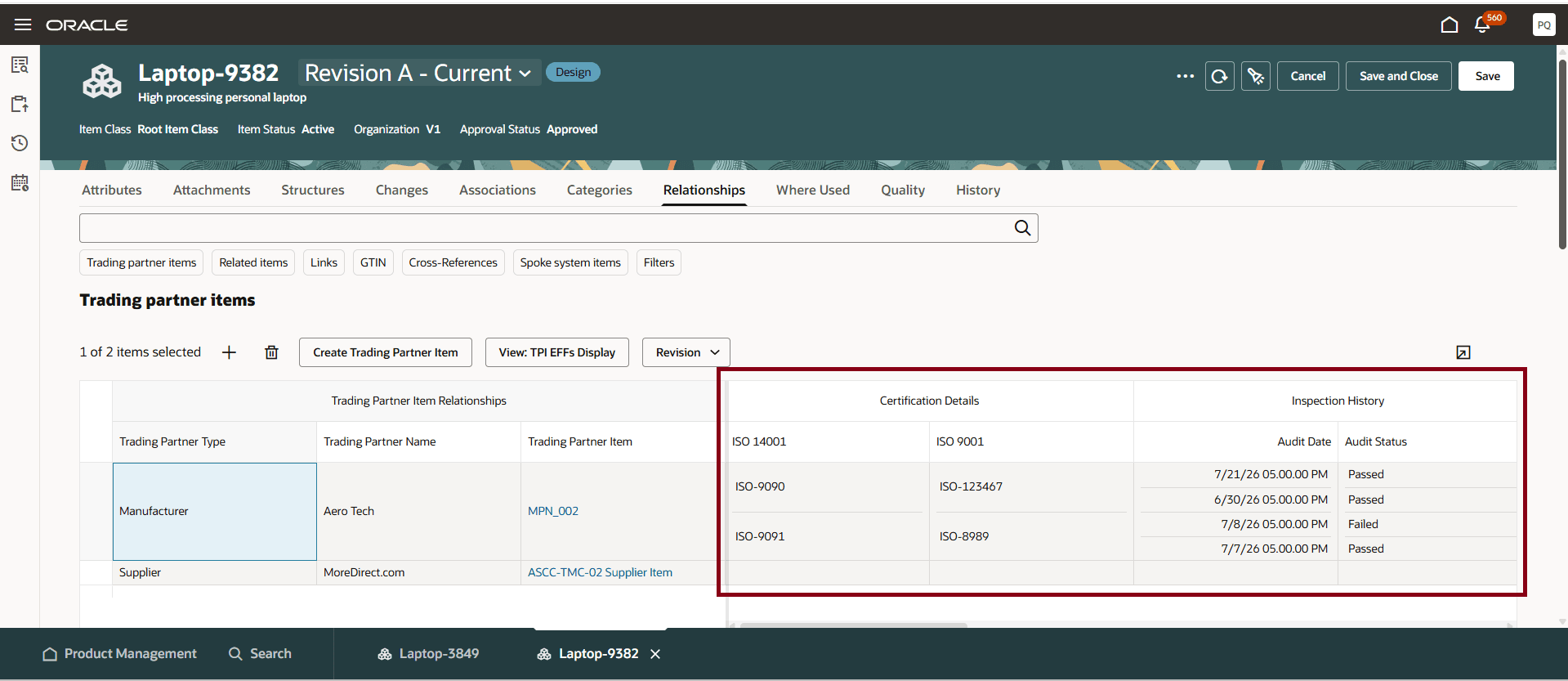
Trading Partner Item Relationships table: Manufacturer extensible flexfield attributes
The following screenshot shows the trading partner item extensible flexfield attributes displayed in the Trading Partner Item Relationships table.
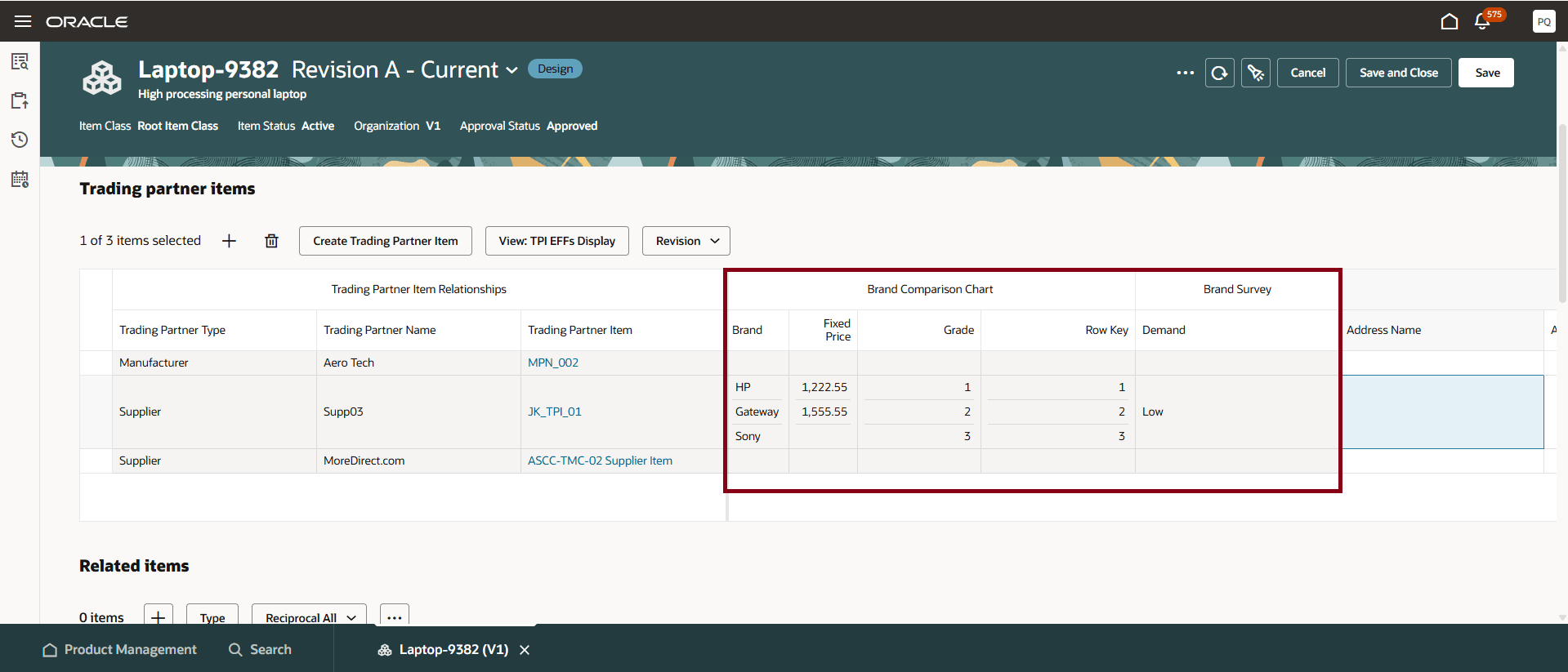
Trading Partner Item Relationships table: Trading partner item extensible flexfield attributes
You can also associate a supplier address with each supplier trading partner Item relationship. When creating or updating a supplier trading partner item relationship, you can select a supplier address. This allows you to maintain multiple relationships for the same supplier item using different supplier addresses.
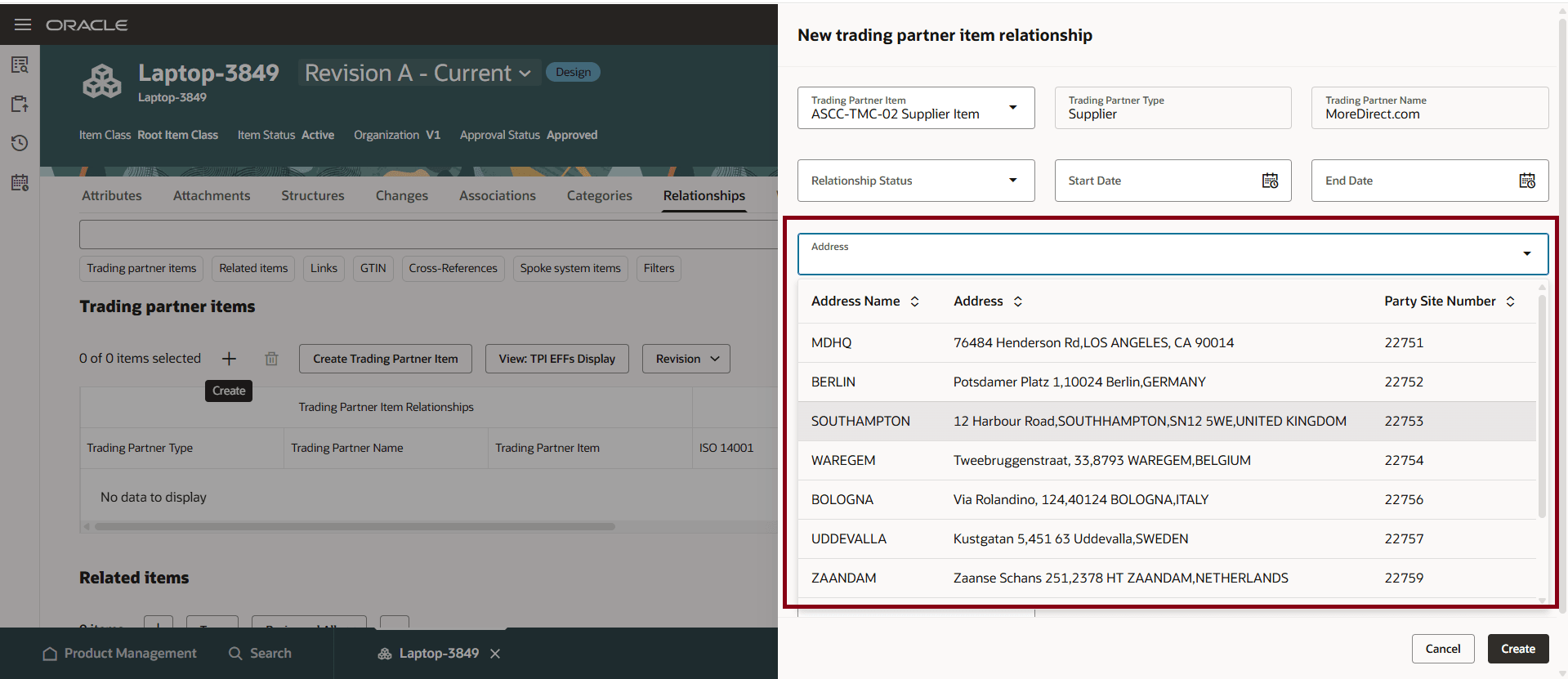
Supplier trading partner item relationship: Select supplier address
The following screenshot shows the selected supplier address displayed in the Trading Partner Item Relationship table.
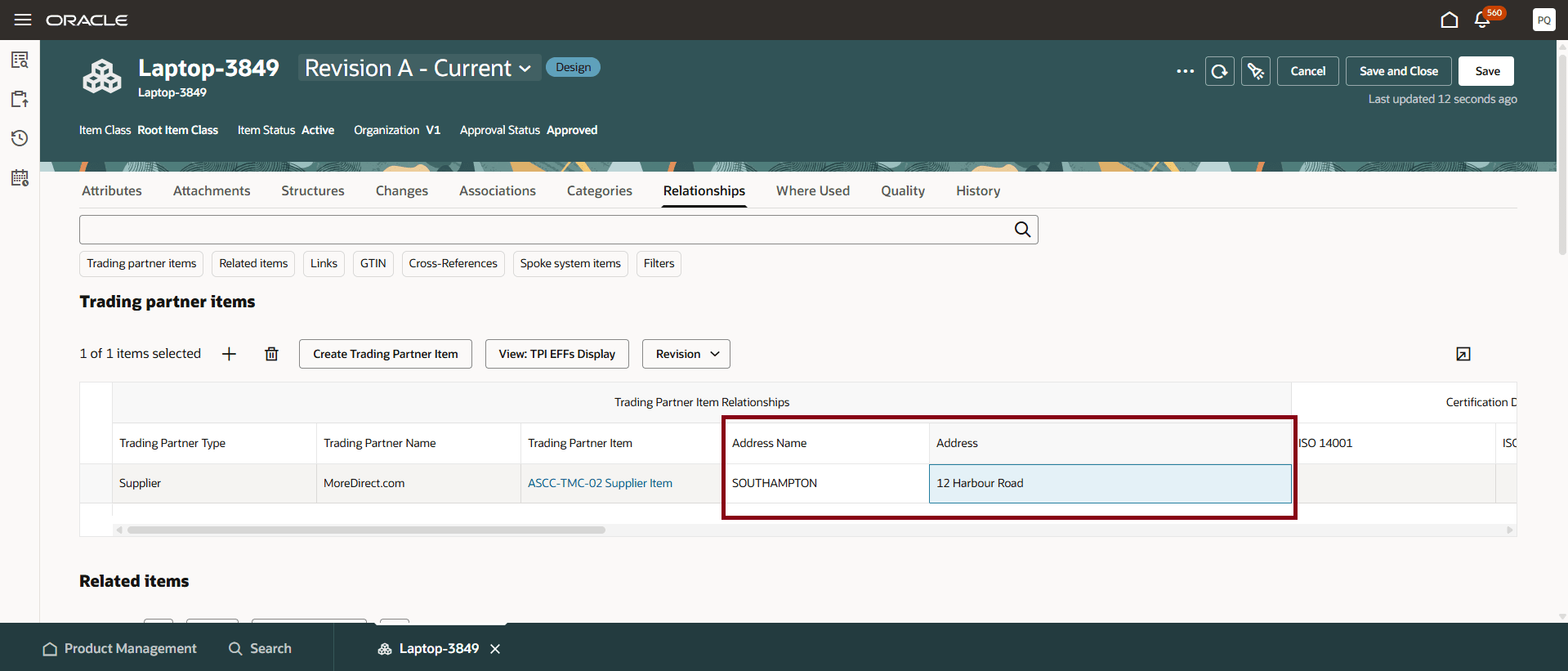
Trading Partner Item Relationships table displays selected supplier address
When creating a trading partner item, you can view both the required and optional single row and multirow extensible flexfield attributes. Select Required Attributes to display the required attributes or select All Attributes to enter values for all available single row and multirow extensible flexfield attributes as shown in the following screenshot.
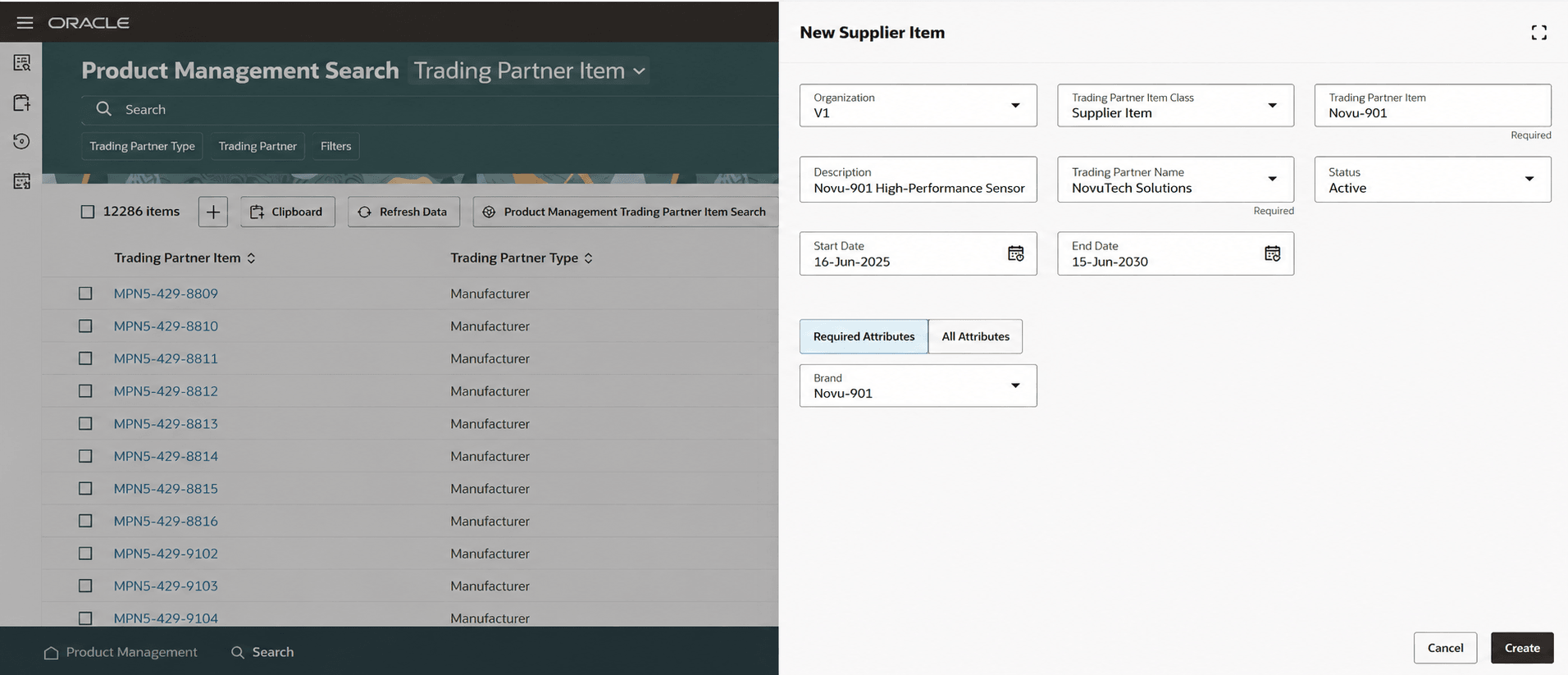
Creating a trading partner item: Required Attributes
The following screenshot shows the All Attributes view for entering single row and multirow extensible flexfield values when creating a trading partner item.
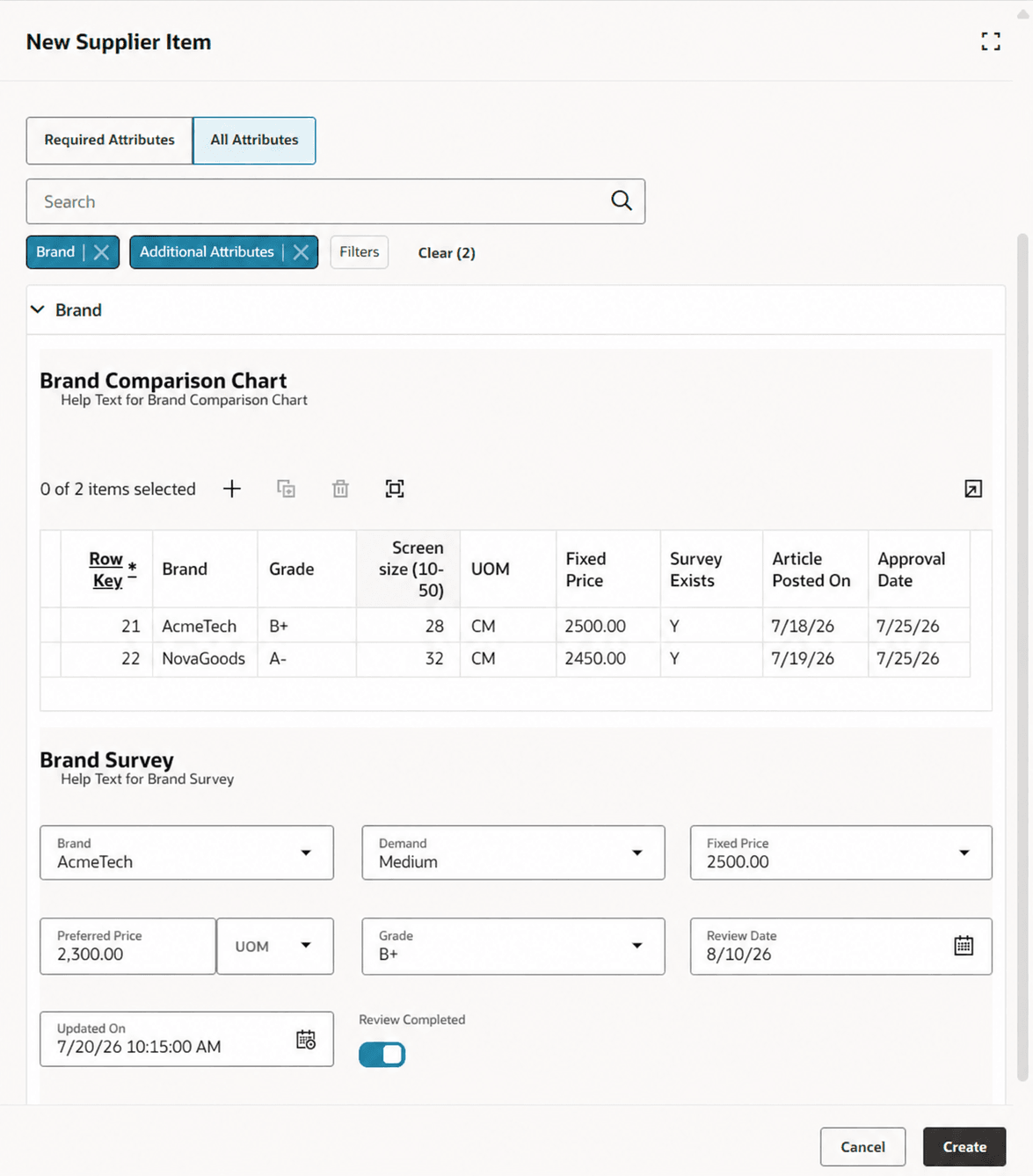
Creating a trading partner item: All Attributes view for entering single row and multirow extensible flexfield values
These enhancements benefit your business by:
- Improving the efficiency of managing trading partner item relationships.
- Allowing multiple supplier relationships for the same supplier item by associating different supplier addresses.
- Decreasing navigation to view key information by providing in context view to relevant manufacturer and trading partner item extensible flexfield data from the Trading Partner Item Relationships table.
- Simplifying trading partner item creation by enabling users to capture both required and optional extensible flexfield attributes in a single flow.
- Enabling faster decision-making based on consolidated relationship information displayed in a configurable table.
Steps to enable and configure
Use the Opt In UI to enable this feature. For instructions, refer to the Optional Uptake of New Features section of this document.
Offering: Product Management
Tips and considerations
- Address support is available only for supplier trading partner item relationships in this update.
- The Address drop-down list displays only the supplier addresses associated with the selected supplier.
- You can associate a supplier with multiple trading partner item relationships provided each relationship uses a different supplier address.
- If the address feature isn't enabled, the address fields are hidden and the address values aren't accepted through the UI or REST services.
- Existing table functionality remains available when advanced trading partner item functionality isn't enabled.
Key resources
- Watch the Create and Manage Personalized Views in Product Management Search video.
- Manage Item Relationships in the Oracle Fusion Cloud SCM: Using Product Master Data Management guide, available on the Oracle Help Center.
- Oracle Fusion Cloud SCM: Implementing Product Management guide, available on the Oracle Help Center.
Access requirements
If you're using custom job roles, then you need to add privileges identified as new in this update as well as validate that you have the existing privileges listed.
| Privilege status | Privilege name and code |
|---|---|
| Existing | View Item Redwood Relationships (EGP_VIEW_REDWOOD_ITEM_RELATIONSHIP_PRIV) |
| Existing | Manage Item Redwood Relationships (EGP_MANAGE_REDWOOD_ITEM_RELATIONSHIP_PRIV) |
| Existing | View Redwood Trading Partner Item Relationship (EGP_VIEW_REDWOOD_TPI_RELATIONSHIP_PRIV) |
| Existing | Manage Redwood Trading Partner Item Relationship (EGP_MANAGE_REDWOOD_TPI_RELATIONSHIP_PRIV) |
| Existing | View Trading Partner Item Extensible Flexfields (EGP_VIEW_REDWOOD_TPI_ITEM_EFF_PRIV) |
| Existing | Manage Trading Partner Item Extensible Flexfields (EGP_MANAGE_REDWOOD_TPI_ITEM_EFF_PRIV) |