Manage automation errors
Use the Automation Errors page with a new user experience to identify and resolve failures that occur during automated supplier qualification management processes, such as initiative creation, qualification creation, and assessment creation. You can filter automation errors by supplier, procurement business unit, event, or error type to quickly identify errors that need attention. Then, review the error reason and entity information to determine the corrective action needed.
- For setup-related errors, correct the affected object such as a rule set, qualification area, or qualification model that is listed in the Setup column.
- For transaction-related errors, perform the recommended transaction action as listed in the Transaction column.
For errors related to Requalification event, after correcting the setup issue, run the Requalify Supplier Qualifications scheduled process directly from the Automation Errors page. The next run of the process can resolve the error and the corresponding automation error is archived.
For errors related to other events such as supplier registration, supplier registration approval, and supplier promotion, you can make the required setup or transaction correction and then archive the corresponding automation error.
You can also configure guided journeys to provide tailored instructions on the Automation Errors page.
Access the Automation Errors page from the Supplier Qualifications landing page > Automation Errors.
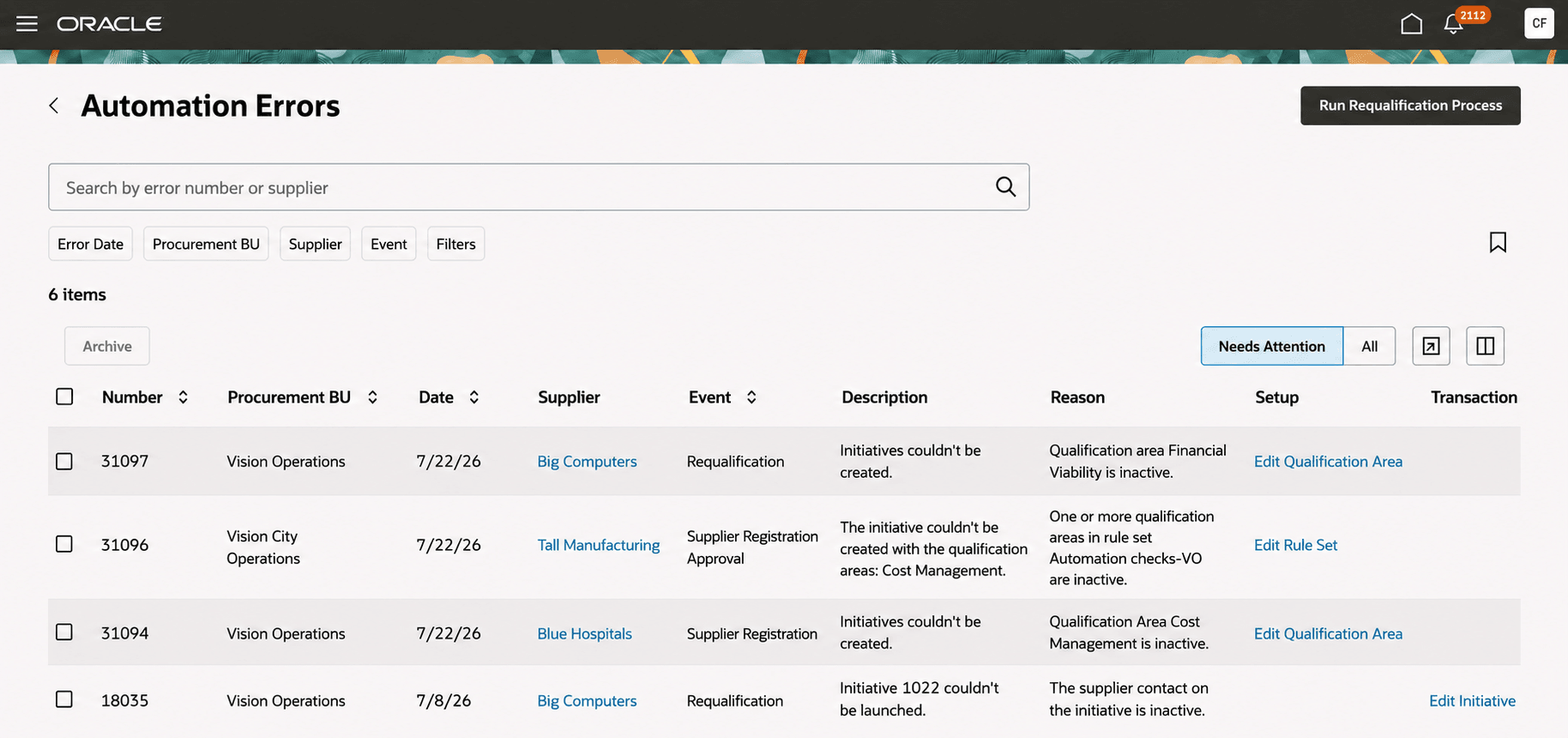
Automation Errors page
This feature helps to quickly identify and resolve setup or transaction issues that block supplier qualification automation. Centralized error details and recommended actions reduce manual investigation, restore automated processing, and help keep qualifications, initiatives, and assessments on track.
Steps to enable and configure
To use this feature, you must enable the ORA_POQ_AUTOMATION_ERRORS_REDWOOD_ENABLED profile option.
- In the Setup and Maintenance work area, search for and select the Manage Administrator Profile Values task.
- On the Manage Administrator Profile Values page, search for either the profile option name or the code.
- Profile option name: Redwood Automation Errors page enabled
- Profile option code: ORA_POQ_AUTOMATION_ERRORS_REDWOOD_ENABLED
- In the Profile Values section, set the Site level to Y.
- Select Save and Close. Changes in the profile value will affect users the next time they sign in.
Tips and considerations
- You can view only the automation errors associated with procurement BUs that you can access.
- Archived automation errors can't be unarchived. To review archived errors, select the All button.
- If a requalification issue persists when the Requalify Supplier Qualifications scheduled process runs, the process creates a new error and archives the earlier error. The process doesn't delete archived errors.
Key resources
- For information about using Oracle Visual Builder Studio to extend your Redwood application pages, see Oracle Fusion Cloud HCM and SCM: Extending Redwood Applications for HCM and SCM Using Visual Builder Studio.
- Refer to Overview of Guided Journeys in the Oracle Fusion Cloud Human Resources: Implementing and Using Journeys guide, available on the Oracle Help Center.
Access requirements
If you're assigned a custom job role that contains these previously delivered privileges and meets the following data security condition, then you can drill down to pages or perform actions.
Data security conditions:
- You have access to procurement business units that have transactions with automated errors.
| Privilege Status | Privilege Name and Code |
|---|---|
|
Previously delivered |
Search Supplier Qualification Automation Error (POQ_SEARCH_SUPP_QUAL_AUTOMATION_ERROR_PRIV) |
|
Previously delivered |
Requalify Supplier Qualification (POQ_REQUALIFY_SUPPLIER_QUALIFICATION_PRIV) |
|
Previously delivered |
Edit Supplier Registration Rule Set (POQ_EDIT_SUPPLIER_REG_RULE_SET_PRIV) |
|
Previously delivered |
Edit Supplier Qualification Area (POQ_EDIT_SUPPLIER_QUALIFICATION_AREA_PRIV) |
|
Previously delivered |
Edit Supplier Qualification Model |
|
Previously delivered |
Create Supplier Qualification Initiative (POQ_CREATE_SUPPLIER_QUALIFICATION_INITIATIVE_PRIV) |
|
Previously delivered |
Edit Supplier Qualification Initiative |
|
Previously delivered |
Edit Supplier Qualification |
|
Previously delivered |
View Supplier (POZ_VIEW_SUPPLIER_PRIV) |