Simulate award scenarios in the Sourcing Command Center
Use the award simulator in the Sourcing Command Center app to generate award scenarios based on your enterprise sourcing award policies. Apply your preferred scenario to finalize the award and create outcome documents.
Oracle Fusion Claw evaluates supplier responses using the award strategies defined in your Enterprise Sourcing Award Policy, including the business priorities, mandatory constraints, and allocation rules that apply to the negotiation’s purchasing categories. Fusion Claw is the outcome driven autonomous execution capability within Fusion Agentic Apps. When a business outcome is defined, Fusion Claw reasons to create a plan, uses authorized Fusion data and customer defined policies, performs the required analysis, and returns an evidence backed result. When permitted, it can also perform governed actions after you review and approve them.
For award simulation, Fusion Claw analyzes negotiation responses and relevant supplier information, applies your sourcing policies, generates feasible award scenarios, explains their trade-offs, and recommends a leading scenario. It operates within your Fusion security and data access context.
The simulator initially generates three scenarios using these award models:
-
Lowest Cost scenario recommends the supplier award or allocation that achieves the lowest total spend.
-
Best Value scenario recommends the strongest overall value based on price, and applicable non-price evaluation criteria, such as requirement scores or composite scores.
-
Optimized Strategy scenario recommends an allocation that balances the priorities, constraints, and business objectives defined in the applicable category strategy from the award policy spreadsheet.
To generate these scenarios, Fusion Claw matches the negotiation’s purchasing categories to the categories and award strategies defined in the policy. It then applies the allocation rules according to the priorities and constraints defined in the policy based on data sources for supplier qualifications, risk, diversity, approved suppliers, and single-source or split-award requirements. A category level allocation rule takes precedence over stated allocation guidance in the award strategy worksheet.
When multiple strategies apply, the primary strategy is applied first and the secondary strategy is applied next. For negotiations containing multiple categories, the simulator determines the dominant category based on the number of negotiation lines and current spend.
Once the outcome scenarios are generated, you can review the scenarios side by side to compare supplier allocations, award amounts, savings, trade-offs, supporting evidence, and the cost of applying business constraints. You can also provide different priorities or constraints to generate additional what-if scenarios through follow up questions. The simulator displays up to five scenarios at a time.
In this update, Fusion Claw can access these data sources to generate the simulations:
- Negotiation: header, lines, requirements
- Supplier Responses: header, lines, requirements, team scores
- Past procurement transactions: Purchase orders, agreements, negotiations
- Supplier Profile: Header, Supplier sites, DFFs, Products and Services, and Business classifications
- Supplier Qualifications
- Approved Supplier List (ASL)
- Your Enterprise Sourcing Award Policy Spreadsheet - needs to be uploaded in the AI Agent Studio policy tool as described in steps to enable section of this document.
To simulate award scenarios for a negotiation:
-
Open the Sourcing Command Center from the Sourcing Landing Page
-
Select Define an Outcome.
-
Select the suggested outcome for simulating award scenarios.
-
Identify and select the negotiation that you want to evaluate. The negotiation must be in closed status.
-
Submit the outcome. Scenario generation process takes some time. Once ready, you can access it from the Outcomes tab.
- Select the tile with your outcome to view the scenarios
-
Review the leading scenario and compare with the alternative scenarios. Examine the recommended supplier allocations, award amounts, savings, policy constraints, trade-offs, rationale, and supporting evidence.
- The award scenarios spreadsheet (.xls) is also generated and available to download.
-
Ask follow-up questions to generate your own custom scenarios.
You can specify additional priorities or constraints, such as using a single supplier, splitting the award between suppliers, retaining an incumbent, limiting supplier concentration, meeting a supplier-diversity target, or excluding suppliers that don’t meet qualification requirements. -
Restart the outcome. Once ready, your custom scenarios can be compared with the previous 3 scenarios.
-
Select the scenario that best meets your sourcing objectives and finalize award.
- The generated award scenarios (.xls) file can be added as a To Award Approver attachment to the negotiation for award approvers to reference in the Redwood application.
-
Review and approve the proposed award then Fusion Claw finalizes the award and creates the applicable outcome documents.
Follow these steps to generate award scenarios.
Open the Sourcing Command Center from the Sourcing landing page actions panel.
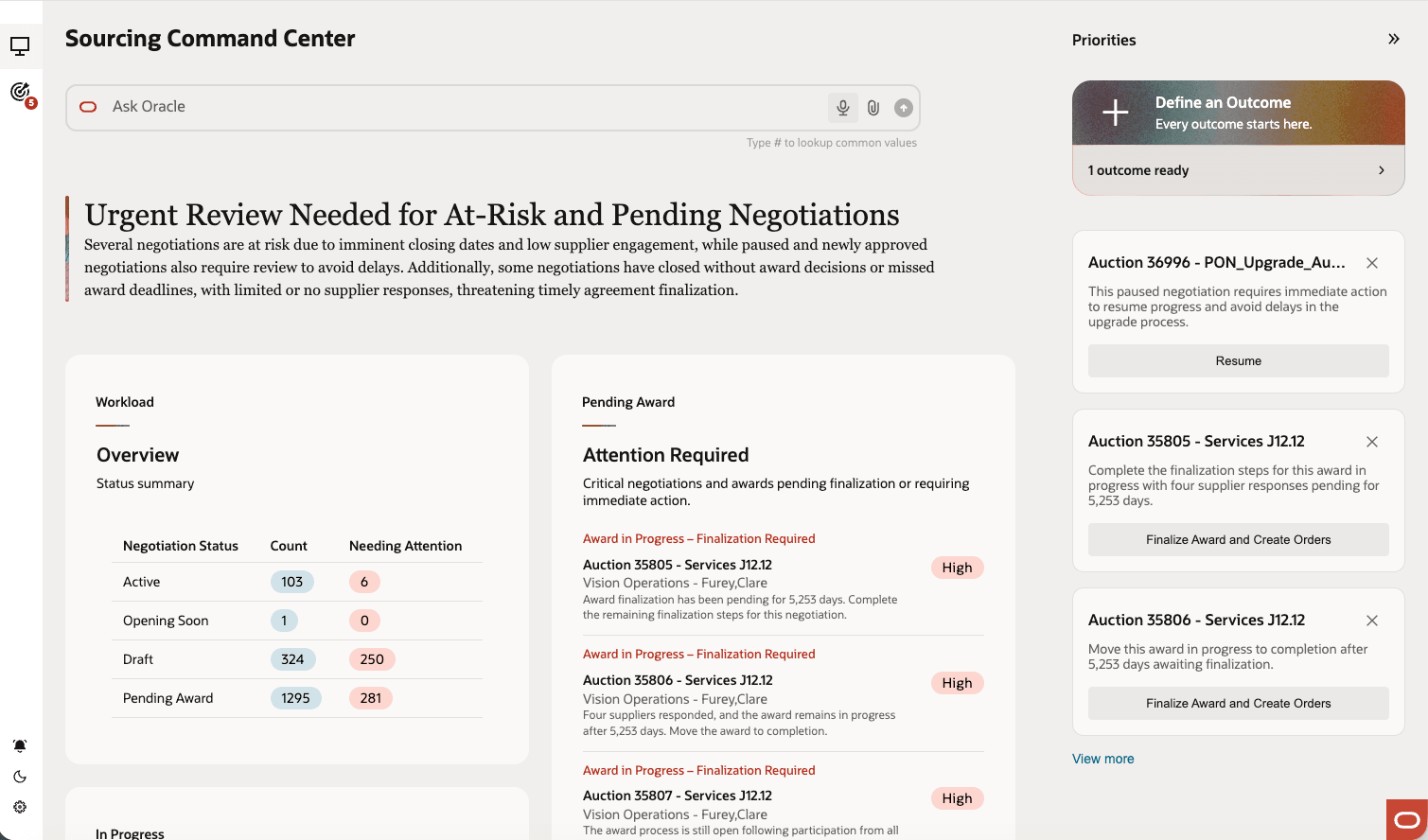
Select 'Define an Outcome'
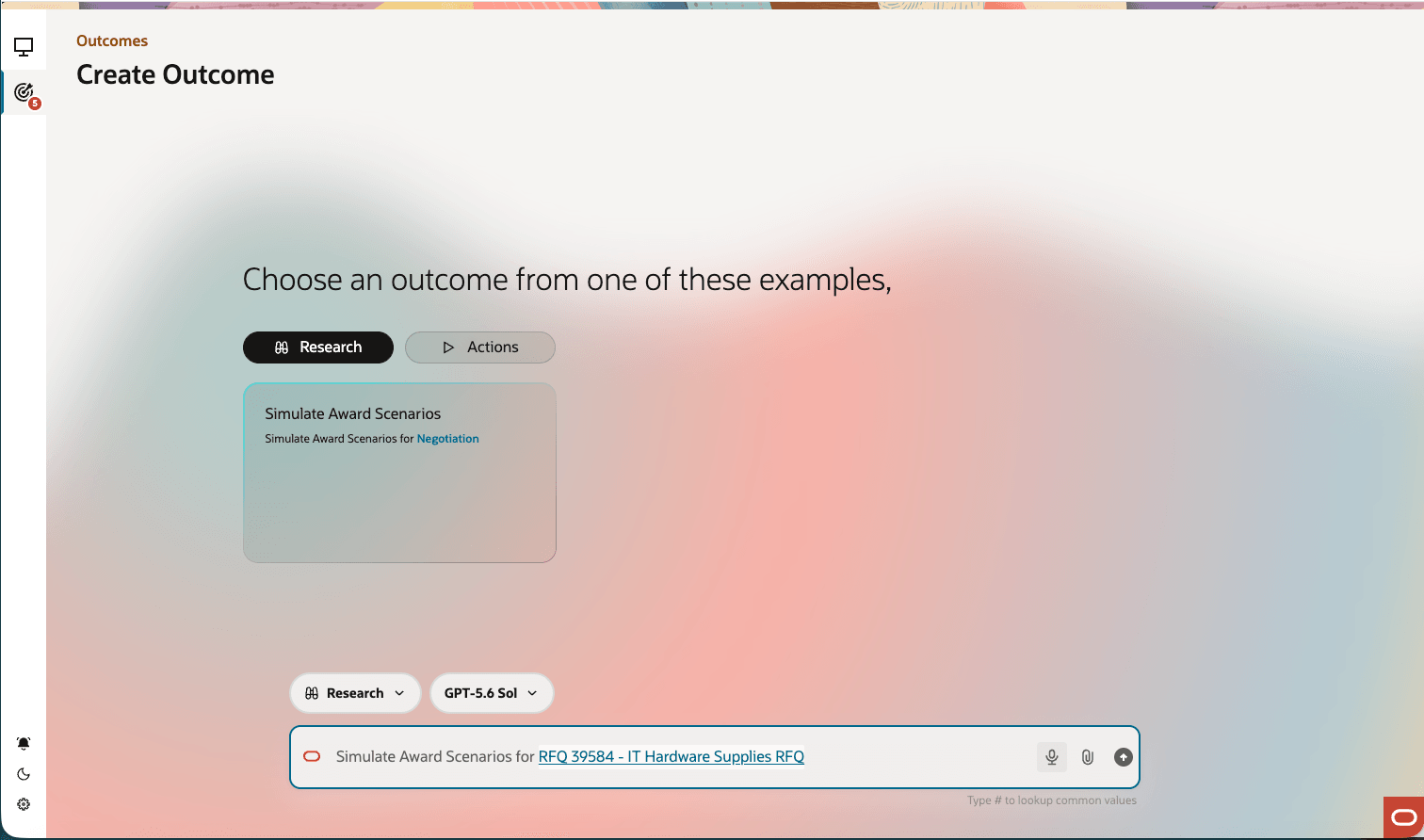
Create Outcome: Select Simulate Award Scenario
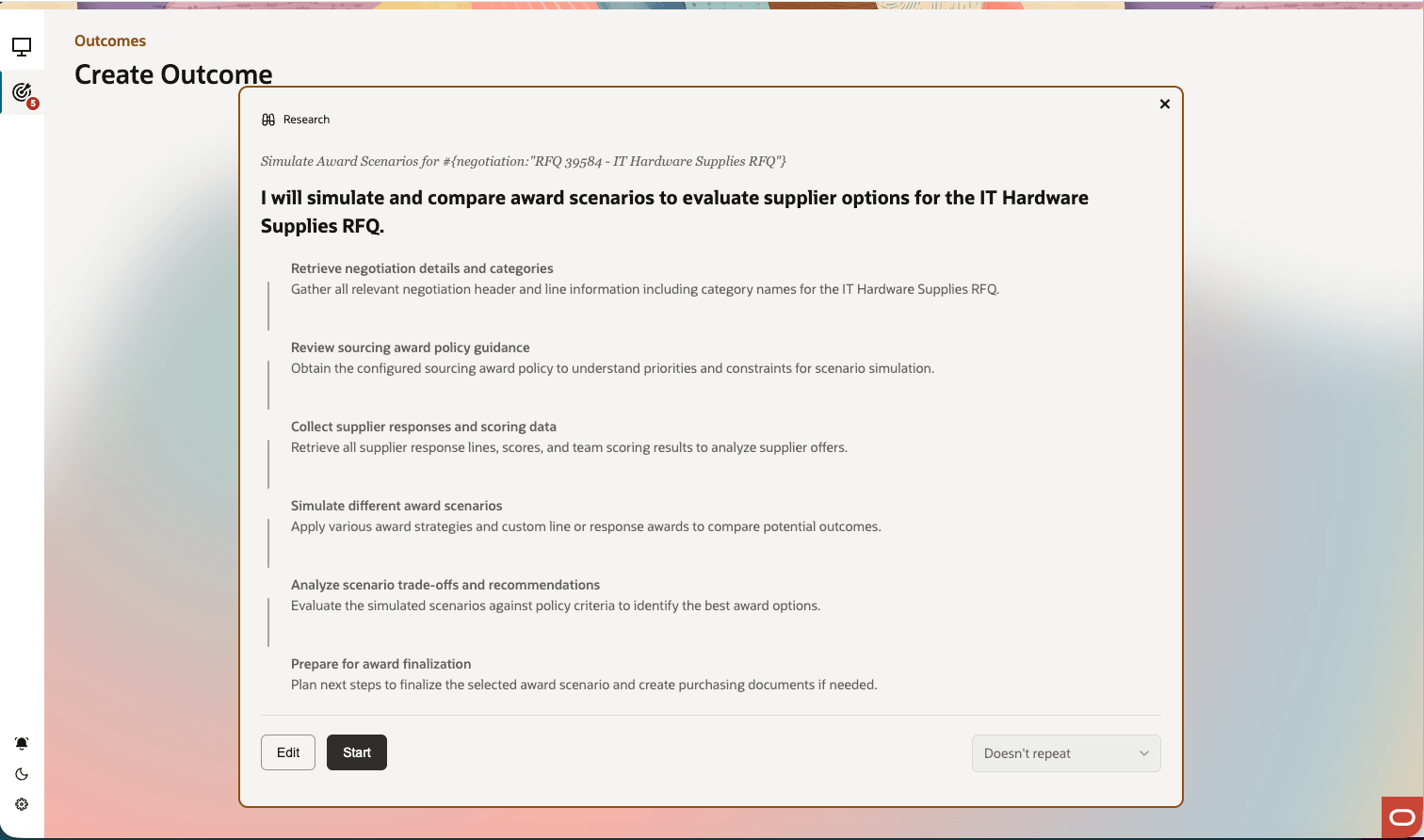
Start Simulations
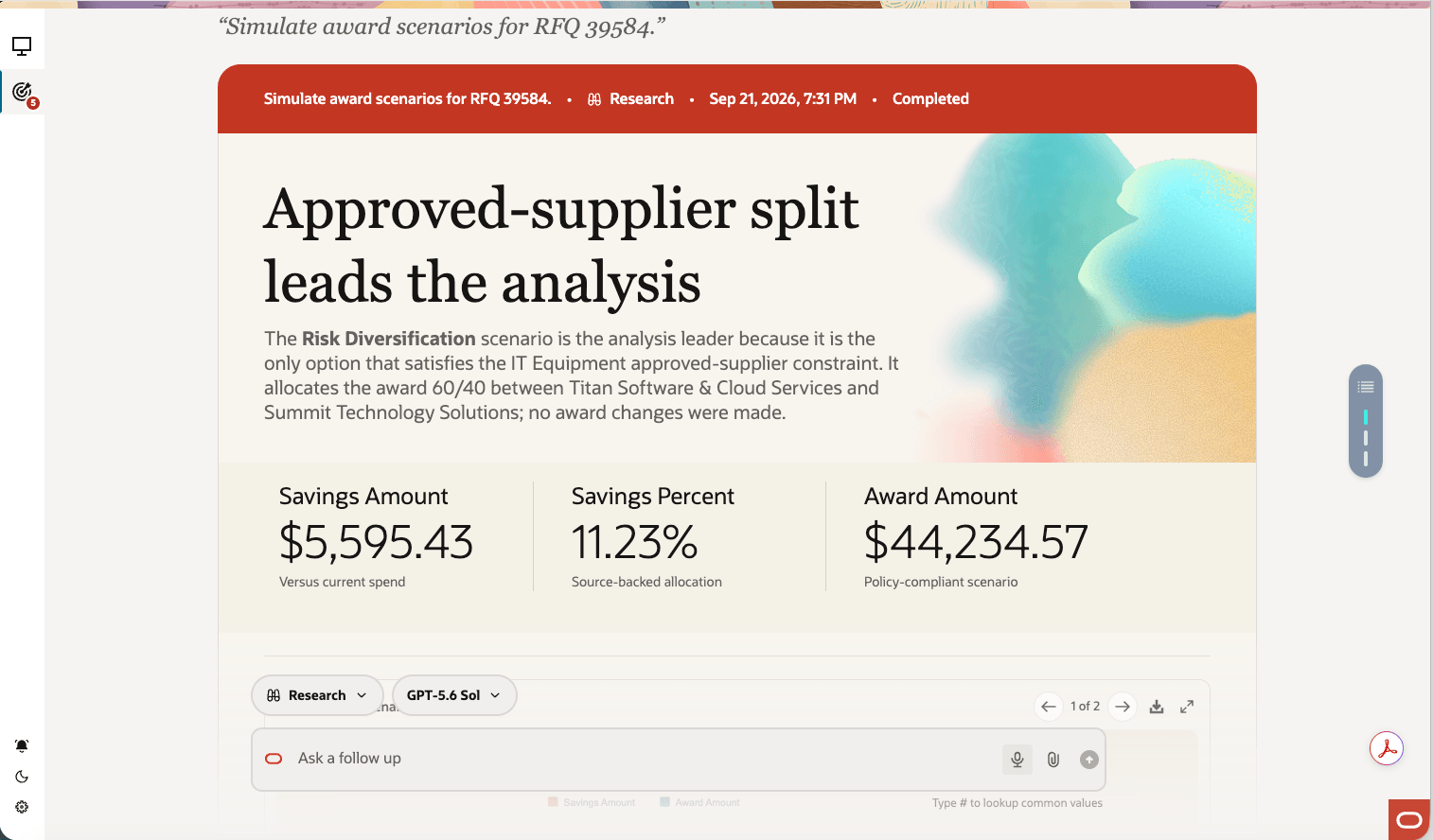
Simulation ready. Review recommendations
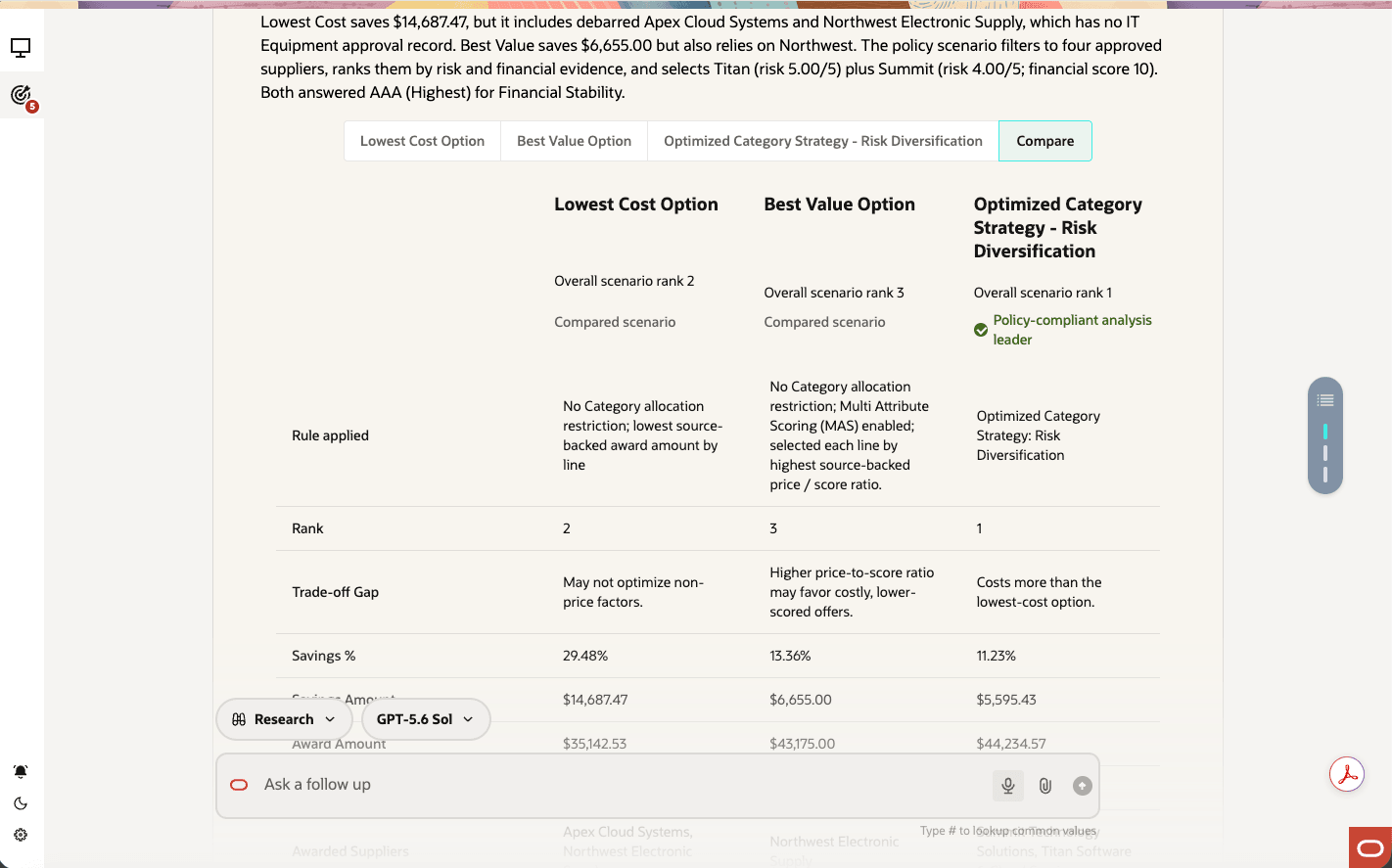
Compare scenarios and ask a follow up question to create your custom scenario
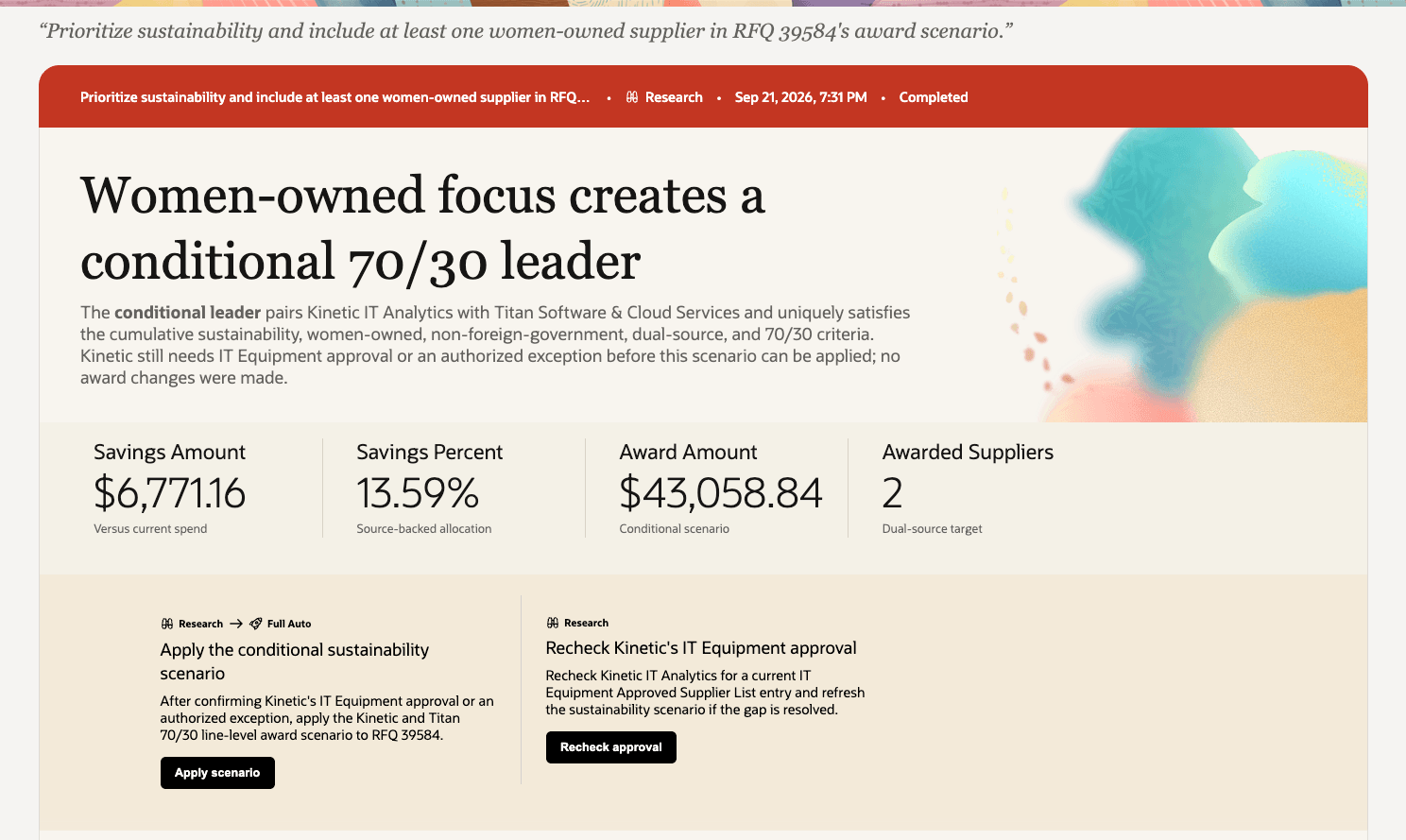
Custom scenarios ready - Take an action to apply scenario to save award and submit for approval
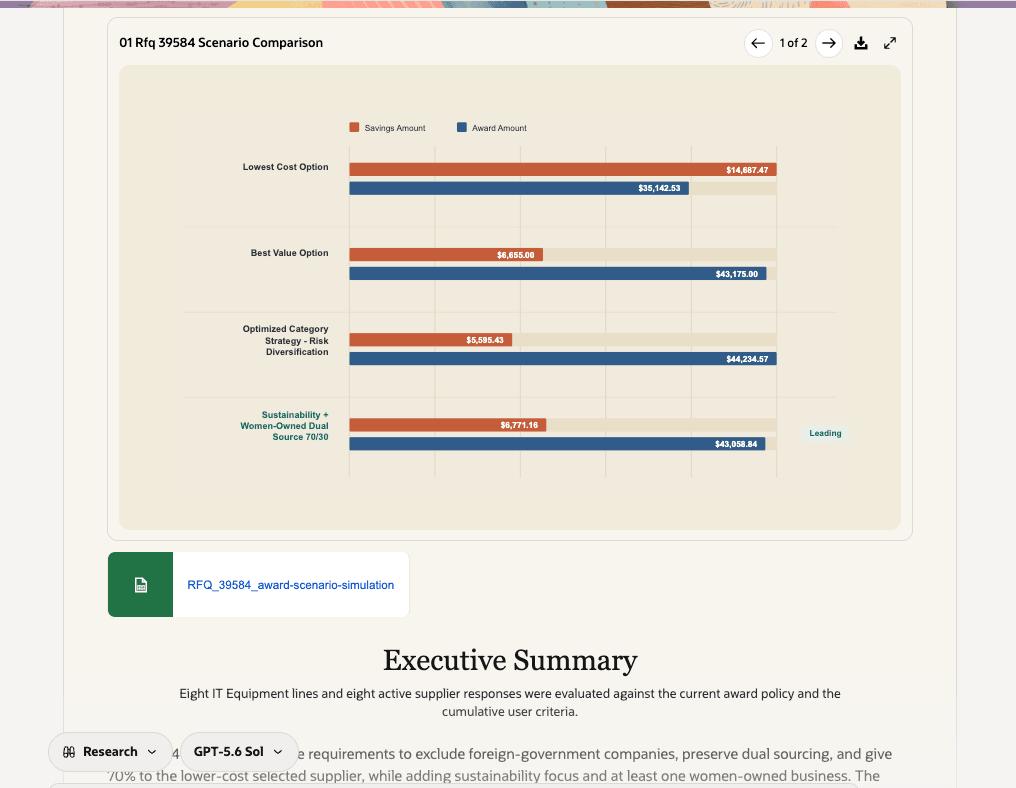
Download scenarios spreadsheet to attach for award approvers
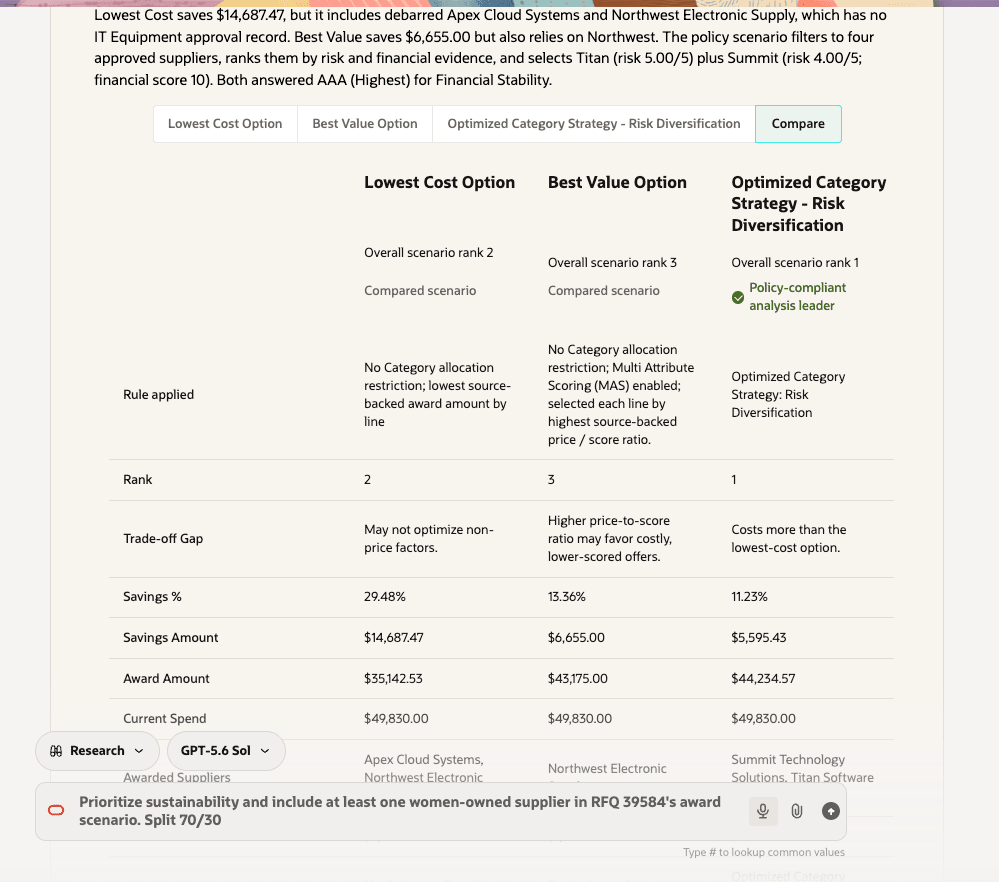
Side-by-side comparison of your custom scenario against other scenarios
Steps to enable and configure
Enable the Sourcing Command Center by enabling this profile option if you haven't already:
-
Sourcing Command Center for Insights (ORA_PON_SOURCING_AGENTIC_APP_ENABLED)
To allow users to interact with agents, enable permission groups in the Security Console on users’ configured job roles.
-
In the Setup and Maintenance work area, search for the Manage Administrator Profile Values task.
-
Search for the Enable Security Console External Application Integration (ORA_ASE_SAS_INTEGRATION_ENABLED) profile option.
-
Set the Site profile level to Yes.
Then, in the Security Console, filter by Roles and Permission Groups to find the duty role Access Sourcing Command Center Duty.
Users assigned a configured job role containing the following existing privilege and duty role can access the Sourcing Command Center:
-
View Supplier Negotiation Work Area (PON_VIEW_SUPPLIER_NEGOTIATION_WORKAREA_PRIV)
-
Access Sourcing Command Center Duty (ORA_DR_PON_COMMAND_CENTER_APP_DUTY)
In the App Settings panel, select to Enable autonomous outcomes.
In this update outcomes are enabled by default. To turn off the award scenario simulator, you must disable autonomous outcomes by configuring the App settings.
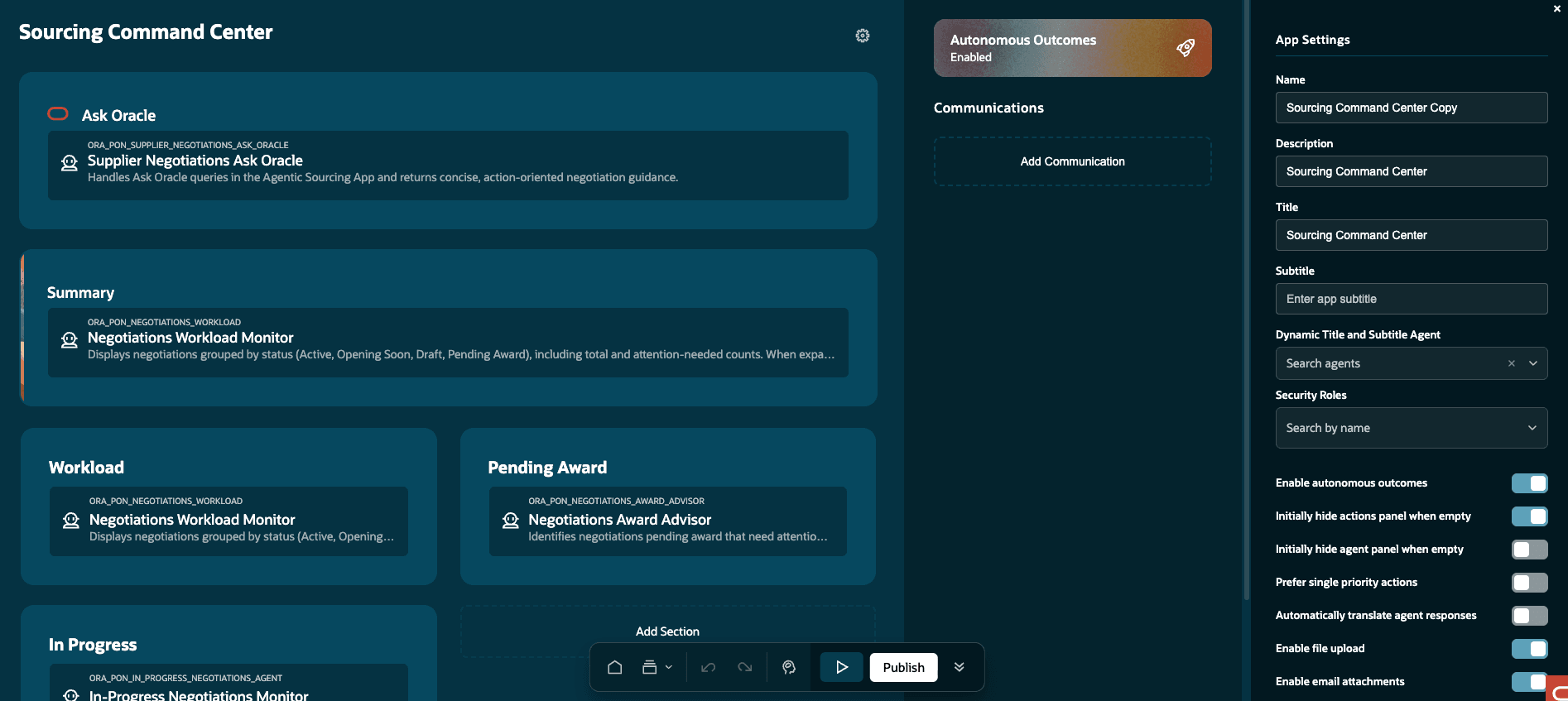
In the App Settings panel, select to Enable autonomous outcomes.
Configure and Add the Enterprise Sourcing Award Policy
Use AI Agent Studio to add the Enterprise Sourcing Award Policy spreadsheet as a document tool. Associate the document tool with the agent used by the award-simulation workflow so that Fusion Claw can use the policy when it generates scenarios.
- Prepare the Enterprise Sourcing Award Policy spreadsheet. Download the policy template. The template has 3 worksheets:
- Authoring Instructions - Use to edit the following worksheets.
- Award Strategies
- Category to Strategies Mapping
- In the Navigator, select Tools, and then select AI Agent Studio.
- Open the Policy Models tab and Policies sub-tab
- Search for Enterprise Sourcing Award Policy
- Click on the 'Open' button
- On the Enterprise Sourcing Award Policy page click Customize
- Click on the Choose File and select the (.xlsx) file
- Click on the Generate File to process the policy document
- Once done, select the function and select the 'Source Code' tab to verify the information extracted from policy document is accurate
- Publish the document
Tips and considerations
- If a category isn’t mapped to an award strategy, the simulator applies a balanced default strategy available in the policy spreadsheet.
- You can provide additional priorities or constraints to ask follow-up questions and generate custom scenarios, then compare them with the initially generated scenarios.
- Fusion Claw identifies evidence that wasn’t found in the available data sources so that you can consider those gaps when reviewing the recommendation.
- The simulator uses only the negotiation, supplier, policy, and supporting information that you’re authorized to access.
Access requirements
Users assigned a configured job role containing the following existing privilege and duty role can access the Sourcing Command Center:
- View Supplier Negotiation Work Area (PON_VIEW_SUPPLIER_NEGOTIATION_WORKAREA_PRIV)
- Access Sourcing Command Center Duty (ORA_DR_PON_COMMAND_CENTER_APP_DUTY)
In the Security Console, filter by Roles and Permission Groups to find this duty role. To allow users to interact with agents, enable permission groups on configured job roles that contain the Access Sourcing Command Center Duty role.
Users’ configured job roles must also contain the privileges required to access the negotiation, and perform the actions they use. They must also contain privileges that grants Fusion Claw access to various capabilities and data to generate the scenarios.
| Privilege Status | Privilege Name and Code | For Data Source |
|
Previously delivered |
Search Supplier Qualifications POQ_SEARCH_SUPPLIER_QUALIFICATION_PRIV |
Supplier Qualifications |
| Previously delivered |
View Supplier Eligibility POQ_VIEW_SUPPLIER_ELIGIBILITY_PRIV |
Supplier sourcing eligibility |
| Previously delivered |
View Supplier Products and Services Categories POQ_VIEW_SUPPLIER_PRODUCTS_SERVICES_PRIV |
Supplier Profile Products & Services |
| Previously delivered |
View Supplier Business Classification POZ_VIEW_SUPPLIER_BUSINESS_CLASSIFICATION_PRIV |
Supplier Profile Business Classifications |
| Previously delivered |
View Supplier POZ_VIEW_SUPPLIER_PRIV |
Supplier profile and transactions information |
| Previously delivered |
Search Approved Supplier List Entry PO_SEARCH_APPROVED_SUPPLIER_LIST_ENTRY_PRIV |
Search Approved Supplier List Entry |
| Previously delivered |
Create Purchase Agreement PO_CREATE_PURCHASE_AGREEMENT_PRIV |
Finalize award and Create Purchase Agreement |
| Previously delivered |
Create Purchase Order PO_CREATE_PURCHASE_ORDER_PRIV |
Finalize award and Create Purchase Orders |
| Previously delivered |
Award Supplier Negotiation PON_AWARD_SUPPLIER_NEGOTIATION_PRIV |
Award Decision making, submit for approval |
| Previously delivered |
Analyze Negotiation Response PON_ANALYZE_NEGOTIATION_RESPONSE_PRIV |
Response Analysis |
|
Previously delivered |
View Supplier Negotiation Response PON_VIEW_SUPPLIER_NEGOTIATION_RESPONSE_PRIV |
Sourcing Supplier Response Data |
| Previously delivered |
View Supplier Negotiation PON_VIEW_SUPPLIER_NEGOTIATION_PRIV |
Sourcing Negotiations Data |