Award and create purchase documents in the Sourcing Command Center
Sourcing managers can now finalize saved negotiation awards from the Sourcing Command Center and create the resulting purchase orders or blanket purchase agreements. The Pending Award panel highlights the oldest negotiations that require award finalization, helping you prioritize and complete award work.
The Pending Award panel includes negotiations in Award in Progress status. For negotiations without award approvals, the panel displays a Finalize Award priority action after an award decision is saved. For negotiations that require award approval, the action is available after the award is approved. The panel displays up to 10 negotiations and prioritizes eligible records by award saved date or award approval date, with the oldest displayed first. This helps you focus on awards that have been awaiting completion the longest.
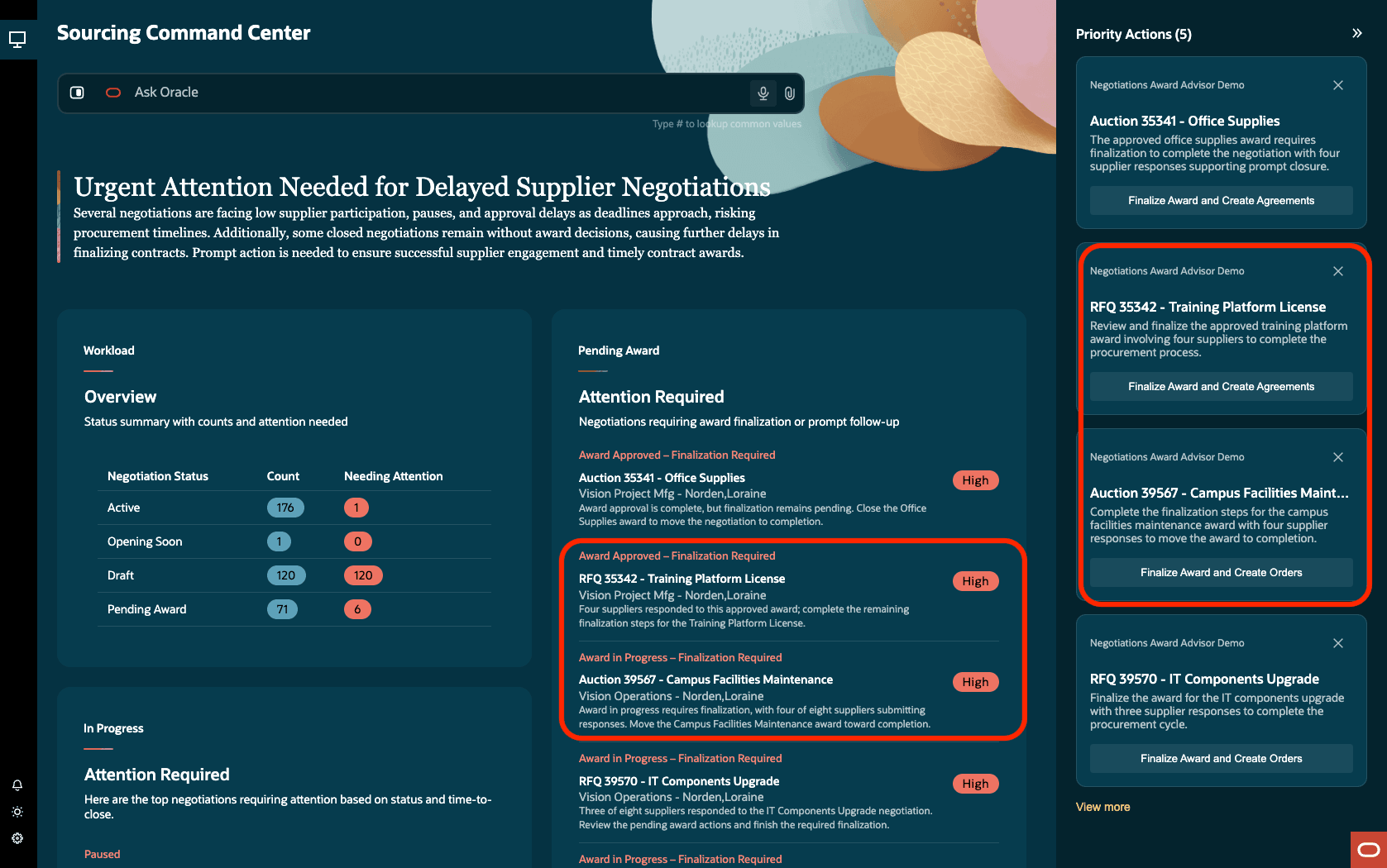
Pending award and priority actions
Use the Finalize Award action to complete the award and create the applicable outcome documents. For purchase order outcomes, the action is labeled Finalize Award and Create Orders. For blanket purchase agreement outcomes, the action is labeled Finalize Award and Create Agreements.
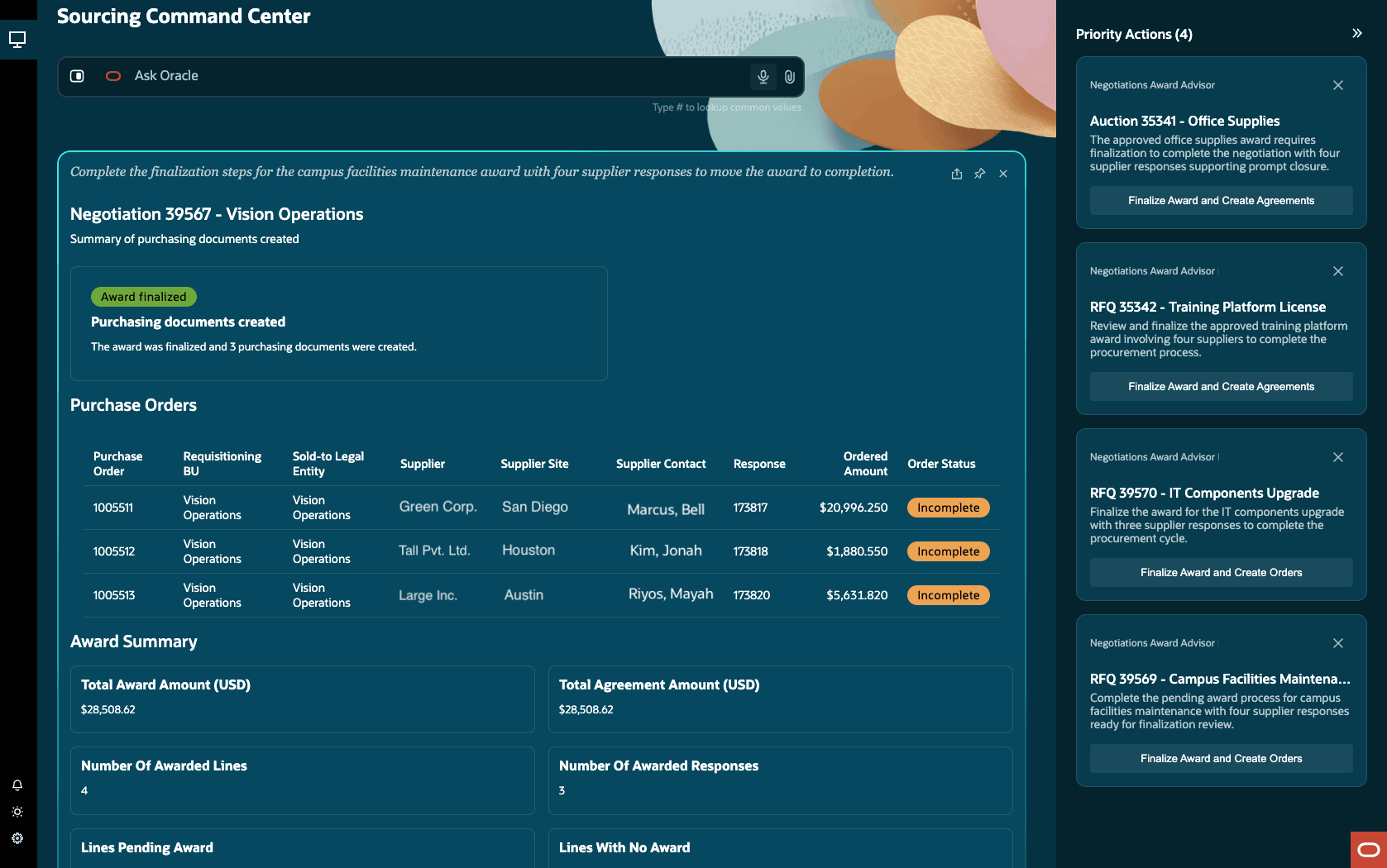
Award finalized and purchasing documents created
Finalize eligible sourcing awards directly from the Sourcing Command Center and create the resulting purchasing documents. Prioritized award work helps reduce delays and move approved sourcing decisions to completion.
Steps to enable and configure
To use this feature, you must enable and configure the Update 26B feature, AI Agentic App: Sourcing Command Center, if you haven't already. For detailed instructions, refer to the Steps to Enable section in the What's New for this feature.
Tips and considerations
- You will see only the negotiations that you have access to as an owner, team member, or Procurement Agent with access to view other agents' documents. You will be able to take the Finalize Award action if you have the necessary security privileges to perform those tasks.
- Review AI recommended priority actions for accuracy before applying. Always validate AI suggestions against your business priorities.
- You can't create supplier contract as an outcome. It will be supported in a future update.
- You can't update the staged purchase orders or agreements, or edit allocations from the command center.
Key resources
AI Agentic App: Sourcing Command Center
Access requirements
Users who are assigned a configured job role that contains these existing privileges and who meet any of the following data security conditions can access this feature.
Data security conditions (any)
- You are the negotiation owner or buyer.
- You are a collaboration team member with full access to the negotiation.
- You are an active procurement agent for the procurement business unit of the negotiation and are permitted to have full access to other agents' documents.
| Privilege status | Privilege name and code |
|---|---|
| Previously delivered | View Supplier Negotiation Work Area (PON_VIEW_SUPPLIER_NEGOTIATION_WORKAREA_PRIV) |
| Previously delivered | Access Sourcing Command Center Duty (ORA_DR_PON_COMMAND_CENTER_APP_DUTY) |
In the Security Console, filter by Roles and Permission Groups to find this new duty role.
To allow users to interact with agents, you must also enable permission groups in the Security Console on those users’ configured job roles that contain the Access Sourcing Command Center Duty role. You can enable permission groups when you manage the basic information of your configured job roles.
Users’ configured job roles must also contain privileges that allow access to the pages where AI agents are enabled.
See Access Requirements for AI Agent Studio (for administrators) and How can I give users access to AI agents (for end-users) for more information.