Manage negotiation templates
Manage supplier negotiation templates in the Redwood experience. From the Negotiation Templates search page you can review templates, as well as create, update, and activate draft templates using a guided process. In a draft negotiation template, you can maintain negotiation details, lines, pricing details, and collaboration or scoring team information when supported by the negotiation type, style, and outcome.
Create a template from an existing negotiation or RFQ by selecting Copy to Template from the Actions menu on the View Negotiation page. You can also duplicate an existing template to carry forward supported template details, retain attachments when needed in the new template without changing the original. Review and update copied or duplicated templates before activating them.
From the Sourcing page, select View More Actions, then select Manage Negotiation Templates to open the Negotiation Templates page.
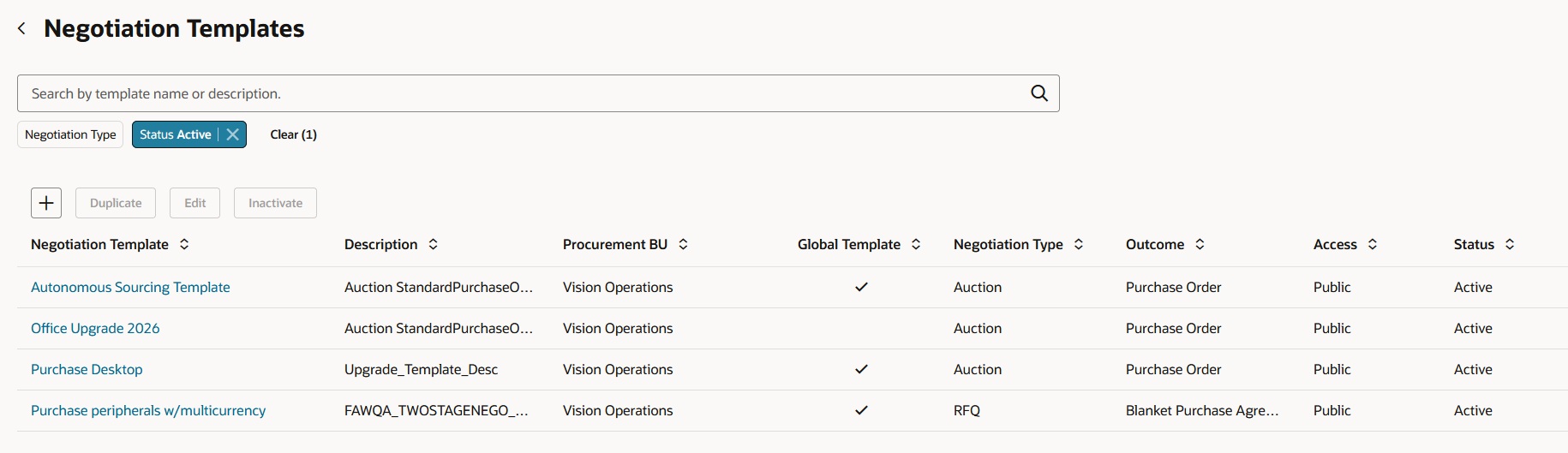
Manage negotiation templates
New and updated templates remain inactive until you activate them. Private templates are available to their owners and collaborators, while access to global templates depends on the user’s access to the applicable procurement business units. Changes to a copied or duplicated template don’t update the original negotiation or template.
This new user experience provides a centralized way to create, manage, and reuse supplier negotiation templates. It helps category managers and buyers standardize negotiation setup, reduce manual effort, and prepare future negotiations more efficiently.
Steps to enable and configure
To access this feature, you must enable the following profile options if you haven't already.
- Redwood Pages for Sourcing Enabled (ORA_PON_SOURCING_REDWOOD_ENABLED). For instructions on enabling a profile option, refer to the Set Profile Option Values topic.
- Redwood Page to Manage Negotiation Templates Enabled (ORA_PON_NEGOTIATION_TEMPLATES_ENABLED)
Tips and considerations
In this release, Supplier Negotiation Templates do not support the following features:
- Internal Cost Factors
- Contracts
- Line Attachments, Descriptive Flexfields (DFFs), and Retainage
- Large Negotiations
Key resources
- For information about using Oracle Visual Builder Studio to extend your Redwood application pages, see Oracle Fusion Cloud HCM and SCM: Extending Redwood Applications for HCM and SCM Using Visual Builder Studio.
- For more information, see Create a Negotiation Template.
Access requirements
Users who are assigned a configured job role that contains these existing privileges can access this feature.
| Privilege Status | Privilege name and code |
|---|---|
| Existing | Manage Supplier Negotiation Template (PON_MANAGE_SUPPLIER_NEGOTIATION_TEMPLATE_PRIV) ) |