AI Agentic App: Sourcing Command Center
Obtain early access to the first agentic AI application - Sourcing Command Center. The Sourcing Command Center is an AI-powered agentic command center where specialist sourcing agents continuously analyze negotiations, supplier participation, award readiness, identify risks and opportunities, coordinate and execute priority actions to drive faster award decisions, stronger supplier engagement, and improved savings outcomes.
The key capabilities include:
- Review AI-generated narrative summary highlighting urgent negotiations, risks, and recommended actions
- View workload overview to understand negotiation volume and items requiring attention
- Review Priority Actions to see the most critical sourcing issues and take recommended actions
- Execute AI-recommended actions directly from the Command Center without navigating away
- Review negotiations pending award and drill into an individual negotiation for a negotiation-centric view
- Use Ask Oracle to perform actions directly on the negotiation, such as splitting award between two suppliers, and sending reminders to invited suppliers with low participation.
To open the Sourcing Command Center, go to Quick Actions and expand the Show More menu.
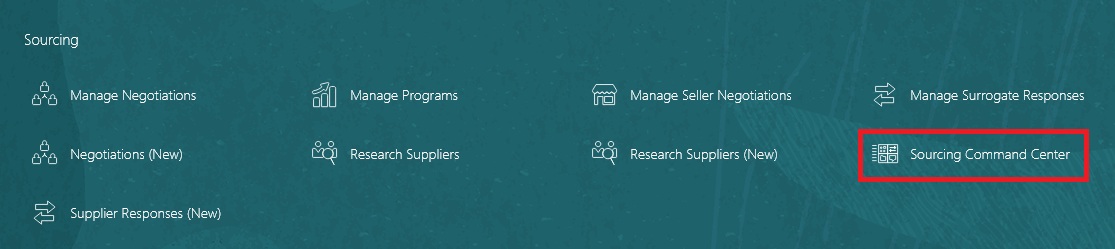
Quick Action for Sourcing Command Center
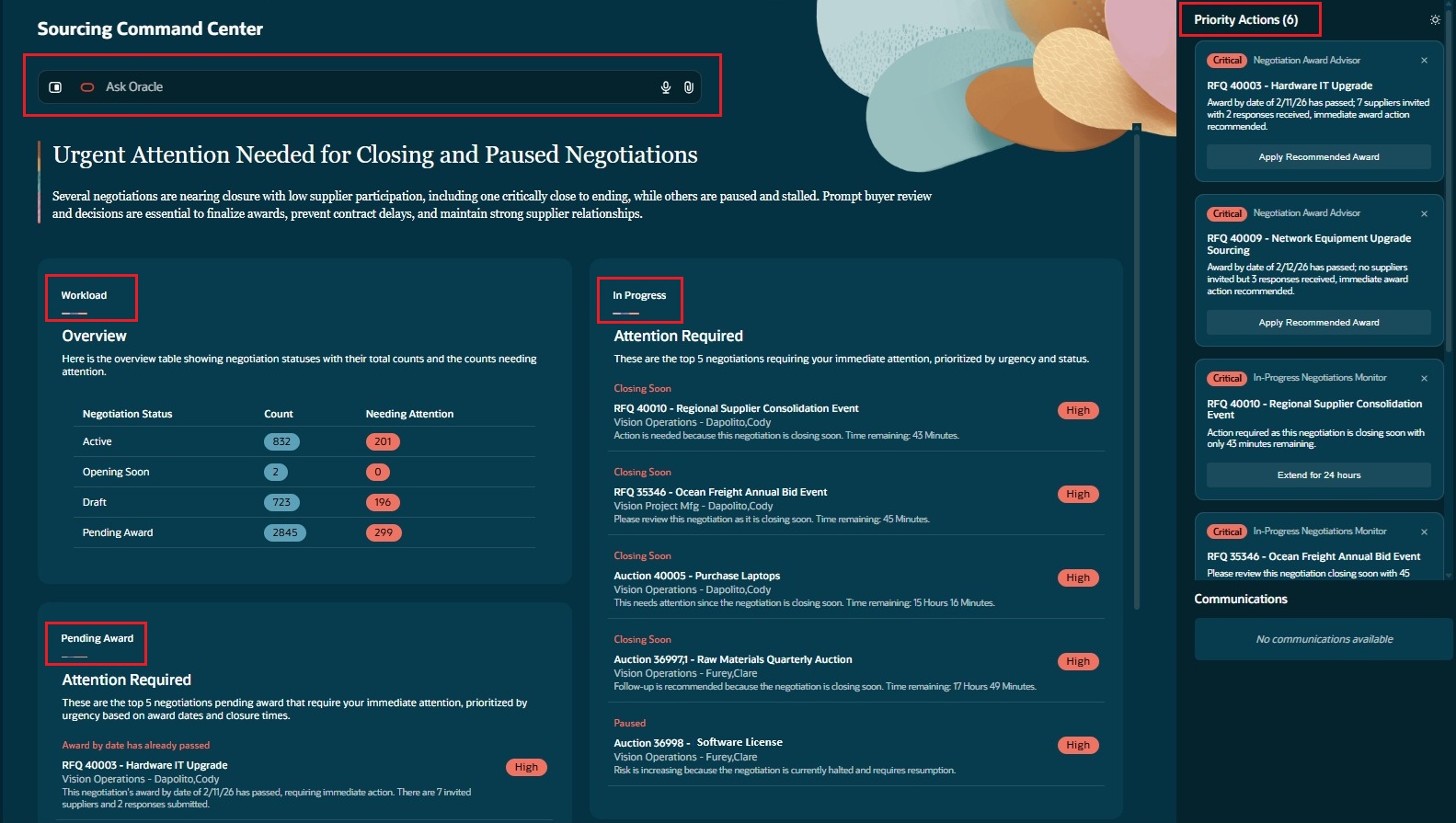
Sourcing Command Center
The Sourcing Command Center surfaces AI-powered agentic workflows through three panels: Workload, In Progress, and Pending Award. The In Progress and Pending Award panels surface the top five negotiations requiring immediate attention, enabling faster prioritization and action.
The Workload panel provides an AI-generated summary and a list of negotiations requiring attention across Active, Opening Soon, Draft, and Pending Award statuses.
The In Progress panel proactively surfaces active negotiations that need immediate intervention, such as events nearing close with low supplier participation. AI powered agentic workflows recommend priority actions such as extending negotiations by 24 hours and provide quick actions to Resume or Update Schedule for Paused or Approved (Not published) negotiations.
The Pending Award panel identifies negotiations that are approaching or past the award date. AI powered agentic workflows recommend award actions so category managers can accelerate award decisions. From the Pending Award panel, you can drill into award details for the negotiation to review AI recommended awards for a sole source supplier or for each line and apply the recommended awards directly.
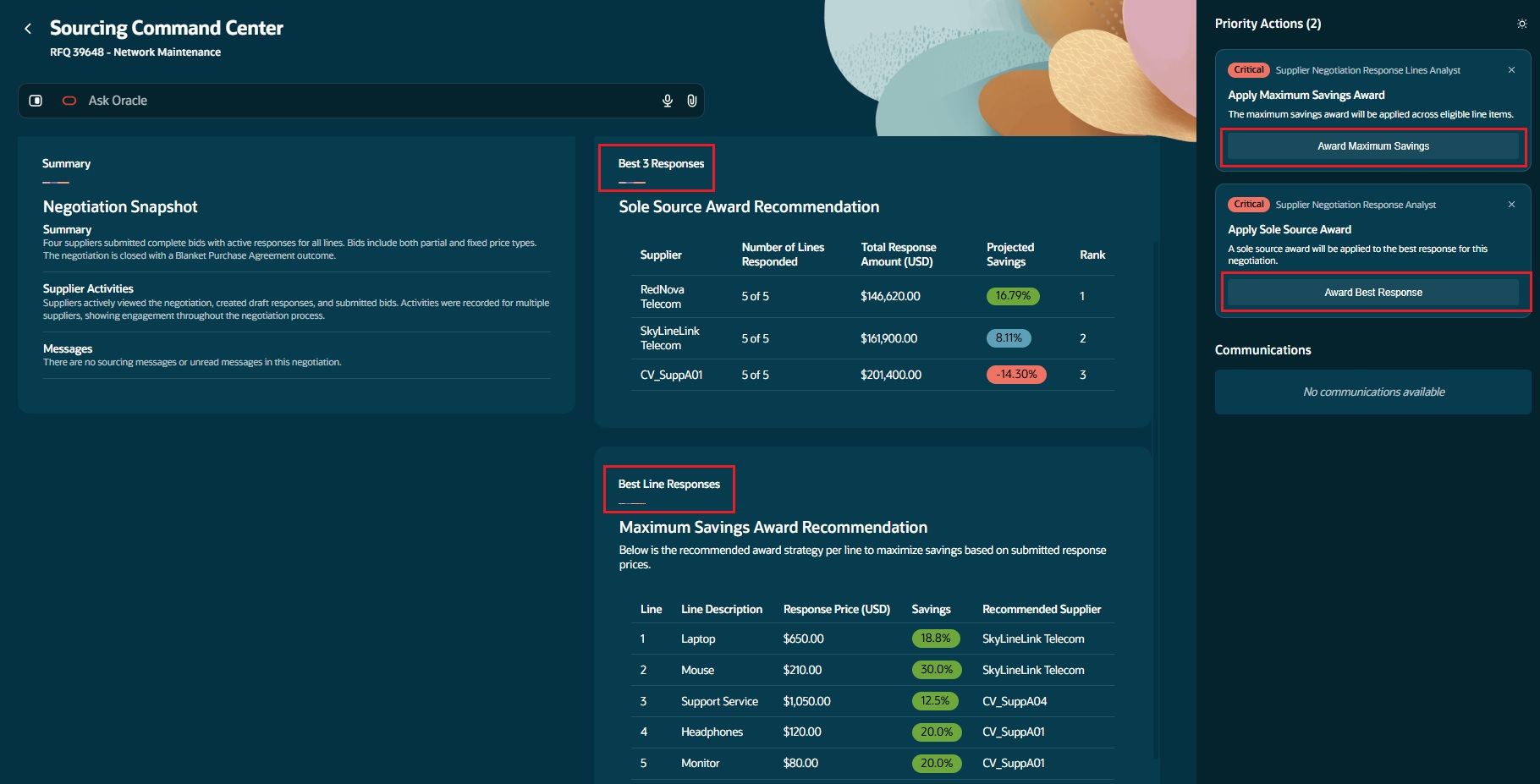
Negotiation Award Details for Best Response and Recommended Priority Actions
The Sourcing Command Center is a goal-oriented decision engine where specialist AI agents own outcomes, apply expertise, and execute work safely within policy and human boundaries. By prioritizing actions and enabling faster, informed decisions, it accelerates sourcing and award cycles, strengthens supplier engagement, and maximizes savings.
Steps to enable and configure
To use this feature, you must enable this profile option:
- Sourcing Command Center for Insights (ORA_PON_SOURCING_AGENTIC_APP_ENABLED)
For instructions on enabling a profile option, refer to the Set Profile Option Values topic.
To allow users to interact with agents, you must also enable permission groups in the Security Console on those users’ configured job roles.
To enable permission groups for roles, take these steps:
- In the Setup and Maintenance work area, search for the Manage Administrator Profile Values task using the search link in the Tasks panel tab.
- Search for the Enable Security Console External Application Integration (ORA_ASE_SAS_INTEGRATION_ENABLED) profile option and set the Site profile level to Yes.
Tips and considerations
- Users will see only the negotiations that they have access to as an owner, team member, or Procurement Agent with access to view other agents' documents. They will be able to take priority actions if they have the necessary security privileges to perform those tasks.
- Review AI recommended priority actions for accuracy before applying. Always validate AI suggestions against your business priority.
- You can’t access the View Negotiations Redwood page from the Sourcing Command Center. To view negotiations, log in to the Oracle Sourcing UI.
Access requirements
Users who are assigned a configured job role that contains the following existing privilege and new duty role can access this feature:
- View Supplier Negotiation Work Area (PON_VIEW_SUPPLIER_NEGOTIATION_WORKAREA_PRIV)
- Access Sourcing Command Center Duty (ORA_DR_PON_COMMAND_CENTER_APP_DUTY)
In the Security Console, filter by Roles and Permission Groups to find this new duty role.
To allow users to interact with agents, you must also enable permission groups in the Security Console on those users’ configured job roles that contain the Access Sourcing Command Center Duty role. You can enable permission groups when you manage the basic information of your configured job roles.
Users’ configured job roles must also contain privileges that allow access to the pages where AI agents are enabled.
See Access Requirements for AI Agent Studio (for administrators) and How can I give users access to AI agents (for end-users) for more information.