Work with plans during demand simulation
You can now open a demand or demand and supply plan while simulating demand. Before this update, the plan was locked during the simulation, and you couldn’t open the plan or change it. This change ensures an improved user experience.
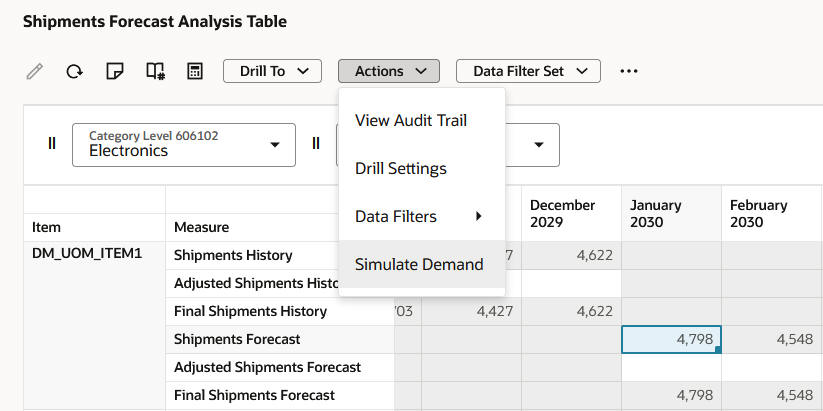
Simulate Demand menu item
Additionally, when you view the status details of the plan, the action for simulations will be Simulate Demand. Previously, the action for simulations was Run, and you couldn’t distinguish a simulation from a full plan run.
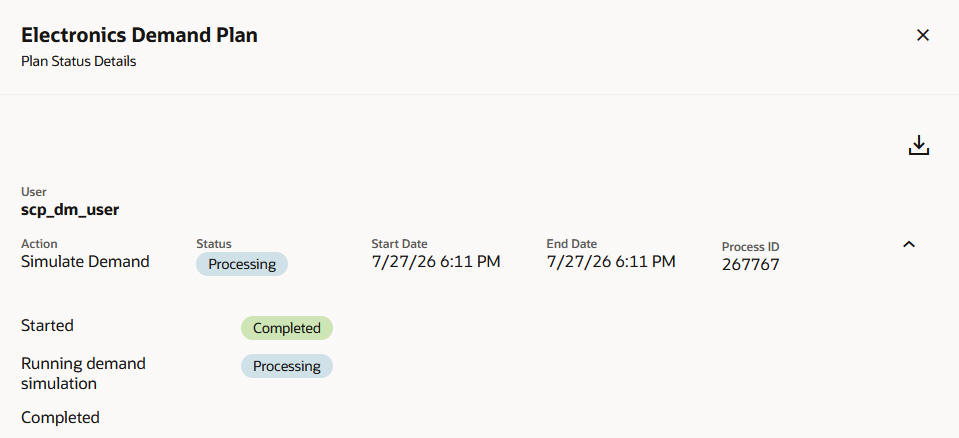
Plan Status Details drawer for a simulation
Steps to enable and configure
You don't need to do anything to enable this feature.
Tips and considerations
This feature is applicable to both the Redwood and classic UIs.
Key resources
Visit https://redwood.oracle.com/ for more information about the Redwood experience.
Access requirements
If you’re using user-defined job roles, then you need to add the privileges identified as new in this update as well as validate that you have the existing privileges that are listed.
| Privilege status | Privilege name and code |
|---|---|
| Existing |
Simulate Demand Forecast MSC_SIMULATE_DEMAND_FORECAST_PRIV |