Specify minimum shelf life controls for perishable items
Use the Remaining Shelf Life Rules page in Supply Chain Management to define and maintain rule headers and rule lines that determine minimum remaining shelf life requirements. This page supports rule maintenance actions, such as create, edit, delete, copy, refresh, export, search, filtering, and level order management.
You can load remaining shelf life rule details through the Supply Chain Management Remaining Shelf Life Rules file-based data import (FBDI) flow. The collection process validates rule details, assignment combinations, item eligibility, duplicate entries, and rank order before loading data.
Oracle Fusion Cloud Supply Chain Planning provides a read-only view of the collected remaining shelf life rules, enabling planners to review the latest rule definitions without modifying the source configuration. The page supports refresh, keyword search, filter chips, and column filters to simplify the review of collected rule data.
Oracle Supply Chain Planning pages also provide visibility into shelf life and minimum remaining shelf life related attributes. Item details can display Shelf Life Days, while Supplies and Demands page can display minimum remaining shelf life demand attributes such as Minimum Remaining Shelf Life Days, Remaining Shelf Life Date, Minimum Remaining Shelf Life Days Anchor Date Type, Minimum Remaining Shelf Life Days from Ship Date, and Remaining Shelf Life Days.
You can collect minimum remaining shelf life related planning data, including item shelf life attributes, scheduled sales order minimum remaining shelf life attributes, supplies with expiration dates, and the Remaining Shelf Life Rules reference entity. Simulation sets for items also support Lot Control, Lot Expiration Control, and Shelf Life Days for lot-controlled and non-lot-controlled items.
These enhancements improve consistency across minimum remaining shelf life setup, planning, and execution by defining remaining shelf life rules centrally and collecting them into Oracle Supply Chain Planning. Planners gain better visibility into shelf life rules, demand minimum remaining shelf life attributes, and supply expiration dates, enabling more informed planning and fulfillment decisions.
This feature provides the following capabilities:
- Define shelf life rules based on business requirements.
- Plan and execute supply chain operations while adhering to shelf life controls.
- Gain end-to-end visibility into shelf life compliance across Oracle Fusion Cloud Supply Chain Planning, Oracle Fusion Cloud Order Management, and Oracle Fusion Cloud Inventory Management.
The specify minimum shelf life controls for perishable items feature includes the following capabilities:
- Respect minimum remaining shelf life constraints in Oracle Fusion Cloud Supply Planning
- Respect minimum shelf life material constraints in Oracle Fusion Cloud Order Promising
- Respect minimum shelf Life material constraints in Oracle Fusion Cloud Backlog Management
- Enforce minimum remaining shelf life in Oracle Fusion Cloud Order Fulfillment
- Support minimum remaining shelf life for back-to-back transfer and on hand flows
The following diagram provides a high level overview of the planning and execution process while ensuring compliance with shelf life controls.
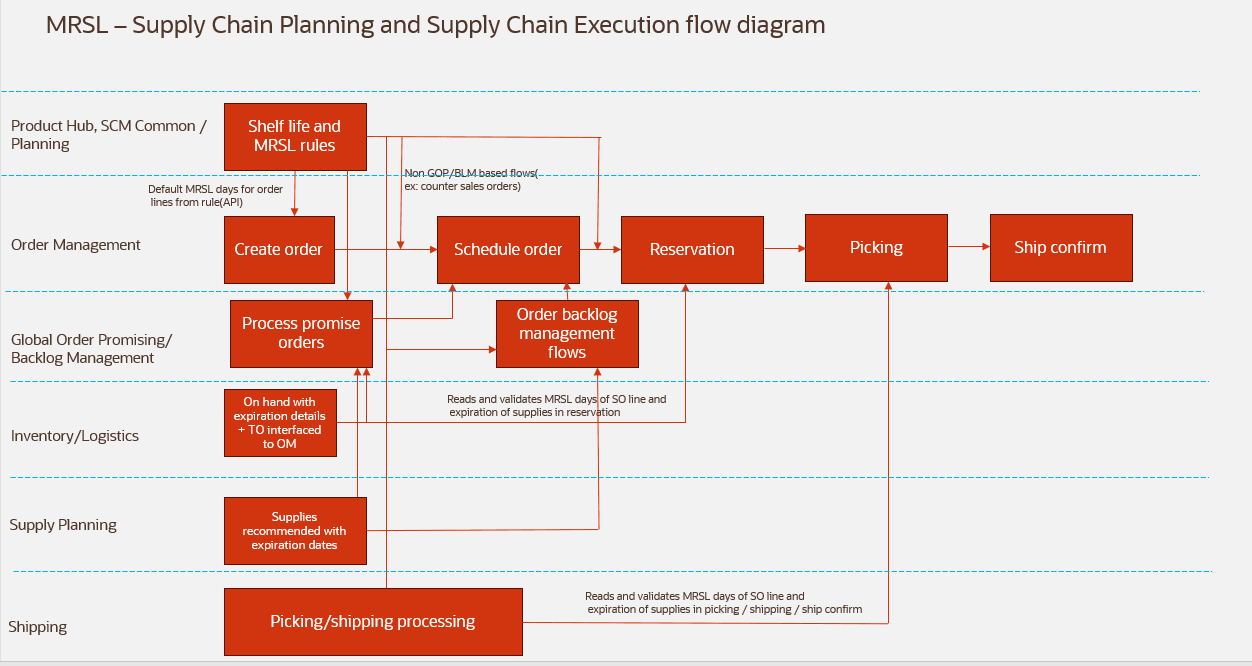
Minimum remaining shelf life flow diagram
Important minimum remaining shelf life attributes
- Minimum remaining shelf life days - Defines the minimum number of remaining shelf life days that a supply must have to fulfill a demand. This requirement is evaluated either at the time of shipment or upon arrival at the destination, depending on the configured anchor date type. The value is defined in the Remaining Shelf Life Rule page and is used by Oracle Supply Planning, Oracle Fusion Cloud Global Order Promising, Oracle Backlog Management, and Oracle Order Management.
- Remaining Shelf Life Date - Represents the earliest date that a supply can have while still meeting the minimum remaining shelf life days requirement for a specific demand.
- Minimum remaining shelf life days anchor date type - Specifies whether the minimum remaining shelf life requirement is evaluated based on the Ship Date or the Arrival Date.
- Ship Date: The fulfilling supply must have at least the configured minimum remaining shelf life days of remaining shelf life when it is shipped.
- Arrival Date: The fulfilling supply must have at least the configured minimum remaining shelf life days of remaining shelf life when it arrives at the customer's location.
- Minimum remaining shelf life days from ship date - Indicates the minimum remaining shelf life that the fulfilling supply must have on the shipment date.
- If minimum remaining shelf life days anchor date type is ship date, this value is equal to the configured minimum remaining shelf life days.
- If minimum remaining shelf life days anchor date type = arrival date, this value is calculated as minimum remaining shelf life days + (arrival date – ship date).
- This calculation ensures that the supply still satisfies the required minimum remaining shelf life upon arrival at its destination.
To plan and execute supply chain processes while complying with minimum remaining shelf life requirements, complete the following steps:
- Enable the Specify Minimum Shelf Life Controls for Perishable Items opt-in.
- Define minimum remaining shelf life rules for the item at either the item or the category level.
- Specify the item's shelf life duration in product hub.
- Collect minimum remaining shelf life rules, shelf life days item attribute, and projected expiration dates for non on hand supplies.
- Create sales orders in Oracle Order Management and schedule in Oracle Global Order Promising while respecting the configured shelf life controls.
- Plan supplies in a supply plan while respecting shelf life controls.
- Perform backlog planning while respecting shelf life controls in Oracle Backlog Management.
- Review the minimum remaining shelf life attributes respected in Oracle Fusion Cloud Supply Chain Orchestration to verify that shelf life constraints have been applied.
- Fulfill sales orders while complying with the configured shelf life requirements.
- Perform reservations, picking, and shipping for sales orders and transfer orders while respecting shelf life controls.
Remaining Shelf Life Rule page
Minimum remaining shelf life rules are configured on the Remaining Shelf Life Rule page.
To navigate to the Remaining Shelf Life Rule page, perform the following steps:
- From the navigator, select My Enterprise > Setup and Maintenance.
- Select either Manufacturing and Supply Chain Materials Management or Oracle Order Management.
- In the Functional Areas section, select Items, and then click All Tasks.
- Select Configure Remaining Shelf Life Rule task to open the Remaining Shelf Life Rule page.
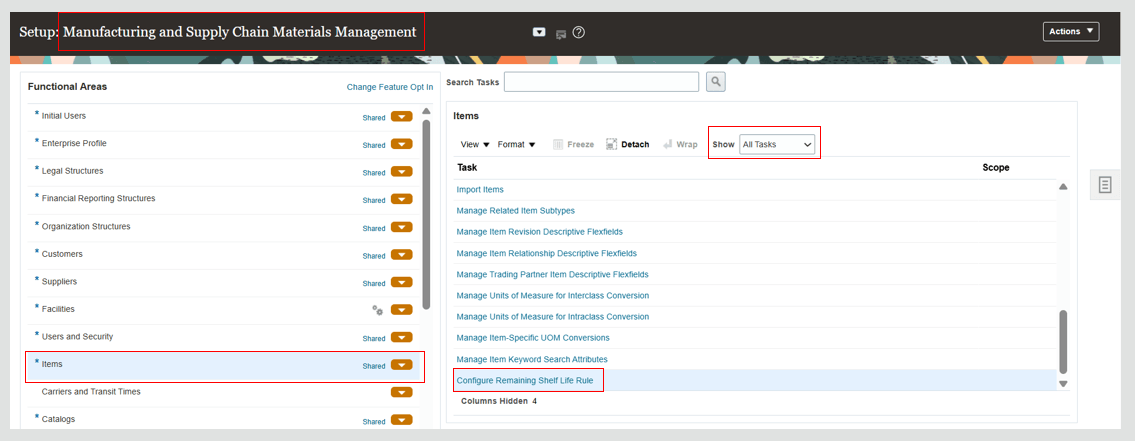
Navigation to Configure Remaining Shelf Life Rule task
The Remaining Shelf Life Rule page opens on the same tab.
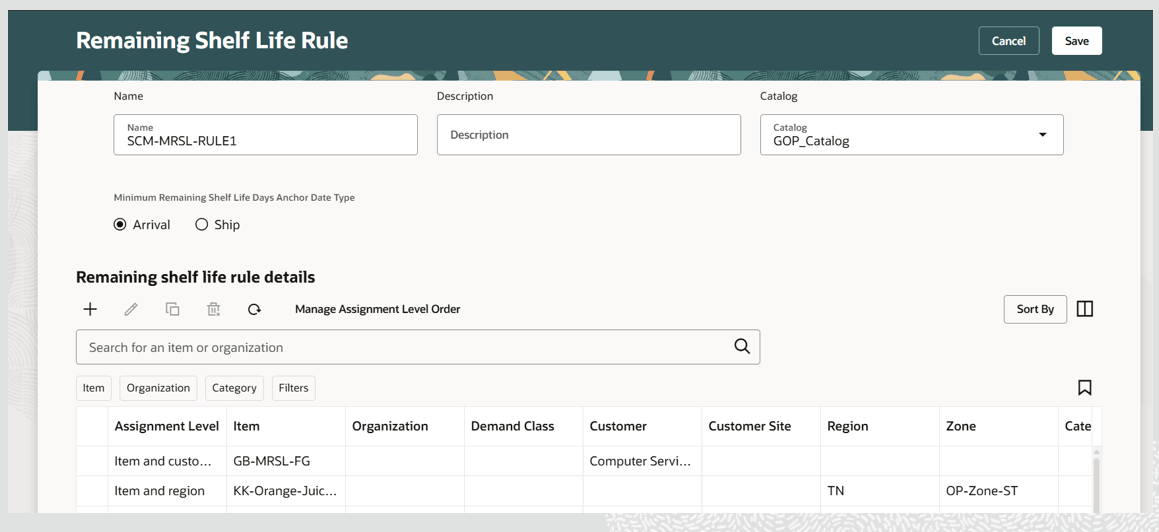
Remaining Shelf Life Rule page
Remaining Shelf Life Rule page details
The Remaining Shelf Life Rule page consists of the following two sections:
1 - Header: Allows you to define a rule name and rule description, select the item catalog, and specify the minimum remaining shelf life days anchor date type.
2 - Remaining Shelf Life Rule Details: Allows you to define the minimum remaining shelf life rules and manage assignment level ordering used when multiple rule assignments are applicable.
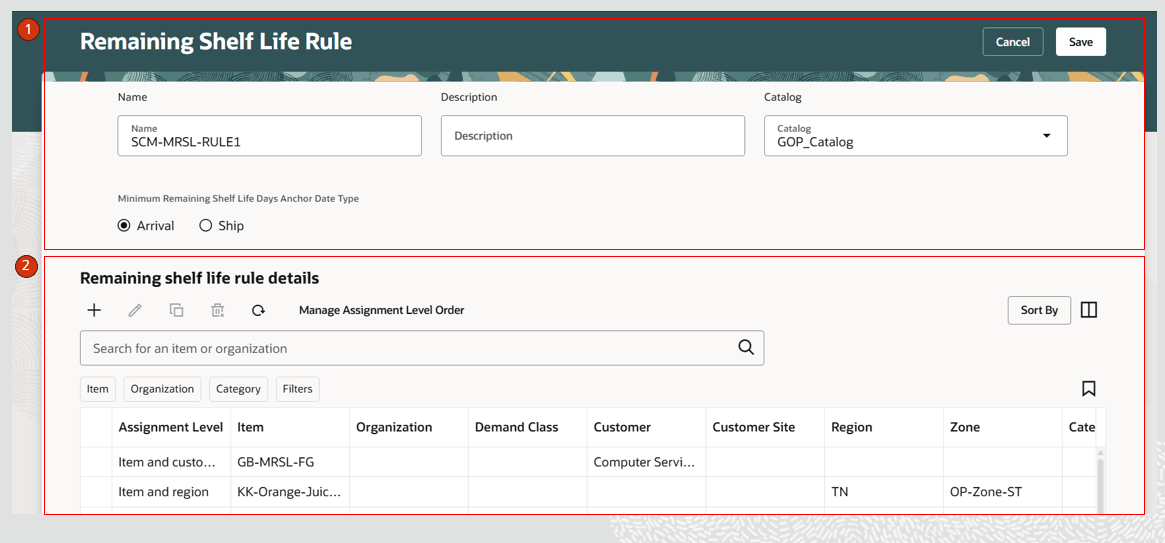
Remaining shelf life rule details
Remaining shelf life rule details
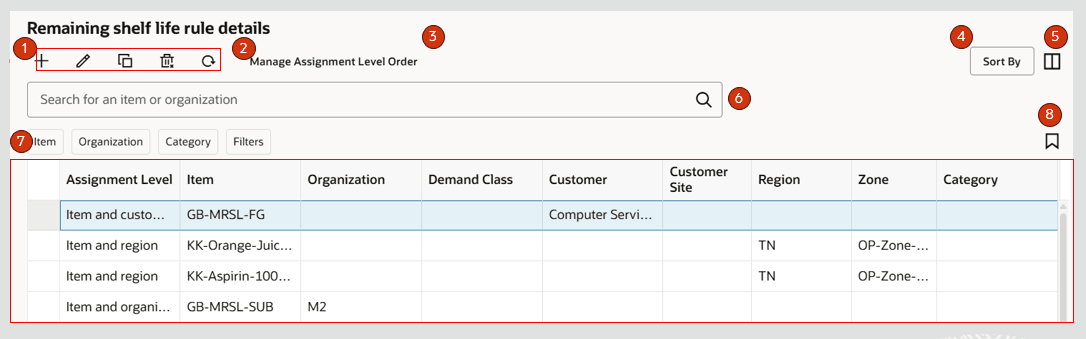
Remaining shelf life rule details
1 - Create, edit, copy and delete minimum remaining shelf life rule details
Create a minimum remaining shelf life rule
- Click the + icon to create a new row.
- You can add a new row by either selecting a row or placing the reference in an existing row and clicking the + icon. A new row is added below the existing row, and an assignment level order is displayed. The Add drawer opens to add the new rule details.
- Select an Assignment Level and enter the relevant details for the selected assignment level.
- Enter a value for Minimum Remaining Shelf Life Days and click Apply.
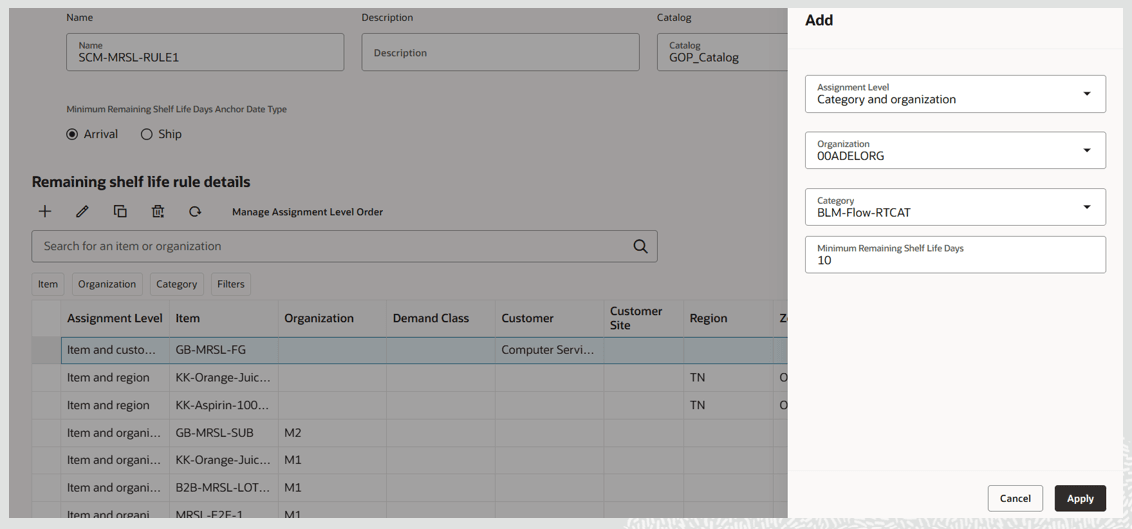
Add a new rule detail
- Minimum Remaining Shelf Life Days is a non-zero, positive integer with a maximum value of 9999.
- You can add multiple rules on the page.
Edit a minimum remaining shelf life rule
- Select the row you want to edit.
- Click the Edit icon.
The Edit drawer opens and displays the details of the selected row.
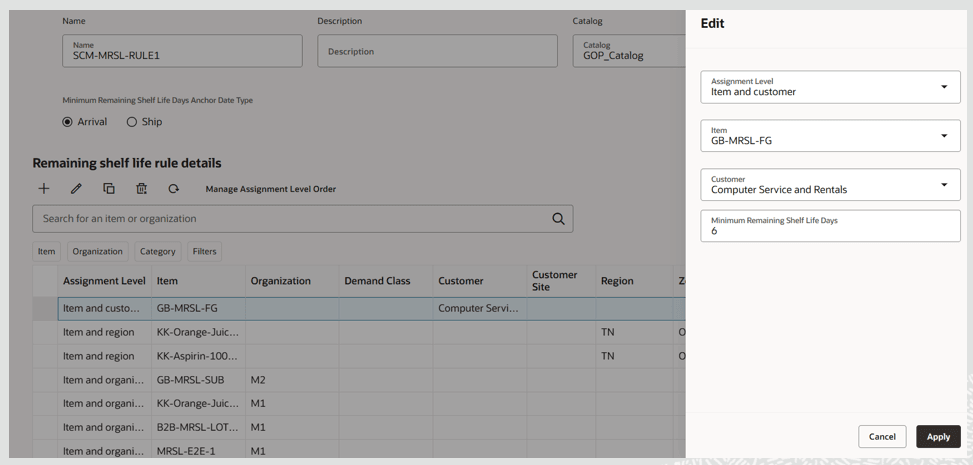
Edit a rule detail
- Edit the required details in the row and click Apply.
- If assignment level is updated, select the relevant details for the assignment level and Save.
Additional considerations:
- Mass edits are not supported on this page. However, you can edit multiple rows individually, one row at a time.
- You can edit rules even when the page displays a filtered set of rules.
- You can update the item catalog associated with a rule. If the catalog is updated, all the category based rule assignments are removed from the rule.
Copy a minimum remaining shelf life rule
- Select the row you want to copy.
- Click Duplicate.
A Duplicate drawer opens displaying details of the row selected for duplication. - Update the required details and click Apply.
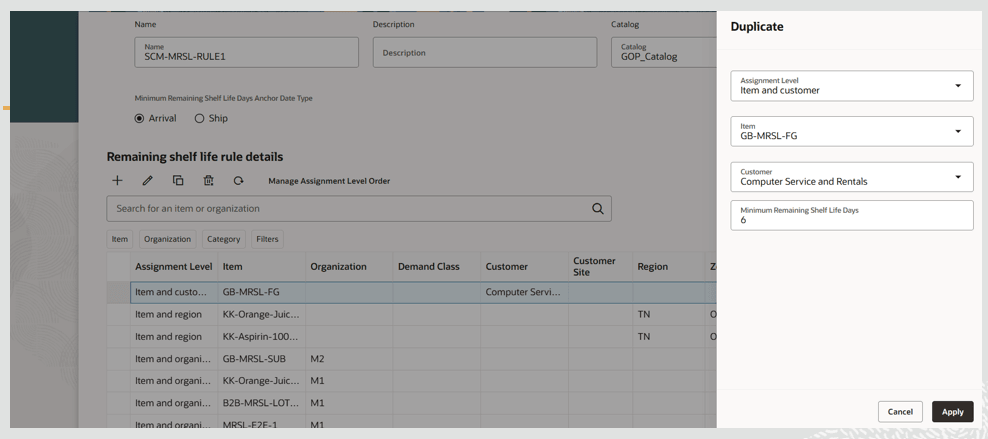
Duplicate a Rule Detail
A new row is inserted below the row selected for duplication.
Delete a minimum remaining shelf life rule
Select the rule you want to delete and click the Delete icon.
The selected rule is deleted.
2 - Refresh remaining shelf life rule detail
- Click the Refresh icon in the toolbar to refresh the remaining shelf life rule details The refresh action performs the following:
- Unsaved changes prompt: The system alerts you if there are any unsaved changes. If you continue with the refresh, the unsaved changes are discarded.
- Reset filters and sorting: Any column filters or sorting applied to the table are cleared.
- Reload data: The table re-queries and retrieves the latest results based on the existing base filter chips.
3 - Manage assignment level order
The default order of the assignment levels is displayed in the following table.
Assignment Level Order
| Assignment level | Level Order |
|---|---|
| Item-Organization-Customer-Customer Site | 1 |
| Item-Customer-Customer Site | 2 |
| Item-Organization-Customer | 3 |
| Item-Customer | 4 |
| Item-Organization-Demand Class | 5 |
| Item-Demand Class | 6 |
| Item-Organization-Region | 7 |
| Item-Region | 8 |
| Item-Organization | 9 |
| Item | 10 |
| Category-organization-Customer - Customer site | 11 |
| Category-Customer-Customer Site | 12 |
| Category-Organization-Customer | 13 |
| Category-Customer | 14 |
| Category-Organization-Demand Class | 15 |
| Category-Demand Class | 16 |
| Category-Organization-Region | 17 |
| Category-Region | 18 |
| Category-Organization | 19 |
| Category | 20 |
When a demand arises, the minimum remaining shelf life rule with the lowest Level Order among the matching assignment levels is applied to determine the minimum remaining shelf life days applicable to that demand.
Manage Assignment Level Order allows you to:
- Move Assignment Levels up or down to change their relative Level Order.
- View the recalculated Level Orders as Assignment Levels are moved up or down.
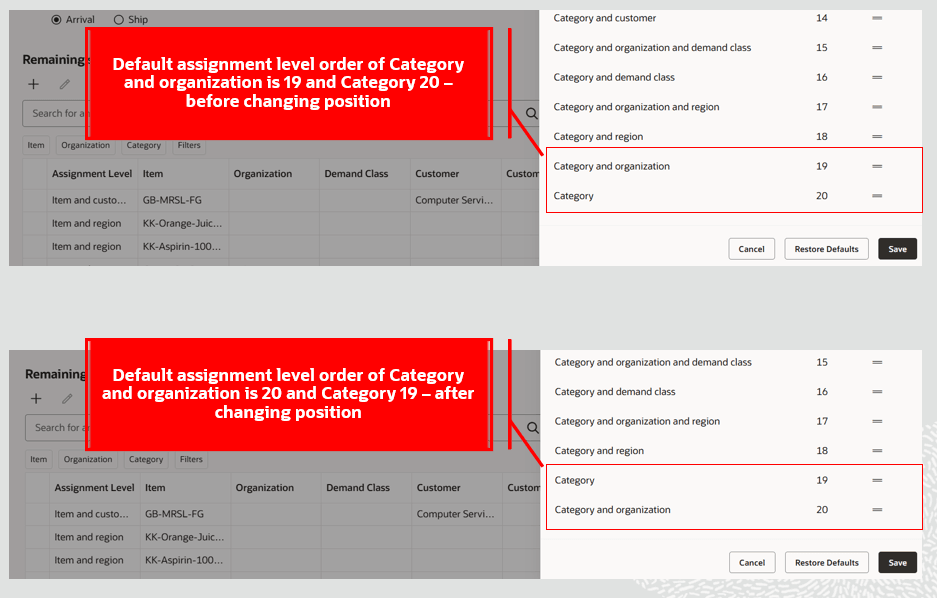
Manage Assignment Level Order used to change Level Order
Perform the following steps to update the assignment level order:
- Click Management Assignment Level Order.
The Assignment Level Order drawer opens. - Drag an assignment level up or down to change its position in the order.
The Level Order number is automatically updated after each movement. - Click Save to apply the updated level order.
To restore the default assignment level order, click Restore Defaults. This resets the assignment levels to their default Level Order values.
Note: The Manage Assignment Level Order option is enabled only for users who are assigned the Manage Remaining Shelf Life Rules privilege.
4 - Sort By
The Sort By action allows you to sort the Remaining Shelf Life Rule Details table by multiple columns.
Perform the following steps to sort the table:
- Click Sort By.
The Sorting drawer opens. - Select the columns you want to sort by and specify the sorting order.
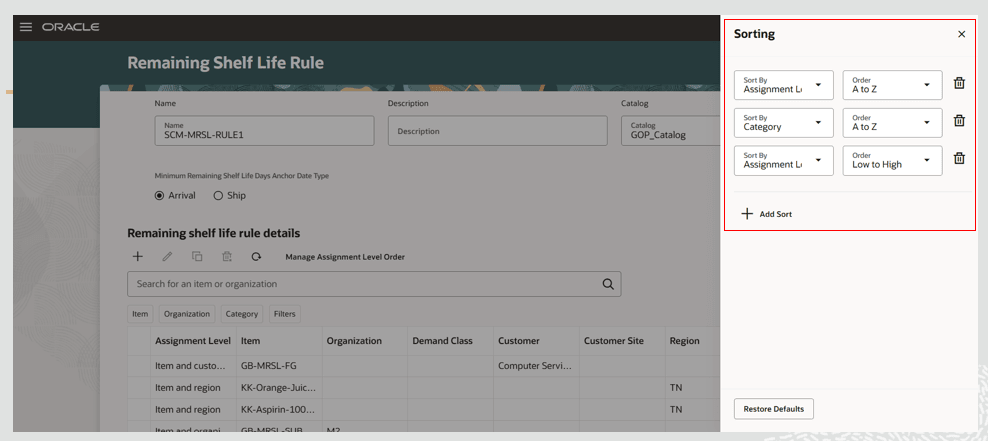
Sort by drawer
- Click the X icon to apply the selected sorting criteria.
5 - Columns
The Columns action allows you to select which columns are displayed in the exceptions table. You can reorder the columns in either of the following ways:
- In the Columns drawer, drag the = icon to move a column up or down.
- In the Remaining Shelf Life Rule Details table, drag and drop columns to rearrange their order.
6 - Keyword search
The keyword search action allows you to search across columns in the Remaining Shelf Life Rule Details table. You can search by Item or Organization.
7 - Remaining Shelf Life Rule Details table
The Remaining Shelf Life Rule Details table allows you to:
- View the remaining shelf life rule details.
- Apply suggested filters to the columns displayed in the table.
- Sort the data by individual columns.
8 - Saved searches
- The saved searches feature allows you to save the current keyword search and suggested filter values as a named saved search.
- You can reuse a saved search to quickly apply the same set of search criteria.
MRSL rule - FBDI template for Supply Chain Management
You can bulk load data into the Remaining Shelf Life Rules page using the Remaining Shelf Life Rules file-based data import (FBDI) template.
Bulk Load Remaining Shelf Life rules
- The FBDI template file name is ScmRemainingShelfLifeRulesImportTemplate.xlsm.
- Use the ERP Load Interface File for Import scheduled process to bulk load the data.
Prepare and upload the FBDI file
- Populate the spreadsheet template with the MRSL rule details that you want to bulk load.
- Use the Generate CSV File macro in the template to generate the CSV file, for example, ScmMRSLRuleDetails.csv.
- Compress the generated CSV file into a ZIP archive.
- Run the ERP Load Interface File for Import scheduled process.
- For the Import Process parameter, select Load Planning Data from Flat Files.
- For the Data File parameter, select the ZIP archive containing the CSV file.
Access the FBDI template
You can access the template on docs.oracle.com by following these steps:
- Navigate to Oracle Supply Chain and Manufacturing 26D.
- In All Books, navigate to Integration.
- Click file-based data import (FBDI) for SCM.
- In the Supply Chain Planning section, select Supply Chain Management - Remaining Shelf Life Rules.
Important: You must bulk load ScmMRSLRuleDetails.csv in a dedicated submission of the Load Interface File for Import scheduled process using the import process Load Planning Data from Flat Files. If this file is included with csv files related to Planning collections, then it’s ignored.
Net change and targeted refresh modes
You can bulk load data into the Remaining Shelf Life Rules page using either net change or targeted refresh mode.
- Net change: The system compares the existing data on the Remaining Shelf Life Rules page with the data in the uploaded file and adds, updates, or deletes records based on the changes identified in the file.
- Targeted refresh: The system deletes all existing records on the Remaining Shelf Life Rules page and replaces them with the records in the uploaded file.
You can configure the collection mode for the bulk load by setting the MRSL Rules Collection Type parameter as follows:
- 1 - Targeted Refresh
- 2 - Net Change
Set the Collection Mode
- Populate the ScpErpIntegrationServiceParamsImportTemplate.xlsm template with a new parameter:
- Parameter: MRSL Rules Collection Type
- Value: 1 for Targeted Refresh or 2 for Net Change
- Use the Generate CSV File macro in the template to generate the CSV file, for example, ScpErpIntegrationServiceParams.csv.
- Compress the generated CSV file into a ZIP archive.
- Run the ERP Load Interface File for Import scheduled process.
- For the Import Process parameter, select Load Planning Data from Flat Files.
- For the Data File parameter, select the ZIP archive containing the CSV file.
Access the ERP Integration Service Parameters Template
You can access the template on docs.oracle.com by following these steps:
- Navigate to Oracle Supply Chain and Manufacturing 26D.
- In All Books, navigate to Integration.
- Click file-based data import (FBDI) for SCM.
- In the Supply Chain Planning section, select Supply Chain Planning ERP Integration Service Parameters.
The following example shows a new record in ScpErpIntegrationServiceParams.csv that sets the collection mode for bulk loading Remaining Shelf Life Rules:
ScpErpIntegrationServiceParams.csv – MRSL Rules Collection Type Parameter
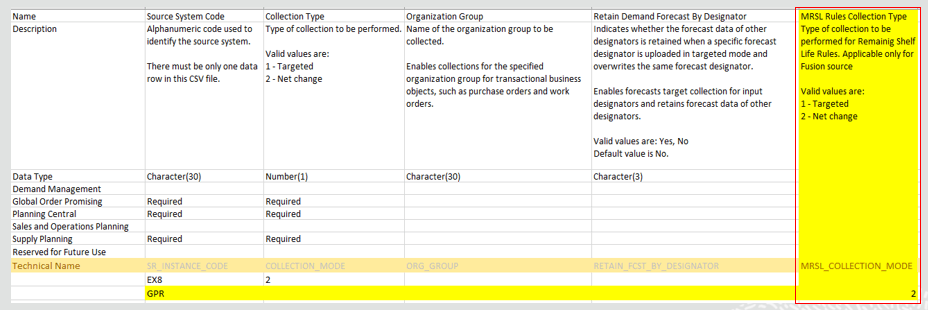
ScpErpIntegrationServiceParams Csv File with new parameter MRSL Rules Collection Type
Additional bulk load considerations
- Category based Remaining Shelf Life Rule details are rejected if the categories do not belong to the catalog specified in the rule.
- You can create, edit, or delete Remaining Shelf Life Rule details using the bulk load process.
Collect Remaining Shelf Life Rule and rule details to Oracle Fusion Cloud Supply Chain Planning
Perform the following steps to collect Remaining Shelf Life Rules and their details for use in Oracle Supply Planning, Oracle Backlog Management, and Oracle Global Order Promising.
- Enable the Specify Minimum Shelf Life Controls for Perishable Items opt-in
- In Collect Planning Data, select Minimum Remaining Shelf Life Rules as the reference data to collect.
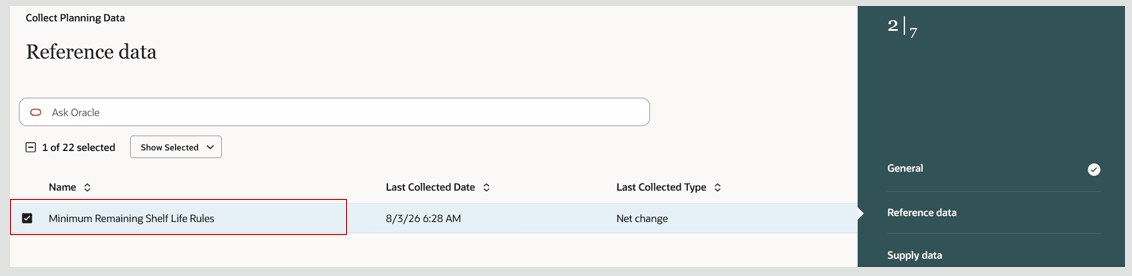
Minimum Remaining Reference Data in Collect Planning Data
- Click Submit to collect Remaining Shelf Life Rules and their details from Oracle Cloud SCM.
Additional details regarding collecting remaining shelf life rule and details from Oracle Cloud SCM
The following additional considerations apply when collecting remaining shelf life rules and their details from Oracle Cloud SCM:
- Remaining shelf life rules and their details are supported in targeted, net change and automatic collection types.
- Minimum remaining shelf life rule reference data can be saved in a collection template and included in scheduled collection submissions through Collect Planning Data, job sets, or REST based collection submissions.
- Minimum remaining shelf life rule reference data can be selected for collection from either the Classic or Redwood Collect Planning Data task page.
- Collected remaining shelf life rules and their details are displayed on the Remaining Shelf Life Rule page under Plan Inputs.
Purge remaining shelf life rule and rule details
Minimum remaining shelf life rule reference data is also available in the Purge Data Repository scheduled process. You can use this process to purge the collected Remaining Shelf Life Rules and their details from Oracle Cloud SCM.
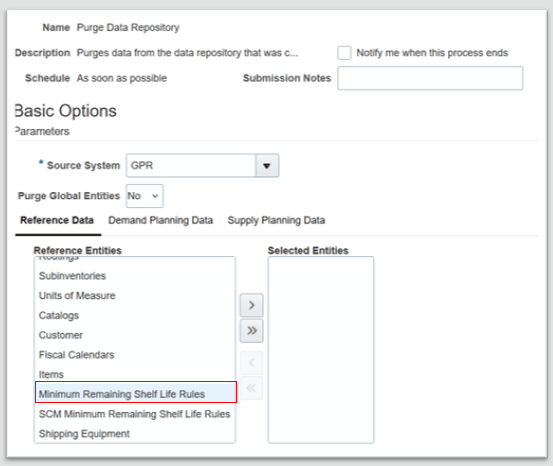
Minimum Remaining Shelf Life Rules Reference Data in Purge Data Repository
Use the SCM Minimum Remaining Shelf Life Rules reference data in the Purge Data Repository scheduled process to purge Remaining Shelf Life Rules and their details collected from Oracle Cloud SCM.
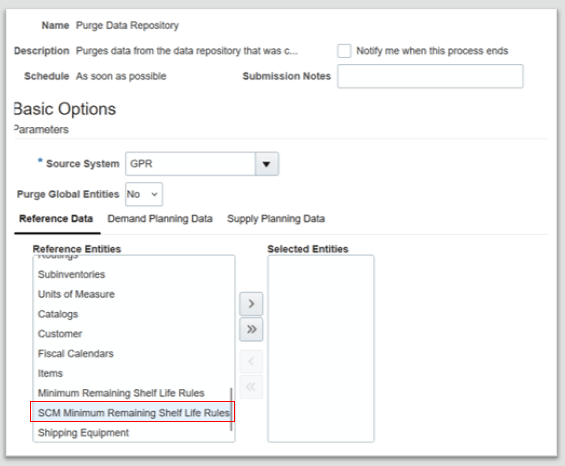
SCM Minimum Remaining Shelf Life Rules Reference Data in Purge Data Repository
Understanding how Oracle Supply Chain Planning and Supply Chain Execution respect shelf life controls
Specify and respect shelf life controls in Oracle Cloud Inventory
Inventory respects minimum remaining shelf life controls throughout the reservation, picking, and shipping processes.
- Reserve supply for minimum remaining shelf life constrained items: When reserving supply for a sales order line, only on hand supply that satisfies the minimum remaining shelf life requirement is considered eligible. This also applies when reserving the transfer order supply for back-to-back orders. The source organization must select the on hand supply that meets the minimum remaining shelf life requirement
- Pick on hand material that meet minimum remaining shelf life constraints: When minimum remaining shelf life rules are configured, the shelf life days defined in the Picking Rules are overridden by the minimum remaining shelf life rules. All other attributes defined in the Picking Rule continue to be honored.
- Lots are allocated only when the expiration date is greater than or equal to the applicable ship date plus the required minimum remaining shelf life days.
- Lots are validated against the minimum remaining shelf life requirement during pick confirmation.
- Ship material that meets minimum remaining shelf life constraints: During shipment confirmation, lots are validated to ensure that they meet the applicable minimum remaining shelf life requirement. If a lot does not satisfy the requirement, shipment confirmation is prevented.
- At ship confirmation, the lot expiration date must be greater than or equal to the applicable anchor date plus the required minimum remaining shelf life days.
- When the anchor date is the ship date, the applicable date is the later of the scheduled ship date and the actual ship date.
- When the anchor date is based on arrival, the applicable date is adjusted based on the arrival-versus-ship-date offset defined by shelf life control.
Specify and respect shelf life controls in Oracle Order Management
Oracle Order Management supports minimum remaining shelf life controls by receiving, storing, and passing minimum remaining shelf life attributes to downstream fulfillment systems.
- Receive minimum remaining shelf life attributes from Oracle Global Order Promising: When a new order line is scheduled, Oracle Order Management receives the minimum remaining shelf life attributes as part of the scheduling response from Oracle Global Order Promising.
- Persist minimum remaining shelf life attributes: Oracle Order Management stores the minimum remaining shelf life attributes so they can be passed to downstream fulfillment processes.
- Receive updated minimum remaining shelf life attributes: When an existing order line is rescheduled, Oracle Order Management receives any updated minimum remaining shelf life from Oracle Global Order Promising as part of the scheduling response.
- Pass minimum remaining shelf life attributes to Oracle Cloud Inventory Management for reservation: When Oracle Order Management creates a new inventory reservation record, it passes the minimum remaining shelf life attributes to Oracle Cloud Inventory Management through the reservation integration.
- Pass updated minimum remaining shelf life attributes to Oracle Cloud Inventory Management: When an existing inventory reservation record is updated from Oracle Order Management, any changes to the Minimum Remaining Shelf Life attributes are passed to Oracle Cloud Inventory Management.
- Pass minimum remaining shelf life attributes to shipping: When Oracle Order Management creates a new shipment line, it passes the minimum remaining shelf life attributes to shipping through the shipping integration.
- Pass updated minimum remaining shelf life attributes to shipping: When an existing shipment line is updated from Oracle Order Management, any changes to the minimum remaining shelf life attributes are passed to shipping.
Specify and respect shelf life controls in Oracle Supply Chain Orchestration
Oracle Supply Chain Orchestration supports minimum remaining shelf life controls by receiving minimum remaining shelf life attributes from Oracle Global Order Promising and passing them to Oracle Cloud Inventory during reservation and transfer order processes.
- Receive minimum remaining shelf life attributes: Oracle Supply Chain Orchestration receives minimum remaining shelf life attributes from Oracle Global Order Promising for back-to-back reservations and transfer order creation processes.
- Pass minimum remaining shelf life attributes for on-hand reservations: Oracle Supply Chain Orchestration passes the minimum remaining shelf life attributes received from Oracle Global Order Promising to Oracle Cloud Inventory Management when creating on hand reservations.
- Pass minimum remaining shelf life attributes for transfer orders: During the back-to-back integration process for sales order scheduling, Oracle Supply Chain Orchestration passes the minimum remaining shelf life attributes received from Oracle Global Order Promising to Oracle Cloud Inventory Management for the transfer order created as part of the process.
Specify and respect shelf life controls in Oracle Supply Planning
Oracle Supply Planning supports minimum remaining shelf life controls to ensure that supply allocation and planning recommendations consider the shelf life requirements of demand.
- Collect shelf life information: Oracle Supply Planning collects Remaining Shelf Life Rule details, supply expiration dates, reservation details with expiration dates, and sales orders with minimum remaining shelf life attributes.
- Respect minimum remaining shelf life constraints in constrained supply plans: A constrained supply plan considers the demand’s remaining shelf life requirement and the supply expiration date when allocating existing supply and recommending planned orders. minimum remaining shelf life constraints are not considered in unconstrained supply plans.
- Allocate eligible supply: The supply plan pegs demands to the earliest-expiring eligible supply that satisfies the demand’s minimum remaining shelf life requirements and outbound lead time requirements.
- Review remaining shelf life details: You can review remaining shelf life information in the plan output to understand how shelf life requirements were considered during planning.
- Improve supply planning quality: By incorporating demand-specific shelf life requirements into supply allocation and planning recommendations, Oracle Supply Planning helps ensure that planned supply is suitable for the demand and reduces the risk of allocating or recommending supply that does not meet minimum remaining shelf life requirements.
Specify and respect shelf life controls in Oracle Global Order Promising
Oracle Global Order Promising considers minimum remaining shelf life requirements when promising sales orders for shelf life-sensitive products.
- Evaluates minimum remaining shelf life and lot expiration constraints: Oracle Global Order Promising evaluates the minimum remaining shelf life requirement and lot expiration constraints when promising sales orders for shelf life-sensitive products.
- Apply minimum remaining shelf life calculations during order promising: Oracle Global Order Promising applies minimum remaining shelf life calculations for Check Availability, Auto Schedule, and Schedule Sales Order calls. The resulting promise includes the following MRSL attributes:
- Minimum Remaining Shelf Life Days
- Minimum Remaining Shelf Life Days Anchor Date Type
- Minimum Remaining Shelf Life Days from Ship Date
- Remaining Shelf Life Days
- Optimizes inventory allocation: Oracle Global Order Promising considers minimum remaining shelf life requirements when evaluating eligible supply, helping optimize inventory allocation for shelf life-sensitive demand.
- Support back-to-back and transfer order supply recommendations: For back-to-back Available-to-Promise and transfer order supply recommendations, Oracle Global Order Promising publishes the minimum remaining shelf life from Ship Date attribute to Oracle Supply Chain Orchestration. This enables downstream processes to enforce the applicable shelf life requirement.
- Provide scheduling transparency: Scheduling Diagnostics and Pegging Properties display minimum remaining shelf life and supply expiration measures, providing greater visibility into how the order promise was calculated.
Specify and respect shelf life controls in Oracle Backlog Management
Oracle Backlog Management enhances fulfillment planning for shelf life-sensitive products by incorporating shelf life and lot expiration controls into supply selection and scheduling decisions.
- Evaluate minimum remaining shelf life and lot expiration constraints: Oracle Backlog Management evaluates minimum remaining shelf life and lot expiration constraints when rescheduling sales order lines for shelf life sensitive products.
- Apply shelf life checks to eligible supplies: Oracle Backlog Management applies minimum remaining shelf life and lot expiration checks to on hand supplies, transfer order supplies, and planned order supplies when a supply plan is used as the supply schedule in Oracle Backlog Management.
- Provide scheduling visibility: Backlog Analysis and Scheduling Diagnostics provide detailed visibility into shelf life-based scheduling decisions by displaying attributes such as:
- Minimum Remaining Shelf Life Days
- Minimum Remaining Shelf Life Days Anchor Date Type
- Minimum Remaining Shelf Life Days from Ship Date
- Remaining Shelf Life Days
- Improve fulfillment planning: By considering minimum remaining shelf life and lot expiration requirements during rescheduling, Oracle Backlog Management helps ensure that supplies selected for shelf life sensitive products meet the applicable minimum remaining shelf life requirements.
Include remaining shelf-life information in stock status reports: Remaining shelf-life information is included in the stock status reports to provide visibility into the shelf life of available inventory.
Steps to enable and configure
Use the Opt In UI to enable this feature. For instructions, refer to the Optional Uptake of New Features section of this document.
Offering: Supply Chain Planning No Longer Optional From: Update 27B
Enable the Specify Minimum Shelf Life Controls for Perishable Items feature by following these steps as follows:
- In the Offerings work area, select the Manufacturing and Supply Chain Material Management offering, and then click Opt In Features.
- On the Opt In: Manufacturing and Supply Chain Materials Management page, click the Features icon for Facilities in the Manufacturing and Supply Chain Materials Management offering.
- Enable the Specify Minimum Shelf-Life Controls for Perishable Items feature.
Tips and considerations
- If you want to use the specify minimum shelf life controls for perishable items feature, then you must first opt in to it. If you’ve already opted in to this feature, then you don’t have to opt in again. This is a temporary opt-in feature and will become the default behavior in Release 27B.
- The specify minimum shelf life controls for perishable items opt-in feature will expire in update 27B.
- Remaining Shelf Life rule details and the collection of Remaining Shelf Life Rule details are not supported for model, Kit assembly (CTO/ATO,PTO) items, and items that are not shippable or stockable.
- Remaining shelf life rule details collected using FBDI can be edited, copied, or deleted on the Remaining Shelf Life Rule page.
- Uniqueness validation is performed based on the Assignment Level and its associated attributes in a Remaining Shelf Life Rule detail. You cannot create multiple rule details with the same attribute combination but different Minimum Remaining Shelf Life Days.
Key resources
- Refer to 26D update feature “Respect Minimum Shelf-Life Material Constraints in Supply Planning” for additional details on respecting shelf life controls in Supply Planning
- Refer to 26D update feature “Respect Minimum Shelf-Life Material Constraints in Order Promising” for additional details on respecting shelf life controls in Global Order Promising
- Refer to 26D update feature “Respect Minimum Shelf-Life Material Constraints in Backlog Management” for additional details on respecting shelf life controls in Backlog Management
- Refer to 26D update feature “Enforce Minimum Remaining Shelf Life in Order Fulfillment” for additional details on respecting shelf life controls in Order Management
- Refer to 26D update feature “Support Minimum Remaining Shelf Life for Back-to-Back Transfer and On-Hand Flows” on respecting shelf life controls in Supply Chain Orchestration
Access requirements
Users who are assigned a configured job role that contains these privileges can access this feature:
|
Privilege status |
Privilege name and code |
|---|---|
| New |
Manage Remaining Shelf-Life Rules (MSC_MANAGE_REMAINING_SHELF_LIFE_RULES_PRIV) |
| New | View Remaining Shelf-Life Rules (MSC_VIEW_REMAINING_SHELF_LIFE_RULES_PRIV) |