Respect minimum remaining shelf life material constraints in Backlog Management
Oracle Backlog Management can reschedule sales order lines while evaluating minimum remaining shelf life and lot expiration constraints for shelf life sensitive products. During scheduling, the planning logic compares the configured minimum remaining shelf life anchor date with the supply expiration date to ensure that only supply meeting the required remaining shelf life is considered for fulfillment.
The update applies minimum remaining shelf life and lot expiration checks for on-hand supplies, transfer order supplies, and planned order supplies when a supply plan is used as a supply schedule in Backlog Management. Backlog Management also uses updated minimum remaining shelf life values when the requested ship-from organization is changed during simulation, ensuring that scheduling decisions reflect the updated fulfillment location.
Backlog Analysis and Scheduling Diagnostics provide detailed visibility into shelf life based scheduling decisions by displaying attributes such as Minimum Remaining Shelf Life Days, Minimum Remaining Shelf Life Days Anchor Date Type, Minimum Remaining Shelf Life Days from Ship Date, and Remaining Shelf Life Days. These diagnostics also identify the lots or supplies selected for fulfillment, including their allocated quantities and expiration dates.
For reservation scenarios, Backlog Management evaluates the specific reserved lot supply for an order rather than treating reserved on-hand supply as a common pool. If reserved supply does not meet minimum remaining shelf life or lot expiration constraints, Backlog Analysis can show an error while still allowing the order line to be released to order management.
These enhancements improve fulfillment planning for shelf life sensitive products by ensuring that Backlog Management selects supplies that satisfy minimum remaining shelf life and lot expiration requirements. They also provide greater visibility into scheduling diagnostics and deliver more consistent handling of reserved and partially reserved demand.
This enhancement supports standalone lot expiry by default. It also supports minimum remaining shelf life through an opt in mentioned in the Steps to Enable section.
Standalone Lot Expiry
Backlog Management considers the expiration date when planning sales order lines for both lot controlled and non lot controlled items. When planning order lines using on hand supply with a specified expiration date, the following rules are applied:
- Arrival type orders: Planned Arrival Date <= Expiration Date of the on hand supply used to plan the order.
- Ship type orders: Planned Ship Date <= Expiration Date of the on hand supply used to plan the order.
The scheduling diagnostics report has been enhanced to show the quantity of the ATP supply used to plan a sales order line, aggregated by expiration date. This capability also supports lot expiry at component level. If Backlog Management does not find available ATP supply for finished goods, it performs a capable to promise (CTP) calculation to plan the order line while considering the expiration dates of the component supply.
For reserved order lines, if the underlying reserved supply doesn’t respect the lot expiry constraint, Backlog Management continues to use the reserved supply to plan the sales order line. In such cases, an error text is displayed on the order line to inform the user about the issue. These order lines remain eligible for release to the order management system. To view the details of the reserved supply, click the Reserved Supply Inventory Identifier icon.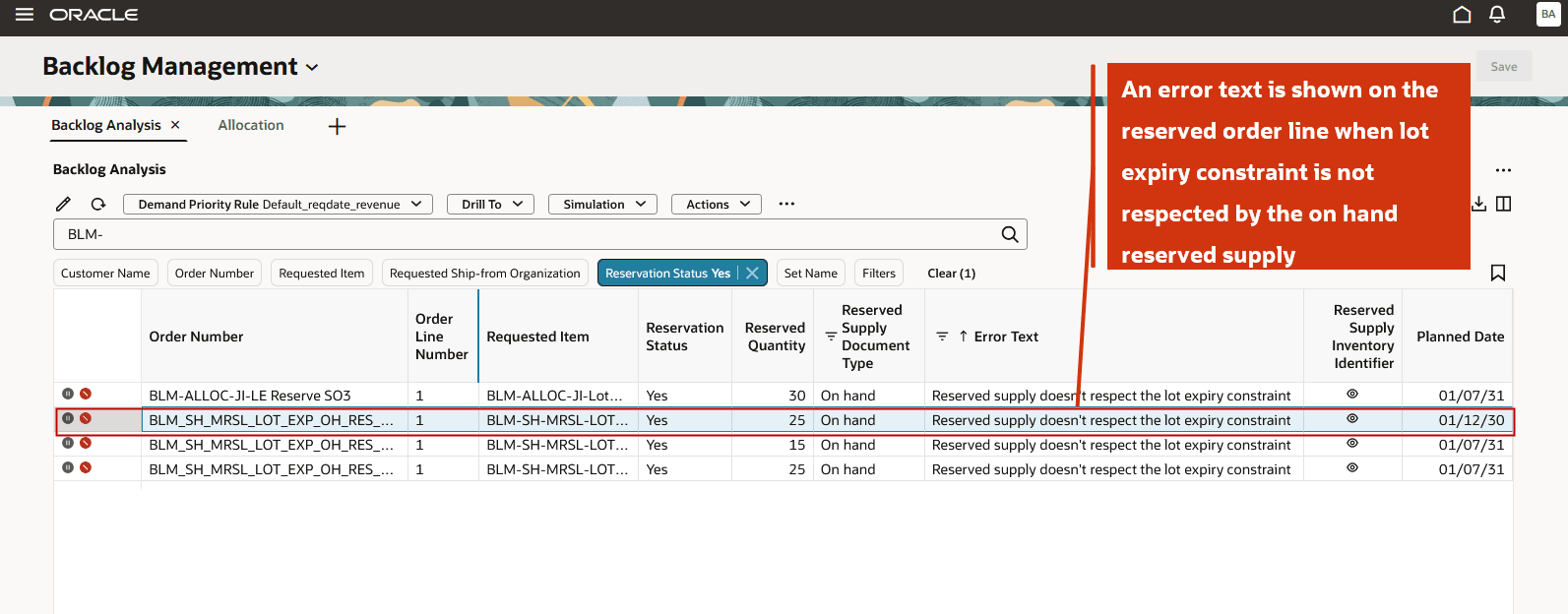
Error text shown on violation of lot expiry constraint for reserved order lines
Notice that the reserved on hand lot supply expires on January 10th, 2030, which is earlier than the planned date of January 12th, 2030 for this order line.
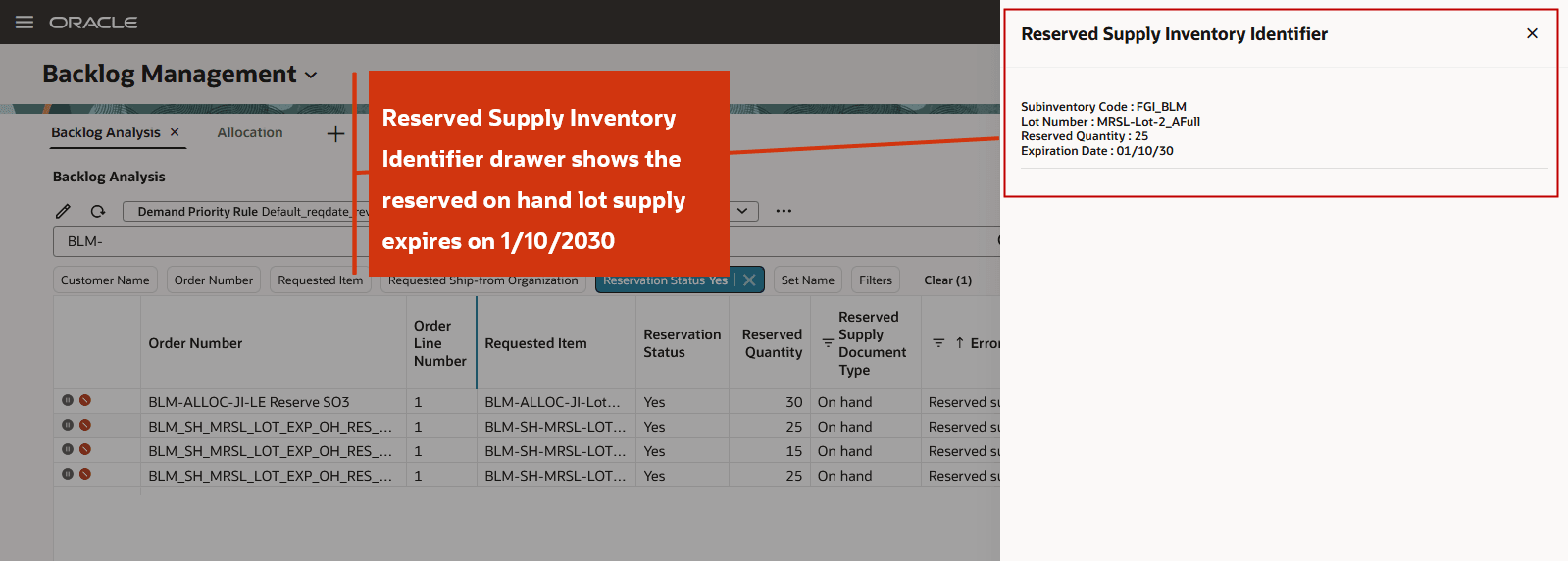
Reserved Supply Inventory Identifier drawer
Example 1: Standalone Lot Expiry
This example demonstrates how a standard item order is planned while respecting the lot expiry constraint. The following assumptions apply to the data shown in this example:
- System Date (plan run date): 1/7/2030
- Request Type: Arrival
- Pick-Pack Lead Time: Not set
- January 7th, 2030 falls on a Monday
- An on hand lot supply of 100 units is available on the plan start date and expires on January 14th, 2030.
- Minimum remaining shelf life is not configured. Therefore, the order is planned by considering the only lot expiry constraint
The highlighted order line is planned for January 12th, 2030. Navigate to the scheduling diagnostic for this order line to understand how the planning decision was made.
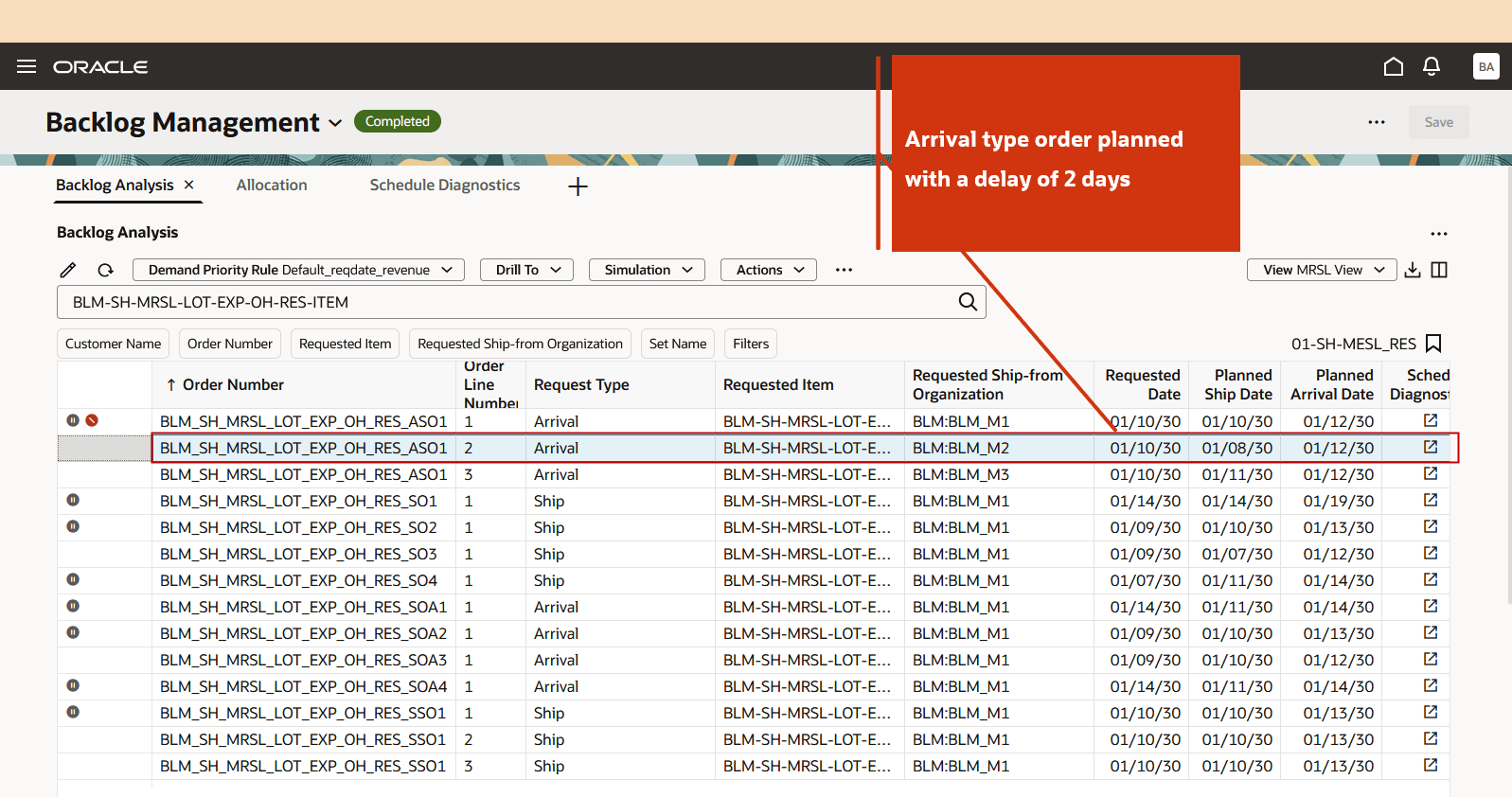
Arrival type order planned by respecting lot expiry
Notice that the tooltip on the demand node shows a Requested Quantity of 40, planned for January 12th, 2030. Let us review the ATP node.
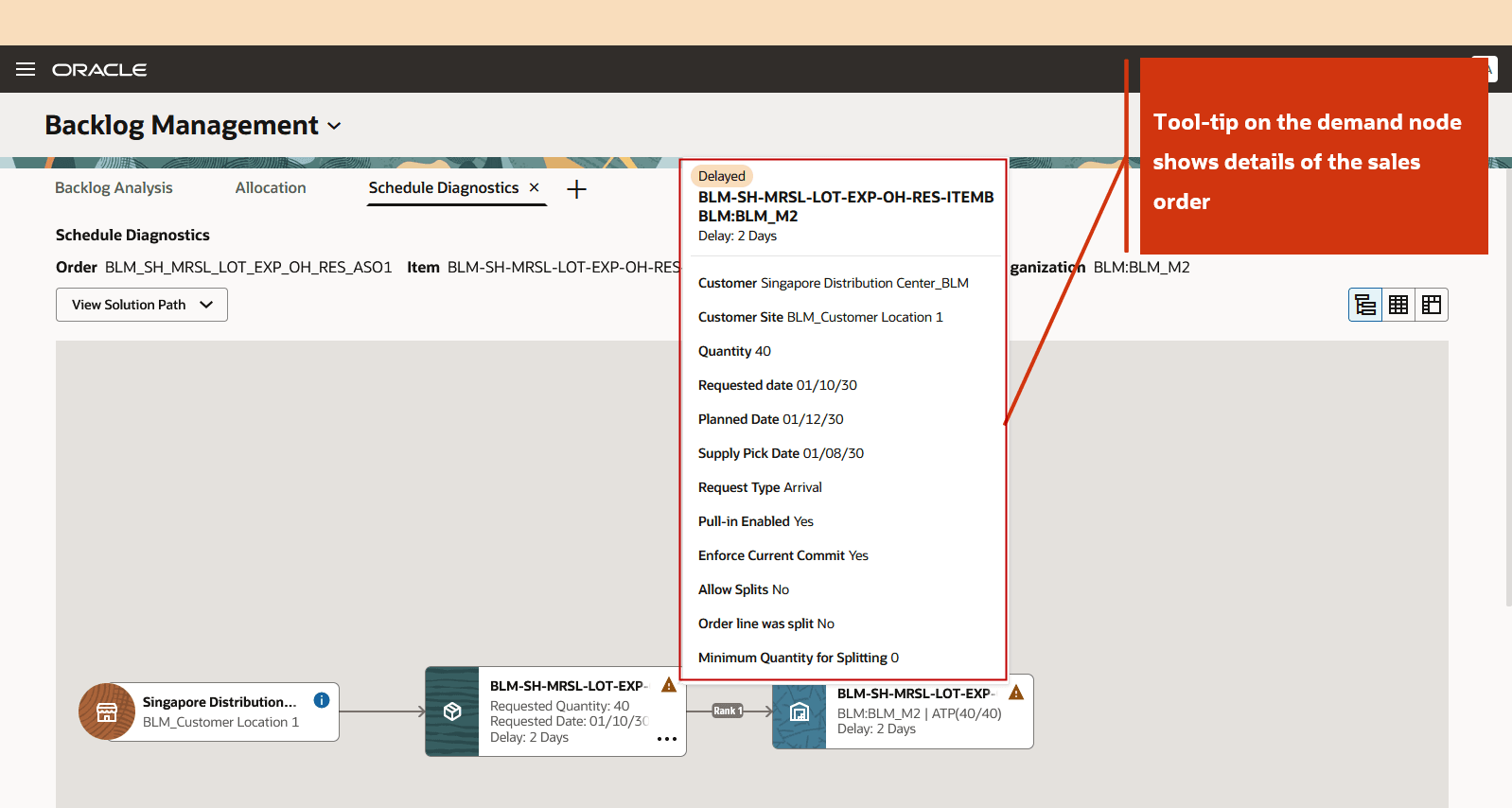
Tooltip on demand node
The tooltip on the ATP node indicates that the Requested Quantity of 40 units is planned on January 12th, 2030. The available ATP supply used to fulfill this request has an expiration date that falls after the planned date, specifically on January 14, 2030.
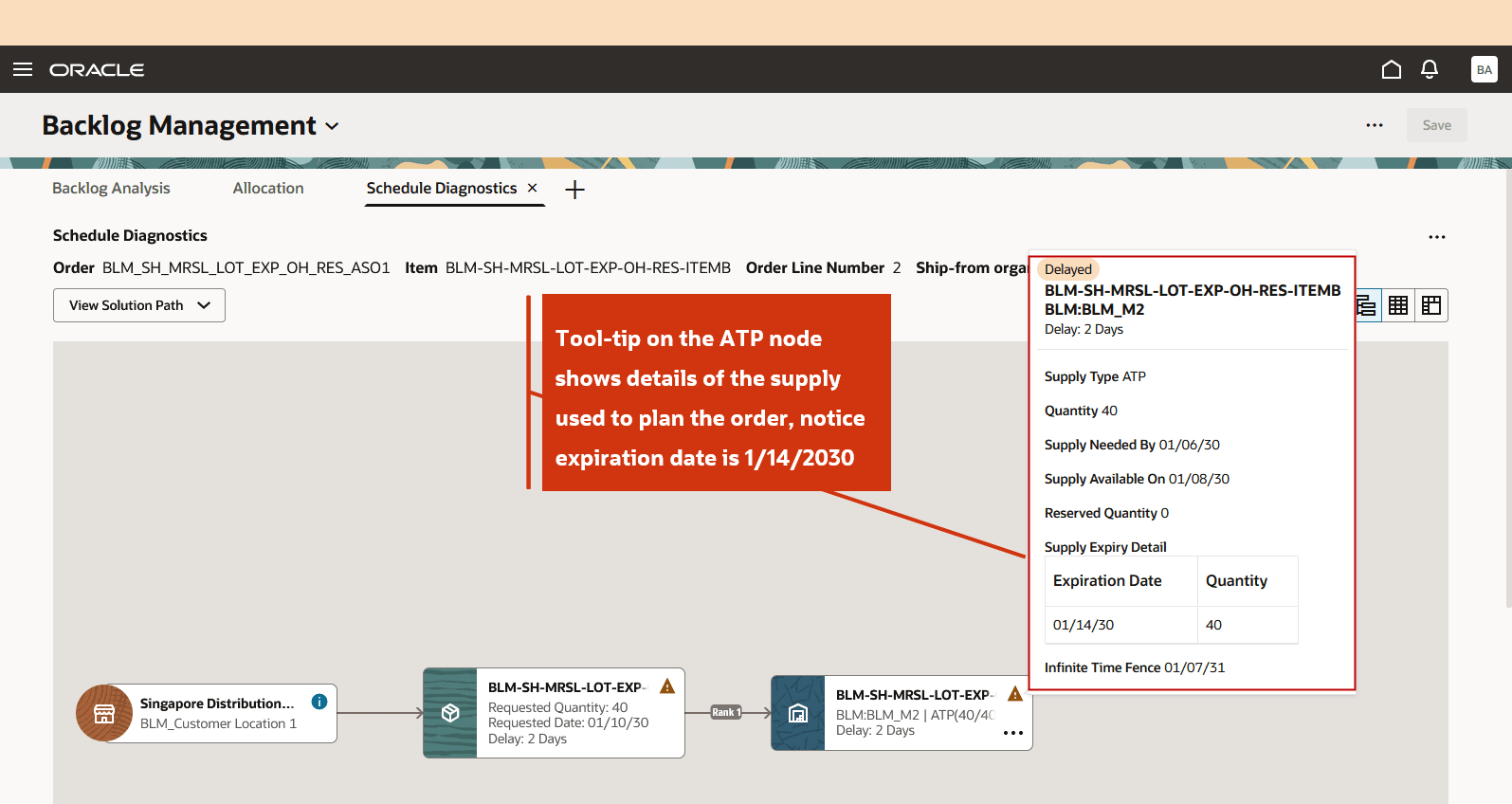
Tooltip on ATP node
Minimum remaining shelf life
This enhancement supports the minimum remaining shelf life specified in the minimum remaining shelf life rule through an opt in feature. For information on enabling this functionality, refer to the Steps to Enable section.
As shown in the following diagram, only the Lot 3 supply is eligible to fulfill the demand because it satisfies the minimum remaining shelf life days requirement based on the Demand Anchor Date.
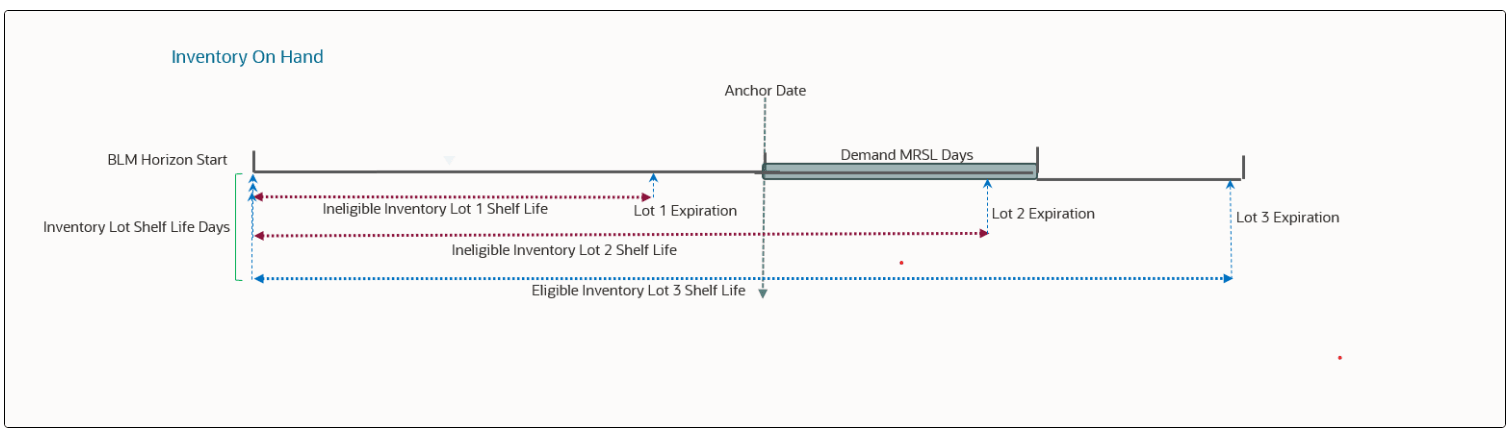
MRSL calculation using on hand lot
Minimum remaining shelf life rule
In the minimum remaining shelf life rule, you can define the number of days of remaining shelf life mandated by your customer’s business. You must also specify whether this number should be calculated from the Ship date or Arrival date. During order rescheduling, Backlog Management applies these conditions to identify and allocate the most appropriate supply for the item.
The following attributes store these user-defined values:
- Minimum Remaining Shelf Life Days: Specifies the minimum number of remaining shelf life days required. This value is determined based on the most granular assignment level applicable to the sales order.
- Minimum Remaining Shelf Life Days Anchor Date Type: Specifies the reference date used to calculate the remaining shelf life. Valid values are:
- Ship - Calculates the minimum remaining shelf life offset from the Planned Ship Date.
- Arrival - Calculates the minimum remaining shelf life offset from the Planned Arrival Date.
After Backlog Management reschedules the sales order, both attribute values are preserved on the order.
In the Actions window, select Remaining Shelf Life Rule under Plan Inputs.
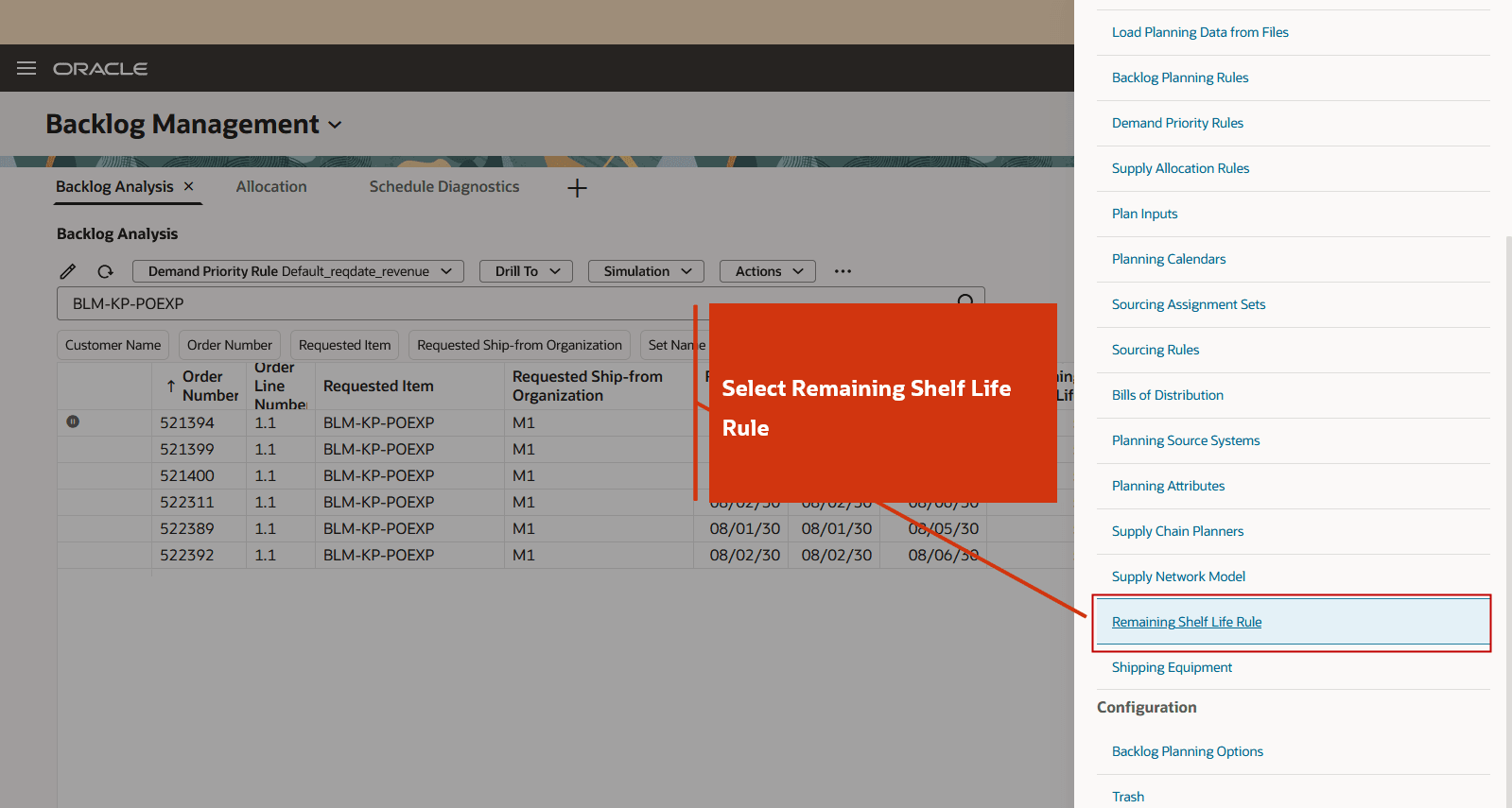
Remaining Shelf Life Rule action
Minimum remaining shelf life rules can be assigned at the following levels of granularity, listed from the most specific to the least specific:
- Item-Organization-Customer-Customer Site
- Item-Customer-Customer Site
- Item-Organization-Customer
- Item-Customer
- Item-Organization-Demand Class
- Item-Demand Class
- Item-Organization-Region
- Item-Region
- Item-Organization
- Item
- Category-organization-Customer - Customer site
- Category-Customer-Customer Site
- Category-Organization-Customer
- Category-Customer
- Category-Organization-Demand Class
- Category-Demand Class
- Category-Organization-Region
- Category-Region
- Category-Organization
- Category
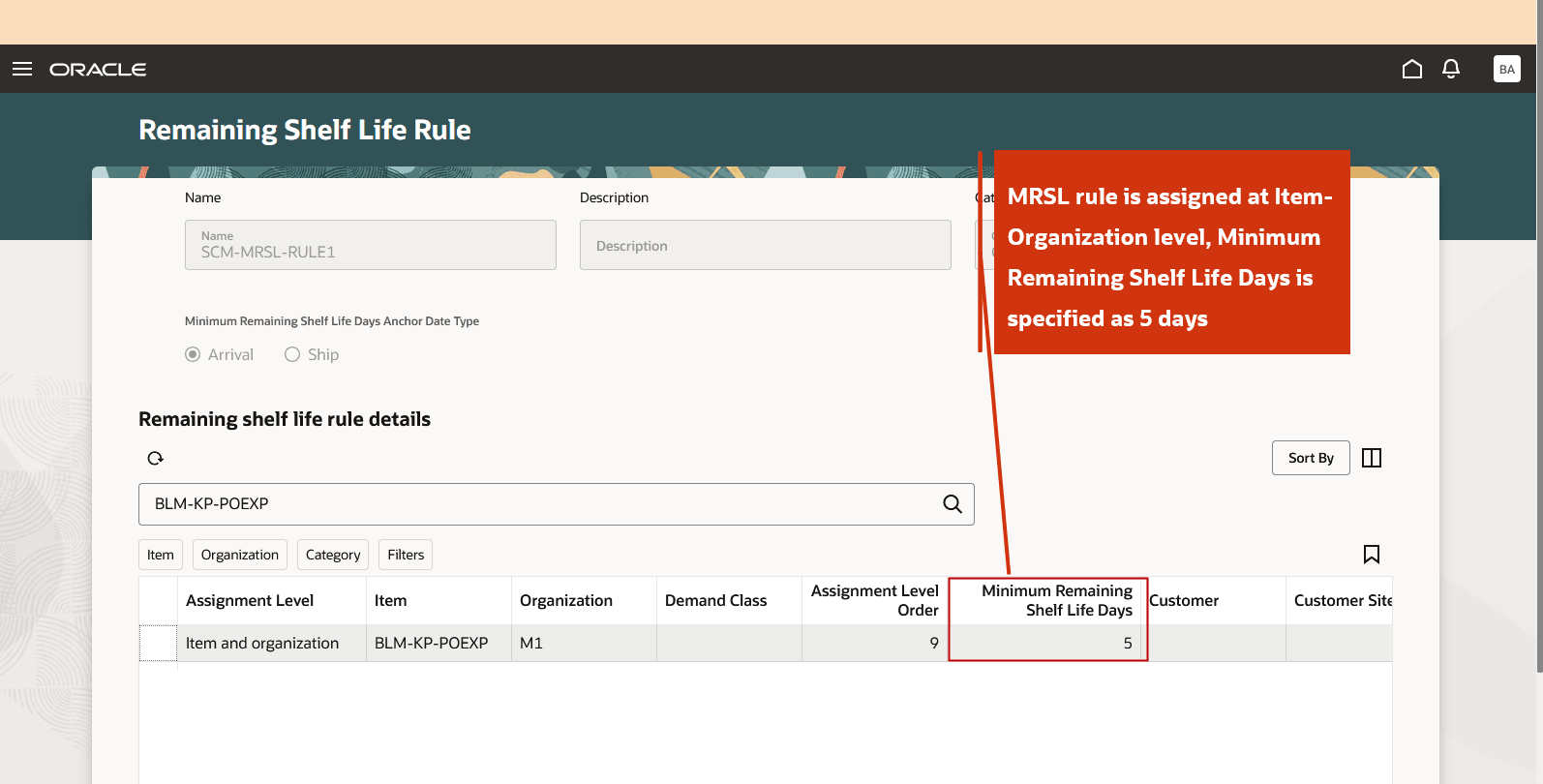
Minimum remaining shelf life rule assigned at Item-Organization Level
Planning logic
During order rescheduling, Backlog Management applies the following logic to evaluate the minimum remaining shelf life requirements:
- Read the applicable minimum remaining shelf life rule.
- Retrieve the following values from the rule:
- Minimum Remaining Shelf Life Days
- Anchor Date Type
- Calculate the minimum remaining shelf life threshold date by adding the Minimum Remaining Shelf Life Days to the selected Anchor Date (Planned Ship Date or Planned Arrival Date) determined during rescheduling. A fully open calendar is used for this calculation.
- Compare the calculated threshold date with the Lot Expiration Date of each potential supply.
- Consider only those supplies that satisfy the minimum remaining shelf life requirement. A supply is eligible if the calculated threshold date is less than or equal to the lot expiration date.
Backlog Management uses the following conditions when selecting ATP supply for order rescheduling:- If the Anchor Date Type is Arrival: Planned Arrival Date + Minimum Remaining Shelf Life Days <= ATP Supply Expiration Date
- If the Anchor Date Type is Ship: Planned Ship Date + Minimum Remaining Shelf Life Days <= ATP Supply Expiration Date
- After rescheduling, Backlog Management calculates the following attributes and displays them on the Backlog Analysis Redwood page, along with the input attributes Minimum Remaining Shelf Life Days and Minimum Remaining Shelf Life Days Anchor Date Type:
- Remaining Shelf Life Days - Indicates the number of shelf life days remaining for the product. This value is calculated as the difference between the ATP supply expiration date and the demand's Minimum Remaining Shelf Life Days Anchor Date.
- Minimum Remaining Shelf Life Days from Ship Date - Indicates the remaining shelf life of an item based on its Planned Ship Date. For demand or supply used for reservation, picking, or shipping, Backlog Management recalculates this value using the planned ship date of the demand.
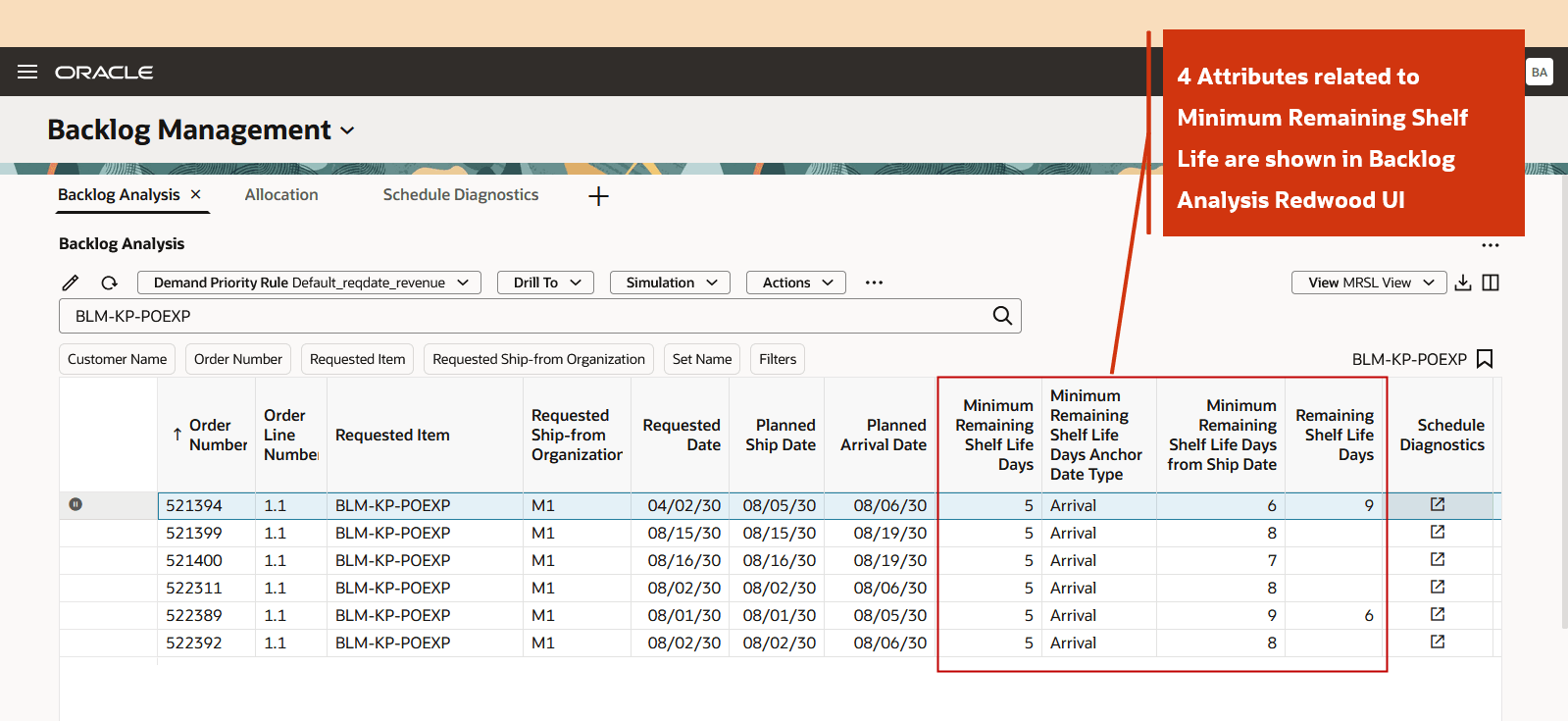
Attributes Related to MRSL shown in Backlog Analysis
Types of ATP supply with expiration dates
Backlog Management considers the expiration dates of the following types of ATP supply when evaluating the minimum remaining shelf life requirements:
- On hand (both lot based, and non lot based)
- Transfer order
- Purchase order
- Work order
- Planned orders from supply plans (if supply plans are specified as a supply schedule in Backlog Management plan options)
Backlog Management retrieves the expiration date for transfer orders, purchase orders, and work orders from the Expiration Date attribute in the collected data (Supplies and Demands table under Plan Inputs). During data collection, this attribute is populated based on the Shelf Life Days attribute in the Items table.
If a supply plan is used as a supply schedule in Backlog Management, the application retrieves the Expiration Date for planned order supplies directly from the supply plan.
Simulation impacts
During simulation, if you modify or clear the ship from organization, Backlog Management recalculates the minimum remaining shelf life days applicable for the sales order line based on the updated ship from organization. If the planned ship from organization is left blank, Backlog Management uses the planned Ship From Organization from which the order is scheduled to be shipped to determine the applicable minimum remaining shelf life days.
Plan integration
Planned order supplies recommended by Oracle Cloud Supply Planning and provided as input to Backlog Management include expiry date information. During order rescheduling, Backlog Management uses this expiry date for to evaluate the minimum remaining shelf life requirement by comparing it with the date derived using the minimum remaining shelf life offset. A planned order supply is considered eligible if its expiry date is on or after the calculated minimum remaining shelf life threshold date. Eligible supplies are then considered for allocation during order rescheduling.
Allocation support
Backlog Management enforces both lot expiration and minimum remaining shelf life constraints when planning demand for allocated items using allocated supplies. The allocated supply targets are derived from the collected ATP supplies.
During order rescheduling, Backlog Management evaluates the applicable constraint based on the planning scenario. Depending on the configuration, it applies either the lot expiration constraint or the minimum remaining shelf life constraint to determine the eligible supply for allocation.
CTP impact
Backlog Management enforces minimum remaining shelf life constraints when planning sales order lines using transfer CTP. Backlog Management does not support minimum remaining shelf life constraint in make CTP cases.
Split order line impact
Backlog Management enforces minimum remaining shelf life constraints when splitting a sales order line by date or organization during order rescheduling. Each resulting split order line is evaluated independently to ensure that the allocated supply satisfies the applicable minimum remaining shelf life requirements.
Example 1: Minimum remaining shelf life constraints with Ship as the Anchor Date Type
This example demonstrates how a standard item order is planned while enforcing the minimum remaining shelf life constraint. The following assumptions apply to this example:
- System Date (Plan run date): 1/7/2030
- Request Type: Arrival
- Pick-Pack Lead Time: Not specified
- January 7th, 2030, falls on a Monday
- Minimum Remaining Shelf Life Days: 10 days, defined at the Item and Organization assignment level.
Supply Picture
The following supply picture is used in this example.
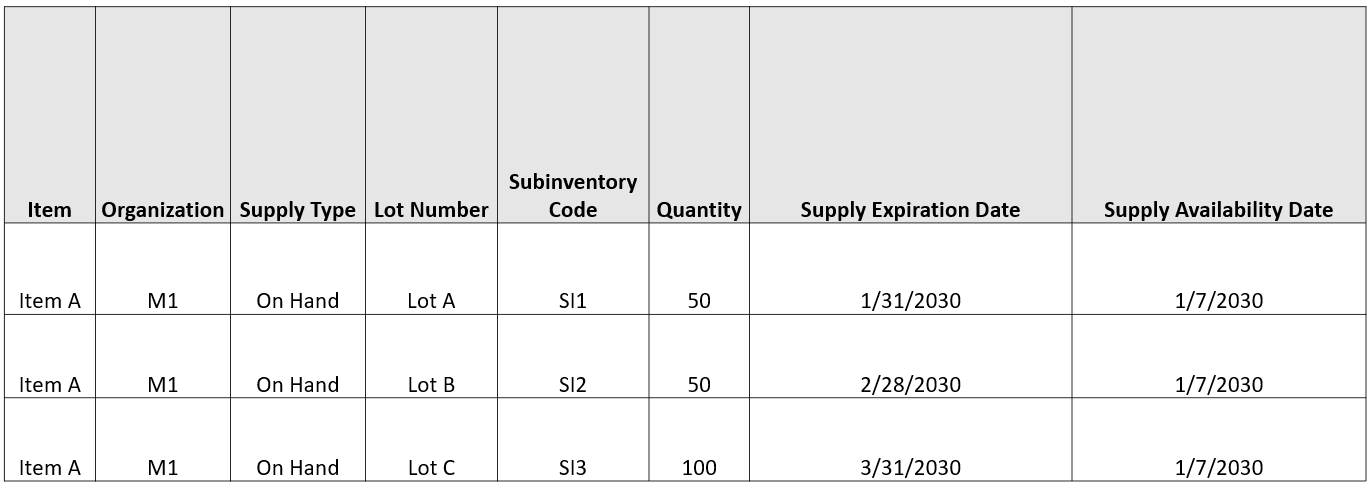
Supply picture
The Backlog Analysis page displays a sales order line with a Requested Quantity of 100 units and a Requested Date of January 14th, 2030. The order is planned as follows:
- Minimum Remaining Shelf Life Days = 10 days
- Minimum Remaining Shelf Life Days Anchor Date Type = Ship
- Based on anchor date type, the Anchor Date is the Planned Ship Date, which is January 14th, 2030.
- Minimum Remaining Shelf Life Date is calculated as Planned Ship Date + Minimum Remaining Shelf Life Days = January 24th, 2030.
- To respect the minimum remaining shelf life constraints, lots that expire on or after Minimum Remaining Shelf Life Date or January 24th, 2030 can be used to plan this order.
- All the 3 on hand lots respect minimum remaining shelf life constraints. All three on-hand lots satisfy the minimum remaining shelf life requirement. The order is fulfilled using Lot A and Lot B because they expire earlier than Lot C, in accordance with the FEFO allocation logic. Of the lots allocated to the order, Lot A has the earliest expiration date (January 31, 2030). Therefore, the consolidated Lot Expiration Date for the order is January 31, 2030.
- Minimum Remaining Shelf Life Days from Ship Date is calculated as (Minimum Remaining Shelf Life Date – Planned Ship Date) = 10 days.
- Remaining Shelf Life Days is calculated as (Lot Expiry Date – Anchor Date) = 17 days.

Backlog Analysis view
Example 2: Minimum Remaining Shelf Life Constraints with Arrival as the Anchor Date Type
This example demonstrates how a standard item order is planned while enforcing the minimum remaining shelf life constraint when the Anchor Date Type is Arrival. The following assumptions apply to this example:
- System Date (Plan run date): January 7, 2030
- Request Type: Arrival
- Pick-Pack Lead Time: Not specified
- January 7th, 2030 falls on a Monday
- An on hand lot supply of 100 units is available on plan start date that expires on January 14th, 2030.
- Minimum Remaining Shelf Life Days: 6 days, defined at the Item and Organization level.
To understand how the order was planned, drill down to the scheduling diagnostics report for Sales Order 522389, Order Line 1.1. The Minimum Remaining Shelf Life Days Anchor Date Type for this order is Arrival.
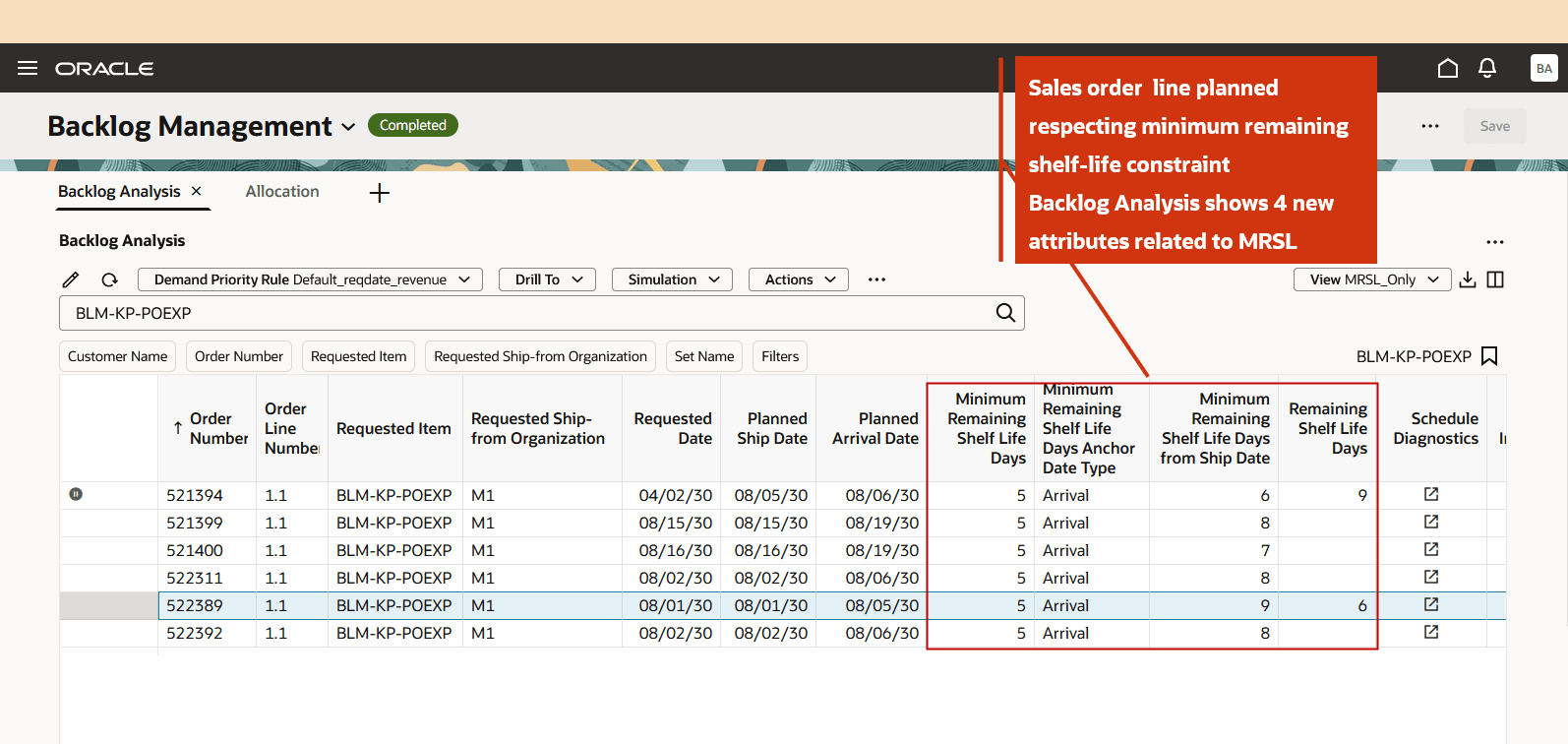
Backlog Analysis Showing MRSL Attributes
The tooltip on the demand node for Sales Order 522389 displays the same four minimum remaining shelf life related attributes shown on the Backlog Analysis page.
- Minimum Remaining Shelf Life Days: Input attribute defined in the minimum remaining shelf life rule. In this example, the value is 5 days.
- Minimum Remaining Shelf Life Days Anchor Date Type: Set to Arrival, which means the following condition must be satisfied:
- Planned Arrival Date + Minimum Remaining Shelf Life Days <= ATP Supply Expiration Date or August 5th, 2030 + 5days <=11th Aug, 2030
- Minimum Remaining Shelf Life Days from Ship Date: Because the anchor date type is Arrival, this value is calculated as:
- Minimum Remaining Shelf Life Days from Ship Date= Planned Arrival Date + Minimum Remaining Shelf Life Days - Planned Ship Date or (August 5th, 2030 + 5 days –August 1st, 2030) or 9 days
- Remaining Shelf Life Days= ATP Supply Expiration Date – Planned Arrival Date or (Aug 11th, 2030 – August 5th, 2030) or 6 days
Note: The ATP Supply Expiration Date is displayed in the tooltip on the ATP node.
If multiple ATP supplies with different expiration dates are used to fulfill the order, the Remaining Shelf Life Days value is calculated using the ATP supply that expires first:
Remaining Shelf Life Days= (Supply Expiration Date of the ATP supply used to plan the demand that expires first) - (Planned Arrival Date)
Now let us view the tool tip on the ATP node.
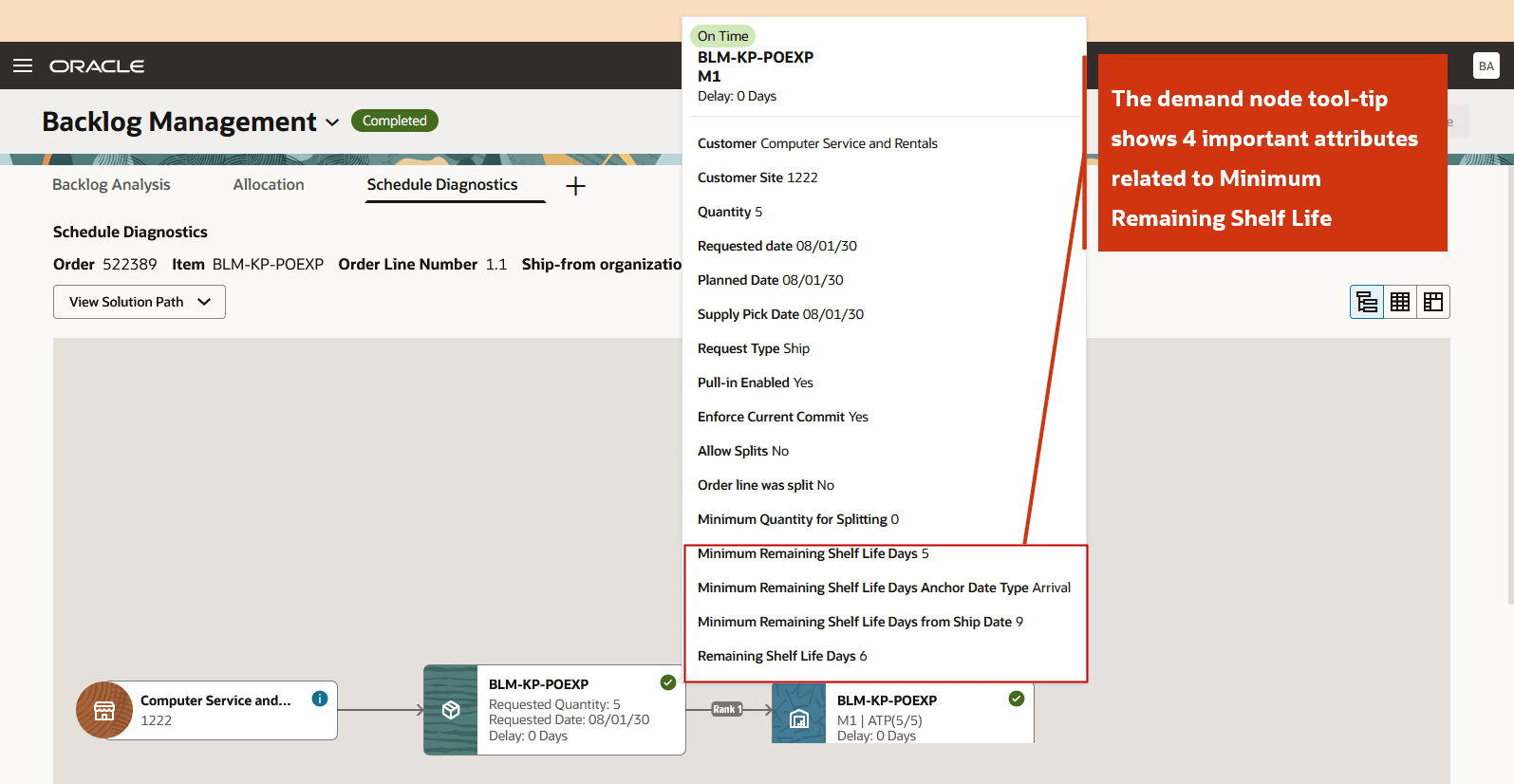
MRSL Attributes on Demand Node
The tooltip on the ATP node displays the expiry details of the supply used to plan this sales order line. In this example, the demand is planned with an ATP supply of 5 units that expires on August 11th, 2030.
Adding the MRSL Days (5 days) to the Planned Arrival Date (August 5, 2030) results in an minimum remaining shelf life threshold date of August 10, 2030. As the ATP supply expires on August 11, 2030, it satisfies the minimum remaining shelf life requirement. The tooltip also displays following important details:
- Supply Expiry Detail: Displays ATP supply aggregated by expiration date. The ATP quantity shown includes only the supply that satisfies the MRSL constraint.
- Total ATP: Displays the total Available-to-Promise (ATP) supply at the ATP node, regardless of whether it satisfies the minimum remaining shelf life constraint.
- ATP Respecting MRSL: Displays only the Available-to-Promise (ATP) supply that satisfies the minimum remaining shelf life constraint.
These attributes help diagnose scenarios where sufficient ATP supply exists, but the demand is still scheduled at the Infinite Time Fence because a significant portion of the available ATP supply does not satisfy the minimum remaining shelf life requirement due to its expiration date.
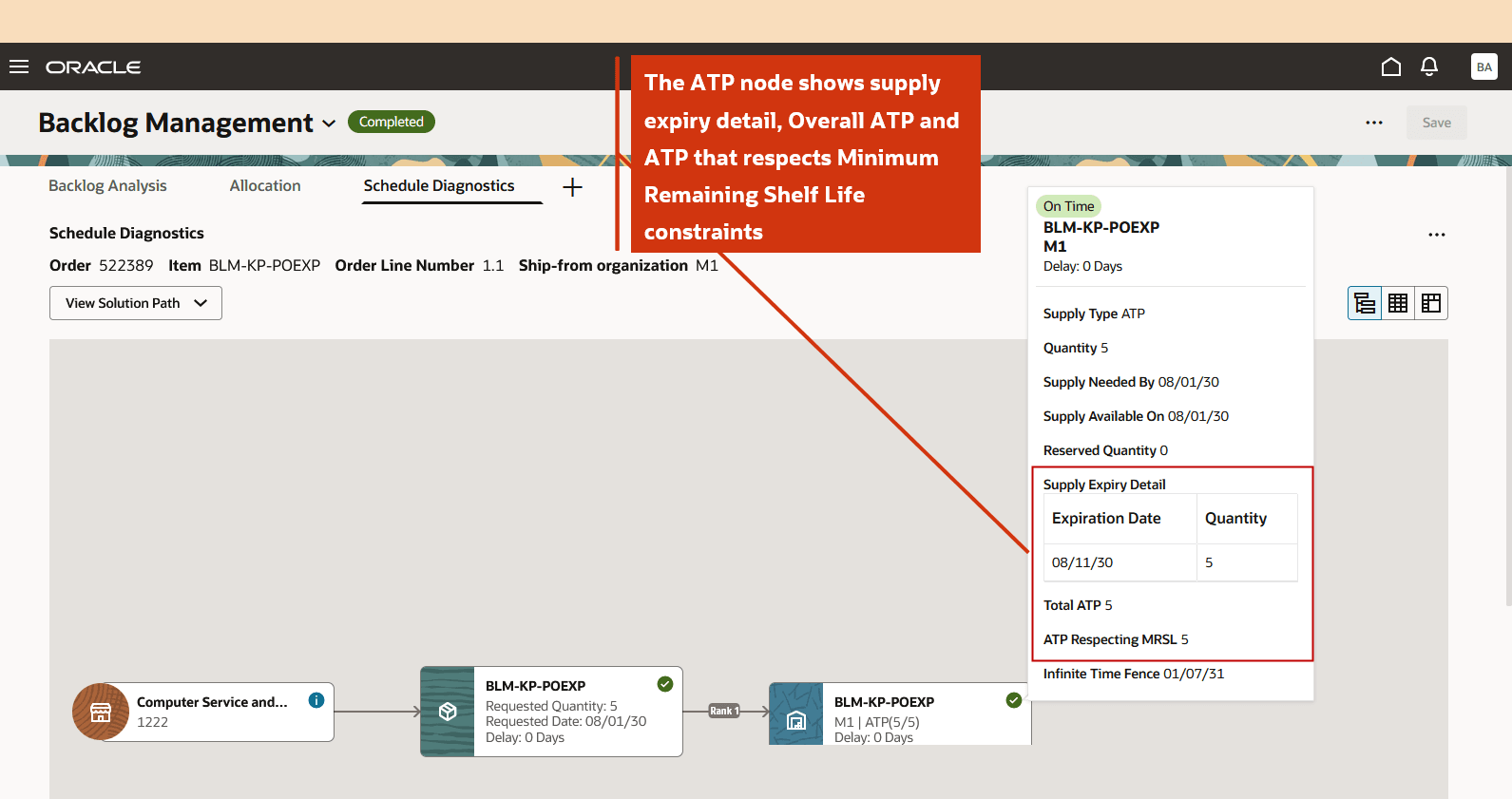
ATP Node Shows Supply Expiry Details
Example 3: Minimum Remaining Shelf Life Constraints Respected with Transfer CTP
This example demonstrates how a standard item order is planned while enforcing the minimum remaining shelf life constraint using transfer CTP. The following assumptions apply to this example:
- System Date (Plan run date): 1/7/2030
- Request Type: Ship
- Pick-Pack Lead Time: Not specified
- January 7th, 2030 falls on a Monday
- Minimum Remaining Shelf Life Days: 10 days, defined at the Item and Organization level
Supply Picture
The following supply picture is used in this example.
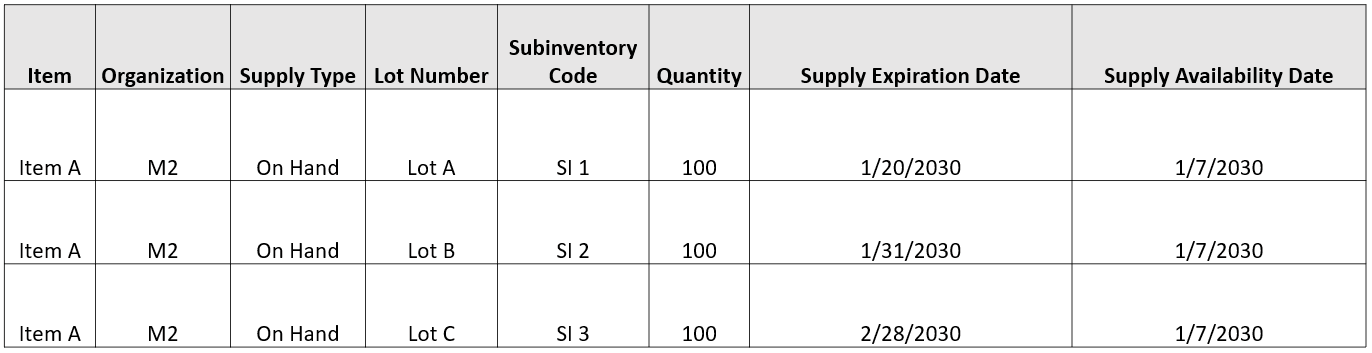
Supply Picture with Expiration Dates
Inter-Org Transit Time
The inter-org transit time used in this example is shown as follows
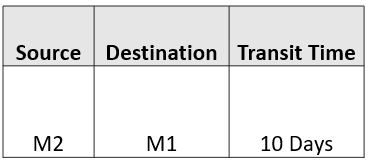
Inter-Org Transit Time
Backlog Analysis
The Lot A (expiry date January 20th, 2030) does not respect the minimum remaining shelf life constraint. Lot B and Lot C both satisfy the minimum remaining shelf life requirement. However, based on the FEFO allocation logic, sales order SO1 is fulfilled by transferring Lot B (expiry date: January 31, 2030) from Organization M2 to Organization M1. The planning calculations are as follows:
- Lot Expiry Date = January 31st, 2030
- Anchor Date or Planned Ship Date= January 17th, 2030
- Minimum Remaining Shelf Life Date = (Planned Ship Date + MRSL Days) or January 27th, 2030
- From 1 and 2, Remaining Shel Life Days= Lot Expiration Date – Anchor Date or 14 Days

Backlog Analysis View
Reservation Impact
During initial reservation creation through workflows initiated by Supply Chain Orchestration or Order Management, a high level reservation is created. The reservation data collected at this stage includes the following attributes:
Item, Organization, Quantity, Expiration Date
During picking in Inventory, the reservation is updated with more specific inventory information:
- Item, Organization, Subinventory, Lot, Quantity, Expiration Date for lot-controlled items
OR
- Item, Organization, Subinventory, Quantity, Expiration Date for non-lot controlled items
Collections can process reservation information at either stage for both lot controlled and non lot controlled items. Once the reservation information is collected, Backlog Management honors the reservation during order planning.
With this enhancement, when a sales order line is reserved against a specific on hand lot, Backlog Management plans the demand using that reserved lot instead of selecting a generic on-hand supply. To improve visibility, the Backlog Analysis page now includes a new column named Reserved Supply Inventory Identifier, which displays the details of the on hand supply reserved for the sales order line.
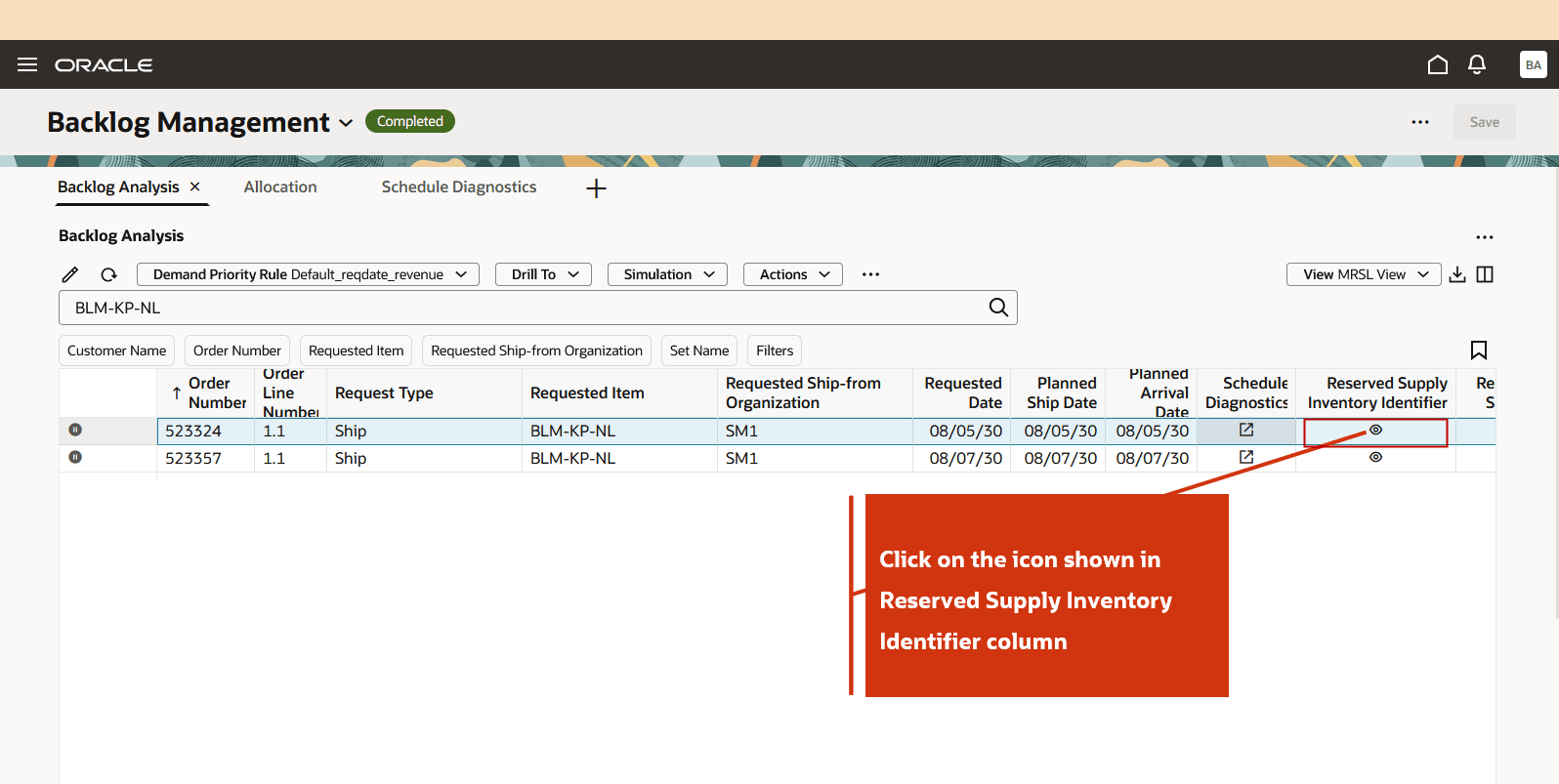
Backlog Analysis View showing Reserved Supply Inventory Identifier Icon
The Reserved Supply Inventory Identifier drawer can display the following attributes:
- Lot Number
- Subinventory Code
- Reserved Quantity
- Expiration Date
If a sales order line is reserved against multiple on-hand lots, the drawer displays the details for all reserved supplies. In this example, all four attributes are displayed for each reserved lot.
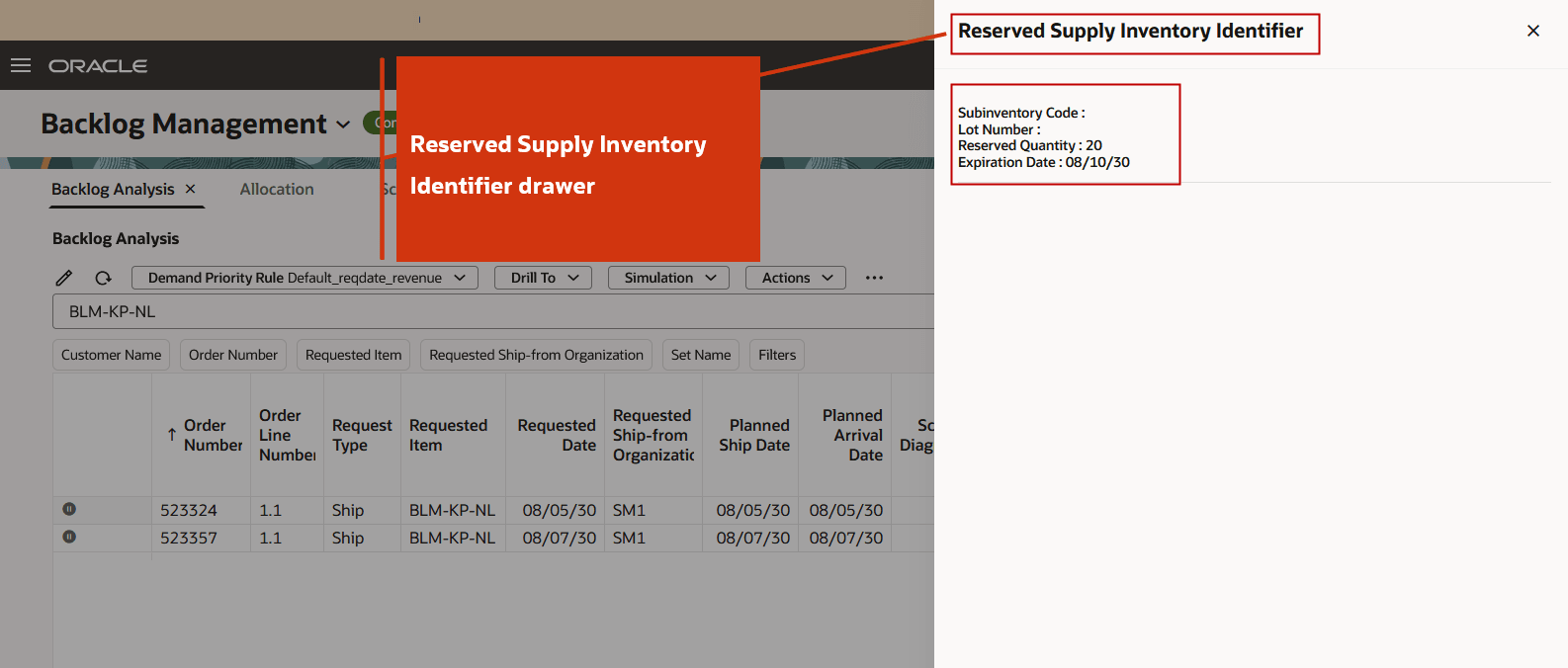
Reserved Supply Inventory Identifier Drawer
Note: Reserved on hand supplies can be either lot controlled or non lot controlled.
Example 4: Reservation Impact
This example demonstrates how a sales order line reserved against a specific on hand lot is planned using that reserved lot instead of a generic on hand supply. The following assumptions apply to this example:
- System Date (Plan run date): 1/7/2030
- Request Type: Ship
- Pick-Pack Lead Time: Not specified
- January 7th, 2030 falls on a Monday
- Minimum Remaining Shelf Life Days: Not configured
Supply Picture
The following supply picture is used in this example. Sales order SO1 for 100 units is fully reserved against an on-hand supply.
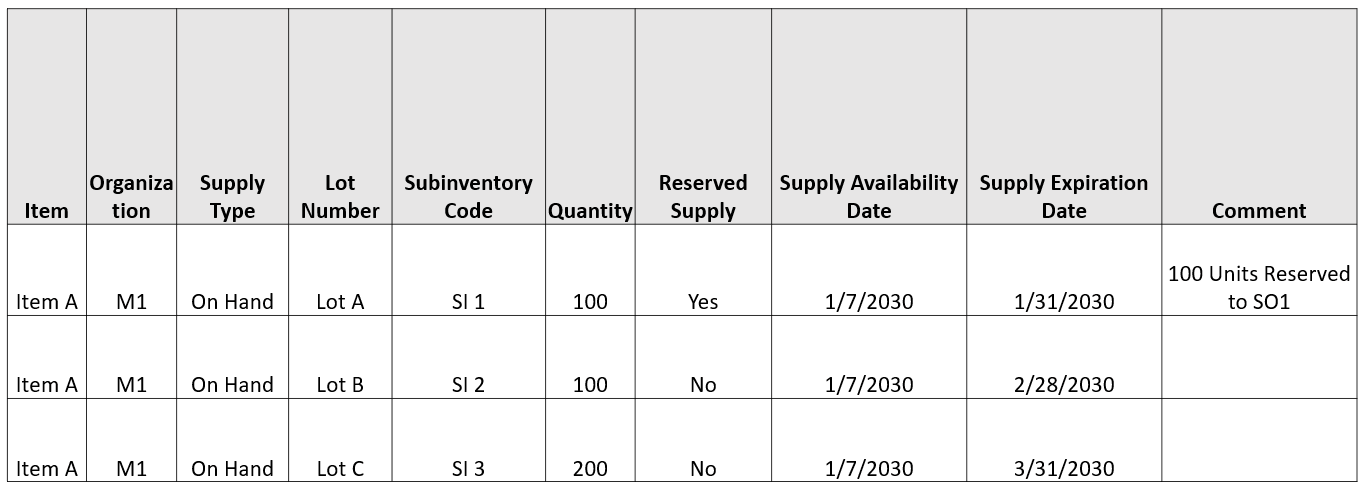
Supply Picture
In earlier releases, a reserved sales order could be planned to use any eligible on-hand lot and was not necessarily allocated to the specific lot against which it was reserved. With this enhancement, Backlog Management plans the sales order line using the specific reserved supply (Lot A) instead of a generic on-hand lot. Because Lot A expires after the planned date of the sales order, the lot satisfies the lot expiration requirement. As a result, no error message related to the lot expiration constraint is displayed for the sales order line.

Backlog Analysis View
Steps to enable and configure
Use the Opt In UI to enable this feature. For instructions, refer to the Optional Uptake of New Features section of this document.
Offering: Supply Chain Planning
Tips and considerations
If you want to use the Respect Minimum Shelf Life Material Constraints in Backlog Management feature, then you must opt in to
1. Its parent feature: Order Backlog Management. If you’ve already opted in to this parent feature, then you don’t have to opt in again.
2. Specify Minimum Shelf-Life Controls For Perishable Items feature. This feature is a temporary opt in that expires in Release 27B.
Additional Tips and Considerations:
- Minimum Remaining Shelf Life Days attribute is read-only in Oracle Backlog Management.
- Lot expiration constraints are supported by default for sales orders originating from both Oracle Fusion Order Management and external order management systems.
- The Anchor Date does not depend on Request Type of the order. It depends on Minimum Remaining Shelf Life Days Anchor Date Type setting in the minimum remaining shelf life rule.
- If Minimum Remaining Shelf Life Days Anchor Date Type is Ship, then Planned Ship Date and Minimum Remaining Shelf Life Days are used to determine the appropriate ATP supply for planning the demand.
- If Minimum Remaining Shelf Life Days Anchor Date Type is Arrival, then Planned Arrival Date and Minimum Remaining Shelf Life Days are used to determine the appropriate ATP supply for planning the demand.
- The minimum remaining shelf life capability is supported for only source orders originating from Oracle Fusion Order Management system.
- If multiple ATP supplies satisfy the minimum remaining shelf life requirement, Oracle Backlog Management allocates the supply that expires first, following the FEFO allocation logic. If two or more lots have the same expiration date, the ATP supply with the smallest available quantity is selected first.
- When the Minimum Remaining Shelf Life Days Anchor Date Type is Ship, the Minimum Remaining Shelf Life Days from Ship Date is equal to the configured MRSL days.
- Minimum remaining shelf life is not supported for ATO/PTO model items.
- Minimum remaining shelf life is not supported for dropship orders.
- Minimum remaining shelf life is supported for set orders.
- If the minimum remaining shelf life feature is not enabled, Backlog Management continues to enforce the standard lot expiration constraint. In this case, orders are promised only against eligible supplies whose Expiration Date is on or after:
- the Planned Ship Date for Ship request types, or
- the Planned Arrival Date for Arrival request types.
Key resources
Refer to the Cloud Applications Readiness content for the following 26D Supply Chain Planning features for more information:
- Supply Planning feature “Specify Minimum Shelf-Life Controls for Perishable Items”
- Supply Planning feature “Respect Minimum Remaining Shelf Life Material Constraints in Supply Planning”
- Supply Planning feature "Respect Expiration Dates of Specific On-Hand Quantities in Material Reservations"
- Global Order Promising feature “Respect Minimum Shelf-Life Material Constraints in Order Promising”
Access requirements
Users who are assigned a configured job role that contains these privileges can access this feature:
|
Privilege status |
Privilege name and code |
|---|---|
| Existing | Monitor Backlog Management Work Area (MSC_MONITOR_BACKLOG_MANAGEMENT_WORK_AREA_PRIV) |
| Existing | Create Backlog Plan (MSC_CREATE_BACKLOG_PLAN_PRIV) |
| New | Manage Remaining Shelf-Life Rules (MSC_MANAGE_REMAINING_SHELF_LIFE_RULES_PRIV) |
| New | View Remaining Shelf Life Rules (MSC_VIEW_REMAINING_SHELF_LIFE_RULES_PRIV) |
The existing privileges were available prior to this update.
The following site-level profile should be enabled:
- Redwood Backlog Management Pages Enabled (ORA_MSC_BACKLOG_MANAGEMENT_REDWOOD_ENABLED)