Supply Planning Allocation Workspace
Allocate scarce, high-value supply chain resources using an agentic Supply Planning Allocation Workspace. This agentic application supports scarce finished goods, key components, and key production resources such as manufacturing lines, work centers, machines, or labor capacity. The allocation methods supported in the agentic application include demand priority, fair share, user-specified percentage allocation, and user-specified quantity allocation.
The application uses demand, supply, item structures, work definitions, and sourcing rules to derive the resource requirements associated with projected demands. It then allocates the available key resources among competing demand requirements based on the selected method. You can review allocation results to understand how each demand group is served, whether critical or high-priority demands are underserved, and which products, components, sourcing assumptions, or resource assumptions drive the result. Additionally, you can compare allocation scenarios, adjust allocation parameters, rerun the allocation process, and compare outcomes against the baseline scenario. The output can include a scenario report, allocation result tables, pivot charts, a Microsoft Excel workbook, and a Microsoft PowerPoint executive summary deck. You can use the allocation decision output to support downstream planning actions, such as creating firm planned orders in Oracle Supply Planning.
This capability can help improve strategic allocation decisions when scarce resources can't satisfy all demand. Scenario comparison helps you understand trade-offs, identify underserved demand groups, and refine allocation policies before translating decisions into tactical and operational plans.
The Supply Planning Allocation Workspace helps you evaluate how to allocate constrained finished goods and critical component supply when demand exceeds availability. You can prioritize demand, assess the impact of shortages, and simulate changes to demand priorities, component supply, and lead times before making planning decisions. If the input forecast does not specify demand priority, the application uses demand due dates to determine allocation priority. Access the workspace from the home page quick link or directly from AI Agent Studio.
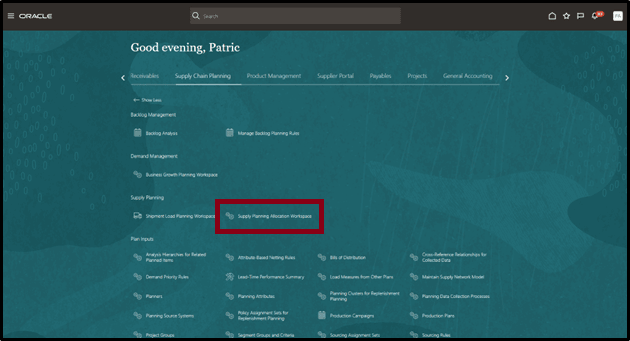
Quick Link
Click the quick link to open the Supply Planning Allocation Workspace.
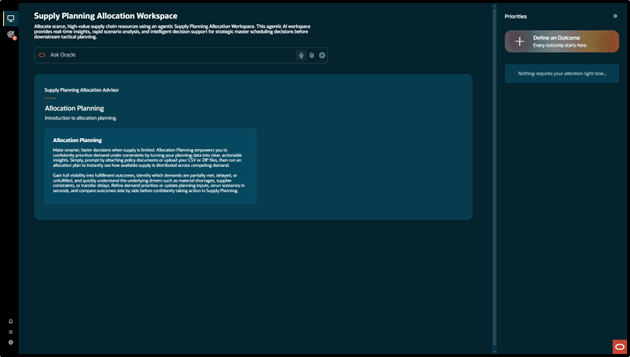
Supply Planning Allocation Workspace
The Supply Planning Allocation Workspace uses user-defined external forecast demand identified by a forecast designator. Define critical components directly under finished goods in a single-level bill of resources. The application uses sourcing rules from a user-defined sourcing assignment set to model finished goods and component supply chains. This capability allocates components to finished goods only. You can use the allocation results to adjust demand or increase component supply in Oracle Supply Planning. The allocation results are not currently integrated with a supply plan.
User Flow
Open the Supply Planning Allocation Workspace from the home page quick link or directly in AI Agent Studio. Click Define an Outcome to start the allocation process. A background workflow calculates allocations based on the input data and policy parameters. You can create multiple outcomes for different demand and supply scenarios or allocation policies, and reopen completed outcomes from the Outcomes tab.
The following screenshot shows the Supply Planning Allocation Workspace home page.
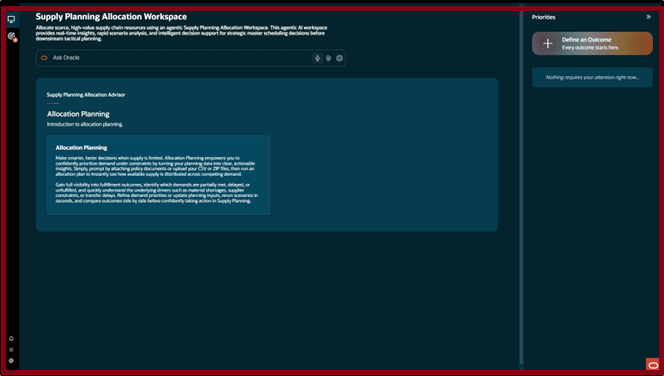
Supply Planning Allocation Workspace home page
Click Define an Outcome to navigate to the Create Outcome page.
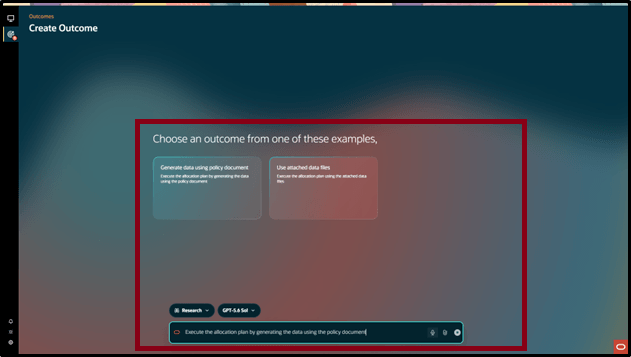
Create Outcome page
You can run multiple outcomes in parallel and access existing outcomes from the Outcomes tab.
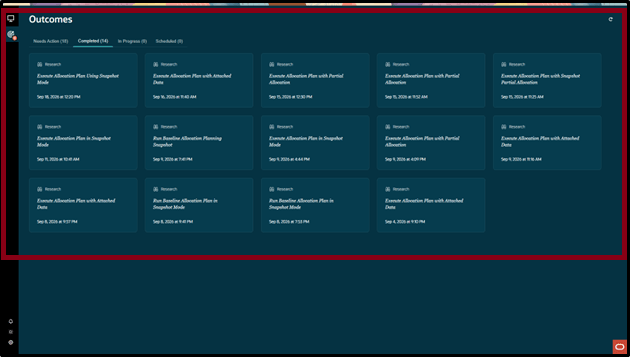
Outcomes tab
Each outcome summarizes how well constrained supply meets demand and suggests further investigations, such as changing demand priorities or available supply, that you can use to create new outcomes.
The following outcome summary shows key planning metrics:
- Demand lines and Demand quantity indicate overall workload.
- Fulfilled quantity shows what the plan can satisfy.
- Unfulfilled quantity highlights the remaining gap or shortage.
- Fill rate measures fulfillment performance as a percentage.
The outcome also recommends investigations and provides supporting data to help you identify shortages and improve allocation decisions.
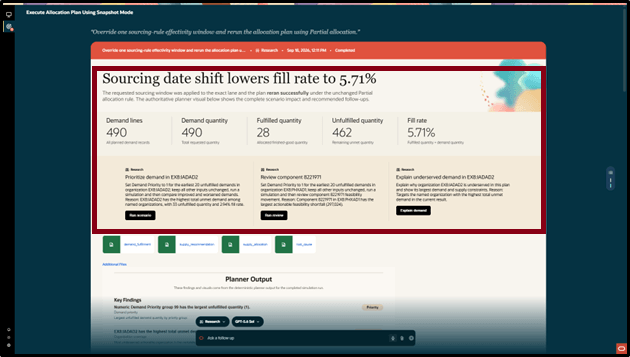
Outcome recommend section
The outcome report summarizes planning results, including fulfillment gaps, constrained components, and late demand. Findings and allocation charts show where demand is met, where shortages remain, and which actions may improve the outcome.
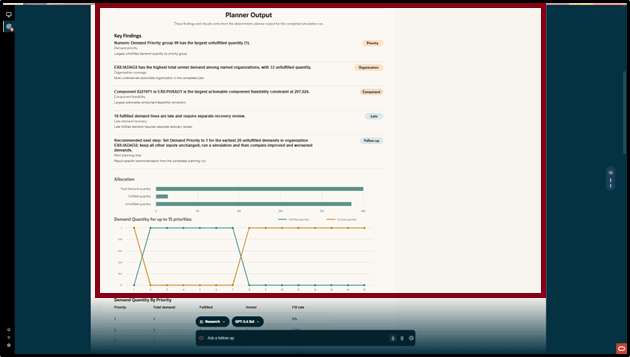
Outcome fulfillment section
The outcome report shows demand fulfillment by priority, including unmet demand and shortages with the greatest potential revenue impact.
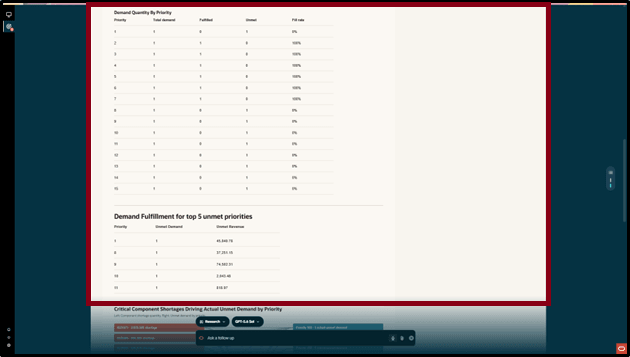
Demand fulfillment and revenue by priority
The outcome report shows how shortages of critical components contribute to unmet demand across priority levels. Use the relationship chart and shortage comparison bars to identify constrained components and prioritize corrective actions.
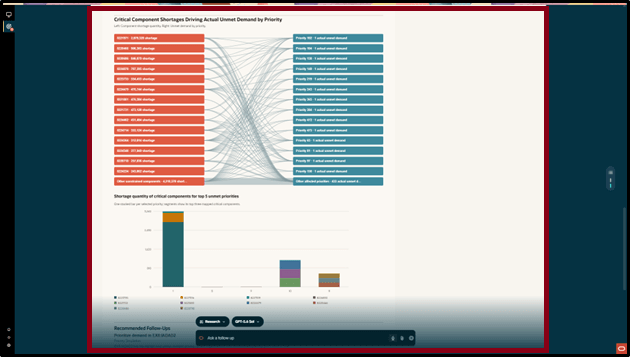
Sankey chart for component shortage
The workflow produces a downloadable constrained-demand result and makes the outcome available in the Supply Planning Allocation Workspace.
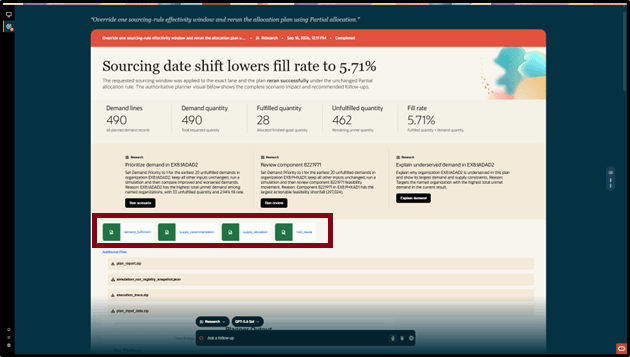
Downloadable constrained-demand result
The following output helps you understand how well each demand group is served by the prescribed allocation policy and whether important demands are underserved.
- Demand_Fulfillment - Forecast or demand results indicating whether demands are met, partially met, late, or unmet.
- Supply_Allocation - Supply allocated to various demands and components required for unmet demand.
- Supply_Recommendation - Suggested planned orders for make and transfer supply.
- Root_Cause - Reasons for unmet demand, such as material shortages, supplier lead times, or interorganizational transfer lead times.
When you run the Supply Planning Allocation Workspace, a workflow processes the allocation policy document. You can update the allocation policy inputs and parameters for the selected input mode, attach the revised policy document to the prompt, and run a new outcome.
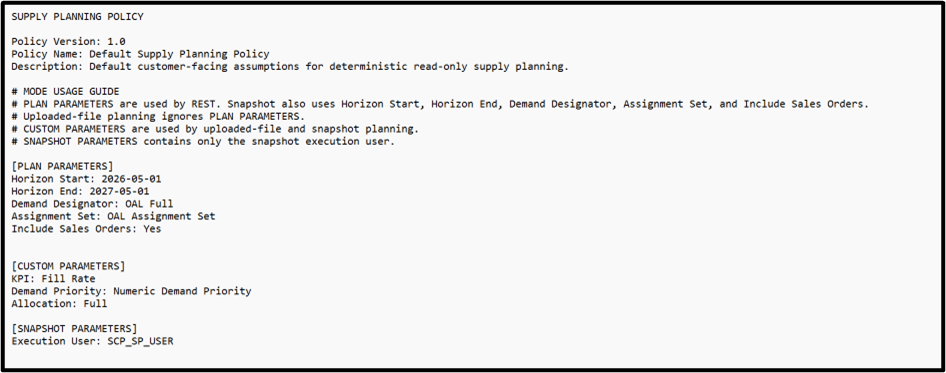
Allocation policy document
You can simulate changes to the baseline outcome by adjusting priorities, supply quantities, or lead times in a file or natural-language prompt. Then run another outcome using those changes.
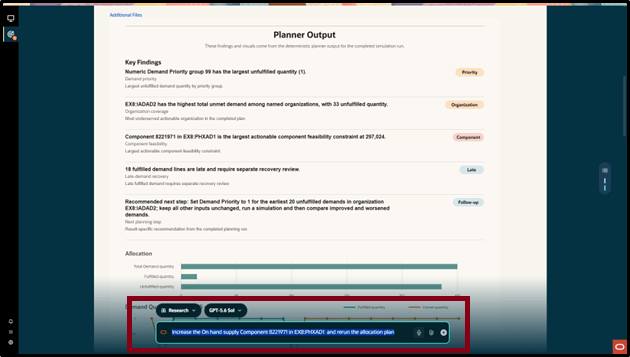
Prompt
The Supply Planning Allocation Workspace supports two data input modes:
- Attached data files: Upload comma-separated value (CSV) files in the required formats.
- Generate data using a policy document: The agentic workflow reads data from the planning data store before starting allocation. You must provide a policy document, but you do not need to upload data files.
When you upload data files, the allocation uses those files. Otherwise, it uses available snapshot files.
For CSV uploads, provide the following files in the required formats:
- List of items and organizations

Items and Organizations
- Bills of Resources for all end items, including key components

Bills of Resources
- Demands and Demand Priorities

Demands and Demand Priorities
- Sourcing Rules

Sourcing Rules
- This file defines the time-phased sourcing assignments for an item, including whether the item is sourced through a buy or transfer process.
- If the sourcing type is Transfer From, the source organization, destination organization, and associated lead time must be specified for the item being transferred.
- If the sourcing type is Buy From, the supplier site, source supplier name, destination organization, and associated lead time must be specified for the purchased item.
- RULE_PRIORITY is used by the allocation run to determine which sourcing assignment to apply when multiple sourcing assignments exist for the same item. The sourcing assignment with the higher priority is selected.
- SOURCING_RULE_SET_NAME is used to group sourcing assignments defined for items. This grouping can then be used to filter records when running the allocation plan in Snapshot mode.
- Available supplies

Available supplies
When you generate data using a policy document, the workflow first runs the Create Flat Files for Allocation Planning Snapshot scheduled process using the parameter values specified in the policy document.
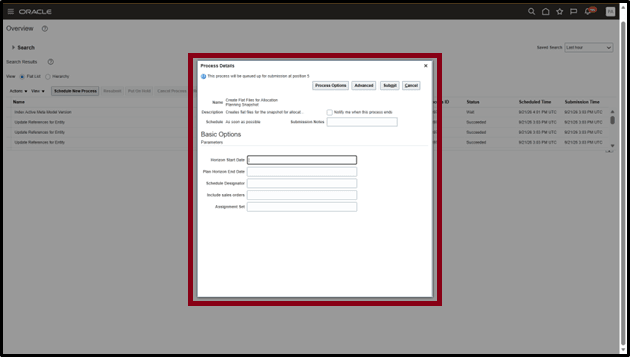
Create Flat Files for Allocation Planning Snapshot scheduled process
Parameters:
- Horizon Start - The first date considered by the allocation process. For example: 2030-01-04
- Horizon End - The last date considered by the allocation process. For example: 2030-09-10
- Schedule Designator - The identifier or name for the specific demand. For example: IKJAPAFC01
- Assignment Set - The sourcing assignment configuration used by the scheduled process. For example: RT-APA-BOR-BM-COPY
- Include Sales Orders - Specify Yes to include sales orders in the scheduled process or No to exclude them.
Generate Data Using a Policy Document mode uses the Schedule Designator and Assignment Set specified in the policy document to allocate demand for matching items and connected supply chain network items.
Steps to enable and configure
You don't need to do anything to enable this feature.
Key resources
Use Oracle Fusion Claw to create autonomous outcomes with agentic applications
Access requirements
To access the Supply Planning Allocation Workspace, you need the following duty role and privilege:
- Supply Planning Allocation Workspace Duty (ORA_MSC_SUPPLY_PLANNING_ALLOCATION_WORKSPACE_DUTY)
- The Supply Planner and Demand Supply Planner job roles inherit this duty role.
- Generate Data Files for Allocation Planning (MSC_GENERATE_DATA_FILES_FOR_ALLOCATION_PLANNING)
- The Supply Planning Allocation Workspace Duty role includes this privilege.