Optimize service levels for an item while achieving segment-level targets
You can now optimize item service levels independently within a segment while still meeting segment-level or plan-level service level targets. Use the Safety stock section of Plan Options to define Service Level Percentage targets at the plan level and, where needed, at the segment level. Segment-level values override the plan-level value for that segment. For segments without a segment-level Service Level Percentage, the planning engine applies the plan-level Service Level Percentage as the effective target at plan run time. If no segments are defined and the plan-level value is set, the plan-level target applies to all items.
You can select the Enforce service levels at aggregated levels option to have inventory optimization meet the target collectively across items in a segment. When this option is enabled, inventory optimization planning optimizes safety stock distribution using factors such as item profitability and demand instead of enforcing the target on each item individually.
With this update, you can improve planning consistency and reduce manual setup by applying plan-level service targets as fallback values for unspecified segments. You can differentiate service-level goals by segment while optimizing safety stock at the aggregate level.
Instead of applying the same Service Level Percentage to every item, the planning engine can intelligently distribute safety stock across items based on inventory optimization factors such as profitability, demand variability, and inventory investment.
This enhancement enables Inventory Optimization Planning to meet service level targets collectively for a segment so that you can minimize overall inventory investment.
This enhancement enables you to:
- Optimize inventory investment while achieving segment-level service objectives.
- Allocate safety stock more effectively by considering item profitability, demand characteristics, and inventory optimization criteria.
- Reduce the need to define Service Level Percentage values for every segment by allowing unspecified segments to inherit the plan-level target automatically.
- Improve planning consistency by ensuring every segment has a deterministic service level target.
- Support differentiated service strategies for unique product segments efficiently.
How it works
You continue to define Service Level Percentage targets in the Safety stock section of Edit Plan Options.
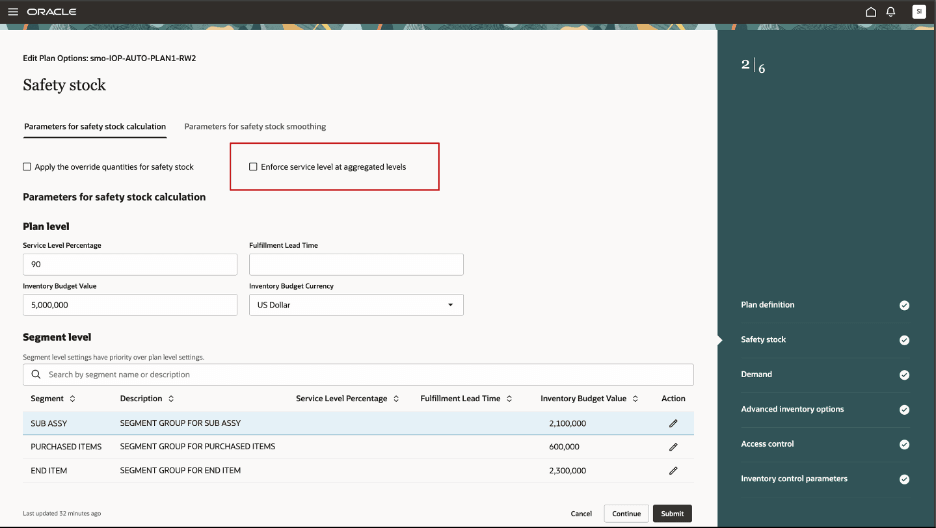
Enforce service level at aggregated levels checkbox
You can specify:
- A plan-level Service Level Percentage, which serves as the default target for the plan.
- (Optional) Multiple segment-level Service Level Percentage values that override the plan-level target for specific segments.
A new option, defined using the Enforce service levels at aggregated levels checkbox, determines how the planning engine applies these targets:
- When this checkbox is unselected (default), the planning engine enforces the configured Service Level Percentage for each individual item, which is the existing behavior.
- When this checkbox is selected, the planning engine achieves the Service Level Percentage collectively across all items within a segment by optimizing the distribution of safety stock. Rather than assigning the same service level to every item, the engine allocates inventory where it delivers the greatest benefit while ensuring the segment-level target is achieved.
If a segment doesn't have its own Service Level Percentage, the planning engine automatically applies the plan-level Service Level Percentage as the target for that segment.
The resulting behavior is summarized in the following table.
Configuration and Service Level Applied
| Configuration | Service Level Applied |
|---|---|
| Segment has a Service Level Percentage defined | Segment-level Service Level Percentage |
| Segment doesn't have a Service Level Percentage defined | Plan-level Service Level Percentage |
| No segments have service levels defined | Plan-level Service Level Percentage for all items |
Example
Suppose you configure the following Service Level Percentage values:
| Level | Service Level Percentage |
|---|---|
| Plan | 98% |
| Treadmills segment | 99% |
| Ellipticals | Not defined |
| Console Components | Not defined |
| Deck Components | Not defined |
If the Enforce service levels at aggregated levels checkbox is selected:
- The Treadmills segment is considered to have 99% target collectively at the aggregate level, not for every item in that segment.
- The Ellipticals, Console Components, and Deck Components segments automatically inherit the 98% plan-level target, and the planning engine optimizes inventory across the items in each segment to collectively achieve that target.
In this way, the plan-level Service Level Percentage determines the target, while aggregate enforcement determines how safety stock is distributed across items to achieve that target with the lowest inventory investment.
Additional information
- Segment-level Service Level Percentage values always take precedence over the plan-level Service Level Percentage.
- If a segment doesn't define its own Service Level Percentage, the plan-level value is used automatically.
- The Achieved Service Level Percentage measure is calculated using a weighted average based on Net Forecast across non-time dimensions.
- User-specified safety stock continues to override calculated safety stock. When user-specified safety stock exists, the achieved service level is calculated using the user-defined safety stock values.
Steps to enable and configure
You don't need to do anything to enable this feature.
Access requirements
Users who are assigned a configured job role that contains these privileges can access this feature:
| Privilege status | Privilege name and code |
|---|---|
| Existing |
View Plan Options MSC_VIEW_PLAN_OPTIONS_PRIV |
| Existing |
Edit Plan Options MSC_EDIT_PLAN_OPTIONS_PRIV |
These privileges were available prior to this update.