Provide an AI Agent Generated Answer as the Top Search Result in Portal
In 25B we introduced the Gen AI Top Answer feature to reduce the search effort for an end-user visiting the DCS Support Portal.
We are enhancing this feature in 26A by generating the Top Answer with the KM Question Answering Agent in Fusion AI Studio.
The golden answer generated is presented at the top of the article listing page. This avoids the authenticated end-user to open and read multiple articles as he’s presented immediately with a relevant answer.
The generated article is also shown when creating a Service request trying to answer the question before submitting. This can have a positive impact on SR deflection rates and less workload for your support center.
The DCS reference implementation and components support this Gen AI feature for KM V2 APIs only (Redwood Knowledge User Experience). This is now the standard knowledge API in the 26A Reference Template.
It’s simple to enable the new km-agent-answer component on your DCS site by setting the AI feature flag Knowledge Answer to true.
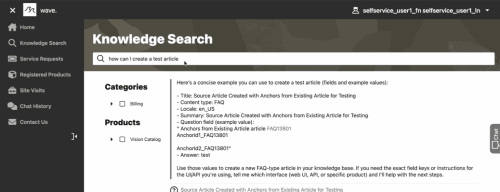
Example of Top Answer generated on top of Search Results List
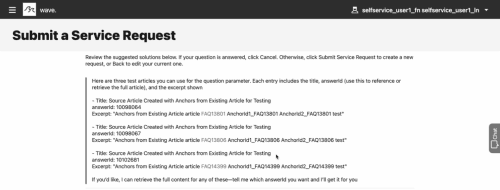
Example of Top Answer generated before submitting SR
Business benefit:
- Higher self-service rates: Present the end-user with the most relevant answer for his intended question at the top.
- Reduce customer search effort: The end-user sees the top answer so doesn't need to open and read multiple articles.
- Reduce service center workload: The SR can be deflected with relevant answers.
- Quick Gen AI adoption: Easy to enable this feature and deliver a powerful AI experience for your customers with Fusion AI Agent Studio.
Steps to enable and configure
This feature requires:
- Your DCS app needs to be configured to use the Knowledge Management V2 API. This is the standard as of 26A.
Step to enable the feature:
- Enable AI Agent capabilities for Knowledge Search
- In Visual Builder Designer, navigate to your DCS app or create a new 26A app
- Click on Variables
- Click featureFlage in the Constants section
- Click AI
- Select KnowledgeAnswer
- Change the default value from "false" to "true"
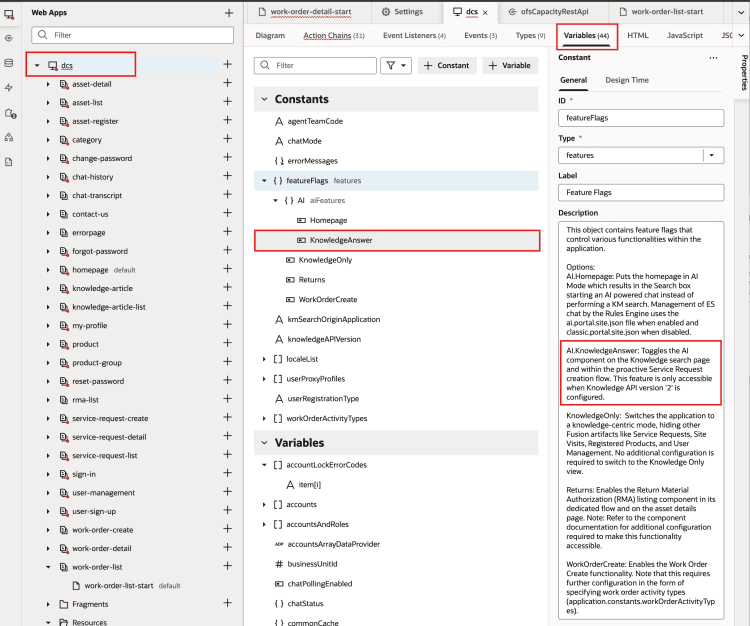
Enable featureFlag AI KnowledgeAnswer in DCS app
- Update the faiRestApi Service Connection
- In Visual Builder Designer, navigate to Services > Backends
- Open the Services side panel by clicking on the Service icon on the left of Visual Builder
- Open the Backends tab
- Click on the 'faiRestApi'
- Click the pencil to edit the server
- Set the scope to urn:opc:resource:fusion:{instance}:fusion-ai/
Replace the {instance} name with your fusion environment name (eg. abcd-test) - Save
- Stage your app after making these changes
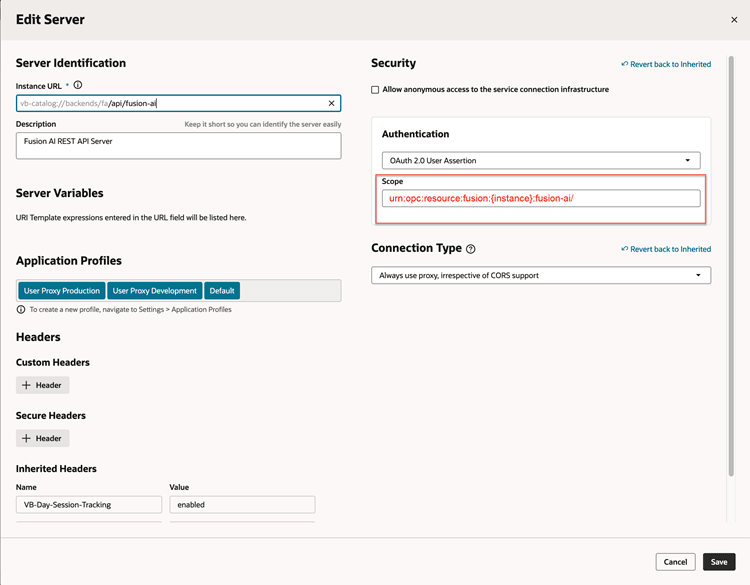
Change the server scope for faiRestApi
Tips and considerations
- The DCS reference implementation and components support this Gen AI feature for KM V2 APIs only (Fusion Knowledge with Redwood User Experience).
- New oj-dcs-km-agent-answer component is pre-installed in the 26A DCS Reference Template and uses the agent answer REST APIs to render the Agent Response.
- The new component replaces oj-dcs-km-ai-answer component introduced in 25B Top Answer feature.
- This feature uses the KM Question Answering Agent in Fusion AI Agent Studio.
- The generation of the article only works when the end-user is authenticated on the portal.
Key resources
Please refer to the following Oracle Fusion Service documentation:
- Get Started with Digital Customer Service
- Get Started with Knowledge (see Playbook and Tutorials on how to Enable Fusion Knowledge with the Redwood User Experience)
- What's New 26A: AI Agent: KM - Question Answering
- Get Started with AI Agent Studio
Access requirements
- Sign in to the Oracle Visual Builder editor as a user with the Developer role to design your DCS portal experience.