Enhanced Activity Stream Message Filtering
You can now extend the Service Requests Activity Stream filter options in Service Center. For instance, by customizing the Action Bar filter UI via Visual Builder Studio, you can add the MessageSubType field. This lets users filter SR messages by both Message Type and Sub-Type. The customized filter is available as an editable filter chip in the Action Bar.
- Improved Productivity: Users can quickly narrow message lists within Service Requests, thus saving time.
- Greater Precision: Supports filtering messages by detailed criteria, minimizing irrelevant results.
- Flexible Customization: Administrators can tailor the filter UI directly using VB Studio, with out-of-the-box support for common scenarios.
Steps to enable and configure
Leverage the Visual Builder Studio to expose your applications. To learn more about extending your application using Visual Builder, visit Oracle Help Center > your apps service area of interest > Books > Configuration and Extension.
This example shows how to add Message Subtype to Filter Message.
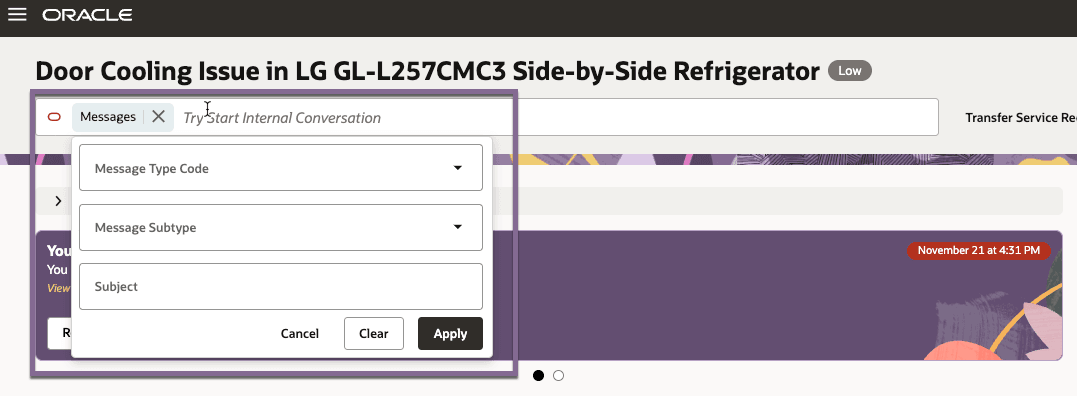
Steps to Enable
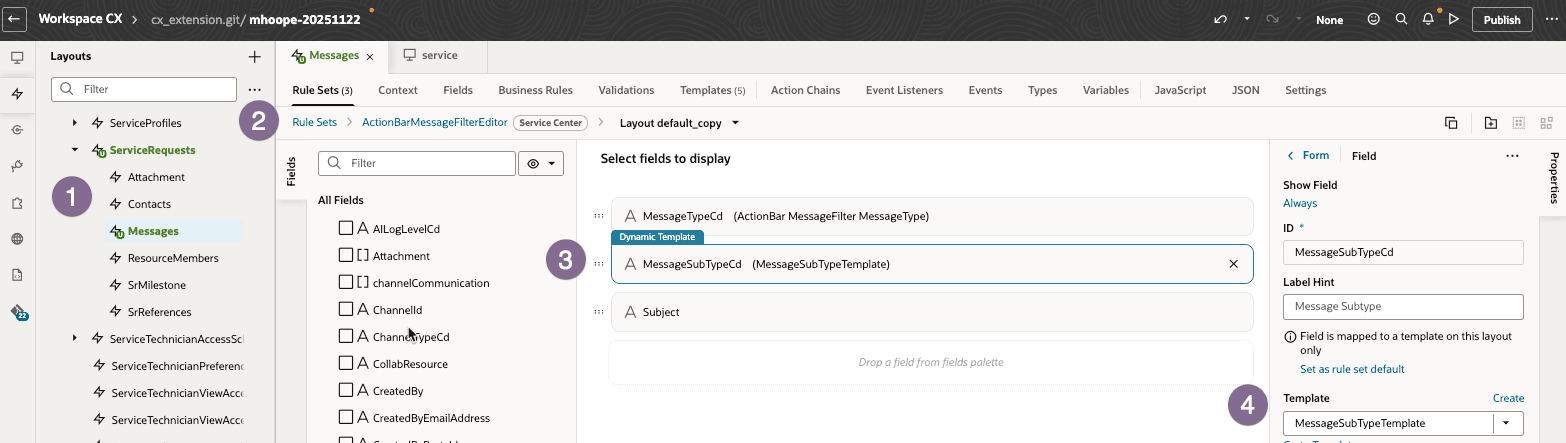
- In Oracle Visual Builder Studio, follow these steps:
- Navigate to Dynamic Layout.
- Then go to DynamicLayouts > ServiceRequests > Messages.
- Under RuleSets, find and select ActionBarMessageFilterEditor.
- Clone the default layout. The following example uses the MessageSubType field, but you can also add any other available Message fields to expand filter capabilities.
- Add the MessageSubType field.
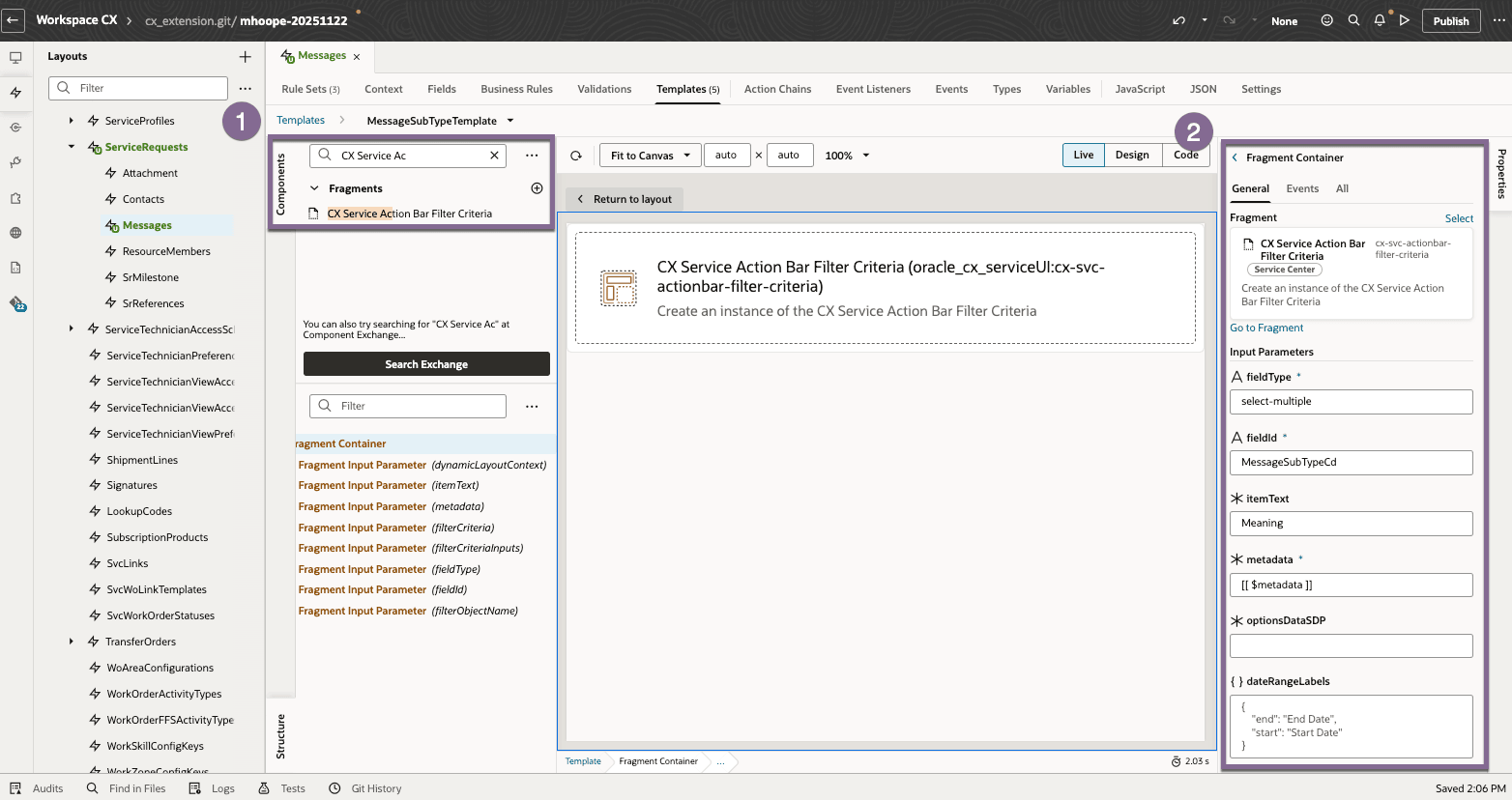
- Important: Create a new template for this field using the markup provided below.
- From the component pallet, add CX Service Action Bar Filter Criteria;
- Set the following Parameters:
- fieldType: select-multiple
- fieldId: MessageSubTypeCd
- itemText: Meaning
- metadata: [[ $metadata ]]
- filterCriteria: {{ $value }}
- filterCriteriaInputs: [[ $dynamicLayoutContext.componentContext.filterEditorFormInputs ]]
- filterObjectName: messages
- Preview and Test
Note:
The "oracle_cx_serviceUI:cx-svc-actionbar-filter-criteria" is intended to be used to layout fields for the ActionBarFilterEditor layout created for the appropriate object - in this case Messages.
All fields to be used in the filter-criteria form, should have their own template using this fragment. This will mean repeated uses in the different templates used for the filter-criteria fields, with only small changes to params like fieldId and fieldType
oracle_cx_serviceUI:cx-svc-actionbar-filter-criteria manages the communication between the filter-criteria form and ActionBar and vice-versa, negating the need for the consumer to create VB code to call APIs
- dynamicLayoutContext, metadata, filterCriteria, filterCriteriaInputs - should all be defined as per the example above and will NOT change
- itemText - will usually be 'Meaning', but see reference to optionsDataSDP
- fieldType - can be one of, 'select-multiple', 'select-single', 'string-value', or 'date-range'
- for 'select-single' or 'select-multiple' an additional optional parameter, 'optionsDataSDP' can be passed, pointing to a user defined ServiceDataProvider. This might be useful for passing a LOVs from an external source (say Contact IDs)
If using optionsDataSDP, be sure to specify the correct field for itemText fragment parameter - e.g. PartyId
-
- for 'date-range' an additional parameter can be specified to provide labels for the Start/End dates:
<oj-vb-fragment-param name="dateRangeLabels" value='[[ {"start": "Start Date", "end": "End Date"} ]]'></oj-vb-fragment-param>
- for 'date-range' an additional parameter can be specified to provide labels for the Start/End dates:
- fieldId - this should be the filter-criteria field Id used by the activity-stream. For example, although PartyId is the field-name used by Contacts, when creating filtering criteria, activity-stream uses 'PostedByPartyId'
- NOTE - for messages filter criteria in activity-stream, the correct fieldIds are 'MessageTypeCd' and 'MessageSubTypeCd' - the same as their counterparts in messages object - these are used in the examples
- filterObjectName - this should be the filter-criteria object name used by activity-stream - in examples its 'messages'
Tips and considerations
n/a
Key resources
n/a
Access requirements
- Oracle Visual Builder Studio for Fusion Application Extension