Adjustment of Map-Based Travel Estimations Based on Historical Data
The time reported by mobile workers between the end of an activity and start of the next activity is often higher than the travel estimations provided by map services. This may be due to various reasons, such as unfamiliar routes, the use of longer routes for trucks, parking time, or time spent checking into customer's premises.
To improve accuracy, the release 26A includes an enhancement for map-based travel estimations. The application now adjusts map-based travel estimations using historical differences between the durations reported by mobile workers and those calculated by the map service. This adjustment applies to all map-based travel estimations, including routing using Street-Level Routing (SLR), real-time traffic, and point-to-point estimations using location coordinates. For example, a telecommunications provider operating in large cities can ensure that mobile workers have sufficient time to locate parking and reach high-rise customer locations, reducing late arrivals and missed SLAs. Likewise, utility or energy companies operating in metropolitan areas often dispatch mobile workers to perform maintenance or inspection tasks where parking near the service point is limited. After moving the vehicle, a portion of the time between activities may involve finding a parking spot and walking to the asset or customer site. The application leverages historical travel patterns, including cases where these short transitions consistently extend total travel time, to produce more accurate, data-driven travel estimations across all operations. The result is smoother routing, fairer workload distribution, and better utilization of field resources.
How the Adjustment Works
The adjusted travel time is calculated based on the typical difference between the map provider's estimated travel duration and the actual time between the start of an activity and the end of the previous activity reported by mobile workers. This calculation is performed separately for each travel key, provided there is enough data for those keys. The destination's travel key is used for these calculations. When there's insufficient data for a given key, the application automatically applies the company level adjustments for that travel key.
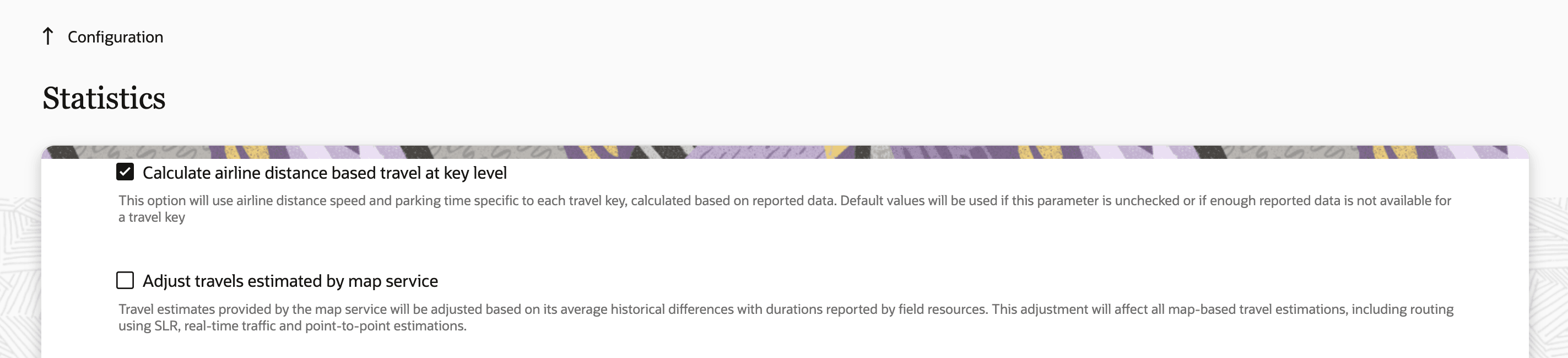
On the Configuration > Statistics page, there is a new checkbox named Adjust travels estimated by map service. Travels estimated by map services are adjusted only if this checkbox is selected. You can set the limits to any value between 0 and 20 minutes. This screenshot shows the Adjust travels estimated by map service checkbox on the Statistics page:
If selected, a range field named Min and max adjustments to travel time estimates is displayed. The adjustment based on machine learning, which would be added to travel durations estimated by map providers, will always be limited to the value set within this range. This screenshot shows the Min and max adjustments to travel time estimates range on the Statistics page:
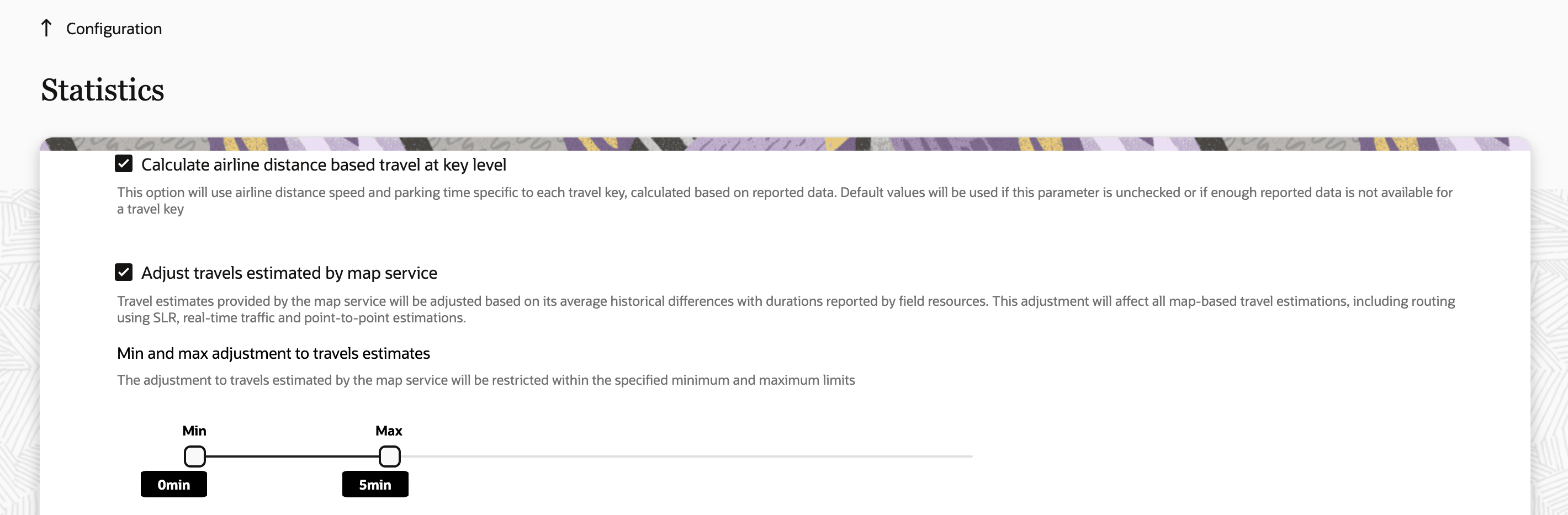
For example, if the application learns that when travelling to a particular location (travel key), the mobile worker typically reports 9 minutes more than what is estimated by the map provider and the min and max adjustment configurations are set to 0 and 5 minutes respectively, the application adds only 5 minutes (instead of 9) to the travel time estimated by the map provider. So, if the map provider estimates 40 minutes of travel, the application schedules the activity 45 minutes after the end of the previous activities (assuming no idle time).
Changes to Airline Distance-Based Estimation Parameters
With the availability of street-level routing (SLR) and real-time traffic, which have provided more accurate methods for travel estimation, the application relies significantly less on the airline distance-based travel estimation. When the airline distance estimation is used, the application uses the parameters specific to the travel keys, if enough data is present.
The parameters Default Airline Distance Speed and Default Departure/Parking Time configured on the Statistics page, are used to estimate the travel duration based on airline distance only when SLR was not enabled or where there was insufficient data to estimate the airline distance-based travel at the key level.
To simplify the configuration and maintain consistency, these parameters are now managed through the Statistics APIs rather than the fields on the Statistics page. Administrators can use the API to retrieve and update the airline distance-based travel estimations based at the company level, in the same way values are currently managed at the travel key level. This change ensures a more consistent and streamlined approach across the application.
As with airline distance-based estimation at the travel key level, the default values for travel based on airline distance can now be managed through Statistics APIs.
To differentiate whether data should be retrieved at the company level or the travel key level, a new parameter called level has been introduced in the GET airlineDistanceBasedTravel API operation.
- When the value of level is set to 'company', data at the company level is retrieved.
- When level is set to 'travelkey', data for the travel key level is retrieved.
- If no value is specified for level, the API returns data for both company level and travel key level airline distance estimations.
When level is specified as 'company', the parameters 'key' and 'KeyId' are ignored. In this case, the response contains these values:
key = nullkeyId = nullorg = 'All Organizations'
Similar to the key-level behavior, the Get airlineDistanceBasedTravel API operation retrieves a set of distance and travel time pairs based on the existing Default Airline Distance Speed and Default Departure/Parking Time parameters previously configured on the Configuration > Statistics page.
For example, if Default Departure/Parking Time was set to 10 minutes and Default Airline Distance Speed was set to 60 km/h, the application estimates 10 minutes of travel time for a distance of 0 km, and for every additional kilometer, the application adds 1 minute ( since 60km/h translates to 1 minute for every kilometer).
The resulting travel estimations would be as follows:
|
Distance (km) |
Travel Time (min) |
|
1 |
11 |
|
5 |
15 |
|
10 |
20 |
|
20 |
30 |
|
50 |
60 |
Note that the distance here refers to the straight-line distance between the coordinates, not the actual route traveled by the mobile worker.
Since the Default Departure/Parking Time and Default Airline Distance Speed parameters are manually configured by administrators, the travel time values calculated based on those parameters are considered as overrides. The application calculated values are used for the estimated values.
Example Scenario
Based on historical data, the application has learned that the typical departure/parking time is 5 minutes, even though the administrator has configured it as 10 minutes on the Statistics page. Similarly, the application has determined that the average airline distance speed is 30 km/h, while the configured value is 60 km/h.
|
Parameter |
Configured Value |
Learned Value |
|
Default Departure/Parking Time |
10 min |
5 min |
|
Default Airline Distance Speed |
30 km/h |
60 km/h |
When the GET airlineDistanceBasedTravel API operation retrieves data under these conditions, the results are as follows:
|
Distance (km) |
Travel Time (min) |
Override (min) |
|
1 |
7 | 11 |
|
5 |
15 | 15 |
|
10 |
25 | 20 |
|
20 |
45 | 30 |
|
50 |
105 | 60 |
In this example, the estimated value has a parking time of 5 minutes and adds 2 minutes per kilometer (30 km/hr translates to 2 minutes for every km). The override values show the manually configured parameters that administrators have defined.
As with the PATCH airline distance based travel API operation at the travel key level, administrators can now override the default airline distance-based estimation parameters by providing two pairs of distance and travel time values.
Example, if the PATCH Update airline distance based travel API operation used the following pairs:
|
Distance (km) |
Override (min) |
|
5 |
10 |
|
10 |
15 |
The application automatically calculates the corresponding departure/parking time as 5 minutes and the airline distance speed as 60km/h. Using these values, the application can calculate the travel duration of any distance, as shown below:
|
Distance (km) |
Override (min) |
|
1 |
6 |
|
5 |
10 |
|
10 |
15 |
|
20 |
25 |
|
50 |
55 |
In the PATCH airlineDistanceBasedTravel API operation, a new optional parameter called level specifies whether the override is applied at the company level or for a specific key. For company level use ‘company’ and for travel key level use ‘travelkey’ as the value for this parameter.
Sample request body:
{
    "items" : [ {
                "level": "company",
                "data" : [ {
                              "distance" : 5,
                              "override" : 10
                        }, {
                               "distance" : 10,
                              "override" : 15
                        } ]
                  }]
    }
Migration and System Behavior
- Existing values for Default Departure/Parking Time and Default Airline Distance Speed parameters in Statistics configuration are used to calculate travel overrides.
- Learnt values for Default Departure/Parking Time and Default Airline Distance Speed are used to calculate estimated values of travel.
- These values will continue to evolve as new data is collected.
- Anytime customers decide to stop using overrides, the learnt values are used from then on.
Some business benefits of this feature are:
- More realistic travel times result in more reliable routes for mobile workers, thereby reducing late arrivals and the probability of missing SLAs.
- Consistent travel estimation across methods (map-based or airline-distance) improves planning and dispatching accuracy.
- Prevents setting unrealistic travel times for mobile workers when using SLR.
- Simplifies configuration management by removing redundant parameters and aligning travel-estimation controls under a unified API approach.
- Delivers a more transparent and data-driven way of managing travel time estimations across the organization.
Steps to enable and configure
- Navigate to the Configuration > Statistics page in Oracle Fusion Field Service.
- Select the Adjust travels estimated by map service checkbox. This activates the adjustment of map-based travel times using historical data.
- (Optional) Define the minimum and maximum adjustment range in minutes under Min and max adjustments to travel time estimates. The application limits all learned travel-time adjustments within this range.
- To manage the airline distance–based travel parameters (for example, Default Departure/Parking Time and Default Airline Distance Speed), use the Statistics APIs instead of the Configuration > Statistics page.
- Use the GET and PATCH
airlineDistanceBasedTravelAPI operations to view or override company level or travel key level parameters.
Tips and considerations
If the application does not have enough data to calculate the value of the adjustment to be applied to SLR based travel estimations, the calculated value remains as 0. In such cases, if customers want to add some fixed value, say 10 mins to all SLR based travel durations, customers can set the Min adjustment value to 10.