Standardized API Connectivity for Plugins
Effective release 26A, Oracle Fusion Field Service has standardized the process by which plugins access REST APIs of other Fusion products and the Oracle Fusion Field Service API. This update eliminates the prior reliance on the Applications functionality in Oracle Fusion Field Service, which was previously required for setting application endpoints and API access levels for Fusion and Oracle Fusion Field Service REST APIs.
Note: These improvements are effective for Oracle Fusion Field Service users. The legacy Applications method for API calls will remain available and supported for Oracle Field Service users.
Changes in Plugin API
Obtain environment name and REST API URLs using Plugin API
Plugins can now easily obtain the required environment name and REST API URLs across all lifecycle stages. The init, open, updateResult, and wakeup methods now include an environment object with the following parameters:
- environmentName: Required for composing the scope that defines the plugin's access level
- fsUrl - Oracle Field Service REST Server URL
- faUrl - Oracle Fusion Services REST Server URL
Example
{
    "apiVersion": 1,
    "method": "init" / "open" / "updateResult" /"wakeup",
    ...
    "environment": {
        "environmentName": "xxxxxxxxx",
        "fsUrl": "https://xxxxxxxxx.fs.ocs.oraclecloud.com",
        "faUrl": "https://xxxxxxxxx.fa.ocs.oraclecloud.com"
    }
}
Access Oracle Field Service and Fusion REST APIs using IDCS
Access to REST APIs across the Fusion ecosystem is standardized through the IDCS (Identity Cloud Service) provisioned for your Fusion environment. The Field service application, located in the Oracle cloud services section of IDCS, grants access to all required APIs, including the Oracle Fusion Field Service API and other Fusion product APIs.
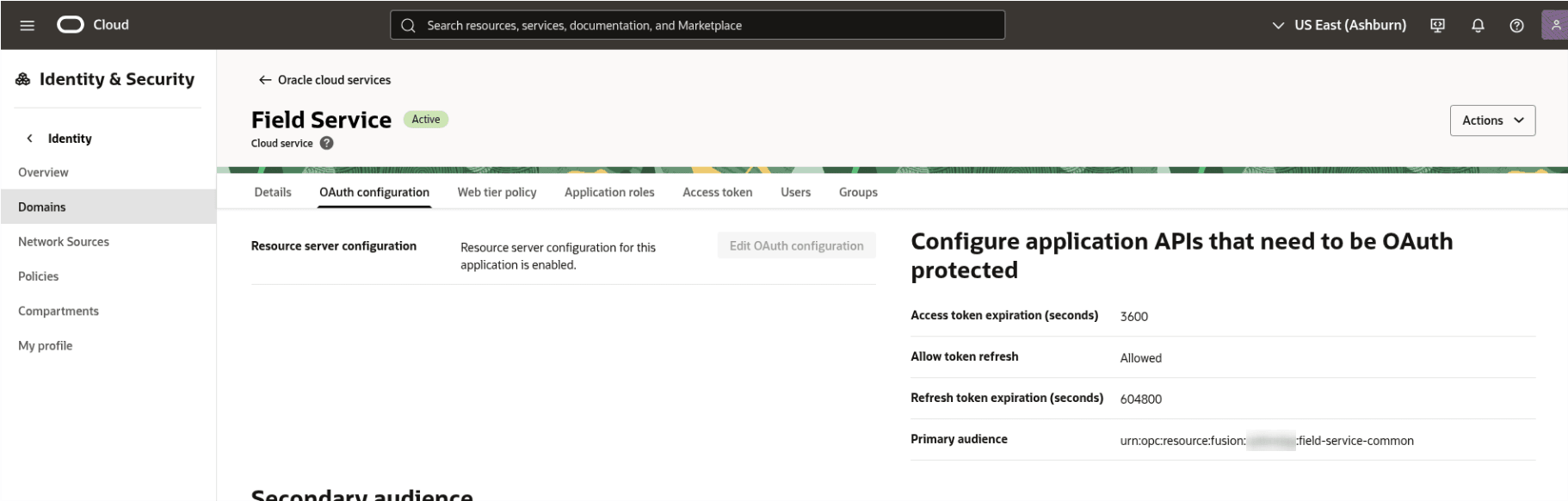
Identity & Security
When implementing a plugin, integrators must include logic to obtain an access token for the target API from IDCS before making the desired API call.
Get access token to authenticate to REST API
- New getAccessTokenByScope procedure: Use the new Plugin API procedure, getAccessTokenByScope, to obtain the required access token for REST API authentication.
- User assertion flow to get a token: The token is issued using the user assertion flow, meaning the token is tied to the current plugin user. All changes made using the plugin using this token will be recorded in target applications under that user's name.
- Access token expiration time: The OAuth access token expires after 3600 seconds (1 hour).
Passing 'scope' parameter in the request to get access token
The scope parameter, is mandatory when calling the new getAccessTokenByScope procedure. This is an important security parameter used to restrict REST API access to a particular claim, preventing the user from accessing data outside of defined resources. The type of the parameter is String.
Note: You must include the environment name within the scope parameter to correctly identify the target environment for the REST API calls.
Audience and Scopes for Oracle Fusion Field Service API
The application defines the following primary audience and five distinct scopes:
Primary audience: urn:opc:resource:fusion:xxxxxxxxx:field-service-common:
Scopes
| Scope | Description |
|---|---|
| / - | Default scope. Allows access: Swagger/openapi endpoints |
| /use | Mobile Worker Planning. Includes: Activity read-write, Resource read-write, Inventory read-write, Capacity read-only, Metadata read-only |
| /view | Read-Only Access: Identical to the /use scope, but all access is restricted to read-only. |
| /events | Receive Events: Grants access to the Event API. |
| /setup | Administration: Grants read-write access to Metadata, Statistics, and Parts Catalog. |
Scope for Fusion API
Oracle Fusion Field Service application from IDCS provides is connected to 'Fusion Applications Cloud Service' resource which gives an access to Fusion REST API by scope: 'urn:opc:resource:faaas:fa:XXXXXXXXXurn:opc:resource:consumer::all'.
Oracle Fusion Field Service application within IDCS is connected to the Fusion Applications Cloud Service resource. This connection grants access to Fusion REST APIs using the following scope:
urn:opc:resource:faaas:fa:XXXXXXXXXurn:opc:resource:consumer::all
Note: When developing a plugin, system integrators must explicitly define the appropriate scope for each targeted API within the plugin code. This scope is then used in the request to IDCS to obtain the JWT access token.
Example of "getAccessTokenByScope" procedure
Request
{
    "apiVersion": 1,
    "method": "callProcedure",
    "callId": "1111111111",
    "procedure": "getAccessTokenByScope",
    "params": {
        "scope": "urn:opc:resource:faaas:fa:XXXXXXXXXurn:opc:resource:consumer::all"
    }
}
Response
{
    "apiVersion": 1,
    "method": "callProcedureResult",
    "callId": "1111111111",
    "procedure": "getAccessTokenByScope"
    "resultData": {
        "token": "...",
        "status": "success",
        "detail": ""
    }
}
Errors
Examples of errors
{
    "apiVersion": 1,
    "method": "error",
    "callId": "...",
    "errors": [
        {
            "type": "TYPE_PROCEDURE_GET_ACCESS_TOKEN_NATIVE_ERROR",
            "code": "CODE_GET_ACCESS_TOKEN_NATIVE_OFFLINE_NOT_SUPPORTED",
            "procedure": "getAccessTokenByScope"
        }
    ]
}
{
    "apiVersion": 1,
    "method": "error",
    "callId": "...",
    "errors": [
        {
            "type": "TYPE_PROCEDURE_GET_ACCESS_TOKEN_NATIVE_ERROR",
            "code": "CODE_GET_ACCESS_TOKEN_NATIVE_PROCEDURE_TIMEOUT",
            "procedure": "getAccessTokenByScope"
        }
    ]
}
Full list of errors
| Error Type | Error Code | Additional Fields | Root Cause |
|---|---|---|---|
| TYPE_INTERNAL | CODE_UNKNOWN CODE_JSON_INVALID CODE_METHOD_NOT_SUPPORTED |
- | Common errors validation |
| TYPE_PROCEDURE_ERROR | CODE_PROCEDURE_UNKNOWN | procedure | Wrong procedure name |
| TYPE_PROCEDURE_PARAM | CODE_PROCEDURE_PARAM_VALUE_INVALID | scope | Parameter scope is not a string. The value is null/empty or has number, boolean, object, array type. |
| TYPE_PROCEDURE_GET_ACCESS_TOKEN_ERROR | CODE_GET_ACCESS_TOKEN_OFFLINE_NOT_SUPPORTED | scope | getAccessToken procedure is called while device is offline |
| TYPE_PROCEDURE_GET_ACCESS_TOKEN_ERROR | CODE_GET_ACCESS_TOKEN_PROCEDURE_TIMEOUT | scope | Procedure couldn't get access token from server in 15 seconds. |
Changes for 'Asset details' and 'Debriefing'
The need to configure 'applications' for the pages is removed, the pages natively communicate with other applications out-of-the-box.
Respectively, the 'Applications for REST APIs' section is removed from configuration of 'Asset details' and 'Debriefing'.
Pages now communicate natively with other applications out-of-the-box, eliminating the need to configure Applications. Consequently, the Applications for REST APIs section has been removed from the configuration of Asset details and Debriefing.
Business Benefit
- Asset Details and Debriefing pages now require minimal configuration and can work out-of-the-box.
- Custom plugins now utilize a standardized approach for calling APIs within Oracle Fusion Field Service and other Fusion products, simplifying integration and development.
Steps to enable and configure
You don't need to do anything to enable this feature.
Tips and considerations
Applications no longer needed for 'Asset details' and 'Debriefing'
The requirement to configure applications for screens has been removed, as screens now communicate natively with other systems. The Applications for REST APIs configuration section is no longer visible for Asset Details and Debriefing.
Don't mix scopes with different audience
You cannot combine scopes that belong to different audiences (aud values) within a single token request. In Oracle IDCS, a scope follows this structure:
urn:opc:resource:<aud>:<resource>:<scope>
- aud (audience): defines which service the token is intended for (for example, fusion, fa, faas, hcm, and so on.)
- scope: defines what access within that service
If you request scopes with different aud values, then IDCS audience to set in the <aud> claim of the resulting access token and the request fails.
When Fusion Services REST Service URL is available
The faUrl (Fusion Services REST Server URL) parameter is available only within Oracle Fusion Field Service environments.
How to construct a path to API calls
When an access token is obtained, system integrators must implement logic to build the full path to the required REST API. The easiest way to utilize the parameters provided in the environment object, which is available in the init, open, updateResult, and wakeup Plugin API methods. It contains:
- environmentName - a name of a current environment
- fsUrl - Field Service REST Server URL
- faUrl - Fusion Services REST Server URL
To construct a full path to a REST API the system integrator should combine environment name + REST Server URL + a path to a desired REST API. The examples can be found below:
- https://xxxxxxxxx.fs.ocs.oraclecloud.com/rest/ofscMetadata/v1/activityTypes
- https://xxxxxxxxx.fa.ocs.oraclecloud.com/hcmRestApi/scim/Users