Use AI Suggestions within Help Desk Chat
Agents can now make use of AI assistance within chat by using suggestions generated by AI. These chat snippets are derived by assessing the employee's question and providing a short summarizations of knowledge within Help Desk. The agent can click on the snippet of their choice to have it automatically added to the chat, as though they had typed it themselves. Chat snippets can also be suggestions for smart texts based on what the agent is typing.
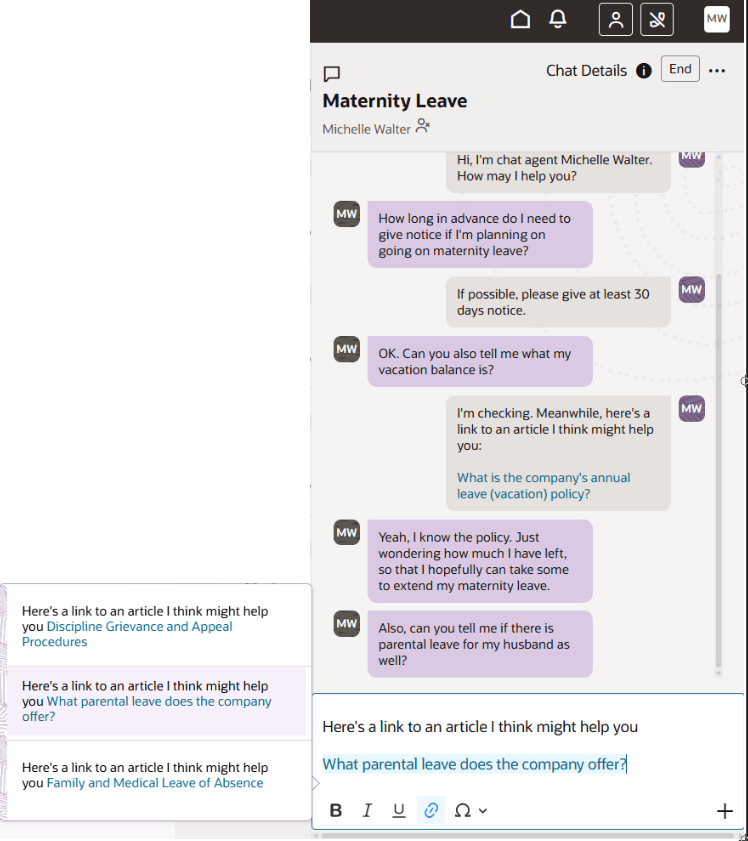
Chat Sippets
By clicking on the verbiage they want to include in the chat, the text is automatically entered into the chat window to be sent to the employee. This saves typing time for the agent.
Steps to enable and configure
To enable the ability to have AI snippets suggested during a chat:
- Go to Setup and Maintenance.
- Click on the Tasks icon.
- Click Search.
- Search for Manage Administrator Profile Values and click the resulting link.
- Enter ORA_SVC_SNIPPETS_ENABLED in the Profile Option Code and Search.
- Change the Value to True to allow for snippets to be used generally.
- Click Save.
- Enter ORA_HD_ENABLE_CHAT_AI_ASSIST in the Profile Option Code and Search.
- Change the value to Yes to allow for snippets to be used within Help Desk.
- Save and Close.
- Click Done.
You should sign out and back in for these changes to take affect.
Tips and considerations
Not seeing any suggestions?
- If there is no knowledge found that is deemed relevant to answering the questions, no chat suggestions are given.
- Be sure that both the Preferred Knowledge Locale and Default Language are set.
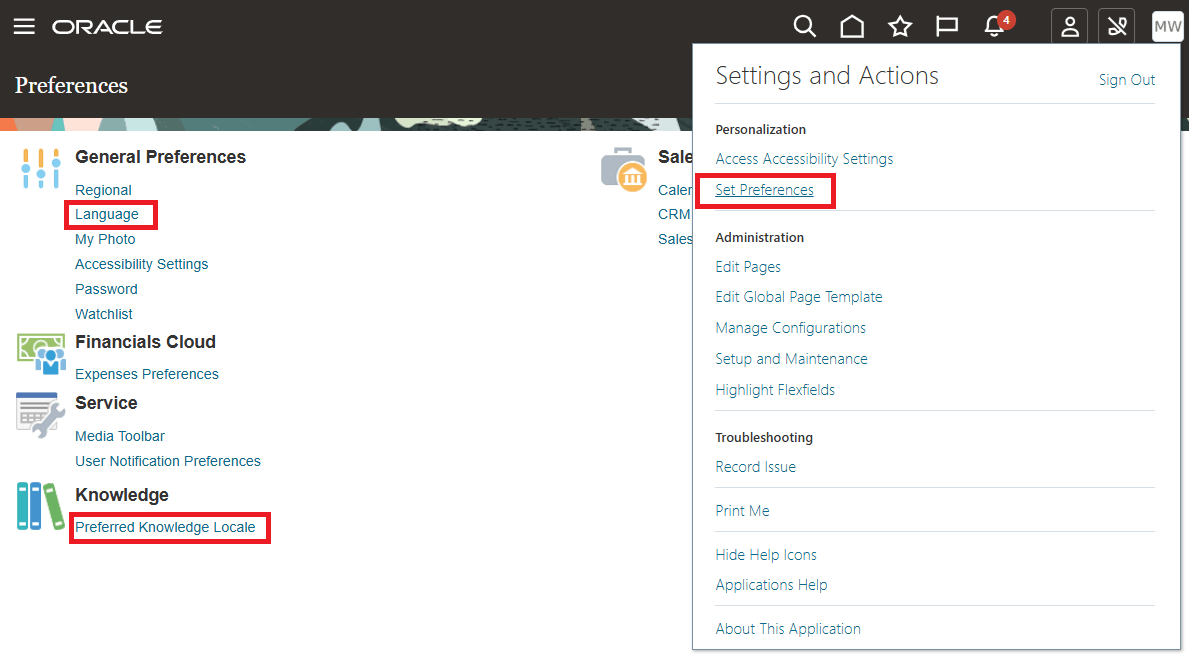
Set Language Preferences
Key resources
After this feature is generally available, a video showing how to configure your environment and a demonstration of the functionality will be found on Oracle Video Hub: Fusion Help Desk.
Link to related Service Center documentation on Call Snippets: https://docs.oracle.com/en/cloud/saas/readiness/service/25a/bsvc-25a/25A-b2b-service-wn-f35290.htm
Access requirements
To use AI generated text, users must have the role:
ORA_SVC_GEN_AI_USER
This gives privileges is required to take advantage of the summarization features within Help Desk, including:
- SVC_ACCESS_HRHD_SUMMARIZATION_APIS - for HR Help Desk
- SVC_ACCESS_ISR_SUMMARIZATION_APIS - for Internal Help Desk
The Service Generative AI User role (ORA_SVC_GEN_AI_USER) is included in all Help Desk roles provided Out of the Box, including the following:
Help Desk Roles with Gen AI Abilities
| Internal Help Desk User | ORA_SVC_INTERNAL_HELP_DESK_USER_JOB |
| Internal Help Desk Agent | ORA_SVC_INTERNAL_HELP_DESK_AGENT_JOB |
| Internal Help Desk Manager | ORA_SVC_INTERNAL_HELP_DESK_MANAGER_JOB |
| Internal Help Desk Administrator | ORA_SVC_INTERNAL_HELP_DESK_ADMINISTRATOR_JOB |
| Next Gen Human Resource Help Desk User | ORA_SVC_HUMAN_RESOURCE_HELP_DESK_USER_JOB |
| Next Gen Human Resource Help Desk Agent | ORA_SVC_HUMAN_RESOURCE_HELP_DESK_AGENT_NG_JOB |
| Next Gen Human Resource Help Desk Manager | ORA_SVC_HUMAN_RESOURCE_HELP_DESK_MANAGER_NG_JOB |
| Next Gen Human Resource Help Desk Administrator | ORA_SVC_HUMAN_RESOURCE_HELP_DESK_ADMINISTRATOR_NG_JOB |