Chat in Browser UI: Desktop Notifications for New Chat Messages
Agents can now receive desktop notifications for new chat messages when the Browser UI (BUI) is minimized or out of focus, helping them stay responsive without constantly monitoring active chat sessions. Clicking a notification brings the BUI into focus, opens the correct chat, and positions the agent at the first unread message so they can immediately pick up the conversation in context. Notifications are shown per chat, making it easier to manage multiple active conversations without losing track of where new messages began.
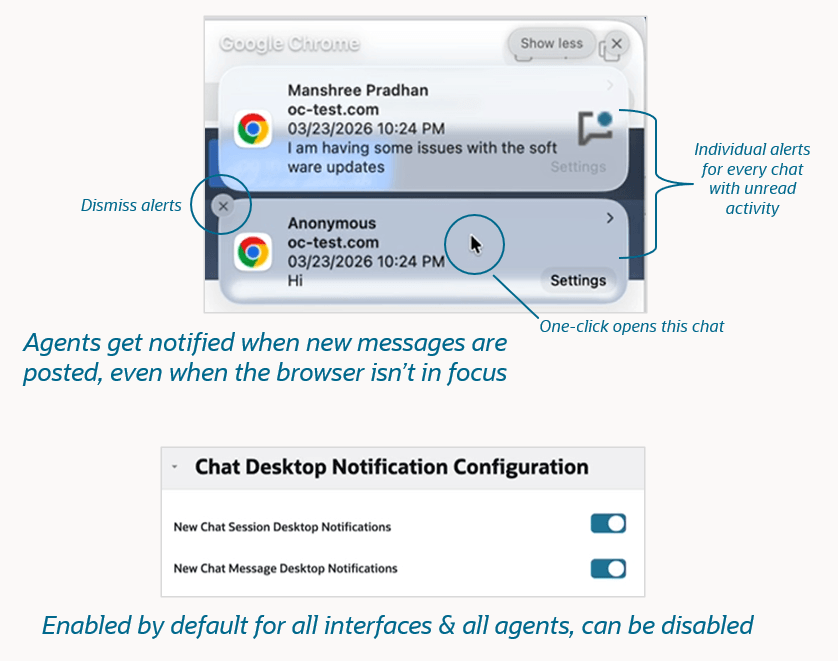
26B New Chat Message Desktop Notifications
Business Value:
Employee Optimization: One-click navigation to unread messages enables faster responses and smoother multitasking across concurrent chats
Steps to enable and configure
You don't need to do anything to enable this feature.
Tips and considerations
- This enhancement is available in the BUI JUNE I release, available on non-production sites May 22, 2026 and on production sites June 26, 2026
- Verify your sites use Engagement Panel v19+
- This feature does not require a CX upgrade
- This feature does not require a feature flag
- This feature is enabled by default at the interface level. More information about configuring this feature can be found at cx.rightnow.com, please search for
- This feature is not available for Oracle B2C Service sites deployed in Oracle U.S. Government data centers. More information can be found here Answer ID 12877: B2C Service capabilities that are not available for U.S. Government sites
Access requirements
- Chat Admin
- Chat Agent