Update Labor Hours to Oracle Time and Labor Using Debrief
Oracle Fusion Field Service 26B release provides a native integration between Oracle Fusion Field Service and Oracle Fusion Cloud HCM Time and Labor (OTL). In the Oracle Field Service mobile app, Debrief captures mobile workers’ labor hours as part of the standard activity workflow and submits them to Time and Labor as standard time card entries. This eliminates the need for separate mobile applications and duplicate manual time card entries and enables the use of Time and Labor capabilities such as time card creation, validation rules, approval workflows, and downstream processing for payroll and project costing.
How to use
- Create a project-based activity in Oracle Fusion Field Service. The Debrief page opens with the activity’s labor hours prepopulated.
- Review the labor hours on the Debrief page and make any necessary edits as shiown in the following screenshot:
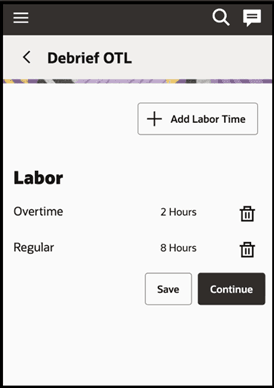
- Submit Debrief from the Oracle Field Service app.
When this activity is completed a new time card is created with labor hours captured from debrief page in OTL. If the time card is already available, labor hours will get updated to the existing time card. You can update these time values by deleting the populated values and saving the new values.
Time Card Data Elements
OTL time card entries include the following information:
- Assignment Number
- Primary Assignment ID
- Project Number
- Task Number
- Expenditure Type Name
- Expenditure Type Class
- Expenditure Type, Time Type, or Payroll Time Type
- Time (Duration)
- Date of Time Entry
- Field Resource Name or Person ID
You can capture labor hours against a payroll time type (Identifies time for payroll processing according to the value selected) or Expenditure Type (Identifies time for costing and billing according to the value selected). These values must be configured in OTL (Manage Time Entry Layout Components) and defined against the user profile in OTL as shown in the following screenshot:
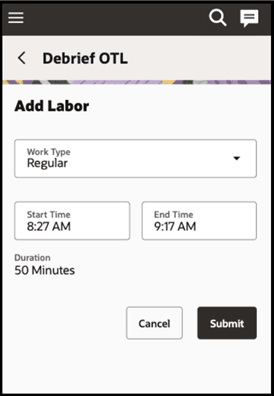
Oracle Fusion Field Service provides an option to configure Work type (the time attribute values) that are specific to its users as a plugin parameter as shown in the following screenshot:
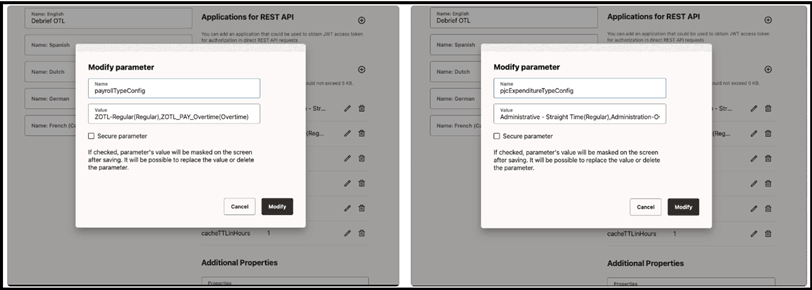
- These values are mandatory for the Debrief page for creating time card entries in OTL. Use the following format to configure the values:
- For Expenditure configuration: <<Expenditure Type Name>> (<<Display Value>>)
- For Payroll configuration: <<Payroll Time Type>> (<<Display Value>>)
- The Display Value appears on the Debrief page for user selection.
- During updates of labour hours, Debrief:
- Uses the selected expenditure name by the user to get the Expenditure Type ID and Expenditure Type class, and then updates the time card.
- Uses the selected payroll time type value by the user and updates the time entry in the time card.
Business Benefits
- Maximized OTL capabilities through rule validation, approvals, compliance checks, and downstream payroll and project costing.
- Streamlined mobile worker experience with time recorded within standard Oracle Fusion Field Service workflows—no dual entry or separate apps.
- Fully automated data flow, so field-captured hours are immediately available in OTL, improving accuracy and timeliness.
- Enhanced compliance and controls by leveraging OTL validation and audit trails for governance and traceability.
- Increased operational efficiency that reduces administrative overhead for mobile workers and back-office teams.
Steps to enable and configure
- Make sure you have setup the time entry setup and maintenance tasks appropriately as per this link.
- Make sure you have configured the plugin parameter for work type as mentioned in the feature description.
Tips and considerations
- Supported activities: Posting to OTL is supported only for project-based activities. Activities created from Fusion Service work orders or Maintenance work orders are not supported in this flow.
- Offline scenario: If the mobile device is offline, Debrief does not attempt to post to OTL. When the device is back online, Debrief automatically posts pending entries to OTL.
- Error handling: Debrief includes a built-in retry mechanism for failed posts to OTL. By default, retries continue for 24 hours. You can extend this window using a plugin parameter.