Fusion Inventory Support
Starting with Oracle Fusion FIeld Service 26B release, users can search for and install Fusion Inventories directly from the Oracle Fusion Field Service application without using the OIC accelerator.
To enable this, Stocking Locations available to resources must be configured using the Stocking Locations in Oracle Fusion Service Logistics. For more information, see Set Up Stocking Locations.
You can also configure using the API.
How to use
Configured Stocking Locations are displayed on the Resource Info page in Oracle Fusion Field Service:
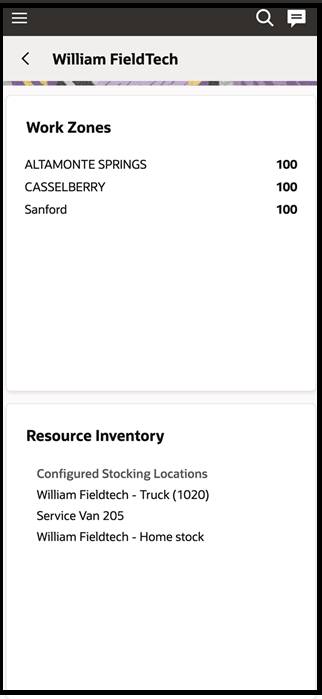
Note: Only Active Stocking Locations with Usable conditions are available in Oracle Fusion Field Service.
After a mobile worker signs in to Oracle Fusion Field Service, inventories with positive balances from the configured Stocking Locations are loaded. Each inventory includes the following details:
- Organization ID, Subinventory code
- Item Number, Item Description, Revision
- Primary unit of measure
- Locator, Lot number
- Serial numbers
- DFF fields configured for items
- Quantity of inventory currently available in the specified sub-inventory and locator. When the item is recorded in a Service Work Order debrief, this quantity is automatically deducted.
Inventory access is restricted to users who are logged in under their assigned resource profile. In Oracle Fusion Field Service, users can search for and install inventory from the Debrief page. Users can perform searches by item number, item description, or serial number. Inventory search and installation are also available offline after the data has been loaded.
Note: Fusion inventory records do not appear on the Oracle Fusion Field Service Inventory page. Installed items can be viewed on the Service Work Order Debrief page in the Fusion environment.
Business Benefits
- Enable native interaction between Oracle Fusion Field Service and other Fusion applications for inventory management.
- Leverage a consistent Fusion Inventory Management model, including Locator support.
- Maintain robust offline inventory management capabilities to empower mobile workers.
Steps to enable and configure
You don't need to do anything to enable this feature.
Tips and considerations
N/A