Start of the Day Mobile Worker Pre-brief
Starting with 26B, an AI-powered pre-brief is available on the My Route page to help mobile workers prepare for their day by identifying and reserving the required parts in advance. The application uses an AI agent to scan the configured inventory locations, automatically reserve available parts, and highlight any shortages before the work begins.
This proactive approach ensures that mobile workers start their day with the necessary inventory, minimizing delays, elevating first-time fix rates, and improving customer satisfaction.
How it works
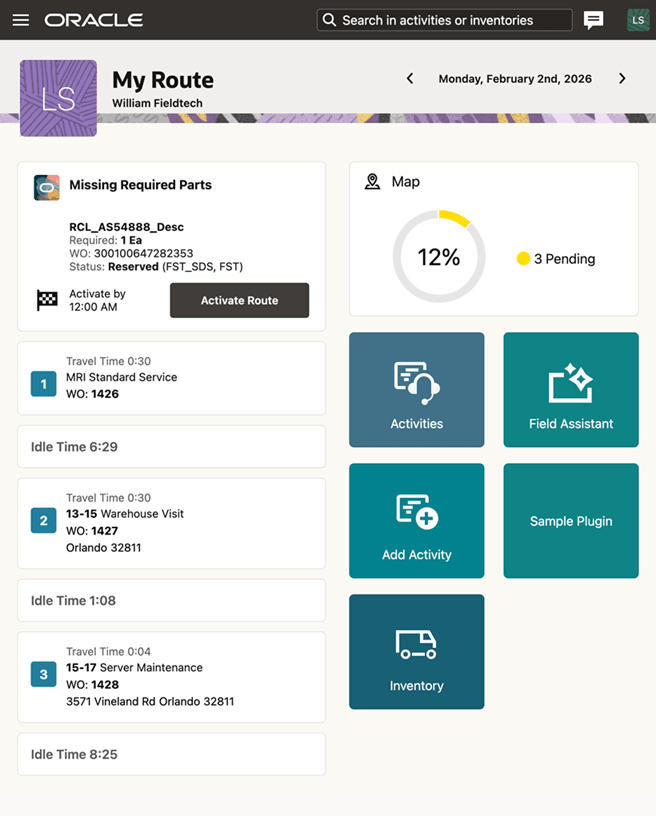
When mobile workers access the My Route page, if the required parts for any work orders in the route are unavailable, the Missing Required Parts section appears at the top of the page.
This section includes:
- Item description
- Required quantity
- Associated work order
- Status (either Reserved in Stocking Location or Not Reserved)
The Missing Required Parts section remains visible until the route is activated.
AI-driven inventory check and reservation
The AI agent checks the part availability in the stocking locations configured for the resource.
- It first checks the Technician type stocking locations.
- If parts are unavailable, it checks Manned, Unmanned, and Site Dedicated stocking locations.
- If all required parts are available, they are automatically reserved.
- Only stocking locations with Active status and Usable condition are considered.
Business Benefit
- Boosts Mobile Worker Productivity: Ensures all the required parts are reserved before the workday, minimizing delays, and unplanned downtime
- Improves First-Time Fix Rates: Increases job completion efficiency, reducing the need for follow-up visits
- Optimizes Inventory Management: Automates part checks and reservations, helping to avoid shortages and reduce excess stock
- Improves Customer Experience: Enables timely service delivery, driving higher satisfaction and trust
Steps to enable and configure
The feature is available only in Oracle Fusion Field Service.
- Enable the feature using the FSM flag: ORA_FFS_START_OF_DAY_BRIEF.
AI Agent permissions setup
To enable AI-driven pre-brief functionality, configure the required roles and permissions:
- Create a new role or update an existing role.
- Set the Role Category to Common – Job Roles.
- Assign these required roles, privilege groups, and data access:
- Role Hierarchy
- Add the duty role: ORA_DR_FAI_GENERATIVE_AI_AGENT_RUNTIME_DUTY
- Assign the job role: ORA_SVC_FIELD_SERVICE_TECHNICIAN_JOB
- Permission Groups
Ensure the following permissions are available:Permission Security View read:Generative AI Workflow Execution AllRowsAllFields update:Generative AI Workflow Execution AllRowsAllFields delete:Generative AI Workflow Execution AllRowsAllFields read:Generative AI Supported Business Object allAccess read:Generative AI Workflow allAccess read:Field Service Activity allAccess read:Field Service Activity Type allAccess read:Time Slot allAccess - Function Security Policies
Assign the following privileges:- RCL_INT_EXT_LOC_MAPPINGS_DETAILS_BY_SERVICE_PRIV
- INV_VIEW_INVENTORY_ONHAND_BALANCE_WEB_SERVICE_PRIV
- RCL_TECH_SUBINVENTORIES_DETAILS_BY_SERVICE_PRIV
- RCL_MANAGE_PART_REQUIREMENTS_BY_SERVICE_PRIV
- SVC_VIEW_SERVICE_WORK_ORDERS_USING_REST_PRIV
- Data Security Policies
Create a data security policy to allow access to work order data:- Create a new data security policy.
- Enter a policy name (for example, Grant View Work Order Data).
- Select the object: Field Service Work Order.
- Set access to All values.
- Add the following actions:
- Read
- View Field Service Work Order
- Role Hierarchy
Tips and considerations
The AI agent currently supports responses in English only.