My Route Page User Experience
Starting with 26B, the My Route page includes enhanced visuals and alerts to help mobile workers better understand their daily schedule and activity status.
What’s improved
The following enhancements improve visibility, provide contextual insights, and support more efficient route handling:
- Activity status labeling
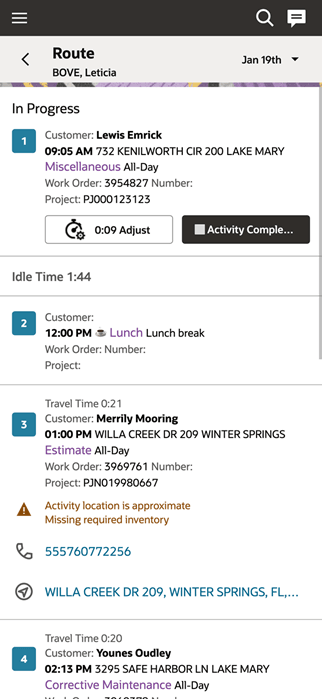
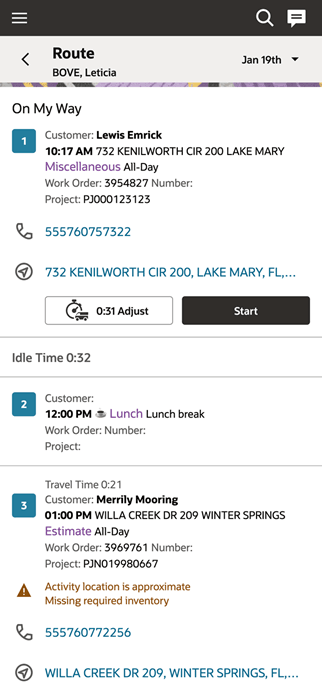
- Activities on the My Route page now display intuitive status labels:
- Pending appear as Next Activity
- En route appear as On My Way
- In progress appear as In Progress
- Activities on the My Route page now display intuitive status labels:
- Activity alerts
- Each activity can display alerts to highlight important conditions, such as:
- Activity location is approximate
- Missing required inventory
- Each activity can display alerts to highlight important conditions, such as:
- Updated activity icons
- Activity icons are now standardized and displayed in blue, replacing previous status-based color variations.
- Activity numbering
- Activities are displayed in sequential order for better clarity.
- Unordered activities are identified with a clock icon.
- Localization support
- The My Route tile label now reflects the translated value of the Map action.
Business Benefit
- Improved visibility into activity status and route progression.
- Faster decision-making with contextual alerts and clearer visual indicators.
- Enhanced user experience through a consistent and simplified interface design.
Steps to enable and configure
You don't need to do anything to enable this feature.