Extensible Recommendation Cards for the Service Request Details Page and other SR pages
This feature introduces a reusable framework to surface recommendation cards in the Service Request Details Page. Built on the UI Events Framework (UEF) and AI Agent templates, the logic that controls the display of recommendation cards is no longer hard coded.
Implementers can use prebuilt AI Agent templates to generate recommendations and render them as recommendation cards. These cards can be added to supported Redwood pages such as Service Request Details page, Service Contact page, or SR Create page. The framework also supports custom cards, event-driven triggers, and integration with the AI Conversation panel.
Here are three simple, practical use cases:
- Upsell During Service Request Handling
- When a service rep opens a service request, a recommendation card can suggest relevant offers or upsell actions
- Example: Offer an extended warranty when a product issue is reported.
- Agent Guidance for Faster Resolution
- When a high-severity issue is detected, a card can suggest the next best action.
- Example: Recommend assigning the SR to a specialized team or following a predefined troubleshooting step.
- Automated Follow-Up Actions
- After certain updates (such as a status change), a card can prompt the service rep to take additional steps.
- Example: Suggest sending a follow-up email or adding a case note to keep the customer informed.
- Allows implementers to control when and where recommendations appear
- Enables implementers to create recommendations based on their organization's unique workflow
- Reduces development effort through a well-defined event framework and declarative designers (VB Studio and AI Agent Studio)
- Support AI-driven insights without rebuilding UI components
Steps to enable and configure
Leverage the Visual Builder Studio to expose your applications. To learn more about extending your application using Visual Builder, visit Oracle Help Center > your apps service area of interest > Books > Configuration and Extension.
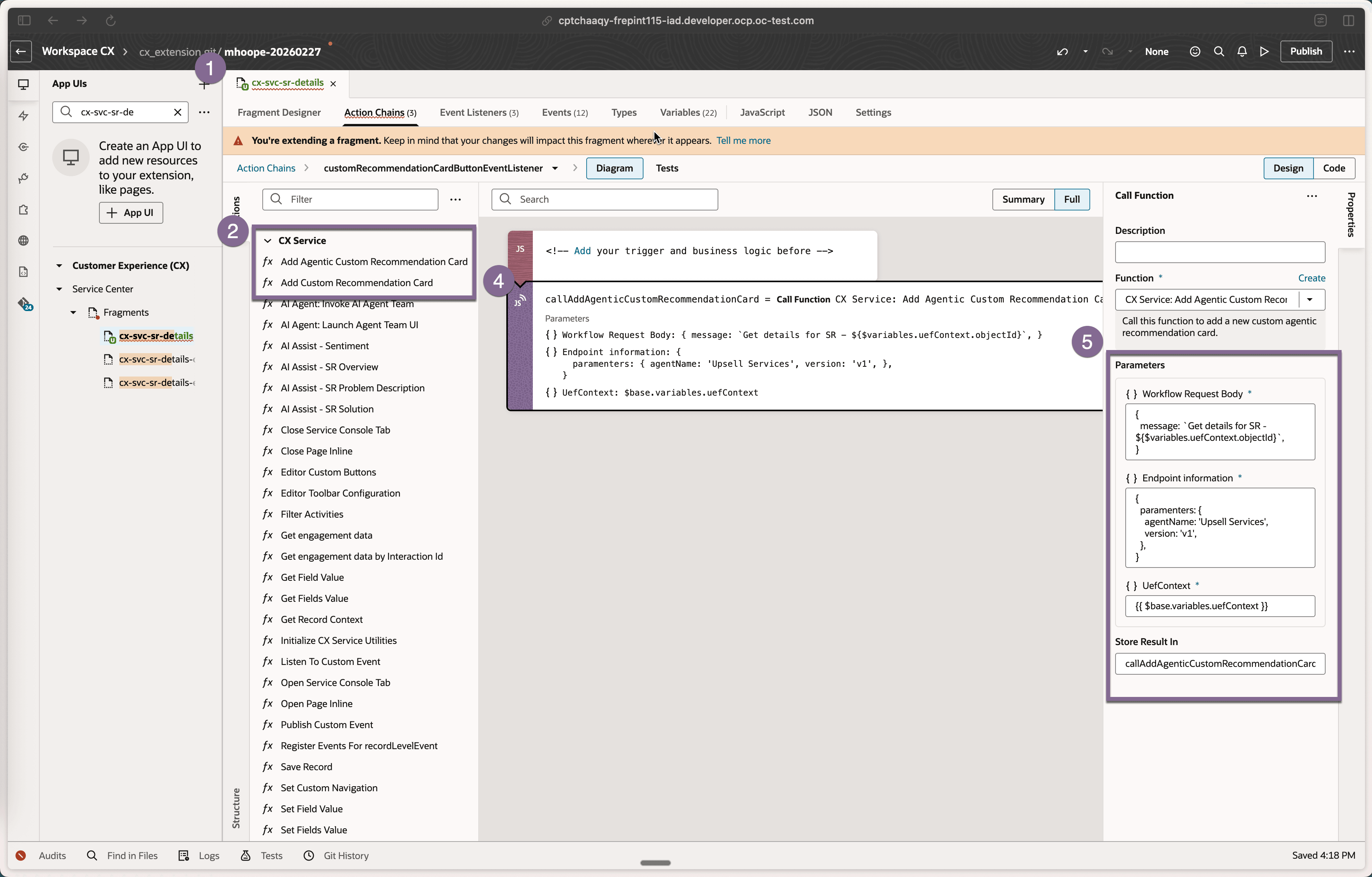
Add Recommendation Cards
These steps provide a general guideline for implementing recommendation cards.
-
Prepare AI Agent Template
-
Create or use an existing AI Agent (workflow agent)
-
Define an output schema with:
-
Primary text and secondary text
-
Primary and secondary actions (up to two buttons)
-
Postback message for interaction handling
-
-
-
Add Event Hook in Page (VB Studio)
-
Open the target cx-svc-sr-details fragment in Visual Builder Studio
-
Add a record-level event listener
-
Configure a trigger (e.g., field value change such as Severity = High)
-
-
Invoke Recommendation Card
-
Use the Add Recommendation Card global action
-
Provide required inputs:
-
Agent name and version
-
Workflow request body (e.g., SR details context)
-
UEF context (available on the page)
-
-
-
Render and Position Card
-
The framework injects the card into the page
-
Custom cards appear alongside existing cards
-
By default, new custom cards are displayed last (priority can be extended in future)
-
-
Handle Card Interactions
-
Add a listener for the Recommendation Card Event
-
Implement custom logic for:
-
Button clicks (e.g., Assign, Add Note)
-
Postback handling to update SR fields or trigger actions
-
-
-
Integrate with Conversation AI Panel
-
Configure card click behavior to trigger the Conversation AI panel
-
Associate the panel with the agent team that generated the recommendation
-
Use postback data to pass context between the card and AI panel
-
-
Validate End-to-End Flow
-
Trigger recommendation via configured event (e.g., Severity change)
-
Verify card rendering, actions, and event communication
-
Confirm AI panel launch and correct agent association
-
Tips and considerations
n/a
Key resources
n/a
Access requirements
- Oracle Visual Builder Studio for Application Extension
- Oracle AI Agent Studio