Refine SR Summaries with interactive AI
Service representatives can now interact directly with the SR Summary.
- Click the SR Summary section to activate it
- Enter prompt-based commands using the action bar (for example: “simplify”, “add more details”, “focus on recent updates”)
- The system regenerates the summary in real time based on the input
The updated summary appears instantly without reloading the page.
- Helps improve clarity of AI-generated summaries for the user
- Helps agents quickly understand SR context
- Builds trust in AI by allowing refinement of the output
Steps to enable and configure
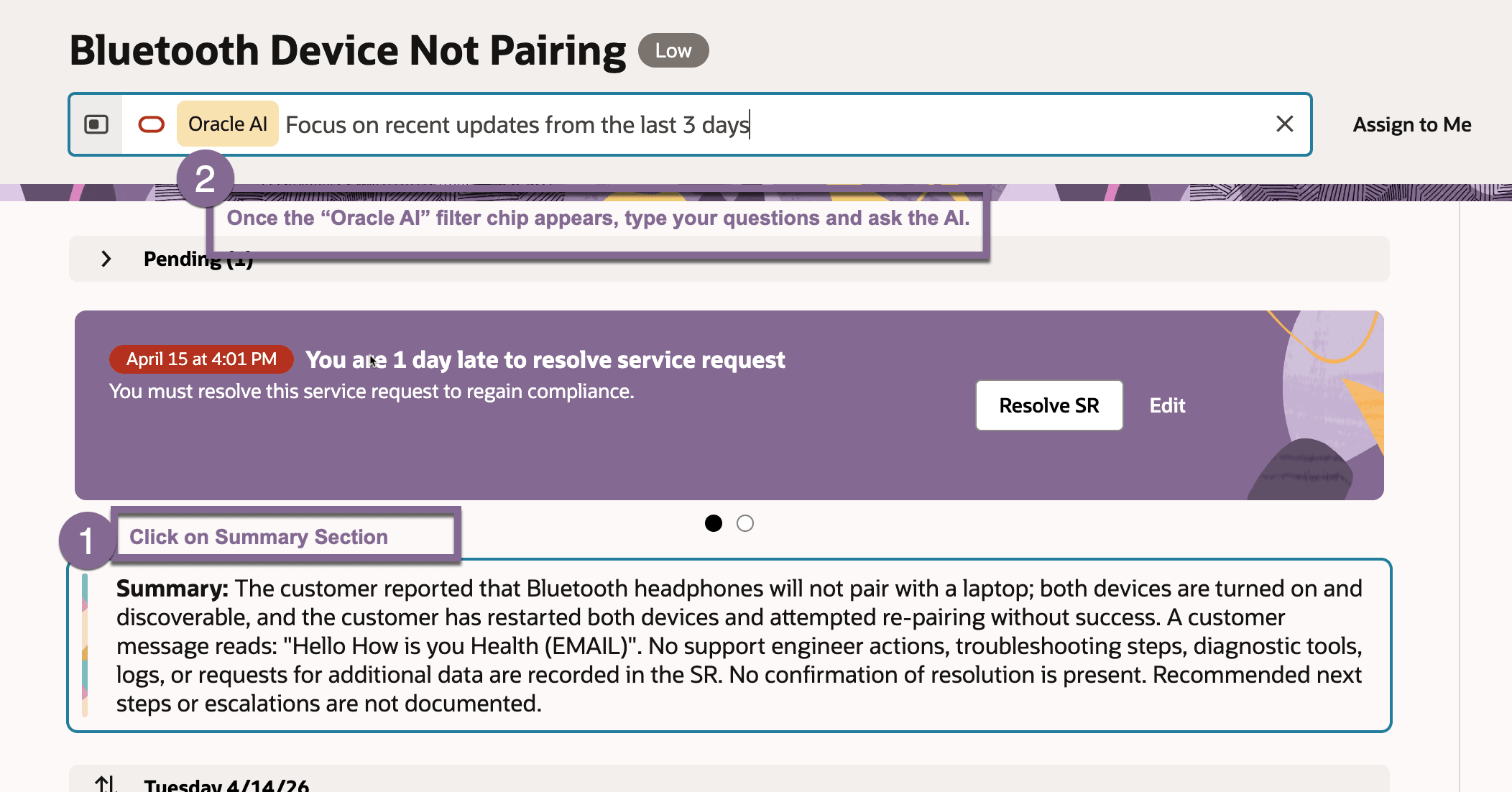
Refine SR Summaries with Interactive AI
- Navigate to the Service Request (SR) details page
- Locate the SR Summary section
- Click on the SR Summary to activate interactive mode
- Use the action bar to enter a prompt command
- Submit the prompt
- View the refreshed summary generated by AI in real time
- Repeat prompts as needed to further refine the summary
(Note: Ensure AI Summarization and related AI Agent services are enabled and properly configured in your environment.)
Tips and considerations
n/a
Key resources
n/a
Access requirements
n/a