Update Crew Member Labor Time to Oracle Time & Labor using Debrief
Oracle Fusion Field Service 26C introduces the ability to capture and manage crew labor hours directly from the Debrief page for activities associated with an Oracle Project Management task. When an activity is opened, labor hours for assigned crew members can be automatically populated based on the activity duration, providing a prefilled starting point and reducing manual effort. Before submission, users can review and update labor entries by correcting, deleting, or adding records for crew members, including additional team members or different work types as needed.
This enhancement strengthens the native integration between Oracle Fusion Field Service, Oracle Time and Labor (OTL), and Oracle Project Management for crew-based activities. By extending the existing connectivity between Oracle Fusion Field Service and Oracle Project Management, organizations can capture crew labor effort more accurately and leverage the information for project costing, payroll processing, and profitability analysis. The experience is also extensible through the plugin framework, enabling organizations to tailor labor capture workflows to their operational requirements.
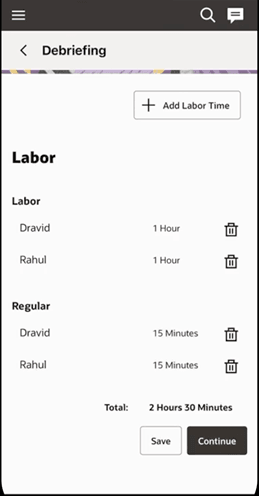
Mobile debriefing screen
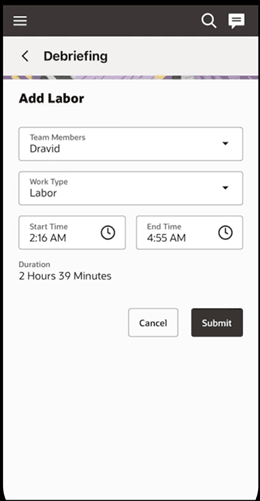
Mobile add labor form
After you save or submit the debrief, labor hours are automatically transferred to OTL as time entries for the appropriate mobile workers and project tasks. This helps improve the accuracy, consistency, and compliance of project costing and payroll processes.
Business Benefits
- Improves project costing and profitability accuracy by capturing crew labor hours against the appropriate project tasks and automatically updating them in OTL. The native integration between Oracle Project Management and Fusion Data Intelligence also enables intuitive reporting for project costing and profitability insights.
- Reduces manual effort and minimizes data entry errors through automatically populated labor hours on the Debrief page, with the option to correct, delete, or add missing entries before submission.
- Supports ERP and payroll processes by recording labor hours as structured OTL entries for each mobile worker or resource, enabling downstream costing or payroll processing.
- Improves field-service operational efficiency by enabling crew leads and crew members to validate and finalize labor hours directly during the debrief process, reducing dependency on back-office reconciliation and follow-up corrections.
Steps to enable and configure
- Access the Debrief Page: Navigate to the Debrief page for your assigned activity.
- Review Auto-Populated Labor Hours:Review the labor hours populated for each crew member, reflecting the activity’s duration.
- Edit/Add Labor Hours: As a crew lead / crew member, you can delete the labor hours against any crew member’s entry and use Add labor to input labor time for crew members. You can use the Add labor option to add labor hours for missing crew member or labor hour for a different work type.
- Save or Submit: After the labor hours are accurately entered, save your changes or submit the Debrief for processing. This data will get updated to Fusion OTL as a time entry.
- Verify time entry in OTL: After the activity is completed, verify that the labor hours are updated in OTL as time entries against the project task for each crew member. Once the activity is completed make sure the labor hours are updated as time entry in OTL against the project tasks for each crew member.
Oracle Fusion Field Service provides an option to configure Work type (the time attribute values) that are specific to Oracle Fusion Field Service users as a plugin parameter.
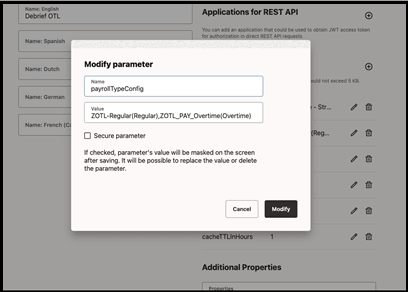
Modifying a parameter with payroll configuration values
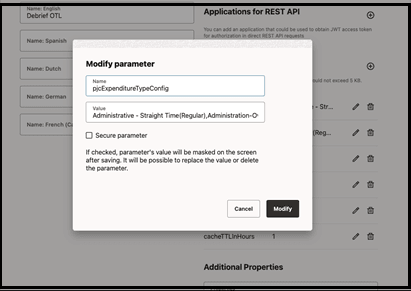
Modifying a parameter with expenditure configuration values
- These values are mandatory for the Debrief page for creating time card entries in OTL. The value should be configured in the format shown below:
- Display values will be displayed on the Debrief page for field service users to select.
- For Expenditure Configuration: <<Expenditure Type Name>>(<<Display Value>>)
- For Payroll Configuration: <<Payroll Time Type>>(<<Display Value>>)
- Display values will be displayed on the Debrief page for field service users to select.
- While updating the labor hours, Debrief
- Will use the expenditure name selected by the field service user and then get the Expenditure Type ID and Expenditure type class and update the time card with these values.
- Will use the payroll time type value selected by the user and update the time entry in the time card.
To enable automatic population of crew labor hours, configure the laborItemNumberForRegLabor plugin parameter.
- When the laborItemNumberForRegLabor plugin parameter is configured for crew labor, the Debriefing Plugin opens with labor hours prepopulated for all crew members based on the configured rules. This includes the default labor item and applicable labor time for the team.
- When automatic population isn’t configured for crew labor, the plugin opens the Add Labor page. Crew members can manually select the appropriate work type and enter their individual labor hours. Labor entries are created and associated with the specific resource ID or party ID for each crew member.
Tips and considerations
- Supported activities: Posting to OTL is supported only for project-based activities. Activities created from Fusion Service work orders or Maintenance work orders are not supported in this flow.
- Offline scenario: If the mobile device is offline, Debrief does not attempt to post to OTL. When the device is back online, Debrief automatically posts pending entries to OTL.
- Error handling: Debrief includes a built-in retry mechanism for failed posts to OTL. By default, retries continue for 24 hours. You can extend this window using a plugin parameter.