IMPORTANT Actions and Considerations
REPLACED OR REMOVED FEATURES
Features and technical components of the solution may be removed or replaced to enhance the security, performance, and overall quality of the cloud service. When this occurs, the deprecation of a feature or component will be announced in advance, allowing customers sufficient time to anticipate the change and transition to any enhanced replacement feature/component. After the deprecation is announced, the deprecated feature or component will remain in the solution until the planned removal date and will not be enhanced or made compatible with other new features.
New Deprecations/ Removals
| Application Area | Removed Feature | Planned Removal | Replacement Feature | Replaced In | Additional Information |
|---|---|---|---|---|---|
|
Oracle Field Service – Delivery Channels / Integrations |
Support for legacy encryption protocols SSL 3.0, TLS 1.0, and TLS 1.1 in Delivery Channel configurations |
Configuration updates must be completed before September 29, 2026 (documented in Oracle Field Service 26D readiness) |
Delivery Channels support only Default Encryption and TLS 1.2 (legacy encryption options are removed) |
Oracle Field Service 26D |
Note To align Oracle Field Service with current industry security standards, support for the legacy encryption protocols SSL 3.0, TLS 1.0, and TLS 1.1 is being removed from Delivery Channel configurations. Customers should review existing configurations, verify that receiving endpoints support TLS 1.2 or the Default Encryption option and update them before September 29, 2026 to avoid disruption in integrations involving Outbound Delivery Channels and Message Scenarios respectively. |
| Oracle Field Service Knowledge Configuration | Legacy Fusion Knowledge Classic Search API / V1 knowledge search | Oracle Field Service 27A | Semantic search and answer generation, commonly referred to as Golden Answer Search V2 | Oracle Field Service 27A |
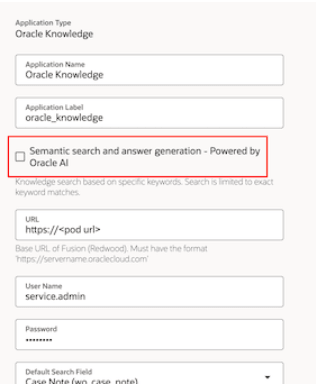
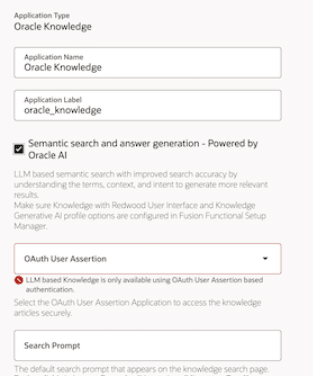
Note Oracle Field Service customers using legacy Fusion Knowledge classic search must upgrade their configuration to the latest knowledge search experience. This update is required because the Classic Search API is being retired (End of Notice Announcement). The new configuration enables semantic search and answer generation powered by Oracle AI, helping mobile workers find more relevant knowledge articles and concise answer summaries from the Field Service activity context. What Is Changing The legacy Classic Search API / V1 knowledge search option is being removed. Oracle Field Service customers who have configured Fusion Knowledge using the legacy classic search setup must update their Field Service configuration to use the newer knowledge search setup, commonly referred to as Golden Answer Search V2 or semantic search and answer generation. This screenshot shows the legacy page to configure Fusion Knowledge in Oracle Field Service:
Legacy Semantic search and answer generation This screenshot shows the updated page to configure Fusion Knowledge in Oracle Field Service:
Latest Semantic search and answer generation Who Is Impacted This change applies only to customers who meet both of these conditions:
No Field Service setup change is required for customers who:
Impacted customers must review and update their Oracle Field Service Knowledge configuration before the Classic Knowledge removal in the 27A update. Customers should:
|
Previously-Announced Deprecations
|
Application Area |
Removed Feature |
Planned Removal |
Replacement Feature |
Replaced In |
Additional Information |
|---|---|---|---|---|---|
|
Oracle Field Service Single Sign On Login Policy |
Oracle Field Service Personal Identification Number (PIN) for SSO Login Policy |
TBD |
Offline Application Unlock via Device Biometric for SSO Login Policy |
TBD |
Note Oracle Field Service will introduce enhanced security measures for users authenticated via SSO Login policies who find themselves working offline. In scenarios where application access needs to be restored for security reasons, such as a re-login timeout configured directly in the Identity Provider (IdP), Oracle Field Service will unlock access to the application by prompting the user to confirm their identity through the default authentication method configured on their device. This could include the use of biometric data, such as a fingerprint or face recognition scan, or by entering the secure PIN code.
|