Extend Cloud Maintenance Work into Field Service Scheduling and Enablement
Note
This capability is available in Oracle Fusion Field Service environments, as it uses the native Fusion platform and the common service data model used across other Fusion applications, including Oracle Fusion Cloud Maintenance. You can verify whether you've Oracle Field Service or Oracle Fusion Field Service, by signing in and checking the About page.
In 26C, Oracle Fusion Field Service strengthens its native connection with Oracle Cloud Maintenance by extending planned maintenance work into field scheduling, routing, assignment, and mobile worker enablement. Cloud Maintenance continues to manage asset maintenance planning, while Field Service optimizes how that work is delivered in the field through activity management, native mobile apps, and technician enablement capabilities. This connected flow brings maintenance planning and field enablement together by giving Field Service direct access to maintenance work order context and ensuring field progress is reflected back into the maintenance process. Together, these native capabilities create a seamless end-to-end experience that helps organizations improve accuracy, efficiency, and maintenance outcomes.
This update helps maintenance teams continue planning work in Oracle Maintenance, while dispatchers, administrators, and mobile workers use related Maintenance information in Oracle Fusion Field Service to plan, route, assign, view, update, and complete field activities. In 26C, supported Maintenance Work Order, Operation, and Asset information can be used across key Field Service configuration and execution flows, including routing filters, work skill conditions, work zone keys, duration and travel keys, static and dynamic filters, activity address calculation, SLA information, and configurable forms. Bulk routing can also create Field Service activities from eligible Maintenance Work Order Operations when routing can successfully schedule and assign the work.
Extend Maintenance Information into Oracle Fusion Field Service Scheduling Logic
Administrators can use supported Maintenance Work Order and Maintenance Work Order Operation fields and descriptive flexfields, also known as DFFs, in Oracle Fusion Field Service scheduling configuration. This helps Field Service routing reflect how maintenance work is planned in Oracle Maintenance without requiring customers to copy the same information into separate Field Service custom fields only for scheduling purposes.
Supported Maintenance information can be used in routing filters, work skill conditions, work zone keys, activity duration keys, travel keys, static filters, and dynamic filters.
Supported Maintenance Fields in Scheduling Configuration
Table: Supported Maintenance Fields
| Field Service Configuration Area | Maintenance Work Order Fields Supported | Maintenance Work Order Operation Fields Supported | Supported DFF Types for Work Order and Operations |
|---|---|---|---|
| Work skill conditions | Work Order Type Work Order Sub Type Organization Code |
Standard Operation Code Work Center Code |
String Number |
| Activity duration keys | Work Order Type Work Order Sub Type Organization Code |
Standard Operation Code Work Center Code |
String Number |
| Travel keys | Work Order Type Work Order Sub Type Organization Code |
Standard Operation Code Work Center Code |
String Number |
| Work zone keys | Organization Code | Work Center Code | String Number |
| Activity filters | Work Order Priority Work Order Type Work Order Sub Type Work Order Status Organization Code |
Standard Operation Code Work Center Code |
String Number |
For example, a user may plan preventive maintenance work for different organizations, work centers, operation types, or asset-related scenarios. In Oracle Fusion Field Service, administrators can use supported Maintenance information to help determine which operations should be considered for routing, which skills are required, which work zone should apply, and how duration or travel statistics should be selected.
Create Activities from Eligible Maintenance Work Order Operations
Bulk routing can create, schedule, and assign Field Service activities from eligible Maintenance Work Order Operations.
Administrators define which Maintenance Work Order Operations should be considered by creating or updating filters in Oracle Fusion Field Service. The filter is then selected in the bulk routing plan. For the selected filter, administrators enable Assign Maintenance Work Orders and select the Field Service Activity Type that should be used when Field Service creates activities from matching Maintenance Work Order Operations.
When the bulk routing plan runs, Oracle Fusion Field Service evaluates the matching Maintenance Work Order Operations using standard routing logic. Routing can consider work skills, work zones, duration, travel time, routing filters, SLA information, resource availability, resource compatibility, reoptimization behavior, and other routing plan settings.
This enhancement does not change standard Field Service routing logic. It extends existing routing configuration so Maintenance Work Order Operations can be evaluated by routing using supported Maintenance Work Order and Maintenance Work Order Operation fields and DFFs.
Activity Fields Populated from Maintenance and Asset Data
Activity Fields
| Field Service Activity Field | Source |
| Street Address | Asset Location Address Line 1 |
| City | Asset Location City |
| State | Asset Location State |
| Postal Code | Asset Location Postal Code |
| Country | Asset Location Country |
| SLA Start | Maintenance Work Order Planned Start Date |
| SLA End | Maintenance Work Order Forecast Date |
Address fields are populated when the asset location can be resolved. When travel is enabled for the selected Activity Type, Field Service uses the activity address to support travel time calculation according to standard Field Service travel settings.
Maintenance planning dates can also provide scheduling context. The Maintenance Work Order planned start date can be used as the activity SLA start. If the Work Order is related to a maintenance program and has a forecast date, the forecast date can be used as the activity SLA end.
If routing can successfully schedule and assign a Maintenance Work Order Operation, Oracle Fusion Field Service creates an activity using the configured Activity Type and places it on the assigned resource route. If routing cannot find a feasible assignment, no Field Service activity is created for that operation during that routing run. The operation may be considered again in a future routing run if it remains eligible and continues to match the selected filter.
After an activity is created, it behaves like a regular Oracle Fusion Field Service activity. Dispatchers and mobile workers can manage it according to standard Field Service behavior.
Eligibility Rules
Maintenance Work Order Operations must pass internal eligibility checks and customer-configured routing filters before they can be routed.
Internal eligibility checks include:
- The Work Order system status is released.
- The Work Order planned start date is before or within the date range covered by the routing plan.
- Assignment or reassignment is allowed.
- The operation is a count point operation.
- Optional operations are not considered.
- Auto transact operations are not assigned. When they appear between two count point operations, they are represented as gaps.
- The Work Order is a single-asset Work Order. If the Work Order has multiple assets, its operations are not selected for Field Service activity creation.
- An activity for the Maintenance Work Order Operation has not been created yet, or the previous activity was deleted or canceled.
Customer-configured filters should use supported Maintenance Work Order, Maintenance Work Order Operation, and Asset fields so that only relevant Maintenance Work Order Operations are selected for routing.
Activity Type Behavior
The selected Activity Type controls important behavior for the activity created from the Maintenance Work Order Operation, including travel calculation, segmentation, duration calculation, and other standard Field Service activity behavior.
Administrators should review the selected Activity Type before using it for Maintenance Work Order Assignment.
Duration Behavior
Duration for a newly created activity is calculated using Field Service configuration.
If the selected Activity Type allows duration statistics and relevant statistics are available, Field Service can use duration statistics.
If duration statistics are not available, duration may be calculated from the Required Usage value of the Maintenance Work Order Operation Resource.
If a Maintenance Work Order Operation requires multiple operation resources, Field Service combines the Required Usage values from those resources to calculate the activity duration.
If required usage does not provide a usable duration, Field Service uses the default duration from the selected Activity Type.
If a Maintenance Work Order Operation has a single required resource with zero required usage, the created activity may still have a nonzero duration if duration statistics are available or if the selected Activity Type has a default duration.
Travel and Activity Address Behavior
Travel time is calculated according to Field Service settings when travel is enabled for the selected Activity Type.
For Maintenance Work Order Operations, travel calculation is based on the activity address, which can be populated from the asset linked to the Maintenance Work Order.
Address fields are populated from the asset location when the asset location can be resolved.
SLA Behavior
The Maintenance Work Order planned start date can be used as the activity SLA start for its operations.
If the Work Order is related to a maintenance program and has a forecast date, the forecast date can be used as the activity SLA end.
SLA information can then be used by routing according to the routing plan configuration.
Work Orders Without Operations
Oracle Fusion Field Service creates activities from Maintenance Work Order Operations, not from the Maintenance Work Order header.
If a Maintenance Work Order has no operations, routing ignores it and no Field Service activity is created.
Multiple Operations on a Maintenance Work Order
If a Maintenance Work Order includes multiple operations, Oracle Fusion Field Service evaluates the operations individually.
Field Service does not create one activity for the entire Work Order. Instead, a separate Field Service activity can be created for each eligible Maintenance Work Order Operation that matches the selected routing plan filter and can be successfully scheduled and assigned.
The system does not use an all-or-none approach at the Work Order level. If only some operations can be scheduled and assigned during a routing run, Field Service creates activities only for those operations. Operations that are not assigned may be considered again in a future routing run if they remain eligible and continue to match the selected filter.
Activities created from Maintenance Work Order Operations are ordered according to operation sequence numbers. The resequencing flag is not considered.
Operations Without Required Resources
A Maintenance Work Order Operation can still be scheduled and assigned even when no required Maintenance Resource is explicitly configured for the operation in Oracle Cloud Maintenance. Information about the required Maintenance Resources, if any, is not considered for routing.
Operations with Multiple Required Resources
If a single Maintenance Work Order Operation requires more than one resource in Oracle Maintenance, Oracle Fusion Field Service still creates one activity for that operation.
Routing does not directly assign the operation based on the required Maintenance Resources defined in Oracle Maintenance. Assignment to field resources or teams is based on Field Service routing configuration, including the selected Activity Type, routing filters, work skills, work zones, resource availability, duration, travel, and other routing rules.
Although required Maintenance Resources are not used directly for Field Service assignment, their Required Usage values may be used for duration calculation when duration statistics are not available. If the operation requires multiple resources, Field Service may calculate duration using the required usage information from those resources.
Auto Transact Operations
Auto transact operations are not created as Field Service activities and are not assigned to field resources. When a non-zero auto transact operation appears between two count point operations, it is represented as a gap between the scheduled Field Service activities and shown as idle time on the field resource’s route. This idle time accounts for the time consumed by the auto transact operation before the following count point operation can start.
If an auto transact operation appears before the first schedulable count point operation, it is skipped for routing purposes because it does not affect the timing between schedulable operations. Auto transact operations with zero duration are ignored.
Segmentation Behavior
A Maintenance Work Order Operation can be created as a segmentable activity only when segmentation is allowed by the selected Activity Type.
For segmentable operations, standard segmentable activity rules apply. Segment duration is limited by the configured minimum and maximum segment size, but the last segment may be shorter than the minimum.
All segments that belong to the same Maintenance Work Order Operation are assigned to the same field resource.
Deleted or Canceled Activities
After a Maintenance Work Order Operation is successfully routed, Oracle Fusion Field Service creates an activity for it.
If the activity is later canceled or deleted while the Maintenance Work Order Operation remains active, the operation may be considered again in a future routing run and may be assigned again.
To prevent recreation, cancel the operation in Oracle Maintenance.
Routing Plan Support
Maintenance Work Order Operation routing is supported for bulk routing plans.
Continuous, immediate, and urgent routing plans do not support routing Maintenance Work Order Operations in this release.
Routing Report Behavior
Only Maintenance Work Order Operations that pass the filters and are assigned to field resources appear in the Routing Report.
Routing Report improvements may be considered in future releases.
Show and Update Maintenance Information in Configurable Forms
Administrators can add supported Maintenance Work Order and Maintenance Work Order Operation fields to Oracle Fusion Field Service configurable forms. This lets customers show Maintenance context in configurable Field Service experiences, such as dispatcher forms, technician forms, inspection flows, or customer-specific maintenance checklists.
This forms support is separate from standard screen behavior introduced in 26A. The table below describes the Maintenance fields supported in configurable forms for this 26C enhancement.
Supported Maintenance Fields in Configurable Forms
Supported Maintenance Fields
Field category in configurable forms |
Supported fields | Form access |
| Maintenance Work Order fields | Work Order Number Work Order Description Work Order Priority Work Order Status Work Order Type Work Order SubType Canceled Reason Organization Code |
Read-only |
| Maintenance Work Order Operation fields | Operation Sequence Number Standard Operation Code Operation Name Operation Description Work Center Code Planned Start Date Planned Completion Date |
Read-only |
| Maintenance Work Order and Operation DFFs | String Number Date Datetime |
Read-write |
Forms help customers guide field activity management using Cloud Maintenance information. For example, a technician working on a Maintenance Work Order activity can review the operation name, operation description, work center, planned dates, and other supported Maintenance details directly in a Field Service form. If supported DFFs are configured, the technician can capture or update Maintenance-specific information without requiring duplicate Field Service custom fields.
Review Existing Integrations and Configuration
Users who already use OIC-based or custom integrations for Cloud Maintenance and Oracle Fusion Field Service should review their existing implementation. These 26C enhancements may reduce the need to duplicate Maintenance information in separate Field Service custom fields, routing-specific mappings, form-specific mappings, or other integration-specific mappings when native Field Service configuration can use Maintenance information directly.
Existing integrations should be reviewed to determine which parts are still required and which parts can be simplified.
Business Benefit
This feature helps customers create a more connected maintenance-to-field-service experience by making Cloud Maintenance information directly actionable within Oracle Fusion Field Service. Built on the power of the Fusion platform and native Field Service flows, this capability helps organizations move from maintenance planning to optimized field execution with less manual coordination, fewer duplicate configurations, and greater visibility across the maintenance lifecycle.
- Connects maintenance planning with field enablement by allowing Maintenance Work Order, Operation, and Asset information from Oracle Cloud Maintenance to guide Field Service scheduling, assignment, activity creation, and completion flows.
- Improves scheduling and routing accuracy by using Maintenance Work Order and Operation details in routing filters, work skill conditions, work zones, duration keys, travel keys, and static and dynamic filters.
- Reduces duplicate configuration and integration overhead by making Cloud Maintenance information natively available in Field Service, instead of requiring customers to copy the same information into separate custom activity fields or integration-specific mappings.
- Gives teams better visibility across the maintenance lifecycle by enabling Cloud Maintenance-planned work to flow into Field Service execution, while giving dispatchers, administrators, and mobile workers the maintenance context they need to manage and complete field activities.
- Strengthens mobile worker enablement by making relevant maintenance information available in Field Service activity flows and configurable forms, helping technicians view work context, capture updates, and complete maintenance activities more efficiently from the field.
- Supports adaptable maintenance operations by letting administrators adjust Field Service behavior as maintenance processes, organizations, work centers, operation types, and asset maintenance needs evolve.
Steps to enable and configure
Prerequisites
Before configuring this capability, confirm the following:
Prerequisites
| Prerequisites | Description |
| Eligible Field Service offering is in use | Confirm that the environment uses either the Oracle Fusion Field Service offering or the Oracle Fusion Suite Professional offering. This capability is available only for environments that belong to one of these SKUs. |
| Cloud Maintenance Work Orders are available | The Maintenance Work Orders and Operations that should be scheduled must exist in Oracle Maintenance. |
| Work Orders have operations | Field Service creates activities from Maintenance Work Order Operations. Work Orders without operations are ignored by routing. |
| Work Orders are eligible for assignment | Work Orders should be released and meet the required eligibility rules. |
| Bulk routing is used | This capability is supported for bulk routing plans. |
| Existing integrations are reviewed | If an OIC-based or custom integration currently creates Field Service activities from Maintenance Work Order Operations, make sure it does not create duplicate activities for the same operations. |
| Field Service filters are configured | Filters must be created or updated in Oracle Fusion Field Service to identify the Maintenance Work Order Operations that should be considered by routing. |
| Activity Type is configured | The Field Service Activity Type selected for Maintenance Work Order Assignment should be reviewed before use. |
Configure Maintenance Work Order Assignment in Routing
To configure routing for Maintenance Work Order Operations:
- Open Oracle Fusion Field Service.
- Create or update a filter that identifies the Maintenance Work Order Operations that should be created, scheduled, and assigned by routing.
- In the filter, use supported Maintenance Work Order, Maintenance Work Order Operation, and Asset fields to define the type of maintenance work to include.
- Go to the routing configuration area.
- Open the routing profile and bulk routing plan that should schedule Maintenance Work Order Operations.
- Add or select the filter that identifies the Maintenance Work Order Operations to include:
- If the routing plan uses the simplified filter experience, add or select the filter in the Filters section.
- If Legacy Assignment Rules is enabled, add or select the filter under Non-scheduled activities in the routing bucket that should be scheduled and assigned.
- Open Settings for the selected filter.
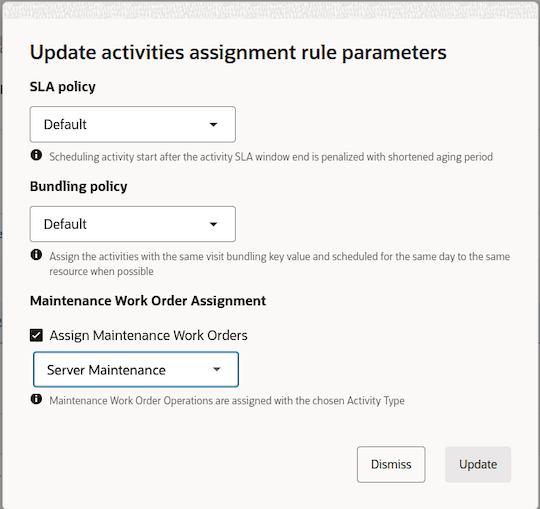
- In the Maintenance Work Order Assignment setting, select Assign Maintenance Work Orders.
- From the dropdown list, select the Field Service Activity Type that should be used when Field Service creates activities from matching Maintenance Work Order Operations. This screenshot shows the Update activities assignment rule parameters section:
- Save the filter and the routing plan.
- Run the bulk routing plan for the applicable bucket.
- Confirm that Maintenance Work Order Operations matching the selected filter are evaluated by routing.
- Verify that corresponding Field Service activities are created and assigned when routing finds a feasible schedule.
Configure Maintenance Fields in Forms
- Navigate to Forms & Plugins.
- Create a form or open an existing form.
- Add the supported Maintenance Work Order, Maintenance Work Order Operation, or Maintenance DFF fields needed for the business process.
- Review whether each field is read-only or read-write.
- Publish the form.
- Open an activity linked to a Maintenance Work Order and Maintenance Work Order Operation.
- Confirm that the selected Maintenance fields appear correctly in the form.
- If the form includes supported Maintenance DFFs, confirm that users with the appropriate access can update the values.
Tips and considerations
- The Maintenance Operation completion behavior was introduced in 26A. Completing a linked Field Service activity can complete the corresponding Maintenance Operation when Complete Maintenance Operation in Field Service is enabled in Functional Setup Manager. Confirm whether this setup is enabled before expecting completion updates in Oracle Maintenance.
- Review existing routing filters, work skill conditions, work zone keys, duration keys, and travel keys to determine where Maintenance information can simplify configuration.
- When configuring routing filters for Maintenance Work Order Operations, consider that activity fields are empty because the Field Service activity has not been created yet. As a result, a filter condition that matches an empty activity field may allow Maintenance Work Order Operations to pass that condition. Some activity fields may be populated only after the activity is created.
- When an activity is linked to a Cloud Maintenance Work Order and Operation, the "Asset Details" standard plugin automatically displays the related asset information without requiring additional property configuration in Oracle Fusion Field Service.
- DFFs defined as part of a context segment in Oracle Cloud Maintenance are not included in the current release scope. Review your DFF configuration to confirm which fields are available for use in Oracle Fusion Field Service.
- Review existing custom activity fields that duplicate Maintenance Work Order or Maintenance Work Order Operation data.
- Review existing forms and plugins to determine whether Maintenance fields can now be shown directly in configurable forms.
- Review existing OIC-based or custom integrations to avoid duplicate activity creation or duplicate data handling.