Link Your Cases to External Documents and Systems
Case workers can now easily create and manage external links from a case, making related information in other systems available directly from the case record. Links can point to URL-accessible resources such as Jira issues, Confluence pages, SharePoint or Google documents and folders, Oracle Fusion pages, NetSuite records, or other enterprise systems.
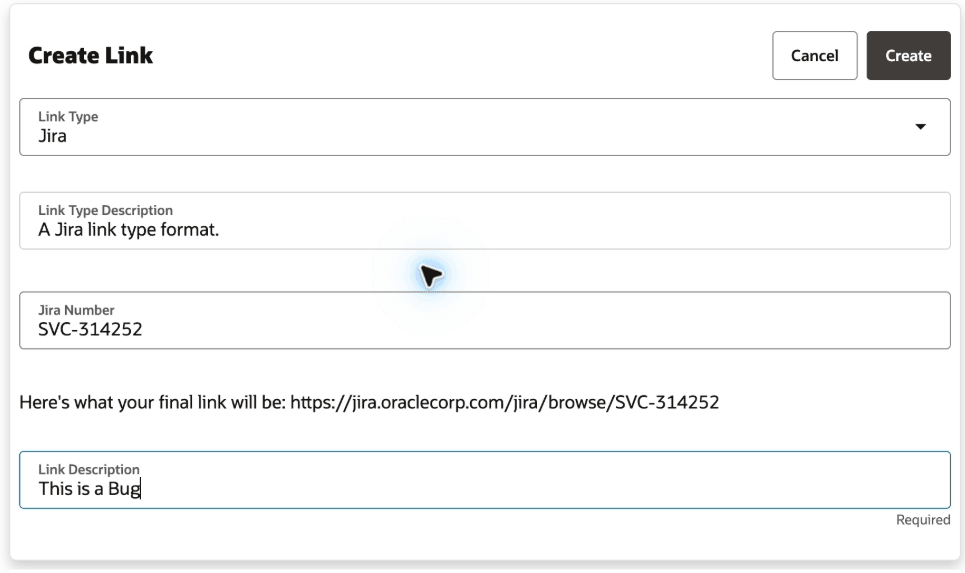
Screenshot of Create Link interface
External links reduce navigation time and help case teams keep related work, documents, and third-party system records connected to the case without duplicating external content or storing external data in the case record. Administrators can configure additional link types easily, ensuring your organization can link to their most important systems.
Steps to enable and configure
Users: Users with the appropriate privileges (see 'Access Requirements' below) can access links in the following ways.
- Using the 'Create Links' SmartAction in the Action Bar.
- Navigating to the 'Links' folder of the Case Details page.
Administrators: Seeded link types include Jira, Basic Link, Google Document, Google Directory, SharePoint Document, and Oracle Fusion. Administrators can create additional link types for their systems as follows.
- Sign in as an administrator.
- Go to Service or Help Desk general setup.
- Open Manage Links.
- Click Create Link Types.
- Select a seeded link type or create a link type.
- For tokenized links, enter a link format with placeholders in braces. For example: https://jira.oraclecorp.com/jira/browse/{Jira Number}.
- For static links, use the Basic Link link type and enter the full URL when creating the link.
- Save the updated or new link type.
Tips and considerations
Users:
- You cannot create duplicate links for the same object and link value.
- Links must be fully qualified URLs or network paths. Relative paths aren't supported.
- Links open in a new browser tab or window. The target system controls its own authentication and authorization.
- External links are one-way references from the case to a web destination. They aren't Fusion object relationships and do not create a reverse relationship in the target system.
- All required tokens in a link type must have values when a link is created or updated. Extra token values are accepted but aren't used by the link format.
Administrators:
- Link types already used by links can't be deleted.
- The stored link format and link value each have a 2000-character limit. The final runtime URL can be longer after token substitution.
Key resources
Developers or administrators can also use the svcLinks and svcLinkTypes svcLinkTypes REST resources to create, update, view, and delete links and link types:
-
/crmRestApi/resources/11.13.18.05/svcLinks
-
/crmRestApi/resources/11.13.18.05/svcLinkTypes
Common REST queries include:
-
/crmRestApi/resources/11.13.18.05/svcLinks?q=LinkTypeCd=JIRA
-
/crmRestApi/resources/11.13.18.05/svcLinks?q=ObjectReferenceNumber=<CASE_NUMBER>
Access requirements
The following privileges are required users to the access the External Links features:
- SVC_VIEW_LINK_PRIV: View service links.
- SVC_CREATE_LINK_PRIV: Create or update service links.
- SVC_DELETE_LINK_PRIV: Delete service links.
- SVC_SETUP_LINKS_PRIV: Set up service link types.