Context-Aware AI and Summarize Human Handoff
Oracle Fusion Field Service enhances AI Agent interactions in Collaboration by providing relevant context from the user’s current environment and allowing users to share supported objects, such as activities, resources, inventory, and locations, with the AI Agent. This helps the AI Agent better understand the user’s situation and provide more relevant responses without requiring users to manually enter the same information.
When additional assistance is required, the AI Agent can hand off the conversation to a human operator and provide a concise summary of the interaction. This helps the human operator quickly understand the user’s request, relevant context, and actions already taken, enabling a smoother and more efficient handoff.
Note: This enhancement only applies to Oracle Fusion Field Service environments. You can verify whether you've Oracle Field Service or Oracle Fusion Field Service, by signing in and checking on the About page.
Provide Oracle Fusion Field Service Context to the AI Agent
When a user starts a conversation with an AI-powered Field Assist in Collaboration, Oracle Fusion Field Service includes appropriate context from the user’s current work environment.
The context includes information about the field resource, route date, and current activity. The AI Agent can use this information to understand the user’s situation without requiring the user to manually enter the same details in the conversation.
The context is provided in the parameters field of the request, as shown in the following example:
{
  "parameters": {
    "context": {
      "resourceId": "<resource ID>",
      "routeDetails": {
        "currentActivityId": "<activity ID>",
        "routeDate": "<route date>"
      }
    }
  }
}
The AI Agent must be configured to interpret and use the context provided in the request.
Share Supported Oracle Fusion Field Service Objects with the AI Agent
Users can share supported Oracle Fusion Field Service objects with the AI Agent as attachments in a Collaboration conversation. Supported objects include:
- Activities
- Resources
- Inventory
- Locations
Oracle Fusion Field Service sends the object identifier and configured object information to the AI Agent in the parameters field of the request. The AI Agent can use the provided information directly or use the object identifier to retrieve additional details when supported by its configuration.
The information included for each object depends on the fields configured for that object.
Activity Attachment
The following example shows activity information provided to the AI Agent:
{
  "activityDetails": {
    "type": "activity",
    "data": {
      "aid": "37110",
      "apptNumber": "WO-100245",
      "astatus": "started",
      "aworktype": "install",
      "date": "2026-11-30",
      "q_pid": "12312321",
      "customerName": "John Smith",
      "address": "221B Baker Street",
      "city": "Bengaluru",
      "postalCode": "560001",
      "timeSlot": "08:00-12:00"
    }
  }
}
Inventory Attachment
The following example shows inventory information provided to the AI Agent:
{
  "inventoryDetails": {
    "type": "inventory",
    "data": {
      "invid": "98765",
      "invtype": "router",
      "serial_number": "SN-123456",
      "status": "installed",
      "model": "XR-500",
      "quantity": "1"
    }
  }
}
Resource Attachment
The following example shows resource information provided to the AI Agent:
{
  "resourceDetails": {
    "type": "resource",
    "data": {
      "pidext": "12312321",
      "pname": "Technician 1",
      "ptype": "technician",
      "email": "tech@example.com",
      "phone": "+1-555-0100"
    }
  }
}
Location Attachment
The following example shows location information provided to the AI Agent:
{
  "locationDetails": {
    "type": "location",
    "data": {
      "lat": "12.9716",
      "lng": "77.5946"
    }
  }
}
Provide a Conversation Summary During Human Handoff
When an AI Agent transfers a conversation to a human operator, it can provide a concise summary of the interaction. The summary is displayed separately to the human operator and helps them understand the user’s request, relevant Oracle Fusion Field Service context, and actions already taken without reviewing the complete conversation history.
The AI Agent can generate and return the summary as part of the handoff response, and the Collaboration user interface displays the summary to the human operator.
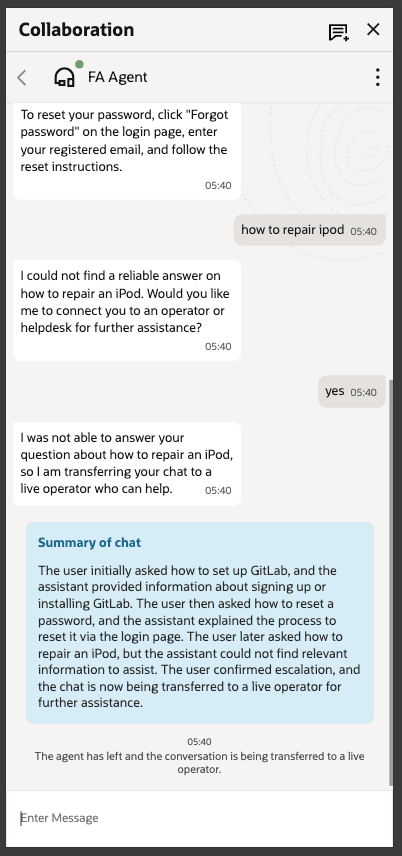
The summary can include:
- The user’s request
- Relevant Oracle Fusion Field Service context
- Troubleshooting or actions already completed
- Recommendations provided by the AI Agent
- Outstanding questions or issues that require human assistance
The AI Agent can also provide a final message that is displayed to the user before the handoff.
To initiate the human handoff and provide a conversation summary, the AI Agent returns a response in the following format:
{
  "action": "ESCALATE_TO_LIVE_OPERATOR",
  "message": "<message displayed to the user before the handoff>",
  "summary": "<summary displayed to the human operator>"
}
Where:
- action must be set to ESCALATE_TO_LIVE_OPERATOR to initiate the handoff to a human operator.
- message contains the final message displayed to the user before the handoff. This field is optional. If it is not provided, no final message is displayed.
- summary contains the conversation summary displayed to the human operator. This field is optional. If it is not provided, no handoff summary is displayed.
How it Works in Practice
A typical flow looks like this:
- The user opens a Collaboration chat and sends a message to the AI Agent.
- The application adds relevant context, such as activity and route details.
- Collaboration forwards the message and context to the AI Agent.
- The AI Agent responds with an answer or asks for more information.
- If the AI Agent escalates to a human, it can send a summary of the conversation for the operator to review first.
Sample User Experience
A mobile worker opens chat from an active route, attaches a particular activity, and asks the AI Agent for help. The AI Agent can use the route context and attached activity information immediately instead of asking the user to re-enter the same information. If the issue needs human follow-up, the operator receives a concise summary of what happened so the handoff is faster and less repetitive.
Business Benefit
- Improves AI Agent response relevance by providing relevant Oracle Fusion Field Service context and information from supported Oracle Fusion Field Service objects.
- Reduces manual data entry by allowing users to share supported Oracle Fusion Field Service objects directly in the conversation.
- Enables smoother human handoffs by providing the human operator with a concise summary of the user’s request, context, and actions already taken.
- Helps resolve issues faster by reducing repeated questions and giving both the AI Agent and human operator the information needed to continue the conversation.
Steps to enable and configure
- Configure an AI Agent in Oracle AI Agent Studio, or use an existing AI Agent.
- Create or update a Field Assist in Oracle Fusion Field Service and configure it to connect to the AI Agent.
- Ensure that the AI Agent is configured to:
- Accept contextual information provided by Oracle Fusion Field Service, such as user, activity, resource, inventory, and location details.
- Return the appropriate response when initiating a human handoff.
- To provide a conversation summary during human handoff, configure the AI Agent to return the summary field as part of the ESCALATE_TO_LIVE_OPERATOR response:
{ "action": "ESCALATE_TO_LIVE_OPERATOR", "message": "<message to display before the handoff>", "summary": "<summary to display to the human operator>" }
Configure the AI Agent with instructions to generate a concise summary whenever it initiates a human handoff. The summary should capture the key discussion points, the user’s request, actions already taken, and any relevant context, and populate the summary field in the response.
- Save the Field Assist configuration and initiate a conversation with the AI Agent to verify that:
- Relevant context is provided to the AI Agent.
- Supported attachments, such as activities, resources, inventory, and locations, can be included in the conversation.
- Conversation summaries are displayed when the conversation is handed off to a human operator.
Tips and considerations
- Ensure that the AI Agent is configured to consume the contextual information provided by Oracle Fusion Field Service so that it can generate relevant and accurate responses.
- The summary field is optional. If the AI Agent does not return this field, no conversation summary is displayed during the human handoff.
- The action field must be set to ESCALATE_TO_LIVE_OPERATOR to initiate the human handoff.
- The message field contains the final message displayed to the user before the AI Agent initiates the handoff.
- Configure the AI Agent prompt or orchestration logic to generate a concise and accurate conversation summary before initiating the human handoff. The summary should include the user’s request, relevant context, actions or recommendations provided by the AI Agent, and any outstanding issues that require human assistance.
- The AI Agent receives the identifiers and configured data for supported Oracle Fusion Field Service objects. It can use this information directly or use the object identifiers to retrieve additional details when supported by its configuration.
- Before enabling this feature in a production environment, validate the end-to-end human handoff experience, including the generated summary, to ensure that it meets your organization’s support requirements.