Native Connectivity with Oracle Fusion Data Intelligence
Oracle Fusion Field Service introduces native connectivity with Oracle Fusion Data Intelligence (FDI) in release 26D, enabling customers to analyze field activity execution. This capability is available to customers upon request, with setup and onboarding guidance provided by Oracle.
Service and operations managers can analyze activity status, assignment, timing, duration, travel time, and service-level agreement (SLA) performance, together with related work-order context. These insights help managers monitor execution trends and identify delayed or incomplete work.
Activity analytics supports analysis across mobile workers, activity types, and organizations. Related service and maintenance work-order, project, and project-task context depends on the corresponding relationships being populated and available for analysis.
Project profitability analysis provides insight into project financial performance, where the required configurations are in place. Subscription and configuration requirements are described under Prerequisites.
This capability provides insights to help customers pursue the following field service business goals:
- Meet SLA and service commitments by identifying late starts, late finishes, and SLA non-compliance.
- Reduce activity backlog by monitoring pending and incomplete work.
- Improve mobile worker workload planning by comparing activity assignments and workload across resources.
- Improve successful work completion by identifying activity types and operational areas with recurring delays or incomplete activities.
- Understand project profitability by analyzing Field Service execution and labor context alongside Fusion ERP Projects revenue, cost, and margin data, where the required configurations are in place.
Note: This enhancement only applies to Oracle Fusion Field Service environments. You can verify whether you've Oracle Field Service or Oracle Fusion Field Service, by signing in and checking on the About page.
Analytics examples
The following examples show how Oracle Fusion Field Service activity data can be analyzed in Oracle Fusion Data Intelligence (FDI).
Activity health
Service and operations managers can review activity volume, completion trends, activity status, SLA compliance, and start and finish timeliness to understand field execution performance.
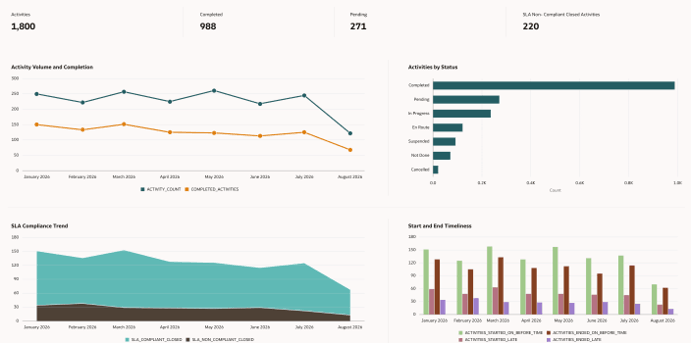
Figure 1: Activity health example
Bottleneck analysis
Managers can examine exceptions and status by activity type, including pending activities, SLA non-compliance, and late starts. Mobile worker workload rankings compare activity counts and late starts to identify areas requiring attention.
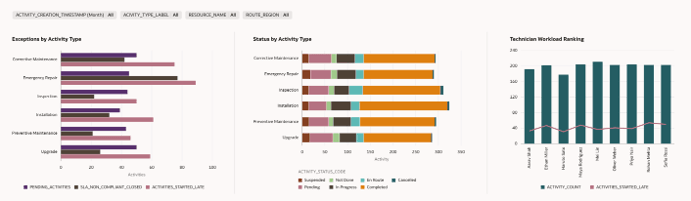
Figure 2: Bottleneck analysis example
Project profitability analysis
Customers using Oracle Fusion Field Service and Fusion ERP Projects can analyze project financial performance in FDI alongside field execution insights, where the required data relationships and configurations are in place.
Field Service debrief labor time context can be analyzed with Fusion ERP Projects revenue and cost data to help customers understand the impact of crew and labor costs. The example below shows project revenue, cost, margin, and margin percentage, together with revenue and margin trends by project type and fiscal quarter.
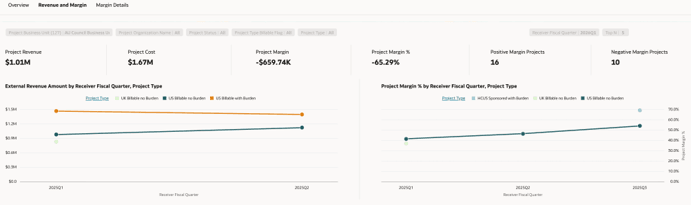
Figure 3: Project profitability example using sample data
Note: These illustrative analytics examples use sample data. Dashboard layouts and available analytics may vary depending on configuration and applicable subscriptions.
Business Benefit
- Improves visibility into field execution by enabling service and operations managers to analyze activity status, completion trends, assignment, and execution timing in FDI.
- Helps identify service delivery bottlenecks through analysis of pending and incomplete activities, late starts, late finishes, and SLA non-compliance.
- Connects work-order demand with field execution by bringing related service and maintenance work-order context into activity analytics.
- Supports informed operational decisions by highlighting activity workload and execution exceptions across mobile workers, activity types, and organizations.
- Provides insight into project profitability by connecting Field Service debrief labor time context with Fusion ERP Projects revenue and cost data, helping customers understand the impact of crew and labor costs.
Steps to enable and configure
To enable this feature you need to log a Service Request (SR).
This feature is available upon request through a service request in release 26D for participating Oracle Fusion Field Service and FDI customers. Oracle provides the applicable setup and onboarding instructions.
Prerequisites
- Ensure that Oracle Fusion Field Service and FDI CX Analytics are provisioned for the participating environment.
- Ensure that the applicable FDI CX Analytics subscription is available for activity analytics.
- Project profitability analysis additionally requires the applicable FDI ERP Analytics subscription, relevant Fusion ERP Projects data, and the configured labor capture and costing.
Enablement procedure
- Submit a service request to request enablement.
- Obtain the applicable enablement instructions from the FDI CX Analytics team.
- Assign the appropriate FDI roles and data access to users who require activity analytics. Include project and financial data access where applicable.
- Validate that the activity data is available in FDI and reconcile it with Oracle Fusion Field Service.
Native connectivity is available after Oracle enables the feature.
Tips and considerations
- This feature is available upon request through a service request in release 26D for participating Oracle Fusion Field Service and Oracle Fusion Data Intelligence customers.
- The current release focuses on Oracle Fusion Field Service analytics data.
- Analytics reflect the latest successfully loaded data in FDI. Discuss the appropriate data refresh interval with the FDI team during implementation.
- Work-order, project, and project-task context depends on the corresponding relationships being populated and available for analysis.
- Activity analytics requires the applicable FDI CX Analytics subscription.
- Project profitability analysis additionally requires the applicable FDI ERP Analytics subscription, relevant Fusion ERP Projects data, and the configured labor capture and costing.
- Configure appropriate FDI roles and data access, including access to project and financial information where applicable.