Use 'My Help Workspace for Employees' to provide efficiency through an Agentic App experience
My Help Workspace for Employees is an employee-facing Agentic App for Help Desk. Employees can use the workspace to review requests and other work (such as items from training or expenses) that need their attention, follow up on requests that were opened but for which you've not yet received an answer, view popular knowledge articles, ask Oracle questions, and log a Help Desk request.
The workspace includes panels for Help Desk requests waiting for the employee, requests that have not been updated recently, and popular knowledge articles. Employees can reply to requests directly from the workspace, send follow-up messages, open knowledge article content, and use Ask Oracle to get answers or create a ticket.
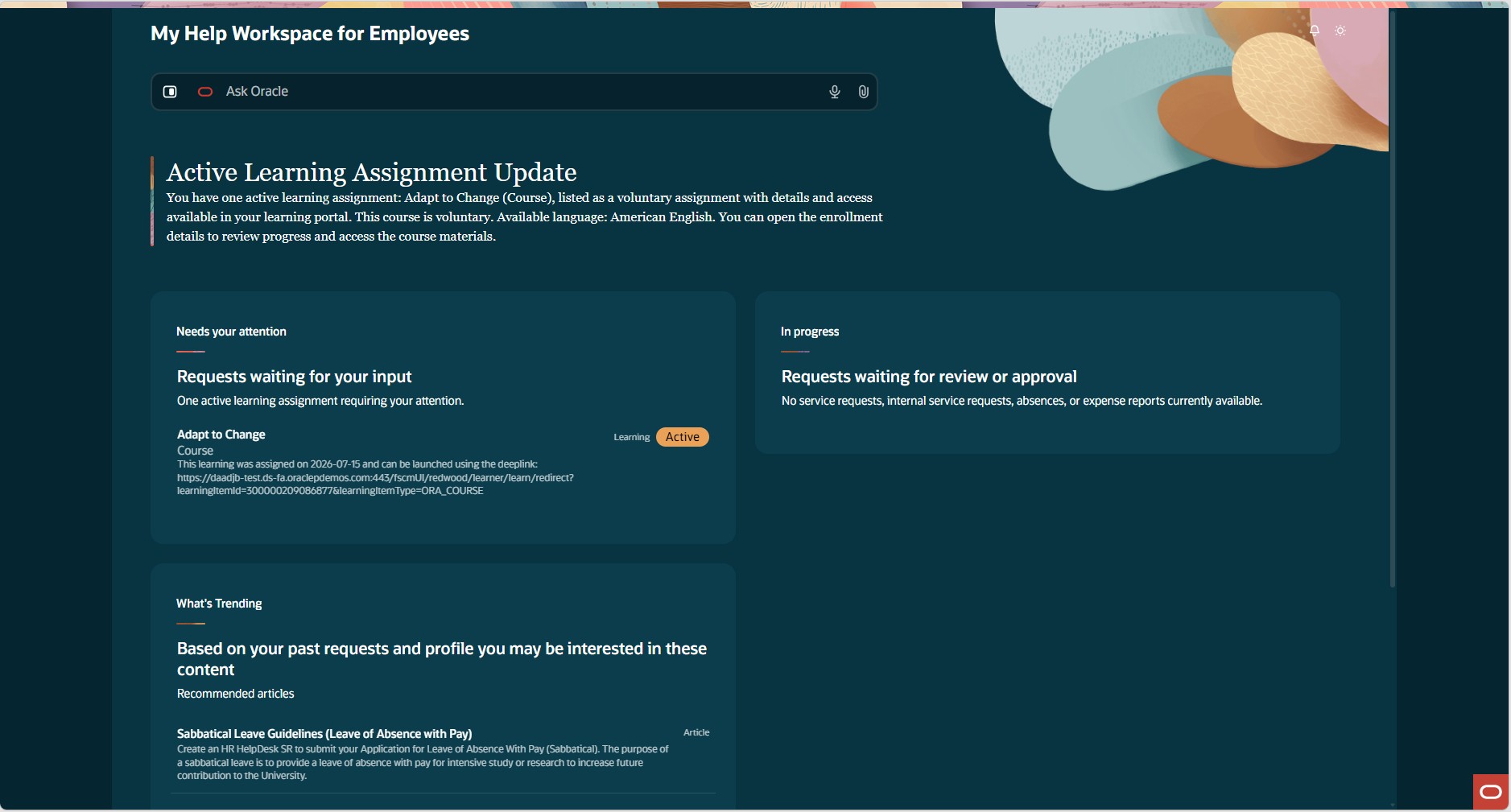
My Help Workspace for Employees
There are a number of components on this page:
- In the Ask Oracle search bar, you can ask questions conversationally, or you can click on the icon on the left of the search bar to open an AI Chat panel.
- The Summary provides an overview of active items, taking into consideration:
- Help Desk requests waiting for additional information from the employee
- Learning assignments that are not completed
- Assigned Journeys
- Expense reports that require action from the employee
- The Needs your attention section lists those items that require further action from the logged in employee, including:
- Help Desk requests waiting for additional information from the employee
- Learning assignments that need to be completed
- Assigned Journeys that need to be completed
- Expense reports that require additional clarification from the employee
- The In progress section includes items that the employee has initiated, but have not been updated in the past two days including:
- Help Desk requests waiting for a response
- Absence requests that are pending approval
- Expense reports pending approval
- What's Trending lists popular knowledge articles.
This feature gives employees a single place to review and act on Help Desk work that affects them. Employees can respond to pending requests, follow up on older requests, and find relevant knowledge without navigating across multiple pages.
For organizations adopting agentic apps, My Help Workspace for Employees also provides a Help Desk-specific example of how agentic app experiences can combine request data, knowledge, and conversational assistance in one employee workspace.
Steps to enable and configure
Create a custom role for app access
- Go to Tools > Security Console.
- On the Roles tab, create a custom role or edit an existing custom role.
- Enable permission groups for the custom role.
- In the role hierarchy, add the delivered duty role My Help Workspace for Employees App User,
ORA_DR_SVC_AI_APP_MY_HELP_WORKSPACE_FOR_EMPLOYEES
- Save the custom role.
- Assign the custom role to the users who should access My Help Workspace for Employees, if this is a new role.
If you need to control who can access the workspace, create a custom role and include the required delivered duty role or equivalent privileges and policies.
Add the app to Quick Actions
- From the home page, go to Configuration > Sandbox.
- Create a sandbox and enable Structure.
- In the sandbox, go to Tools > Structure > Homepage.
- Select Help Desk.
- Go to Quick Actions.
- Add a quick action named My Help Workspace for Employees.
- Set Visible to Yes.
- Set Link Type to Static URL.
- Enter this URL, replacing
<host>
with your environment host:<host>/hcmUI/redwoodAI/ora_my_help_workspace_for_employees - Save and close the quick action.
- Publish the sandbox after you finish testing.
Validate the employee experience
- Sign in as an employee who has the custom role.
- Click on the Help Desk tab.
- Under Quick Actions, open My Help Workspace for Employees.
- You should be able to:
- View a summary and panels for work that needs the employee's attention, work in progress, and popular knowledge articles.
- Expand a request that is waiting for employee information and use Reply to send a response.
- Expand a request that has not been updated recently and use the follow-up action to send a follow-up message.
- Select an article in the What's Trending panel and view the article contents.
- Use Ask Oracle to get AI Assistance and/or log a Help Desk ticket.
Tips and considerations
While the Agentic Application itself is not configurable, the underlying agents used are. AI Agent Workflow codes are as follows for the sections listed:
-
ORA_HELP_DESK_REQUEST_PENDING_MY_ACTION (Needs my attention)
-
ORA_HELP_DESK_REQUEST_WAITING_OTHER_RESPONSES (In progress)
-
ORA_HELP_DESK_WHATS_TRENDING_AGENT (What's Trending)
The Workspace depends on employee-specific data. Knowledge results and Ask Oracle answers depend on the knowledge articles available in the environment and what AI sub-agents are defined for use.
Key resources
After this feature is generally available, a video showing how to configure your environment and a demonstration of the functionality will be found on Oracle Video Hub: Fusion Help Desk.
AI Pricing: What you need to know about AI Agents, Agentic Applications, and AI Units
Access requirements
Users need access to My Help Workspace for Employees and to the app workflows used by the workspace.
Access is controlled by application and workflow read access for Fusion AI agents.
The delivered duty role My Help Workspace for Employees App User, ORA_DR_SVC_AI_APP_MY_HELP_WORKSPACE_FOR_EMPLOYEES, aggregates this access for the My Help Workspace for Employees app and its workflow agents, but this role is not assigned out of the box to existing roles.
The agentic application access policy uses:
- Application code:
ORA_MY_HELP_WORKSPACE_FOR_EMPLOYEES
- Permission group:
oraCommonFusionAIAgents_Application_read
- Data security condition:
oraCommonFusionAIAgents_Application_EndUserAllowedApps
The workflow access policies use:
- Permission group:
oraCommonFusionAIAgents_Workflow_read
- Data security condition:
oraCommonFusionAIAgents_Workflow_EndUserAllowedWorkflow