Widget Gallery Navigation Enhancements in the Customer Service Interface
The Customer Service Representative workflow of the Customer Service Interface Widget Gallery was improved to display only widgets relevant to the selected customer classification, Residential or Non Residential. This targeted filtering reduces unnecessary clutter and helps CSRs quickly locate the appropriate widgets when assisting customers.
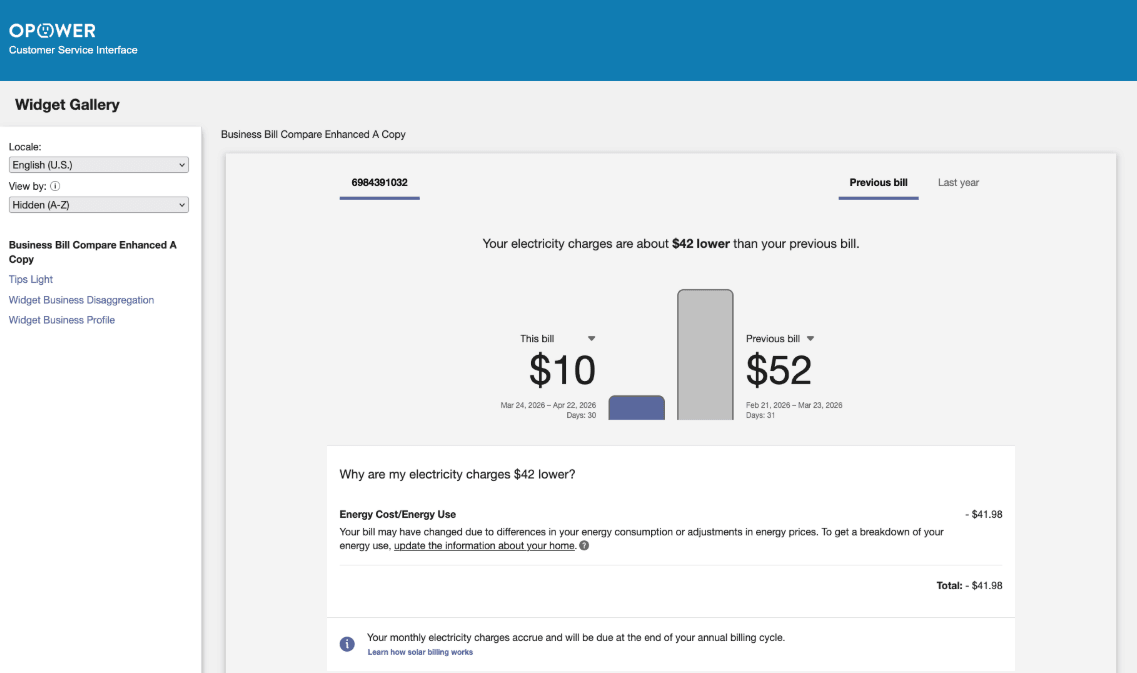
Enhanced Customer Service Interface Widget Gallery
Additionally, the View By drop-down includes a new Hidden option. When selected, Customer Service Representatives can view widgets that are hidden from their standard experience. This enhancement supports troubleshooting scenarios where a customer may be seeing a widget differently than the Customer Service Representative.
These updates improve efficiency, streamline navigation within the Widget Gallery, and support faster responses to customer inquiries.
Steps to enable and configure
Contact your Service Delivery Manager to coordinate configuration of the module.
- Log in to Inside Opower (https://inside.opower.com). This is your portal for questions and information related to your program.
- Go to the Community tab and contact the Service Delivery Manager using the information provided.