Change the Create Opportunity Smart Actions
Change the Create Opportunity smart actions using Oracle Visual Builder Studio (VBS).
Here's how:
- Sign in as a user with access to VBS. For example, sign in as a sales administrator or setup user.
- Create and enter a new sandbox ().
- Go to .
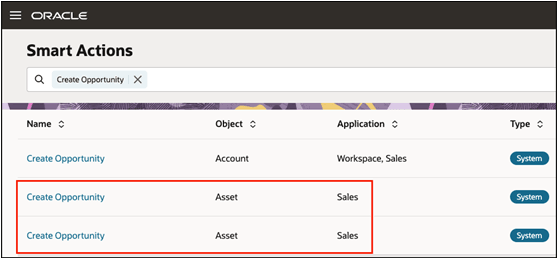
- Disable the Create Opportunity composite action,
SDA-CreateOpportunityComposite-assets:- Find the smart action labeled
SDA-CreateOpportunityComposite-assets. - Disable it by changing the Enabled value to No.
The Create Opportunity composite action creates a single opportunity for multiple assets. In this case, the Asset ID can't be linked at the header level.
- Find the smart action labeled
- Copy the Create Opportunity composite action,
SDA-CreateOpportunityComposite-assetsby duplicating and renaming the copy to something meaningful, likeCreate Opportunity. - In the Edit Smart Action page, edit the Action Type for the action.
- In the Field Mappings region, edit the Asset ID row.
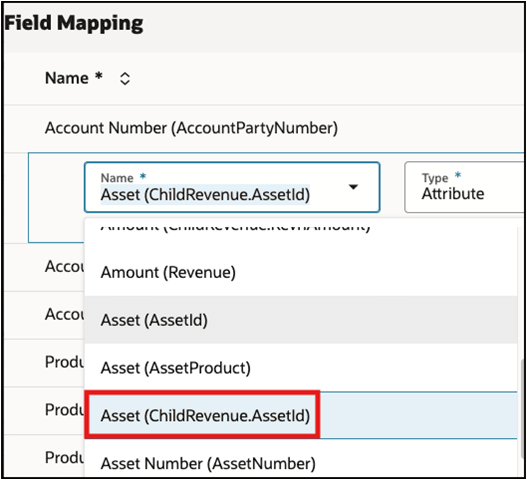
- Change the name from
Asset (ChildRevenue.AssetId)toAsset (AssetId). - Click Done.
- Click the Continue buttons on the next screens, then click Submit to save the change to the smart action.
- Disable the original Create Opportunity smart action, because it's now duplicated.
For more information about creating panels and subviews, see Add Panels and Subviews to Standard Sales Objects.