Edit Express Report Parameters in Preferences
Click the Preferences button in your Express Report to specify the columns, filters, and groups for your report.
For details, see the topics:
- Specify Which Columns Appear in Your Report
- Add Filters to Your Report
- Group Data in Your Report
- Rearrange Column Order in the Report
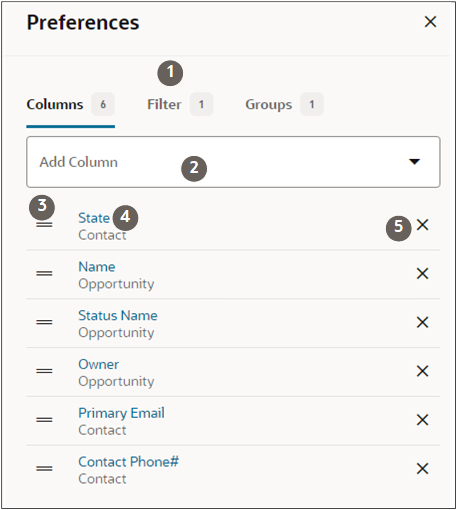
Here's a screenshot of the Preferences section with the Columns tab selected. The usage tips in the table apply to the other tabs as well.
Callout Number Description 1 Unlike Microsoft Excel where you edit in the columns themselves, in Express Reports you do all your work in the three tabs: Columns, Filters, and Groups. 2 Click Add Column (down arrow icon) to pick one of the most frequently used attributes or search for an attribute by keyword. 3 Drag by the lines icon to change order. 4 Drill down into an attribute to change its name. 5 Delete the item from the list.