Use AI to Get a Head Start by Creating Charts and KPIs from a Prompt
Get a head start on creating visualizations by having an AI Agent create basic charts, KPIs (metric cards), and tables for you. You enter a prompt in the sales dashboard, and the AI agent does the rest. If you have sales administrator privileges, you can save and edit the resulting content in the Visualization Configuration tool and add it to sales dashboards in Oracle Visual Builder Studio.
- Enter a prompt in the sales dashboard Ask Oracle bar:
-
To create a chart, enter a prompt and prefaced with the verb "show".
For example, enter: show lost opportunities by sales stage for the Standard Sales Process sales method . In your prompts, be as specific as possible for better results.
-
To create a KPI, enter a prompt starting with "sum of" or "number of". For example, enter: number of opportunities closed this quarter.
The prompt you enter becomes the title of the KPI.
-
When you see the Visualize selection in the list, click it or press the Shift and Return keys on your keyboard.
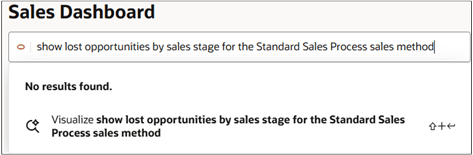
Depending on your prompt, the agent generates a chart, a KPI (metric card), or a table and displays it in the drawer.
-
If you aren't satisfied with the result, rephrase your prompt and try again. Direct editing is limited:
-
For charts, you can update the dimensions and metrics of the visualization by clicking the Action (3 vertical dots) icon. Depending on the graph type, you can change:
- The attribute on the x-axis
- The attribute that's used to categorize the data
- Graph orientation
- Graph stacking
-
You can't edit the generated KPIs directly in the drawer. You must use the Visualization Configuration tool.
-
-
If you have sales administrator privileges, then you can save the generated content to the library by clicking Add to Library.
Once saved, you can:
-
Add the content to your personal sales dashboard by clicking Edit Page Layout button.
- Edit the content in the Visualization Configuration tool and add it to sales dashboards using Oracle Visual Builder Studio.
-