Before You Start
Before you can access and start to use Sales Orchestration, you must:
- Set up Dispatcher rules for salespeople to access the Sales Orchestration page.
For example, to create a dispatcher rule:
- Go to and select the Dispatcher tile.
- From the Dispatcher UI, select Create to
display the following Dispatcher Rules guided process:
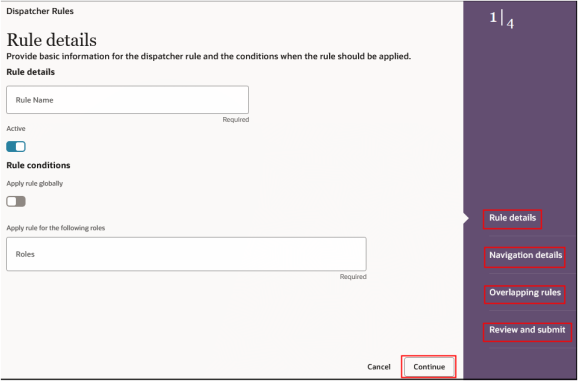
- For the Rule details step, follow the steps in the guided process and provide the required basic information for the dispatcher rule and the conditions when the rule should be applied.
- Continue to the Navigation details step and select the objects and pages that support this rule's navigation, including the navigation component's new destination.
- Continue to the Overlapping rules step and if dispatcher rules overlap with each other, specify which rule to use first from here.
- Select Review and Submit.
Note:You can navigate from the Sales Orchestration application to the VB app in several ways. Use a custom navigation action available in the Actions drop-down list, add a link to the Opportunity header using extensibility, or create a smart action on the list or foldout panel to navigate directly to the Sales Orchestration app.
For more details, see Change Navigation to Pages in Your Sales Application topic in the How do I create an application extension for custom objects? playbook.
You can also view a demo of how to do this from this Using Dispatcher to Override Default Navigation video.
- Enable data capture for opportunity attributes using Deal Data Capture setup for
the Deal Advisor to suggest opportunity updates. For example, to enable opportunity attributes using Deal Data Capture setup:
- Go to and select the Data Capture Rules tile.
- From the Data Capture Setup UI, select Create Data Capture from where you can provide a brief context of what data to capture or what attributes to start with and explore.
- Select Create and a screen similar to the
following screen is displayed.
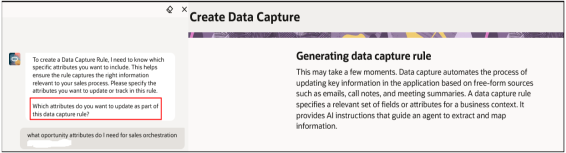
Data capture automates the process of updating key information in the application based on free-form sources such as emails, call notes, and meeting summaries. A data capture rule specifies a relevant set of fields or attributes for a business context. It provides AI instructions that guide an agent to extract and map information.
- In response to the prompt, specify which attributes do you want to
update as part of this data capture rule?
For example, to effectively capture a deal for sales orchestration, key Opportunity attributes typically include:
- Close Date
- Win Probability
- Expected Revenue
- Opportunity Type
- Status
- Comments