Shipment and Billing Details
Manage shipment, billing, and payment for your sales order.
The sales order sets shipment, billing, and payment values by default according to the customer you select. You can accept the default values, or modify them to meet your requirements:
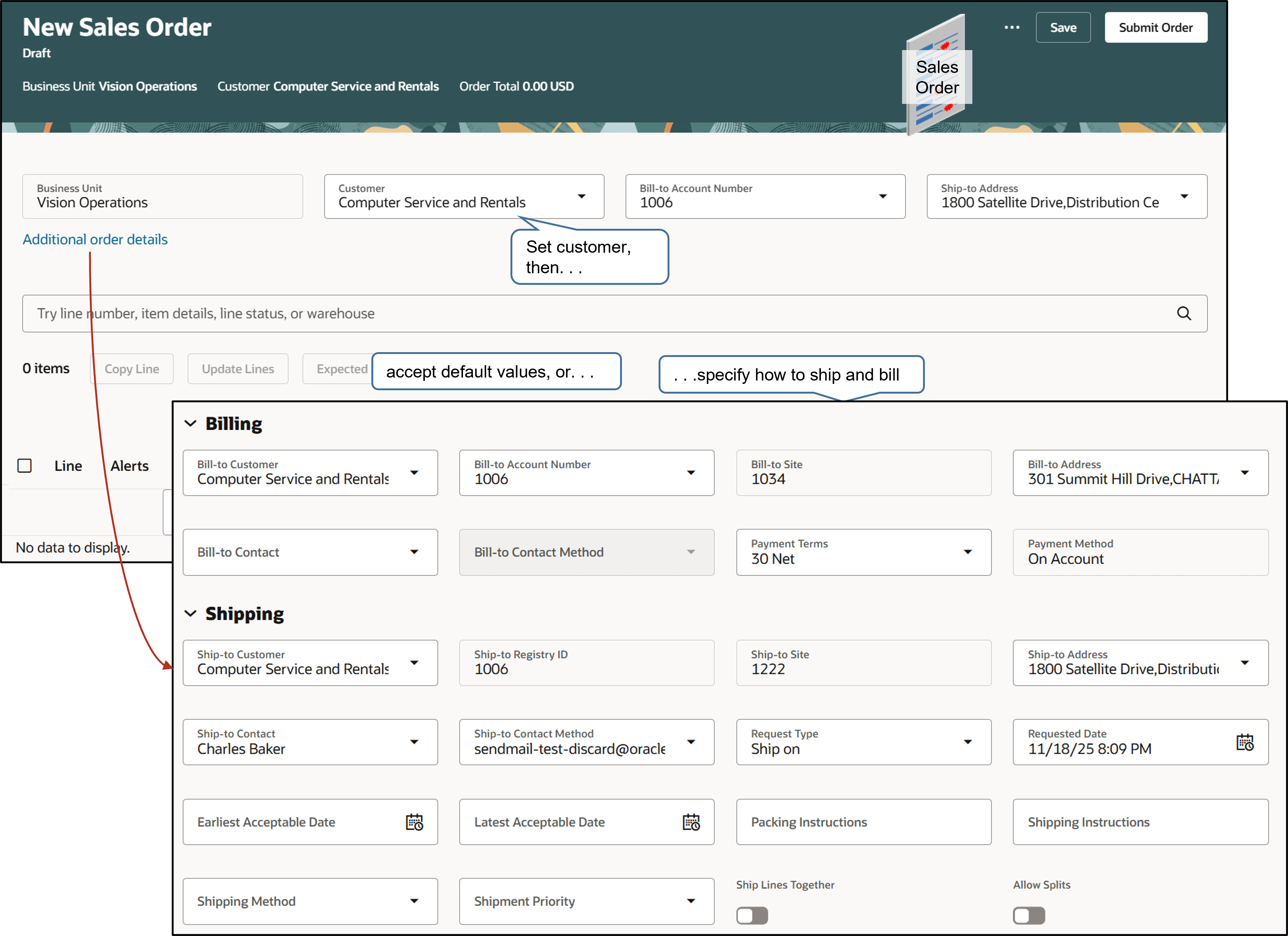
Use the shipment details:
-
Set ship-to details, such as the ship-to contact person.
-
Set the method, such as United States Postal Service.
-
Specify freight terms, such as prepaid.
-
Specify shipment priority, such as High.
-
Add text that describes packing and shipping instructions.
-
Estimate availability.
-
Ship order lines together in a shipment set or by themselves.
-
Specify the supplier, such as the warehouse, the company who supplies the item, and item substitution.
Use the Billing section:
-
Set billing details, such as the bill-to contact person.
-
Set the payment term, such as Net 30.
-
Enter purchase order details.
-
Edit accounting details.
Select the Customer First
The value you set in the Customer attribute affects values you can select in other attributes. For example, the sales order only displays contacts in the Bill-to Contact attribute who are associated with the customer. This behavior also applies with the Bill-to Location, Ship-to Contact, Ship-to Method, Warehouse, Supplier, and so on. If you can't find the value you need, ask your order administrator.
Set Billing and Payment
Order Management might disable some attributes in the Billing section. For example, you must select the Bill-to Location before you can select the Bill-to Contact, and you must select the Bill-to Contact before you can select the Bill-to Method.
Order Management might also disable other attributes depending on the value that you select in the Customer attribute. For example, your order administrator might set up the customer so it uses only one Bill-to Location.
Select Accounting Details
Use the attributes on the order line to tell Order Management how to send accounting details to Oracle Receivables:
|
Attribute |
Description |
|---|---|
|
Accounting Rule |
Select the revenue recognition to send to Oracle Receivables for the invoice line. If you select an accounting rule, then Oracle Receivables will use the value you select instead of the default value it uses. |
|
Invoicing Rule |
Select the time frame to send to Oracle Receivables. The time frame determines when to recognize receivables if the invoice includes more than one accounting period. If you select an invoicing rule, then Oracle Receivables will use the value you select instead of the default value it uses. |
|
Receivables Transaction Type |
Select the accounting for debit memos, credit memos, on-account credits, and invoices that Oracle Receivables creates. Specify whether your transaction entries update customer balances and whether Oracle Receivables posts these transactions to your general ledger. Oracle Receivables doesn't use a default value for the receivables transaction. It will use the value you select. |
Override Details on Order Lines
Some values that you set might override values that you set elsewhere in the sales order. For example, you can enter a value for the Purchase Order on the order header that applies to all order lines. You can also enter a value for the Purchase Order Line on the order line.