Tier Pricing
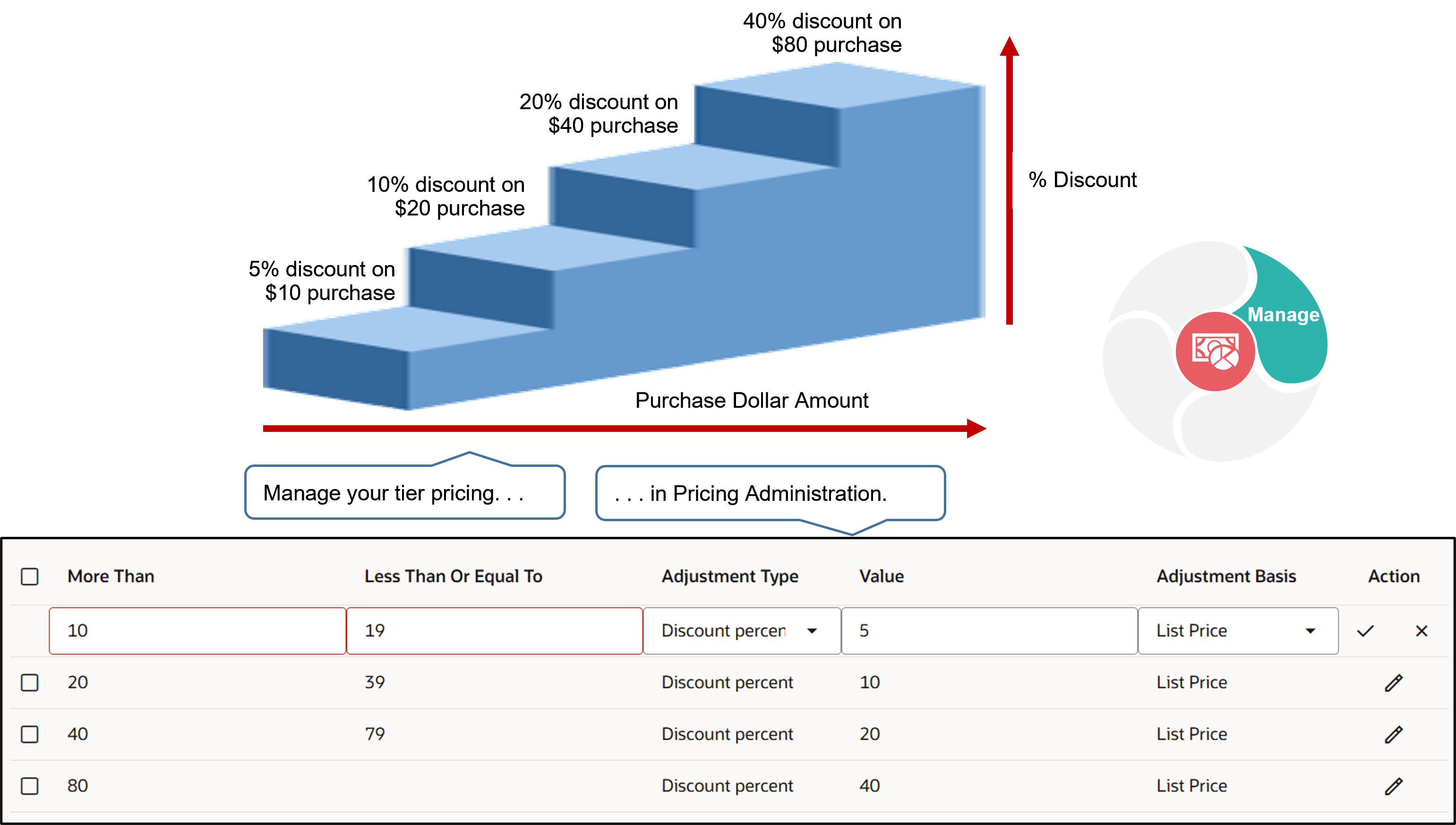
Use tier pricing to adjust a pricing rule according to quantity or monetary value.
Note
-
Use the price list tier to adjust the base list price.
-
Use the tier adjustment on a discount list to adjust list price.
-
Adjust a price list or discount list according to quantity or amount.
-
Apply tiers on the order line or entire sales order.
-
Apply rules to only the highest tier or to all tiers.
-
Apply discount percent, discount amount, markup percent, markup amount, or price override.
-
Apply pricing on each unit ordered or to a block of units.
For example, add tier pricing to a pricing rule to adjust price according to the number of items that the customer orders. If the customer buys:
-
Two desktop computers, use tier 1 to apply a 10% discount.
-
Four desktop computers, use tier 2 to apply a 15% discount.
This topic describes attributes you use with tier pricing. For details, see Add Tiers to Pricing Rules.
You can use these values when you set the Application Method attribute of a tier pricing rule:
-
Per Unit. Apply the rule to each unit.
-
As Block. Apply the rule to a block of units.
Set Up Tiers for Each Unit
Apply the tier pricing rule to each unit. For example, if the sales order includes a quantity of four, and if the discount is $1 for each item, then the total discount is $4.
Use these attributes when you set up a tier pricing rule for each unit:
|
Attribute |
Description |
|---|---|
|
Minimum |
Set the lowest value that defines the tier. |
|
Maximum |
Set the highest value that defines the tier. |
|
Set the Apply To attribute to All Tiers |
Apply the adjustment that each tier specifies. |
|
Set the Apply To attribute to Highest Tier |
If the quantity places the sales order in the highest tier, then apply the adjustment that the highest tier specifies to all items, and ignore all other tiers. |
Example of Setting Up Tiers for Each Unit
Assume you must set up:
-
Tier 1. If the customer orders a quantity of one to 10 items, then price each item at $50.
-
Tier 2. If the customer orders a quantity of more than 10 items, then price each item at $45.
-
Override the list price with a price that you specify for each tier.
Pricing assigns items to tiers when the sales order includes a quantity of 15 items, depending on whether you set the Apply To attribute to All Tiers or Highest Tiers:
|
Tier |
All Tiers |
Highest Tier |
|---|---|---|
|
1 |
10 items |
Not applicable |
|
2 |
5 items |
15 items |
Pricing calculates these values:
|
|
Minimum |
Maximum |
Price Override |
All Tiers |
Highest Tier |
|---|---|---|---|---|---|
|
Tier 1 |
1 |
10 |
$50 |
10 items multiplied by $50 equals $500 |
Not applicable |
|
Tier 2 |
11 |
Not applicable |
$45 |
5 items multiplied by $45 equals $225 |
15 items multiplied by $45 equals $675 |
|
Price for All Tiers |
Not applicable |
Not applicable |
Not applicable |
$500 plus $225 equals $725 |
$675 |
Set Up Tiers for Blocks
You use the same attributes to set up tiers for blocks of units that you use when you set up tiers for each unit, plus a few more:
|
Concept |
Description |
|---|---|
|
Block |
A quantity of items, such as 100 desktop computers. |
|
Increment |
Size of the block. For example, if you specify the Increment as 100, then the block size is 100. |
|
Partial block |
A block that includes only part of the full count of items that the Increment specifies for a block. For example, if the Increment is 100, then any block that includes less than 100 items is a partial block, so a block that includes a quantity of 99 is a partial block. |
|
Satisfied block |
A block that includes the full quantity that the Increment specifies for a block. For example, if the Increment is 100, then a block that includes a quantity of 100 is satisfied. |
If you set Partial Block Action to:
-
Include Partial Block. Pricing applies the discount to each partial block and to each satisfied block.
-
Include Satisfied Blocks. Pricing applies the discount only to each satisfied block.
Examples of Setting Up Tiers for Blocks
Assume you must set up these tiers:
|
Tier |
Quantity |
Price for Each Item |
|---|---|---|
|
1 |
100 to 1,000 |
10 |
|
2 |
1,001 to 2,000 |
5 |
|
3 |
More than 2,000 |
3 |
Also, you override the list price with a price that you specify for each tier.
If you set the Apply To attribute to Highest Tier Pricing, then Pricing will assign these quantities to tiers:
|
Minimum |
Maximum |
Increment |
Item Price |
|---|---|---|---|
|
1 |
1,000 |
100 |
$10 |
|
1,001 |
2,000 |
50 |
$5 |
|
2,001 |
Not applicable |
Not applicable |
$3 |
Example of Using All Tiers or Highest Tier
If the sales order includes a quantity of 2,300 items, then Pricing will assign quantities to each tier depending on how you set the Apply To attribute:
|
Tier |
Set Apply To Attribute to All Tiers |
Set Apply To Attribute to Highest Tier |
|---|---|---|
|
1 |
1,000 items |
Not applicable |
|
2 |
1,000 items |
Not applicable |
|
3 |
300 items |
2,300 items |
Pricing calculates these values for this example:
|
|
Minimum |
Maximum |
Increment |
Price Override |
All Tiers |
Highest Tier |
|---|---|---|---|---|---|---|
|
Tier 1 |
1 |
1,000 |
100 |
$10 |
1,000 items multiplied by $10 each equals $10,000 |
Not applicable |
|
Tier 2 |
1,001 |
2,000 |
50 |
$5 |
1,000 items multiplied by $5 each equals $5,000 |
Not applicable |
|
Tier 3 |
2,001 |
Not applicable |
Not applicable |
$3 |
300 items multiplied by $3 each equals $900 |
2,300 items multiplied by $3 each equals $6,900 |
|
Price for All Tiers |
Not applicable |
Not applicable |
Not applicable |
Not applicable |
$15,900 |
$6,900 |
Example of Using Include Partial Block or Include Satisfied Blocks
If the sales order includes a quantity of 850 units, then Pricing will assign all items to tier 1, and will ignore the other tiers.
Assume the list price is $12 each.
Here are the values that Pricing will calculate depending on whether or not you select Include Partial Block or Include Satisfied Blocks:
|
|
Minimum |
Maximum |
Increment |
Price Override |
Include Partial Block |
Include Satisfied Blocks |
|---|---|---|---|---|---|---|
|
Tier 1 |
1 |
1,000 |
100 |
$10 |
850 items multiplied by $10 each equals $8,500 |
800 items multiplied by $10 each equals $8000 |
|
Tier 2 |
1,001 |
2,000 |
50 |
$5 |
Not applicable |
Not applicable |
|
Tier 3 |
2,001 |
Not applicable |
Not applicable |
$3 |
Not applicable |
Not applicable |
|
Price for All Tiers |
Not applicable |
Not applicable |
Not applicable |
Not applicable |
$8,500 |
$8000 |
|
List Price for Items Not in Satisfied Bloc |
Not applicable |
Not applicable |
Not applicable |
Not applicable |
Not applicable |
50 items multiplied by $12 each equals 600 |
|
Total Price for All Items |
Not applicable |
Not applicable |
Not applicable |
Not applicable |
Not applicable |
$8600 |
Evaluate Block Tiers Across All Lines
Allow Oracle Pricing to consider the quantity from all order lines in your sales order when it prices according to a block of units in a tiered pricing rule. See Evaluate Block Pricing Tiers Across All Lines.