Claim Statuses in Redwood
Use claim statuses to monitor your claims. Each status indicates the progress of the claim from creation to settlement.
A user status can be assigned to each of the claim system status to further track the progress of the claim, based on your business practices.
| Status | What Happens to the Claim |
|---|---|
| Open | New claim is created. |
| Approval Pending | Claim research is complete, with corresponding claim reason applied. The claim analyst has submitted the claim for approval, but isn't yet approved. |
| Approval Rejected | Claim is rejected internally. |
| Settlement Pending | Claim has been submitted and is pending settlement. |
| Settled | Claim has been updated with settlement details in the
Settlement tab including:
|
| Canceled | Claim is canceled by the claims analyst. This action is irreversible. |
Status Transitions for Claims
The following figure shows the status transitions that can happen in a claim.
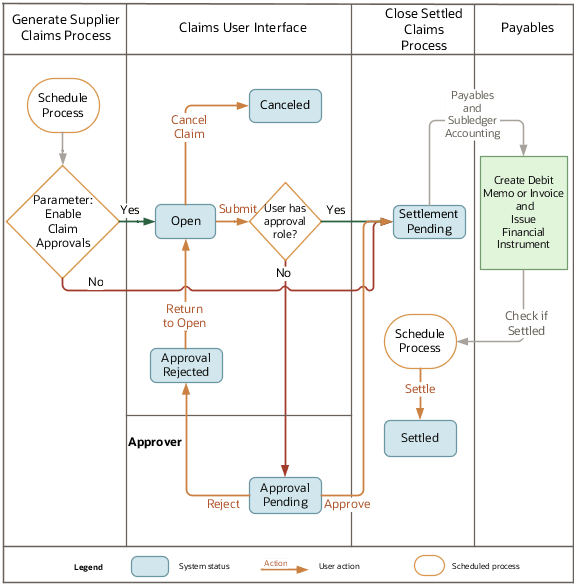
User Action and Status Transitions
| User Action | Source System Status | Target System Status |
|---|---|---|
| Submit | Open | Approval Pending |
| Cancel Claim | Open | Canceled |
| Approve | Approval Pending | Settlement Pending |
| Reject | Approval Pending | Approval Rejected |
| Return to Open | Approval Rejected | Open |