How Performance Documents Work with Goals
Use synchronized goals to keep goal information consistent across Goal Management, Career Development, and Performance Management.
When synchronized goals are enabled, supported changes made to a worker’s active performance and development goals are automatically reflected in applicable performance documents.
Performance Goals
- The goal plan and performance template use the same document type.
- The goal plan and performance document use the same review period.
- The goal plan and Performance Goals section use the same goal Evaluation Type.
- The worker’s goal plan is active.
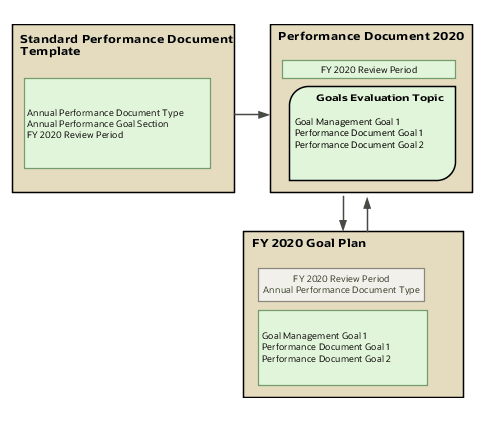
The image shows how the document type and review period helps to integrate performance documents with goal plans. As you can see in the image, the same document type and review period are used in both the Standard Performance Document Template performance document template and the FY2020 Goal Plan goal plan. When the Performance Document 2020 document is created based on the Standard Performance Document Template document template, the Goal Management Goal 1 goal available in the FY 2020 Goal Plan goal plan is automatically included. You can see the goals added in the Performance Document 2020 document in the FY 2020 Goal Plan goal plan.
If the worker has multiple matching goal plans, the application creates a separate Performance Goals evaluation topic for each goal plan. Each synchronized Performance Goals section in the performance template must use a different goal Evaluation Type. The evaluation topic name displayed in the performance document is derived from the worker’s goal plan name, not from the section name configured in the performance template.
- Adding a performance goal
- Editing goal details
- Updating goal weights
- Deleting or cancelling a goal, when permitted
- Moving a goal between goal plans
- Copying or extending a goal
- Transferring a goal to another worker, when permitted
- Individual goal weights aren’t configured in the performance template section.
- Whether weights are enabled is determined by the goal plan.
- Goal weights can be entered with up to 2 decimal places.
- Minimum goal weight isn’t supported.
- Updated goal weights are reflected in the performance document.
- Weight changes that require approval aren’t used in the evaluation until approval is complete.
- Approved goals
- Cancelled goals
- Goals marked as not ready to evaluate
Development Goals
A synchronized development goals section displays a worker’s active development goals in the performance document. and keeps information consistent between Career Development and Performance Management. Unlike synchronized performance goals, development goals generally map to a single development goals evaluation topic rather than separate evaluation topics for multiple goal plans. The evaluation topic name is based on the worker’s development plan name. The application synchronizes supported changes made to active development goals with applicable performance documents. These changes can include adding, editing, or removing development goals, when permitted. Development goals that are no longer relevant should be made inactive so that they don’t continue to appear in performance documents. When evaluation tasks are complete, the application can create frozen copies of the development goals used in the evaluation. Later changes in Career Development don’t alter the frozen evaluation record
Goals Approval
When approvals are enabled, changes made from either Goal Management or the performance document follow the configured approval process. Pending changes can appear in the performance document, but goals with unapproved changes aren’t available for evaluation until approval is complete. The Performance Goals evaluation topic can remain locked while approvals are pending.
Goals Section Type
Use the Performance Goals or Development Goals section type in the performance template. For the Performance Goals section, you can use rating models to rate employees and use calculation rules to calculate an overall goal section rating. Remember to enable ratings and comments so that managers, employees, and participants can select a rating for the section and provide comments.
Goals Not Ready to Evaluate
A worker or manager can mark a performance goal as Not Ready to Evaluate when this option is enabled for their role. When a goal is marked as not ready to evaluate:
-
The goal isn’t validated for missing required ratings or comments.
-
The goal can be excluded from calculations.
-
Existing ratings and comments are retained but aren’t displayed.
Restrictions After Goals Are Evaluated
- An evaluated goal can’t be deleted.
- An evaluated goal can’t be moved to another goal plan.
- An evaluated goal can’t be transferred to another worker.
- A goal plan can’t be deleted when it has created a section in a performance document.
-
Certain goal plan attributes, such as document type, review period, status, and weight configuration, can become read-only after the plan is used in a performance document.