Working with the Consolidated Effective Tax Rate Using IFRS Reporting
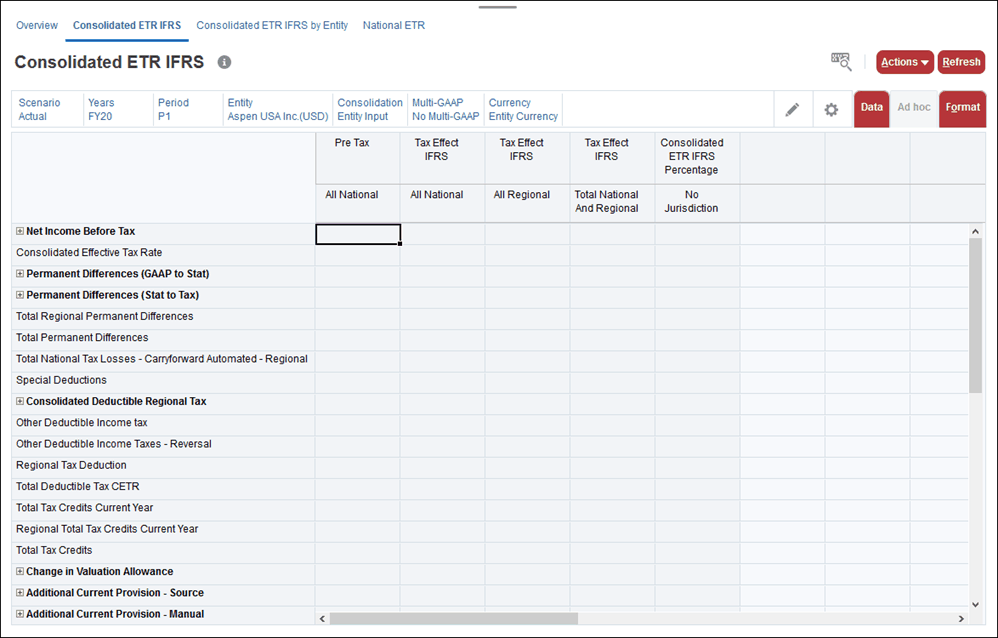
Tax Reporting calculates the Effective Tax Rate (ETR) reconciliation, based on IFRS reporting standards. The Consolidated ETR IFRS form shows the pre-tax, tax, and percentage on the form, and applies both the National and Regional consolidated tax rates. The tax rate is a global rate.
Note:
The IFRS feature must be enabled for the application in order to display the Consolidated ETR IFRS rates form and the Consolidated Tax Rates IFRS by Entity form to show the Accounts calculated using Entity CETR rates. See the following procedures in the Administering Tax Reporting guide to enable the IFRS feature:
Before you begin, you must input a National and Regional Consolidated tax rate. Tax is calculated based on the Consolidated tax rate respectively for National and Regional NIBT. Remaining amounts, such as additional provision items, deferred tax, and so on, are pulled in from the National current and deferred provisions.
The following formulas are used in calculations:
Table 12-17 CETR IFRS Formulas
| Calculation | Formula | Example |
|---|---|---|
|
National Tax Rate Differences |
Current Year Domicile Rate * (NIBT Adjusted) - National Consolidated ETR IFRS rate * (NIBT Adjusted) |
.40(207040) - .40(207040)=82816-82816=0 |
|
Local Tax Rate Differences The local tax rate for each regional entity |
Local tax rate differences = (((Net Income Before Tax Entity1)* Current Year Apportionment Rate))*Current Year Jurisdiction Rate) + (((Net Income Before Tax Entity2)* Current Year Apportionment Rate))*Current Year Jurisdiction Rate)- Local Consolidate ETR IFRS rate * (Net Income Before Taxes) |
Local tax rate differences = (((517600)*.05))*.10)+ (((517600)*.05))*.10)-.05*(517600) Local tax rate differences = ((25880)*.10)+ (25880 *.10)) – .05*517600 Local tax rate differences = (2588 + 2588) – 25880 = -207400 |
|
CETR IFRS % for NIBT |
Tax Effected IFRS at Total National and Regional / Pre-Tax NIBT Adjusted at All National |
23155/517600=0.4485=44.85% 232920/517600=45% |
To view a Consolidated ETR Tax Rates IFRS report:
- Set the National and Local Consolidated tax rates:
- From the Home page, click Application, and then click Configuration.
- On the Configure page, click Consolidated Tax Rates, and then select the Consolidated Tax Rates IFRS tab.
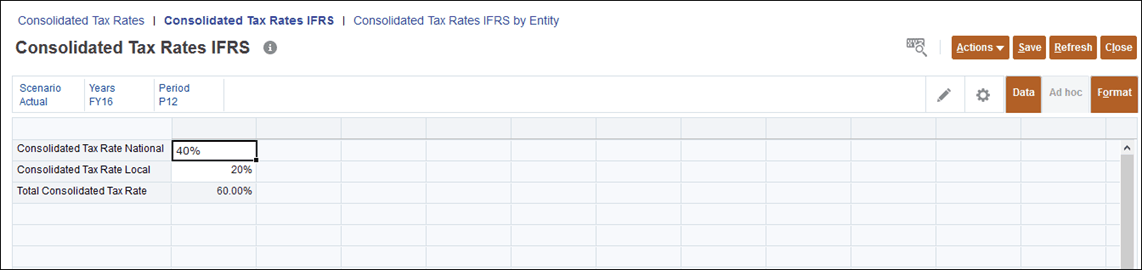
- Enter the National and Local tax rates, and then click Save. Enter the rate as a decimal. For example, enter 1 for 100, or .5 for 50%. These rates do not need to match GAAP rate percentages.
These rates only apply to Net Income Before Tax (NIBT).
Other fields just represent data movement.
- Click Save to populate the Total Consolidated Tax Rate, and then click Close.
- From the Home page, click Tax Provision National, and then click ETR IFRS.
- Click the Consolidated ETR IFRS tab. The following columns are displayed:
- Pre-Tax All National
- Tax Effect IFRS All National
- Tax Effect IFRS All Regional
- Tax Effect IFRS Total National and Regional
- Consolidated ETR IFRS Percentage No Jurisdiction
- Optional: Click the Edit icon
 , and select the POV.
- Select Actions, and then Consolidate.
- Enter the dimensions for which you want to run the calculations. The dimensions default to the current POV, but they can be changed.