Redwood Reconciliation Dashboard Interface
The Reconciliation Workbench UI in the Redwood platform features individual sections for each integration type.
Navigating to Redwood Reconciliation Workbench UI
- Launch the WMS Application
- Go to the Global Settings drop-down list and click Try the new Redwood Experience.
- The Welcome to Warehouse Management Cloud page opens.
- Click the Home with Ask Oracle button icon at the bottom right of the page.

- Search your desired options (Recon Workbench/ Inventory Discrepancies/ ERP
Inventory Summary/ WMS inventory Summary) and launch the UI. Note: We recommend you use a high-resolution screen or higher zoom level to have better visibility of graphs.
Redwood Reconciliation Workbench Dashboard
- Integration Type Tile: These integration tiles display associated
error counts per integration recipes for specific facility and company.

- Receipt Advice
- Receipt Confirmation
- Inventory Transactions
- Shipment Request
- Shipment Confirmation
- ERP Inventory Summary
- MFG Movement Request
- MFG Pick Confirm/Cancel
- Data Grid for Listing Errors for Integration Type – This section
displays an error detail corresponding to integration type making each tile
unique and consists following fields:
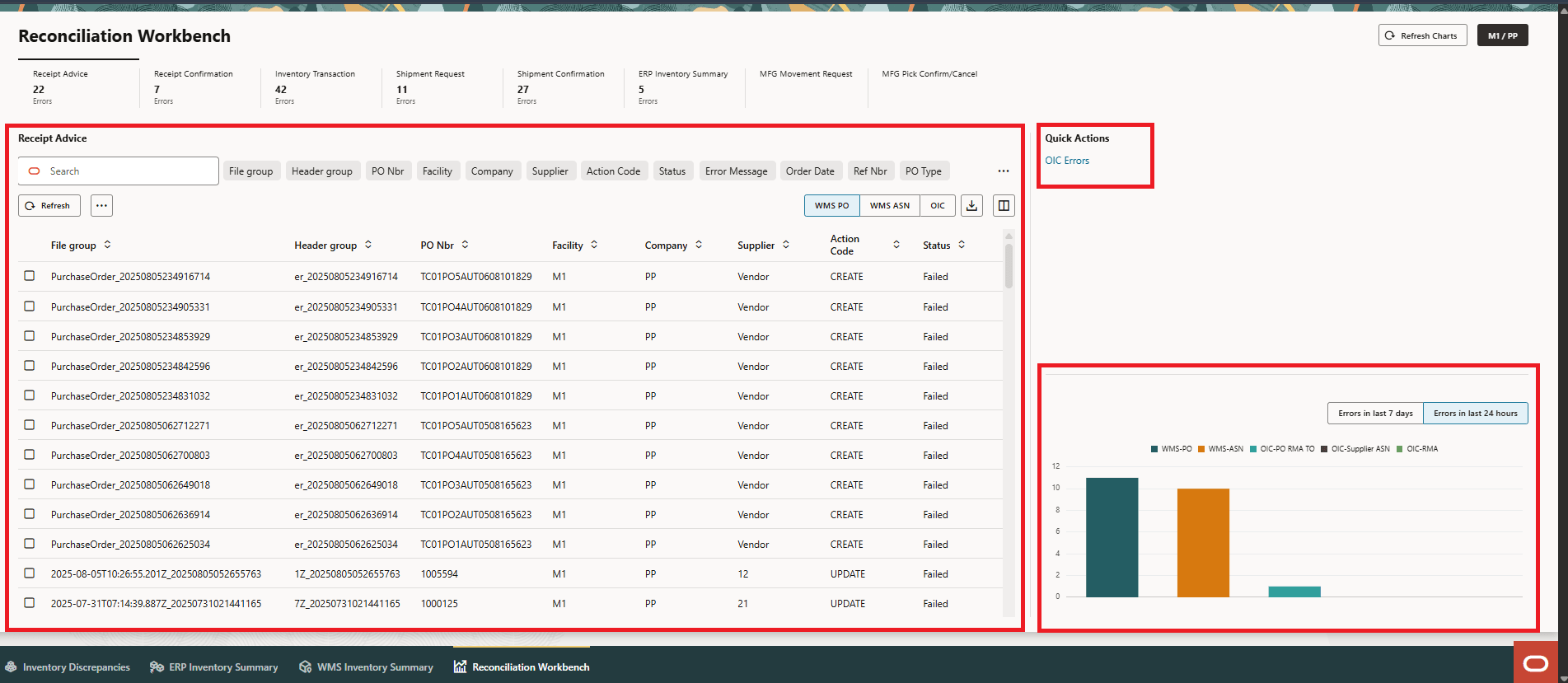
Integration Type Error
Fields Description Search field Filter desirable column to appear on the data grid. Refresh button Updates the data periodically. More Actions (…) Click to access following actions:
- Delete
- Purchase Order Detail
- Reprocess selected records
- Reprocess all failed records
- Clear Stage Records
Toggles
Click to access error details for WMS and OIC Integration Sub-types for specific facility and company.Toggles
Integration Type Toggles Details Receipt Advice WMS PO Fetches stage table error count for PO WMS ASN Fetches stage table error count for ASN OIC Fetches OIC error count for receipt advice Receipt Confirmation WMS Inventory History Fetches WMS inventory history error count for receipt confirmation WMS Output Interface IHT Fetches WMS output interface error count for receipt confirmation. OIC Fetches OIC error count for receipt Confirmation. Inventory Transaction WMS Inventory History Fetches WMS inventory history error count for Inventory transactions.
WMS Output Interface IHT Fetches WMS output interface error count for Inventory transactions
OIC Fetches OIC error count for Inventory transaction
Shipment Request WMS Sales Order Fetches WMS stage table error count for Order
OIC Fetches OIC error count for ship request
Shipment Confirmation WMs Output Interface Load Fetches WMS output interface for Ship confirmation WMs Output Interface Manifest Fetches WMS output interface for Ship confirmation
OIC Fetches OIC error count for ship confirmation ERP Inventory Summary Stage ERP Inventory Summary Fetches WMS stage ERP-INV-SUMMARY input interface for the ERP Inventory Summary integration type OIC Fetches OIC error count for ERP Inventory Summary integration type Export button Download the data in .csv format. Columns Add or hide the columns to the data grid. - Error Count in trend lines and bar graphs:
- Errors in the last 7 Days: Gives an overview of the trend for trailing seven days and displays total errors that occurred for a particular sub-type.
- Errors in the last 24 hours: This is an actionable bar graph. Displays error count captured during the last 24hours or between 2 schedule job runs.
- Quick Action Links: This section provides deep links to OIC page and
ERP-Inventory Transaction. Each specific quick action link is associated per
Integration tile. Following table displays the respective OIC/ERP Inventory
Transaction link specific to Integration Tile.

- Click the OIC Errors link to look for relevant instance ID
for the failed WMS record.
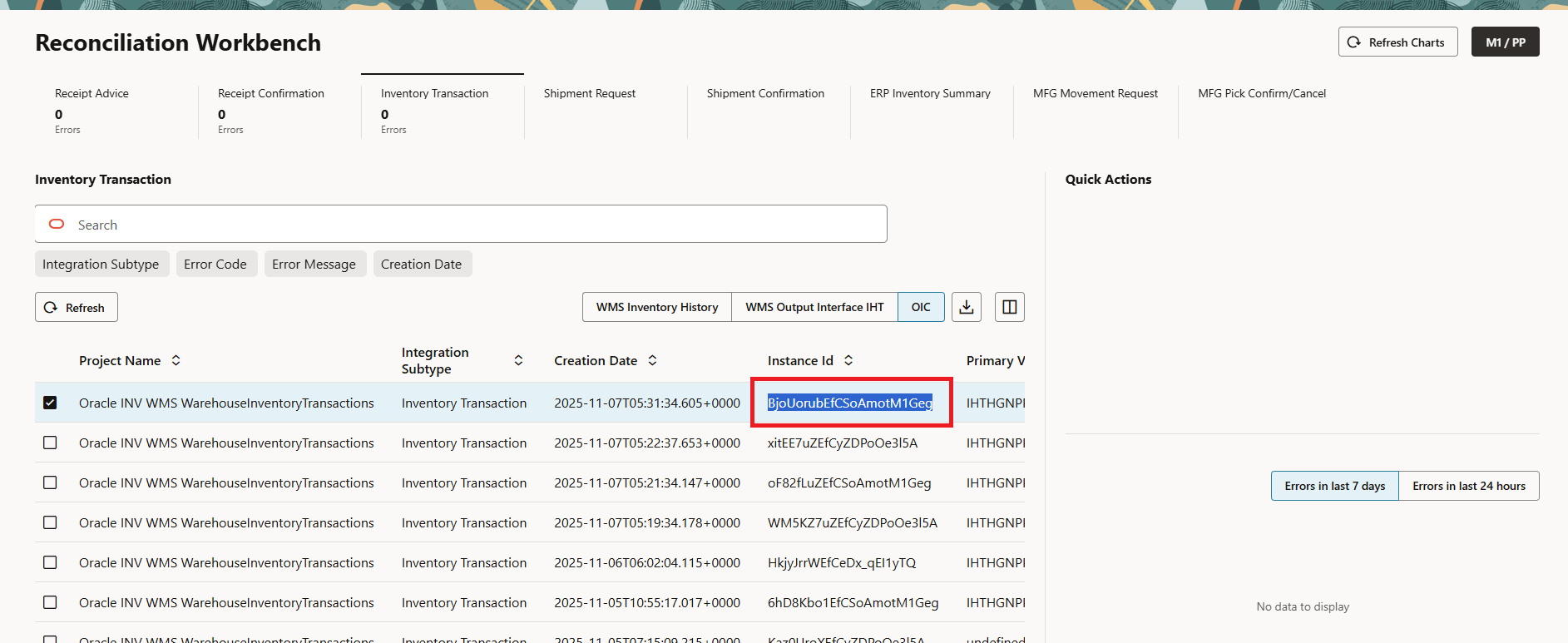
- The OIC error page opens. You can filter and search via Instance ID
and take necessary actions.
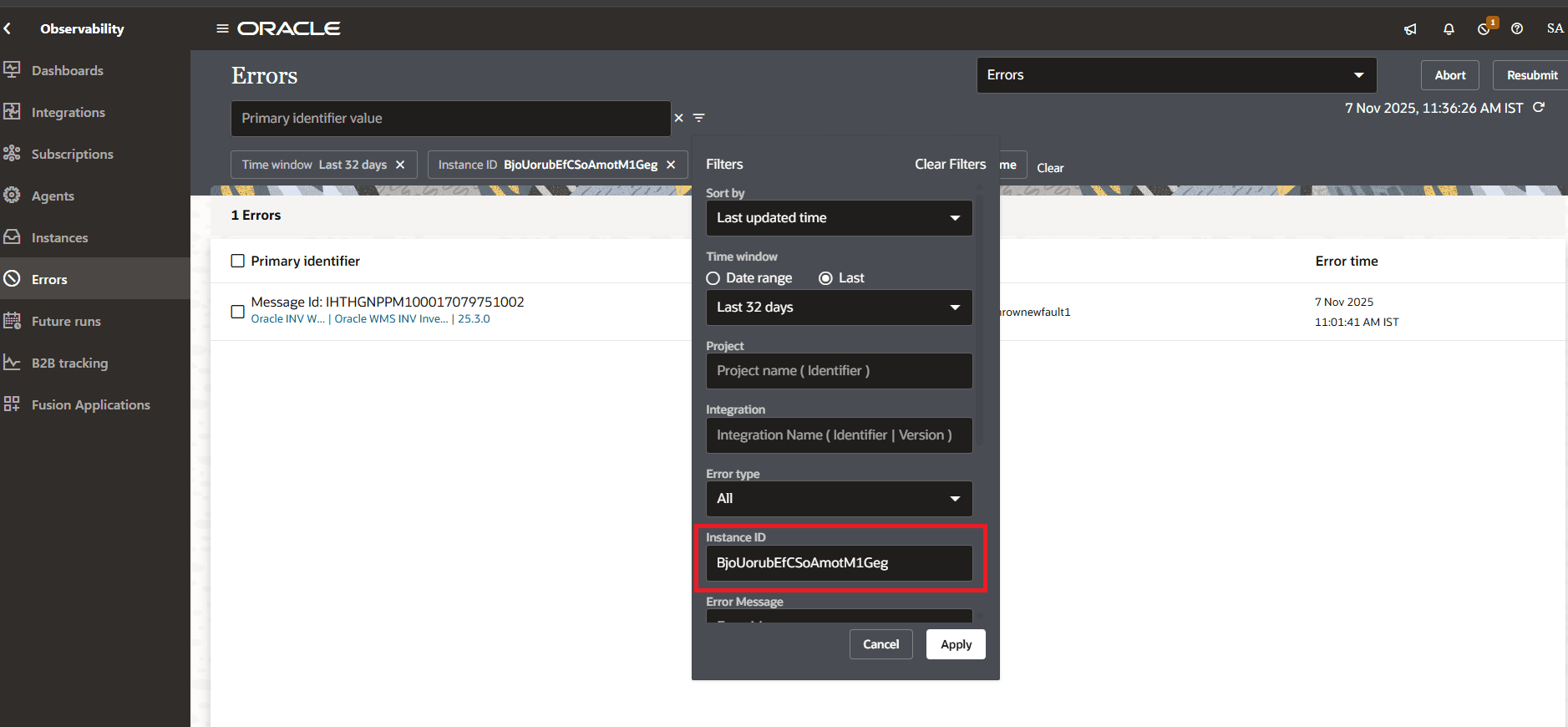 Note: Choose the Date Range per the searched Instance ID. For example, If the failed instance ID is 2 days ago, we recommend you to choose 3 days in the time window.
 - Similarly for ERP, you can navigate to ERP portal and take necessary
action.
Quick Actions
Integration Tile OIC Quick Action ERP Quick Action Receipt Advice OIC Error X Receipt Confirmation OIC Error ERP - Receive Receipt ERP - Putaway Receipt
Inventory Transaction OIC Error ERP - Inventory Transaction Shipment Request OIC Error X Shipment Confirmation OIC Error ERP - Ship Confirmation ERP Inventory Summary OIC Error X
- Click the OIC Errors link to look for relevant instance ID
for the failed WMS record.