Employee Performance Metrics
The legacy User Productivity Report in WFM has been deprecated and replaced with Employee Report on Employee Performance Metrics tab.
Employee Report
This report displays the time spent by employees on WMS, Non-WMS and Ad hoc activities during the selected date range.
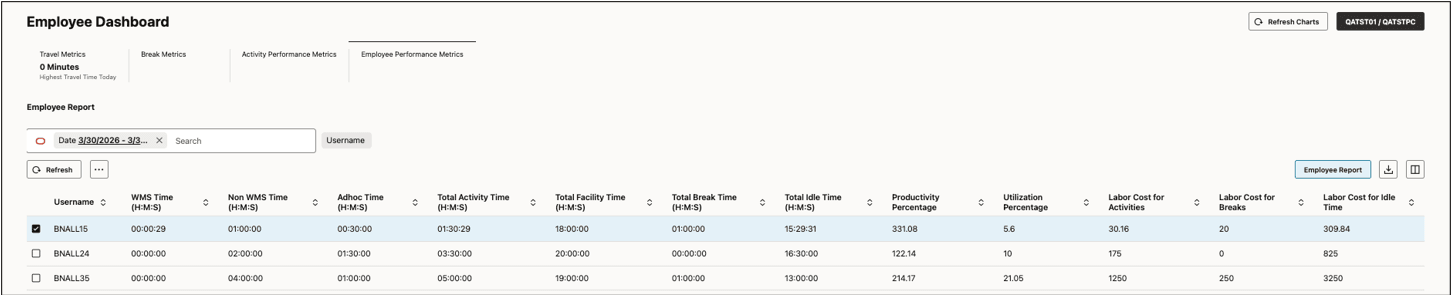
In addition to time spent across different activity types, the report also displays the following information:
- Total Activity Time: WMS Time + Non-WMS Time + Ad hoc Time
- Total Facility Time: Total clocked time (into facility) during the selected date range
- Total Break Time: Total clocked time (into break) during the selected date range
- Total idle Time: Total Facility Time – (Total Activity Time + Total Break Time)
- Productivity Percentage: (Total WMS Goal Time + Total Non-WMS Goal Time)/(Total WMS Time+Total Non-WMS Time) * 100
- Utilization Percentage:(Total WMS Time + Total Non-WMS Time)/Total Facility Time * 100
- Labor Cost for Activities: (Total Activity Time/60) * hourly wage of employee
- Labor Cost for Breaks: (Total Break Time/60) * hourly wage of employee
- Labor Cost for Idle Time: (Total Idle Time/60) * hourly wage of employee
- To calculate Goal Time for WMS Activities, goals are used from Prod Goal Line Group view.
- To calculate Goal Time for Non-WMS Activities, goals are used from Employee Activity Goals view.
- To calculate labor cost, hourly wage is used from Users view.
WMS Time
In the Employee Report, to view all the WMS activities performed by an employee during the selected date range, select the employee and click the “WMS Time” option in the action button dropdown (…).

Additional filtering can be done based on Activity and UOM. Note that date range and user filters are non-functional in this view and will be removed in a future release.
- In the result set, records are grouped by activity, handled UOM and pre-pack
- Goals are used from Prod Goal Line Group view to calculate productivity percentage. Productivity % = (Total Goal Time/Total Time) * 100 for each group.
Non-WMS Time
In the Employee Report, to view all the non-WMS activities performed by an employee during the selected date range, select the employee and click the “Non-WMS Time” option in the action button dropdown (…).

Additional filtering can be done based on Activity and UOM. Note that date range and user filters are non-functional in this view and will be removed in a future release.
- In the result set, records are grouped by activity and handled UOM
- Goals are used from Employee Activity Goals view to calculate productivity percentage. Productivity % = (Total Goal Time/Total Time) * 100 for each group.
Ad hoc Time
In the Employee Report, to view all the Ad hoc activities performed by an employee during the selected date range, select the employee and click the “Ad hoc Time” option in the action button dropdown (…).

Additional filtering can be done based on Activity. Note that date range and user filters are non-functional in this view and will be removed in a future release.
- In the result set, records are grouped by activities.