WFM Mobile Clock Views
This mobile screen (module: rf.wfm.cwrfcicouser) can be used by employees to clock themselves into entities rather going through the supervisor.
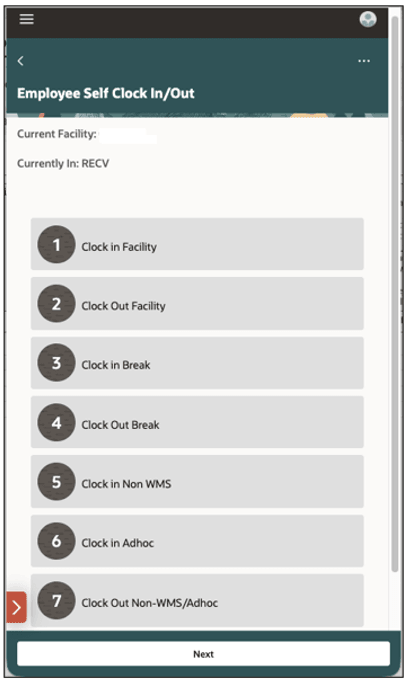
The "Current Facility" and “Currently In” fields provide a visibility of the entities in which the logged in employee is currently clocked in, regardless of how the employee was clocked in (Clock UI, Mobile clock option, Auto CICO, Input Interface, OR REST API). An empty value in these fields indicates that the employee is not clocked into these entities. Employees can select the appropriate option to clock themselves into or out of an entity. Employees are clocked (in or out) at the current facility time, and the clocked information can be viewed in Clock Record view. Since this is a self-clock in/out option, clocker is same as the employee.
As of Release 26B, the following changes have been introduced in this screen:
- Work Area clock option has been removed, since it’s no longer required for employees to clock into Work Area.
- Current Work Area field has been removed from main screen.
- Since Work Area clock option has been removed, users are now presented with all activities in the Non-WMS or Ad hoc clock in option. However, the activities are prefixed with Work Area Name to quickly find the activities that they need to clock into.
- The screen flow of Non-WMS Clock out is determined by the “Capture Quantity During
Clock Out” flag of the activity which can be configured in the Work Area Activities view.
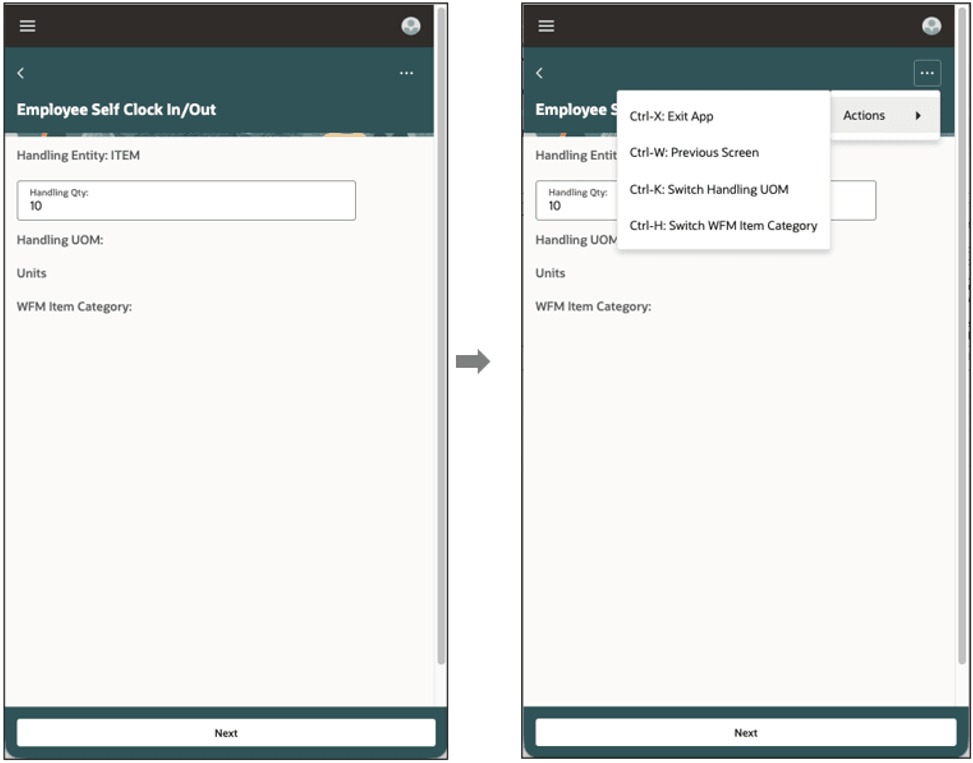
- If the flag is marked as yes, the employee will be prompted to enter the Handling Attributes of the Non-WMS Activity. The employee cannot clock out of the activity without specifying the handling entity, qty and UOM. Item category and LPN Type are optional and can be provided through ctrl keys.
- However, if the flag is marked as no, the employee is clocked out without
any additional prompts, and the Handling Attributes can be updated later
through Clock Record, Input Interface or REST API.