Resolve Replenishment Exceptions
Use the Replenishment Analysis agent to identify replenishment delays that are preventing picking from progressing.
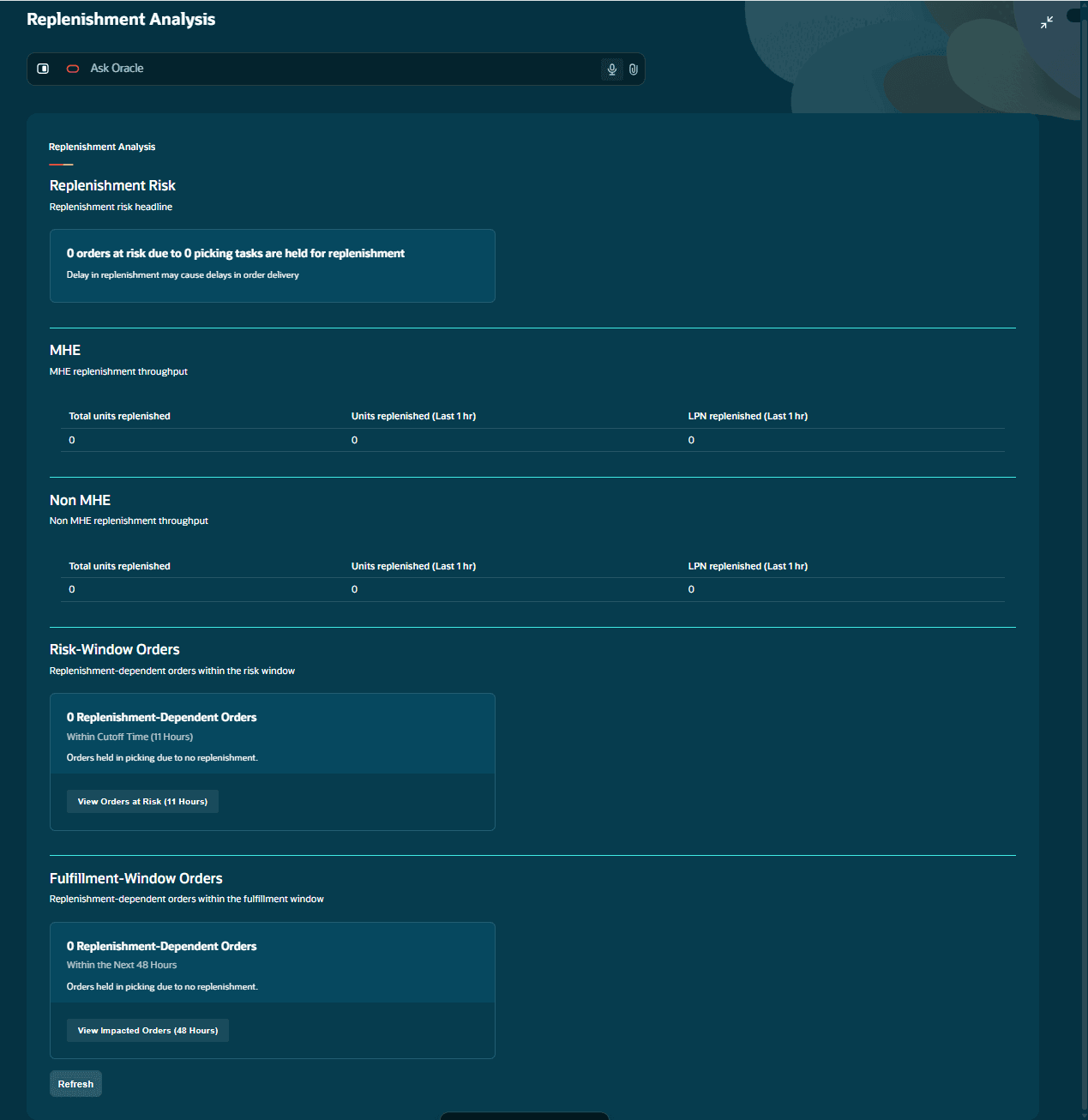
Review replenishment health
Review orders affected by replenishment within both the risk window and the broader fulfillment window.
The summary separates MHE and non-MHE operations and shows total units replenished in the previous 8 hours, plus units and LPNs replenished in the previous hour.
Expand the view to compare MHE systems and warehouse areas. Review:
-
Replenishment backlog and the replenishment rate in the previous hour.
-
Orders impacted by pending replenishment.
-
Picking tasks that depend on replenishment.
A picking task is treated as replenishment-dependent when its allocation has Is Dependent on Replenishment set to true.
Understand dependency links
Replenishment Analysis joins replenishment destination inventory to dependent picking source inventory. Order-detail cross-references identify original customer orders when details have been consolidated. Its task drill-downs show the orders affected in the risk and fulfillment windows.
Investigate affected tasks
Select the actionable replenishment-dependent order count to open task details.
Review the task number, source area, status, applicable action, and the number of orders affected within the risk and fulfillment windows. Use this information to identify the replenishment work affecting the most urgent orders.
Take corrective action
| Condition | Action |
|---|---|
| A Held replenishment task has affected at-risk orders for more than 2 hours. | Use Release Tasks to move an eligible task to Ready. |
| A Ready replenishment task has not been picked for more than 2 hours. | Use Prioritize Tasks to set the task to priority 0. |
| A replenishment task is unassigned. | Use Assign Task, when available. |
If a task is both Held and unassigned, the applicable actions are available for both conditions.
For urgent orders with unassigned replenishment tasks, the agent also prepares a communication containing the affected orders and replenishment task numbers for follow-up.
Check prioritization and assignment
Replenishment prioritization requires a Ready task older than two hours, a priority greater than zero, and an impact on risk-window orders. Assign Task opens a form; the assignment is written only when the form is submitted with a valid WMS username and the selected task matches the current default company and facility. Assignment choices depend on active-user status and facility/company access.
Handle incomplete analysis
Missing pages, data errors, or unresolved timezone configuration can produce an incomplete-analysis message and suppress normal confirmed counts and priority suggestions. Treat unknown counts as unavailable, not zero. Resolve the reported cause and refresh.
Interpret replenishment history
The recent-history calculation excludes matching source decrements and certain distribution movements to avoid counting the same replenishment twice. It deduplicates by group and sequence. Within the accepted history rows, a populated REF_VALUE_23 identifies MHE activity and a blank value identifies non-MHE activity.