Resolve Picking Exceptions
Use the Picking Analysis agent to identify picking bottlenecks, investigate short picks, and address tasks that are delaying at-risk orders.
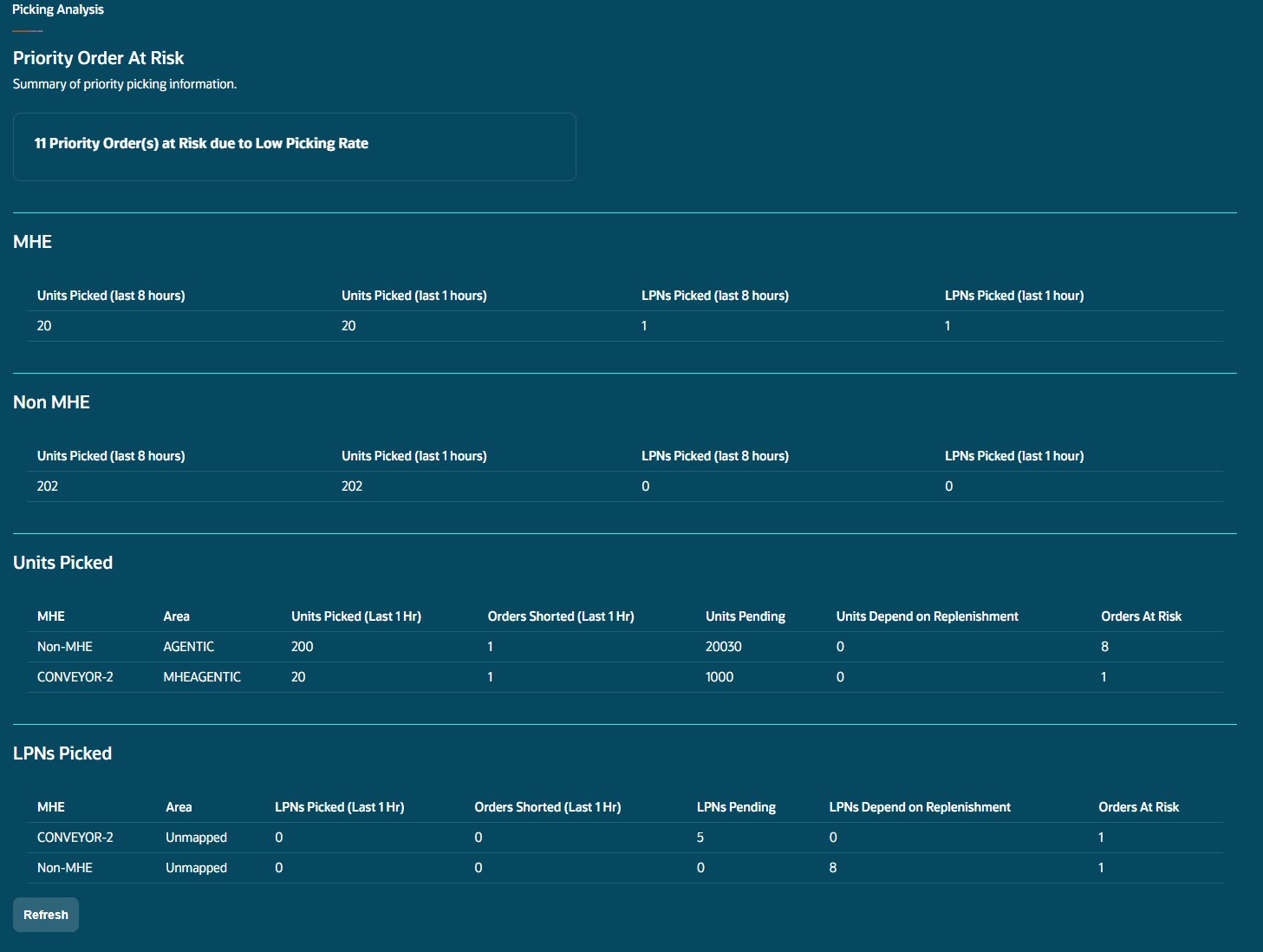
Review picking health
Refresh the page manually to retrieve the latest picking data.
The summary distinguishes between material handling equipment (MHE) and non-MHE operations and shows:
-
The percentage of priority orders at risk because of low picking rates.
-
Total units picked in the previous 8 hours.
-
Units and LPNs picked in the previous hour.
-
Short-picked orders grouped by Order Type.
Expand the view to compare warehouse areas and MHE operations. Review pending work, shorted orders, replenishment-dependent quantities, and orders at risk.
Investigate congested areas
Picking Analysis highlights at-risk areas based on the number of orders at risk. The referenced workflow keeps the top three rows separately for units and LPNs. Picking Analysis highlights the top three congested areas based on the number of orders at risk.
It estimates an area’s clearing time by dividing the pending quantity by the quantity picked in the previous hour. It then compares that estimate with the time remaining before shipment cutoff.
Use the affected-order details to determine where corrective action or operational follow-up is needed.
Interpret clearing time and counts
Clearing time is calculated separately for units and LPNs. Positive pending work with a zero or unavailable rate is treated as risk because it cannot produce a finite clearing-time estimate. This is an estimate at the current rate, not a guaranteed completion time. The headline counts distinct orders; the same order can appear in multiple areas, so area counts can add up to more than the headline. The referenced workflow keeps the top three at-risk rows in each units or LPN category.
Recover short-picked orders
-
Select the short-pick count for an Order Type.
-
Review the affected orders, including remaining time to ship, allocation percentage, order locks, and wave template.
-
Assess inventory availability using a selected wave template.
-
Review allocation probability and re-wave eligible orders.
For assessment limits and result definitions, see Assess Inventory and Run a Wave.
After successful wave execution, only the orders included in that wave are removed from Picking Analysis. Unresolved short-picked orders remain visible.
Coverage: Short-pick analysis uses applicable IHT-92 shorting events. Distribute OBLPN and Repack shorts are outside this scope. See Technical Reference for additional event coverage.
Act on delayed picking tasks
Available actions depend on the task’s condition.
| Condition | Action |
|---|---|
| An at-risk order has a Ready picking task that has not started for more than 2 hours. | Use Prioritize Tasks to set the task to priority 0. Internal pick orders are excluded. |
| An at-risk order has a picking task that has been Held for more than 2 hours. | Use Release Tasks to move an eligible task to Ready. |
| An urgent order has an unassigned Ready or Held task. | Use the prepared communication containing the affected order and task numbers for operational follow-up. |
| An area’s estimated clearing time exceeds the remaining shipment time. | Review the impacted orders and use the available communication support to coordinate corrective action. |
When picking depends on replenishment, review the related work in Replenishment Analysis.
Check picking task eligibility
Ready-task prioritization requires remaining quantity, a nonzero priority, and an age of at least two hours. Held-task release requires at least two hours of age and no replenishment dependency. Urgent unassigned Ready or Held tasks can generate communication content when their deadlines are within two hours. Enter the recipient inputs and submit the communication to send it; prepared content alone does not confirm delivery.