Investigate and Recover a Wave
Use the Wave Analysis agent to investigate partial allocation, unavailable inventory, replenishment dependencies, and wave failures.
Review impacted waves
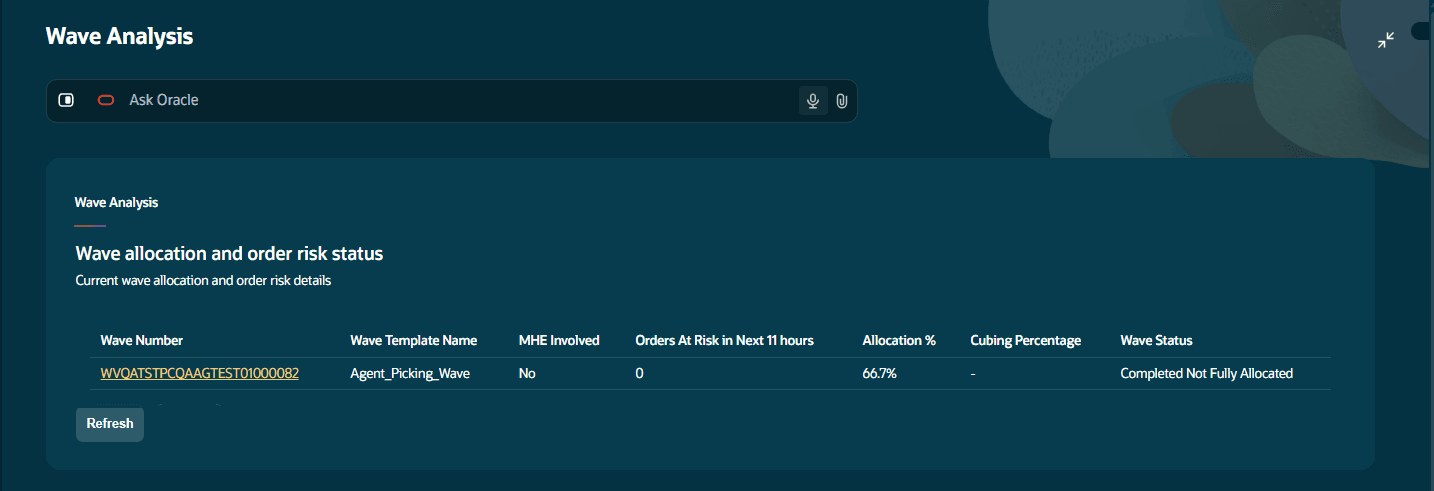
The initial view displays at most six recent waves, sorted by risk count. Review wave status, order impact, wave template, cubing percentage, and MHE involvement where available. The source guide describes the recent period as the previous 24 hours; the referenced implementation also applies wave type, status, and creation-date filters.
The existing guide describes impacted orders as selected-but-not-allocated and shorted orders. The referenced app display prompt and workflow prepare different Wave measures, so administrators must confirm the deployed column labels and count definition before treating an impacted count as the same measure as orders at risk.
-
Select a Wave Number to open its details.
-
Review fulfillment progress, including order count, units allocated and packed, and outbound LPNs created, packed, and shipped.
-
Review the allocation-yield breakdown to understand the remaining work.
| Allocation outcome | Meaning |
|---|---|
| Allocated orders | The required quantity was fully allocated. |
| Partially allocated orders | Only part of the required quantity was allocated. |
| Not allocated orders | Allocation was not completed. |
| Orders awaiting replenishment | Allocation or picking depends on replenishment. |
Priority Actions
Resume a failed wave
Use Resume Wave to restart an eligible failed wave.
The wave must be in Failed status, and picking must not have started. Resume is unavailable when either condition is not met.
Undo a wave for replanning
The referenced workflow can suggest Undo Wave when allocation is above zero and either allocation is below 50% or applicable cubing is below 50%. Review WMS eligibility and the returned result before treating the undo as complete.
Use this action when the wave needs to be undone and replanned.
Additional wave actions
Generate Task can be suggested when task creation is configured, a task template exists, no allocation task exists, and the wave is Completed or Completed Not Fully Allocated. Generate or reprocess pick information uses the selected wave and output-interface records. Wave Pick Info uses interface type 14; Replenishment Pick Info uses type 60.
Understand priority action limits
The referenced workflow prepares at most two priority action candidates, considering Resume Wave before Undo Wave and task generation. A missing suggestion does not establish that no other operational action is possible.
Ask Oracle about a wave
You can also retrieve Wave Analysis information through Ask Oracle. Include the wave number in your question, for example:
“Tell me more about wave 12321.”
Understand record lookup limits
You can also use wave: WV123. Wave lookup applies recent-wave and status filters and is bounded by returned pages. A no-information response does not prove that the record is absent from WMS. It may have been a wave that has been completed.